
表示領域に合わせて自動チャート整列 【KD_AutoFitWindow】【試用版】

Product outline
Community(0)

表示領域に合わせて自動チャート整列 【KD_AutoFitWindow】【試用版】 Indicators/E-books
表示領域に合わせて自動チャート整列 【KD_AutoFitWindow】【試用版】
チャート表示領域に合わせて複数のチャートを自動で整列させます
Sales Result:
12本
Reviews:
Category:
How to provide:
Indicator
Sales from:
11/21/2021
Last Updated:
-
Version:
-
Available company:

Japan

フォロー 0 フォロワー 7
Sellerかえで
Seller's last login time:4/6/2026 16:30:08
Read more seller information
チャート表示領域に合わせて複数のチャートを自動で整列させます。
※こちらの商品は、試用版 (Trial) です。
 事前の動作確認にご使用ください。
 バージョン  説明  価格
 通常版  制限なし  1,200円 
 試用版 (Trial)  以下の制限あり
 ・インジケータ導入後、10分間のみ使用可能
 ・デモ口座でのみ、使用可能
 無料


概要
MT4を最大化させたり元の大きさに戻したり、ターミナルウィンドウやナビゲーターウィンドウを
開閉したりすることで、表示チャートが隠れたり空間が開いたりすることはないでしょうか。
MT4標準機能でも「ウィンドウの整列」はありますが、特定パターンしかなく使い勝手はよくありません。

普段のチャート形状を崩さず、一発で自動整列ができることで利便性が向上します!


出来ること
○好みのチャート配置を設定しておくことで、任意に設定したキーの押下により
  表示領域に合わせて自動でチャートを整列します。

  自由度の高いチャート配置が行えます!
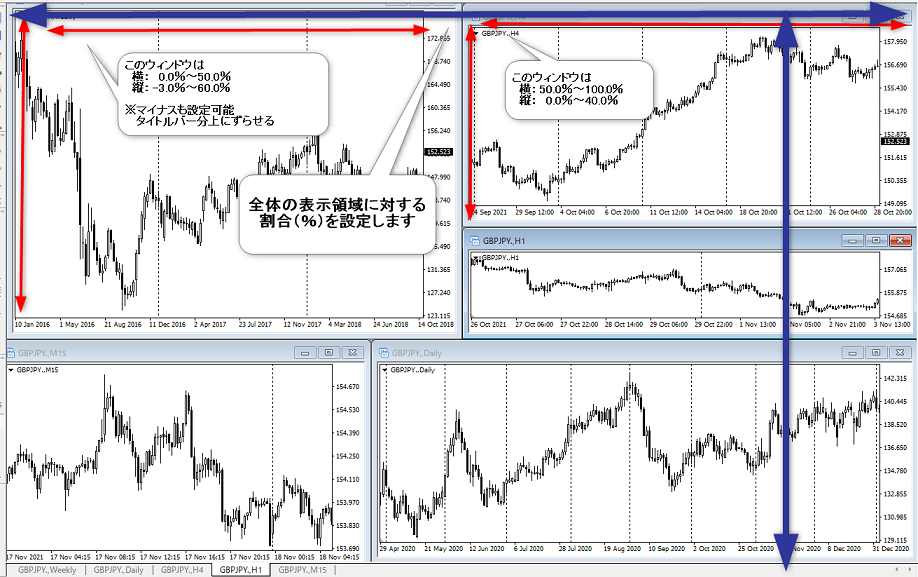


※表示領域が変わる時
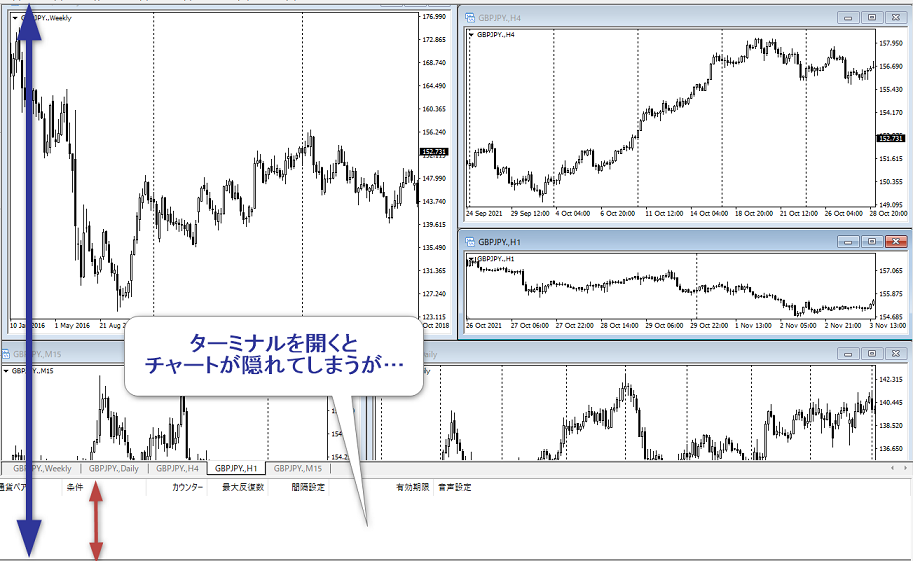
                            ↓ ↓ ↓
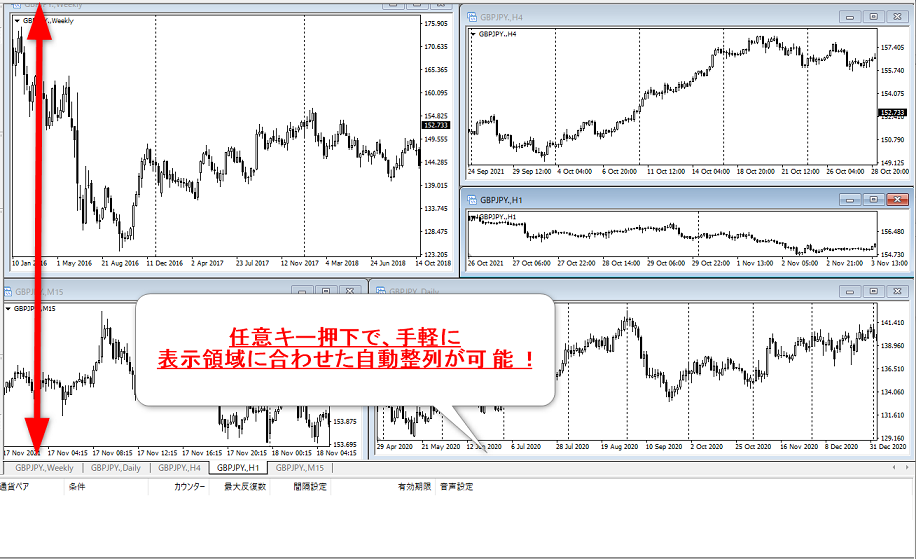


 ※チャートが重なるように設定したり、0%以下や100%以上にすることで一部画面外にしたりすることも可能です。


設定可能チャート上限
 ○一つのインジケータにつき、10個のチャートまで設定できます。
  ※上記例の画像は5個

 ○1つのインジケータで1つのチャート配置パターンを保持できます。
  複数のチャート配置パターンを保持したい場合は、本インジケータを複数導入することで実現可能です。


動作環境
 Windows11
 MetaTrader4 (MT4)
※Windows10でも動作可能。それ以外のOSでの動作確認はしておりません。

その他
 説明書(pdf)を同梱しています。


★関連する外部インジケータの紹介
 本インジケータは【KD_QuickChartChange】と同じトリガーで動作させることが可能です。
 設定された一つのキーを押下することで、本インジケータでのサイズ自動調整と同時に【KD_QuickChartChange】での
 チャート切り替え(状態初期化)を行うことができます。よろしければご検討ください。


無料インジケータの紹介
 本インジケータの他に、無料インジケータもいくつか作成しております。
 無料インジケータはGogojungleの仕様上、「出品中の商品」一覧に表示されません。
 以下の記事にまとめていますので、是非ご覧ください。
  →【無料インジケータ】の紹介

Free
Product outline
Community(0)
Best Seller Ranking
Recommended Products (Campaigns)

For those using GogoJungle for the first timeEasy 3 steps to use the product!

At GogoJungle, we provide services to enrich your investment life for our members. In addition, product purchases are limited to members. Why not register as a member now and make use of GogoJungle!

01
Enter user information and register as a member
02
Follow the instructions to make a purchase
03
Download from My Page
■ Important Matters and Risk Warnings Regarding Investment Products 【Financial Instruments Business Operator】
GogoJungle Inc.
Registration: Director-General of the Kanto Local Finance Bureau (Financial Instruments Business) No. 1960
【Member Association】
Japan Investment Advisers Association
【Fees and Expenses】
The use of software, e-books, investment advisory services, etc., provided on our platform involves purchase prices determined for each product.
Additionally, when conducting actual financial instrument transactions (such as FX or CFD trading), costs such as transaction fees and spreads (the difference between the sell and buy price) may be incurred through the connected brokerage firms.
【Margin and Risk of Loss】
Transactions such as FX (Foreign Exchange Margin Trading) and CFD (Contract for Difference) allow for trading in amounts exceeding the deposited margin.
Therefore, due to sudden fluctuations in target indices (currency, commodity prices, etc.), there is a risk of incurring losses that exceed the deposited margin (loss exceeding principal).
Furthermore, financial instrument transactions involve risks such as price fluctuations, which may result in losses falling below or exceeding the initial investment principal.
【Nature of Services and Trading Entity】
The Company operates a platform (marketplace) providing investment software and information; we do not engage in the buying, selling, mediation, brokerage, or agency of financial instruments on behalf of customers.
The services and information provided are intended as reference for investment decisions and do not guarantee future profits or specific results.
While some services include investment advice, they do not constitute a mandate or solicitation to trade specific financial instruments.
Final investment decisions and the execution of trades must be made at the customer’s own risk and discretion.