
Product outline
Community(0)

CCIが設定ラインをクロスしたら知らせてくれるMT4インジケーター【CCIzero】
「上抜け」と「下抜け」のそれぞれについてCCIのアラートラインを任意に設定可能。アラート機能(メール,サウンド,ダイアログ)およびプッシュ通知機能付き。
Sales Result:
32本
Reviews:
Keywords:
Category:
How to provide:
Indicator
Sales from:
11/02/2021
Last Updated:
-
Version:
-
Web Authentication:
Enable
Available company:
Payment method:




¥980(taxed)
Provider/Distributor
Sales site
GogoJungle

========================================= Blacksunのインジケーター(一覧)はこちらの投資ナビ+の記事をご覧ください。 https://www.gogojungle.co.jp/finance/navi/articles/33779 ========================================= ※リペイントなしのインジケーターです。 ※アラート機能(メール,サウンド,ダイアログ)及びプッシュ通知機能が付いています。 ※星印と矢印のコードの設定項目があるので、星印と矢印の色、大きさや表示位置のみならず、形状についても変更することが可能です。 星印と矢印のコードの設定項目があることの利点については、下記の投資ナビ+の記事をご覧下さい。 https://www.gogojungle.co.jp/finance/navi/359/19177 ※上向きサイン発生時のアラート音と下向きサイン発生時のアラート音について、それぞれ異なるサウンドファイルを設定することが可能です。 ※上向きサインのみ、あるいは、下向きサインのみを発生するような設定も可能です。
◆概要
CCIが設定ライン(任意に設定可能)を上抜けすると空色(スカイブルー)の星印が点灯します。
そして、あるローソク足の終値レベルで空色(スカイブルー)の星印の点灯が確定すると、その次のローソク足の寄り付きと同時に空色(スカイブルー)の矢印が点灯します。
CCIが設定ライン(任意に設定可能)を下抜けすると赤色の星印が点灯します。
そして、あるローソク足の終値レベルで赤色の星印の点灯が確定すると、その次のローソク足の寄り付きと同時に赤色の矢印が点灯します。
CCICrossUpPoint = 0.0,CCICrossDownPoint = 0.0
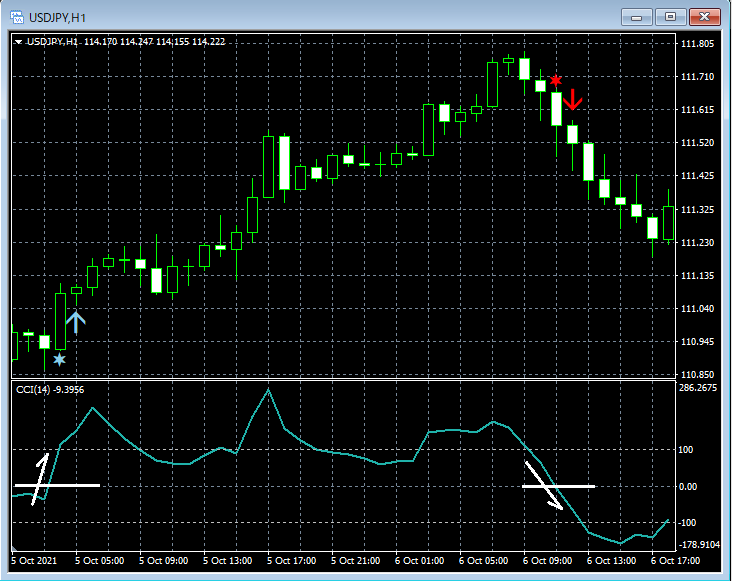 上段: CCIzero(CCICrossUpPoint = 0.0,CCICrossDownPoint = 0.0)
下段: CCI(14)
CCICrossUpPoint = -100.0,CCICrossDownPoint = 100.0
上段: CCIzero(CCICrossUpPoint = 0.0,CCICrossDownPoint = 0.0)
下段: CCI(14)
CCICrossUpPoint = -100.0,CCICrossDownPoint = 100.0
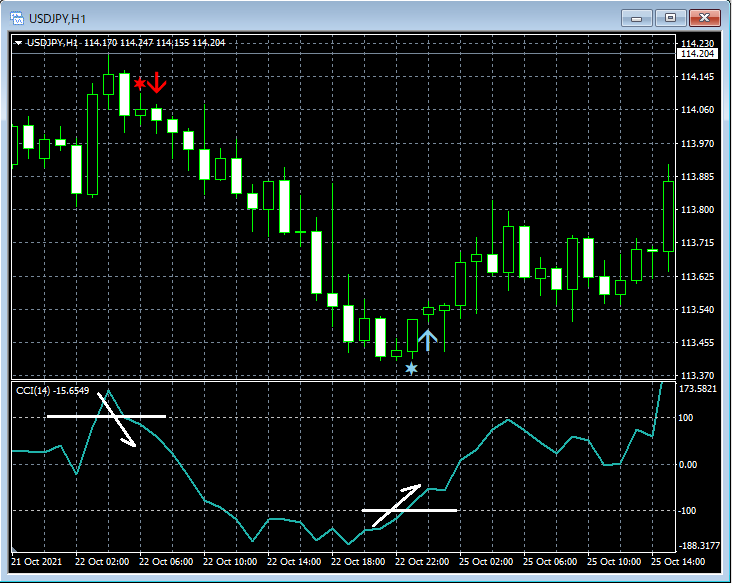 上段: CCIzero(CCICrossUpPoint = -100.0,CCICrossDownPoint = 100.0)
下段: CCI(14)
※本インジケーターにCCIを表示するインジケーターは同梱されておりませんのでご注意下さい。
(なお、CCIはMT4に標準搭載されております。)
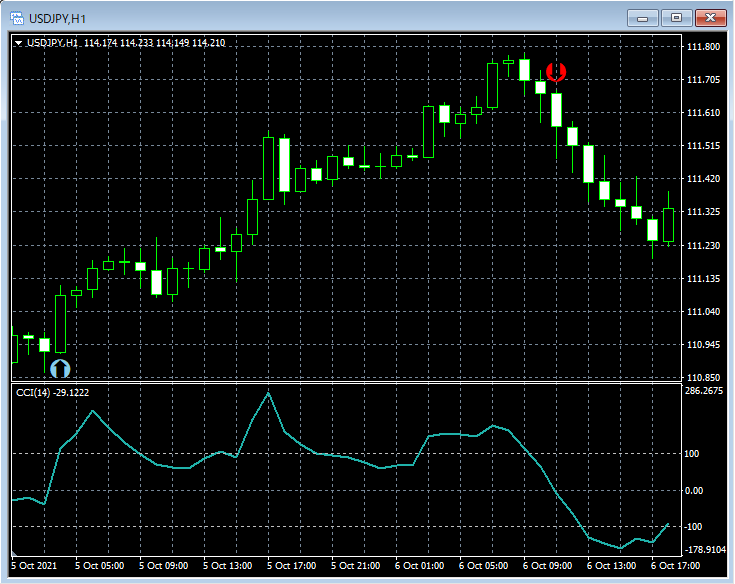
矢印や星印の表示の設定を変更して下図のような表示にすることも可能です。
上段: CCIzero(CCICrossUpPoint = -100.0,CCICrossDownPoint = 100.0)
下段: CCI(14)
※本インジケーターにCCIを表示するインジケーターは同梱されておりませんのでご注意下さい。
(なお、CCIはMT4に標準搭載されております。)
矢印や星印の表示の設定を変更して下図のような表示にすることも可能です。
◆設定項目
下図の通り、"DLLの使用を許可する" にチェックを入れる必要があります。
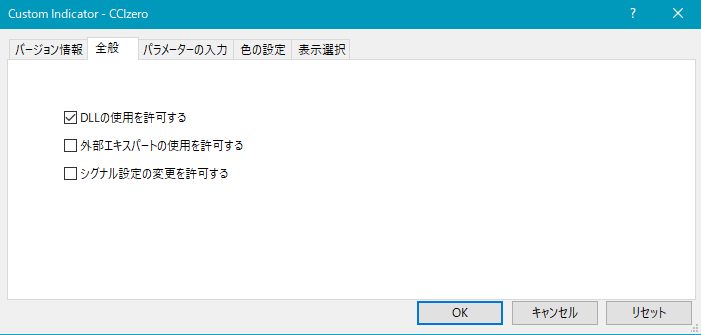
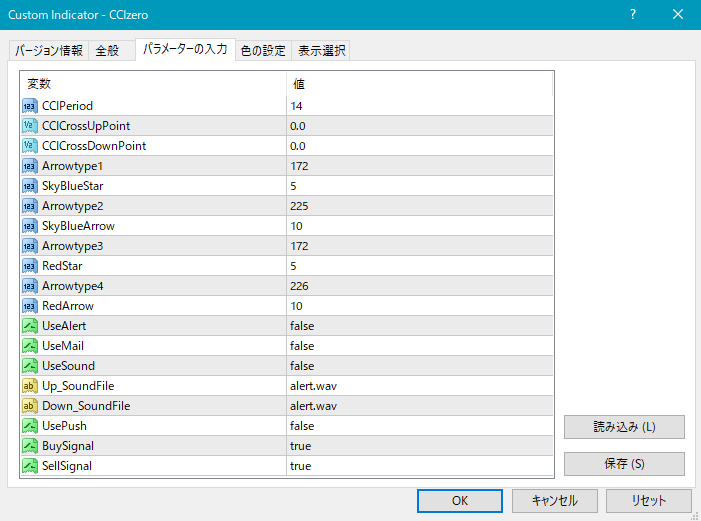 上図の通り、CCIの期間とアラートラインを設定する必要があります。
CCIPeriod : CCIの期間 (初期設定では 14)
CCICrossUpPoint : CCIがこのラインを上抜けするとサイン発生 (初期設定では 0.0)
CCICrossDownPoint : CCIがこのラインを下抜けするとサイン発生 (初期設定では 0.0)
星印や矢印の表示位置に関する設定項目
星印や矢印の表示位置がローソク足に近すぎて見にくかったり、逆に遠すぎて場合によっては表示位置が画面外になってしまう場合もあります。これらの印を表示する高さを、下記の設定項目の値を調整することにより、修正することができます。値が大きいほど表示位置はローソク足から離れていきます。
(初期設定では空色の)星印 → SkyBlueStar
(初期設定では空色の)矢印 → SkyBlueArrow
(初期設定では赤色の)星印 → RedStar
(初期設定では赤色の)矢印 → RedArrow
また、下記の項目の値を変更することにより、星印や矢印の形状を変更することができます。
(初期設定では空色の)星印 → Arrowtype1
(初期設定では空色の)矢印 → Arrowtype2
(初期設定では赤色の)星印 → Arrowtype3
(初期設定では赤色の)矢印 → Arrowtype4
なお、星印や矢印あるいはその代わりとして使用できる記号とそれに対応する番号は下表の通りです。
上図の通り、CCIの期間とアラートラインを設定する必要があります。
CCIPeriod : CCIの期間 (初期設定では 14)
CCICrossUpPoint : CCIがこのラインを上抜けするとサイン発生 (初期設定では 0.0)
CCICrossDownPoint : CCIがこのラインを下抜けするとサイン発生 (初期設定では 0.0)
星印や矢印の表示位置に関する設定項目
星印や矢印の表示位置がローソク足に近すぎて見にくかったり、逆に遠すぎて場合によっては表示位置が画面外になってしまう場合もあります。これらの印を表示する高さを、下記の設定項目の値を調整することにより、修正することができます。値が大きいほど表示位置はローソク足から離れていきます。
(初期設定では空色の)星印 → SkyBlueStar
(初期設定では空色の)矢印 → SkyBlueArrow
(初期設定では赤色の)星印 → RedStar
(初期設定では赤色の)矢印 → RedArrow
また、下記の項目の値を変更することにより、星印や矢印の形状を変更することができます。
(初期設定では空色の)星印 → Arrowtype1
(初期設定では空色の)矢印 → Arrowtype2
(初期設定では赤色の)星印 → Arrowtype3
(初期設定では赤色の)矢印 → Arrowtype4
なお、星印や矢印あるいはその代わりとして使用できる記号とそれに対応する番号は下表の通りです。
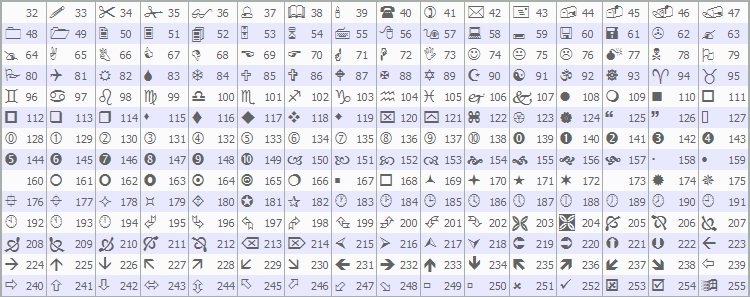 星印や矢印の形状の変更については下記の投資ナビ+の記事をご覧下さい。
https://www.gogojungle.co.jp/finance/navi/359/19177
アラート機能に関する設定項目
UseAlert:
下図のようなアラートダイアログによりサイン発生を知らせる機能を使用する場合には true、使用しない場合には false を選択する。
星印や矢印の形状の変更については下記の投資ナビ+の記事をご覧下さい。
https://www.gogojungle.co.jp/finance/navi/359/19177
アラート機能に関する設定項目
UseAlert:
下図のようなアラートダイアログによりサイン発生を知らせる機能を使用する場合には true、使用しない場合には false を選択する。
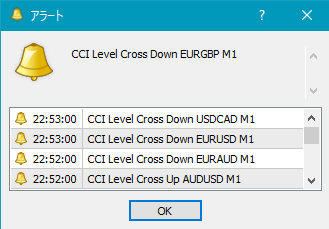 UseMail:
メールによりサイン発生を知らせる機能を使用する場合には true、使用しない場合には false を選択する。
UseSound:
アラート音によりサイン発生を知らせる機能を使用する場合には true、使用しない場合には false を選択する。
Up_SoundFile:
上向きサイン発生時のアラート音に使うサウンドのファイル名を入力する。
Down_SoundFile:
下向きサイン発生時のアラート音に使うサウンドのファイル名を入力する。
UsePush:
プッシュ通知によりサイン発生を知らせる機能を使用する場合には true、使用しない場合には false を選択する。
BuySignal:
上向きサインを発生させる場合には true、発生させない場合には false を選択する。
SellSignal:
下向きサインを発生させる場合には true、発生させない場合には false を選択する。
メールによりサイン発生を知らせる機能を使用する場合のMT4側の設定の一例
ツール → オプション → E-メール
イメージ図
UseMail:
メールによりサイン発生を知らせる機能を使用する場合には true、使用しない場合には false を選択する。
UseSound:
アラート音によりサイン発生を知らせる機能を使用する場合には true、使用しない場合には false を選択する。
Up_SoundFile:
上向きサイン発生時のアラート音に使うサウンドのファイル名を入力する。
Down_SoundFile:
下向きサイン発生時のアラート音に使うサウンドのファイル名を入力する。
UsePush:
プッシュ通知によりサイン発生を知らせる機能を使用する場合には true、使用しない場合には false を選択する。
BuySignal:
上向きサインを発生させる場合には true、発生させない場合には false を選択する。
SellSignal:
下向きサインを発生させる場合には true、発生させない場合には false を選択する。
メールによりサイン発生を知らせる機能を使用する場合のMT4側の設定の一例
ツール → オプション → E-メール
イメージ図
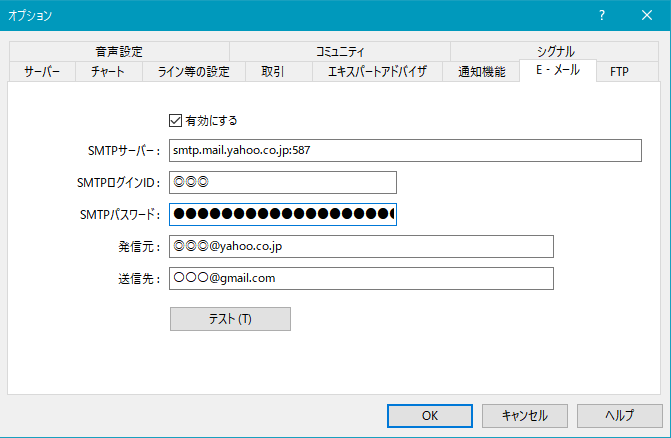 ※設定後にMT4を再起動させる必要があるようです。
◆注意事項
※本インジケーターにCCIを表示するインジケーターは同梱されておりませんのでご注意下さい。
(なお、CCIはMT4に標準搭載されております。)
※本商品概要ページにおけるチャートには、説明の便宜上、直線や矢印などが書き加えられている場合がありますのでご注意下さい。
¥980(Tax included)
Product outline
Community(0)
Best Seller Ranking
Recommended Products (Campaigns)
For those using GogoJungle for the first timeEasy 3 steps to use the product!
At GogoJungle, we provide services to enrich your investment life for our members. In addition, product purchases are limited to members. Why not register as a member now and make use of GogoJungle!
01
Enter user information and register as a member
02
Follow the instructions to make a purchase
03
Download from My Page
