
【お試し版】通貨ペア切り替えインジケーター【ChangeSymbol】

Product outline
Community(0)
【お試し版】通貨ペア切り替えインジケーター【ChangeSymbol】 Indicators/E-books
【お試し版】通貨ペア切り替えインジケーター【ChangeSymbol】
キー入力で通貨ペアを切り替えます。全てのチャートの通貨ペアを一括で切り替えることも可能です。
Sales Result:
10本
Reviews:
Category:
How to provide:
Indicator
Sales from:
07/09/2021
Last Updated:
-
Version:
-
Available company:

Japan

フォロー 0 フォロワー 7
Seller's last login time:1/30/2026 00:39:43
Read more seller information

※お試し版です。15分足のみ使用できます。

 製品版はこちらからご購入ください。


通貨ペアを変更する場合、通常であれば気配値表示から

ドラッグ&ドロップして通貨ペア設定を変更する必要があります。

頻繁に通貨ペアを切り替える場合、この操作が結構面倒だったりしませんか?


また、マルチタイムフレーム分析していて一括で通貨ペアを切り替えたい場合もあるかと思います。


そんな時は当インジケーターがお役に立つかと思います。


キー入力で通貨ペアの切り替え

パラメータで指定したキーを押下することで

  • 次の通貨ペアに変更
  • 前の通貨ペアに変更

をすることができます。


切り替え対象の通貨ペアは気配値表示に表示されている通貨ペアになります。

例えば、現在の気配値表示が下図のようになっている場合
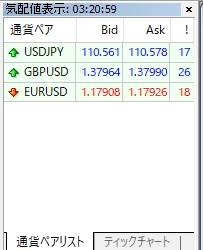

次の通貨ペアに変更するキーを押すと、USDJPY > GBPUSD > EURUSD > USDJPY と切り替わり、

前の通貨ペアに変更するキーを押すと、USDJPY > EURUSD > GBPUSD > USDJPY と切り替わります。


また、パラメーターを変更することで

以下を実現することも可能です。

  • 通貨ペアを変更するキーを変更する
  • 全てのチャートの通貨ペアを切り替える


他の通貨ペアで引いたラインを表示しない

通常MT4では、チャートに引いたラインは1つのチャートにおいて共有されており、

通貨ペアを変更しても価格帯が近いと表示されてしまいます。


例えば下図はGBPUSDのダブルボトムのネックラインに引いたライン(1.43558)ですが


価格帯の近いEURUSDにも同じラインが表示されてしまっています。

しかも全然意味のわからない場所に引かれてしまっていますので

ラインの数が多くなってくると重要なラインかどうかがわからなくなってしまいます。


当インジケーターを使用することで上図のEURUSDのラインを非表示にすることができます。

ただし制限がありまして、普通に作成したラインは非表示にならず、以下のような設定が必要です。


形式:Sync_[通貨ペア]_[時間軸]

さすがに毎回この設定をするは面倒なので下表のSyncシリーズのインジケーターを使用すれば

ライン等のオブジェクト作成時に自動的に設定されるようになっております。

商品名製品版試用版
チャートオブジェクト同期インジケーター(水平線・トレンドライン・チャネル等)【SyncObjects】
リンク
リンク
垂直線同期インジケーター【SyncVerticalLine】リンク
リンク
水平線同期インジケーター【SyncHorizontalLine】
リンク
リンク
トレンドライン同期インジケーター【SyncTrendLine】
リンク
リンク
平行チャネル同期インジケーター【SyncChannel】リンク
リンク
フィボナッチリトレースメント同期インジケーター【SyncFibo】リンク
リンク
フィボナッチチャネル同期インジケーター【SyncTrendLine】
リンク
リンク
長方形同期インジケーター【SyncRectangle】リンク
リンク


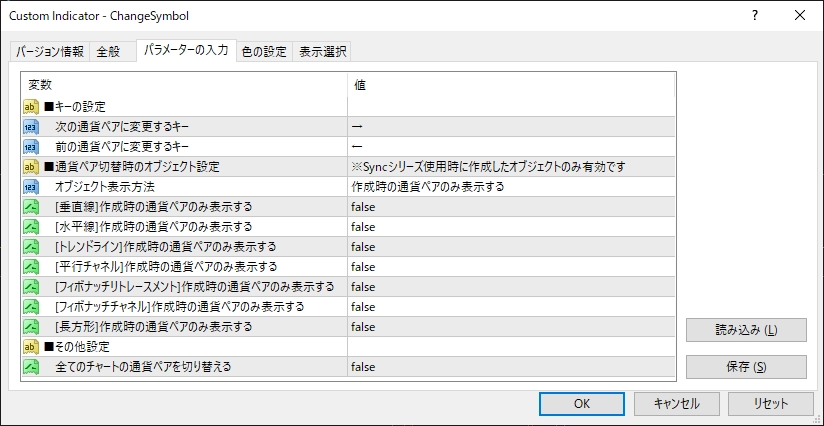
パラメーター


キーの設定

  • 次の通貨ペアに変更するキー
  • 前の通貨ペアに変更するキー

通貨ペアを変更する際のキーを指定します。

デフォルトは「→」で次の通貨ペア、「←」で前の通貨ペアに変更できます。


    通貨ペア切替時のオブジェクト設定

    • 全て表示する: オブジェクトを作成した際の通貨ペア以外でもそのオブジェクトを表示します
    • 作成時の通貨ペアのみ表示する: オブジェクトを作成した際の通貨ペアのみそのオブジェクトを表示します(前述の制限あり)
    • オブジェクト毎に設定する: オブジェクト毎に設定を行います(後述)

    オブジェクト毎に設定するを選択した場合はさらに下記設定が可能です。

    [オブジェクトの種類]作成時の通貨ペアのみ表示する

    • false: オブジェクトを作成した際の通貨ペア以外でもそのオブジェクトを表示します
    • true: オブジェクトを作成した際の通貨ペアのみそのオブジェクトを表示します(前述の制限あり)

    例えば、水平線等の通貨ペア特有のオブジェクトは作成時の通貨ペアのみ表示したいけど

    垂直線等の全ての通貨ペアに共通で表示したい場合に使用します。

    ※上記設定はキー入力時のみ適用されますので

     ツールバーの通貨ペア設定にて切り替える場合には適用されません。


    全てのチャートの通貨ペアを切り替える

    • false: キー入力による通貨ペアの切り替え時に指定しているチャートの通貨ペアのみ切り替える
    • true: キー入力による通貨ペアの切り替え時に表示している全てのチャートの通貨ペアを切り替える

    ※上記設定はキー入力時のみ適用されますので

     ツールバーの通貨ペア設定にて切り替える場合には適用されません。


    Free
    Product outline
    Community(0)
    Best Seller Ranking
    Recommended Products (Campaigns)

    For those using GogoJungle for the first timeEasy 3 steps to use the product!

    At GogoJungle, we provide services to enrich your investment life for our members. In addition, product purchases are limited to members. Why not register as a member now and make use of GogoJungle!

    01
    Enter user information and register as a member
    02
    Follow the instructions to make a purchase
    03
    Download from My Page
    ■ Important Matters and Risk Warnings Regarding Investment Products 【Financial Instruments Business Operator】
    GogoJungle Inc.
    Registration: Director-General of the Kanto Local Finance Bureau (Financial Instruments Business) No. 1960
    【Member Association】
    Japan Investment Advisers Association
    【Fees and Expenses】
    The use of software, e-books, investment advisory services, etc., provided on our platform involves purchase prices determined for each product.
    Additionally, when conducting actual financial instrument transactions (such as FX or CFD trading), costs such as transaction fees and spreads (the difference between the sell and buy price) may be incurred through the connected brokerage firms.
    【Margin and Risk of Loss】
    Transactions such as FX (Foreign Exchange Margin Trading) and CFD (Contract for Difference) allow for trading in amounts exceeding the deposited margin.
    Therefore, due to sudden fluctuations in target indices (currency, commodity prices, etc.), there is a risk of incurring losses that exceed the deposited margin (loss exceeding principal).
    Furthermore, financial instrument transactions involve risks such as price fluctuations, which may result in losses falling below or exceeding the initial investment principal.
    【Nature of Services and Trading Entity】
    The Company operates a platform (marketplace) providing investment software and information; we do not engage in the buying, selling, mediation, brokerage, or agency of financial instruments on behalf of customers.
    The services and information provided are intended as reference for investment decisions and do not guarantee future profits or specific results.
    While some services include investment advice, they do not constitute a mandate or solicitation to trade specific financial instruments.
    Final investment decisions and the execution of trades must be made at the customer’s own risk and discretion.
    GogoJungle Inc.
    Registration: Director-General of the Kanto Local Finance Bureau (Financial Instruments Business) No. 1960
    Member Association: Japan Investment Advisers Association
    GogoJungle Inc.
    Registration: Director-General of the Kanto Local Finance Bureau (Financial Instruments Business) No. 1960
    Member Association: Japan Investment Advisers Association
    Financial Services AgencyJapan Investment Advisers AssociationFinancial Instruments Mediation Assistance CenterSecurities and Exchange Surveillance Commission

    Copyright © 2026 GogoJungle Inc. All Rights Reserved.