
こちらの商品は現在販売しておりません。
商品概要
コミュニティ(0)

スキャルピングインジケーター CloudFX
アリゲーターベースの雲からの反発でシグナル表示、30,80対応のキリ番と前日高値安値とPivotを自動表示!1分足から週足分まで計8個のトレンドメーターと通貨の強弱で強い通貨をキャッチ!
レビュー:






当インジケーターは、トレンド系・オシレーター系・波動系の全インジケーターを一つのパックにした「20年間無敗ロジックインジケーターパック」にも同梱されております。
20年間無敗ロジックインジケーターパック
当インジケーターを単品でご購入される場合は、このページでご購入ください。
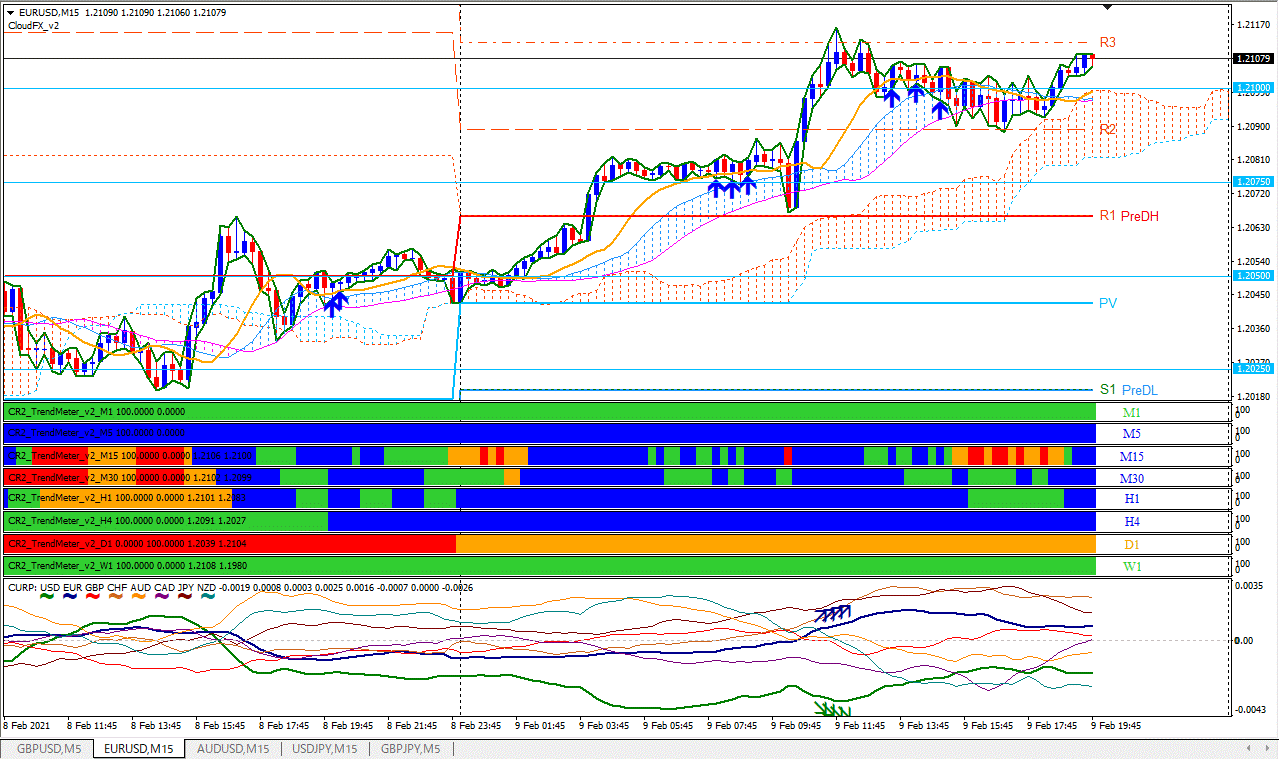 サブウィンドウのトレンドメーターでは、下位足の1分足と5分足については最新のリアルタイムでのトレンド情報を、同位と上位足については過去足と最新のトレンド情報を色で表します。
上昇トレンド判定は、各足の5EMAと21EMAで行い、5EMAが21EMAより上にあって両方とも傾きが上なら青色で、どちらかが下向きなら緑で示されます。
下降トレンド判定は逆となり、赤とオレンジで示されます。
1分足から週足まで、つまり、下位足から上位足までトレンドの状態がリアルタイムで分かります。
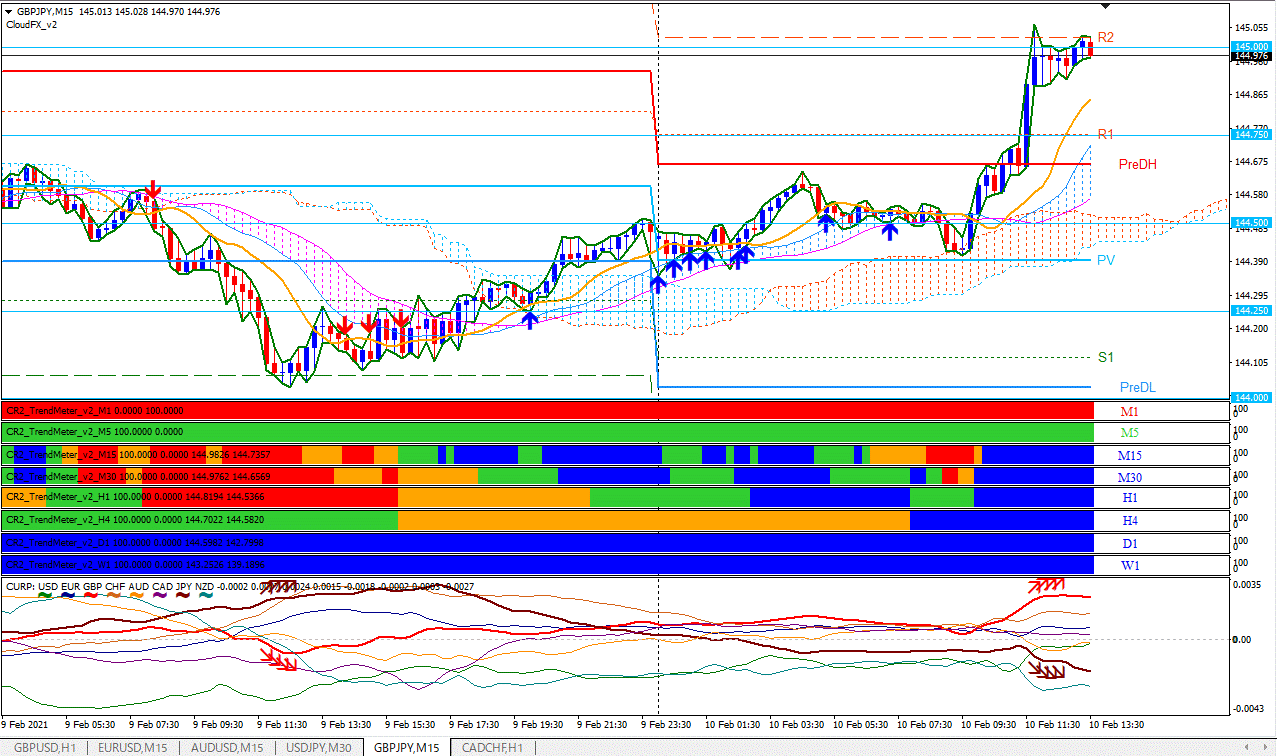
下図はポンド円15分足にCloudFXと同梱のトレンドメーター、通貨の強弱を表示した例です。
サブウィンドウのトレンドメーターでは、下位足の1分足と5分足については最新のリアルタイムでのトレンド情報を、同位と上位足については過去足と最新のトレンド情報を色で表します。
上昇トレンド判定は、各足の5EMAと21EMAで行い、5EMAが21EMAより上にあって両方とも傾きが上なら青色で、どちらかが下向きなら緑で示されます。
下降トレンド判定は逆となり、赤とオレンジで示されます。
1分足から週足まで、つまり、下位足から上位足までトレンドの状態がリアルタイムで分かります。
下図はポンド円15分足にCloudFXと同梱のトレンドメーター、通貨の強弱を表示した例です。
 下図はポンドドル1時間足にCloudFXと同梱のトレンドメーター、通貨の強弱を表示した例です。
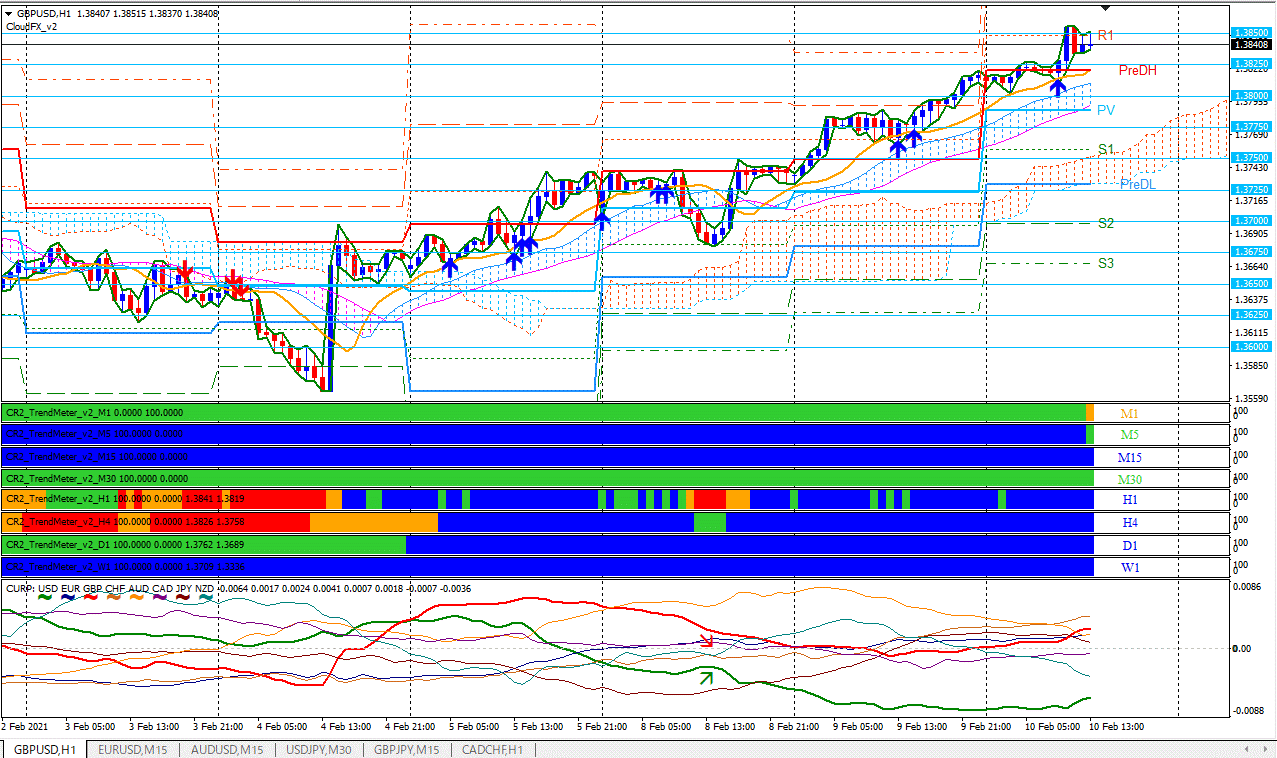 上図において、1分足と15分足以外はほぼ青色なので、非常に強い上昇トレンドを示しています。
下図はユーロドル1分足にCloudFXと同梱のトレンドメーター、通貨の強弱を表示した例です。
上図において、1分足と15分足以外はほぼ青色なので、非常に強い上昇トレンドを示しています。
下図はユーロドル1分足にCloudFXと同梱のトレンドメーター、通貨の強弱を表示した例です。
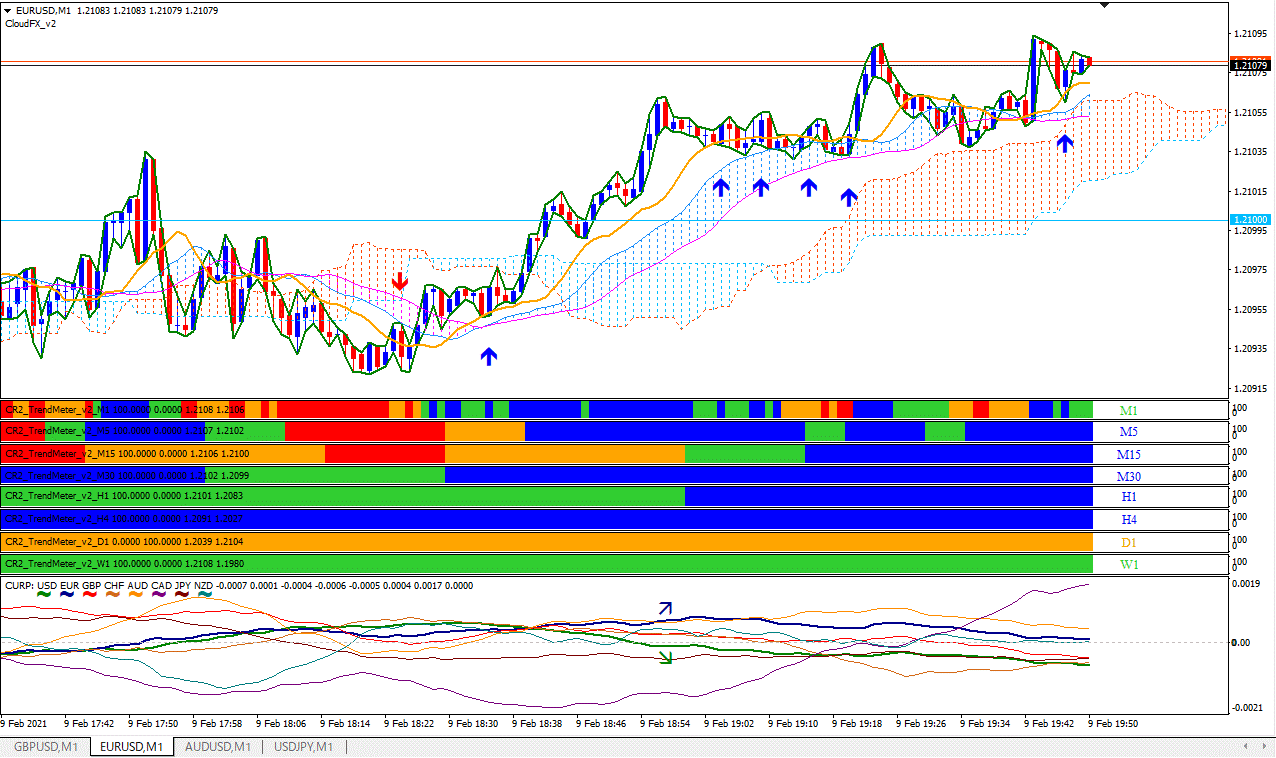 上図において、1分足でスキャルピングをする際にも、4時間足や1時間足のトレンドが同時に見られるのは心強いです。
「スキャルピングインジケーターCloudFX」はデイトレやスキャルピングを行うトレーダーの方が使いやすいように、
感度を調整できるアリゲーターベースの雲からの反発シグナルの他に、高反発ポイントの定番前日高値安値、
世界中のトレーダーが注目するピボットポイント(S1,S2,S3,R1,R2,R3含む)、30,80対応のキリ番(ラウンドナンバー)などの
レジサポ転換になりやすいラインを自動で引き、さらには、通貨の強弱で相対的に強まっている通貨と弱まっている通貨をお知らせし、
自分で引いたトレンドラインや水平線をまたぐとアラートやメールでお知らせするという高機能FX統合運用環境です。
当環境を是非使い倒して、ご成功なさってください!
「CR2_CloudFX」の設定画面は下図のようになっております。
上図において、1分足でスキャルピングをする際にも、4時間足や1時間足のトレンドが同時に見られるのは心強いです。
「スキャルピングインジケーターCloudFX」はデイトレやスキャルピングを行うトレーダーの方が使いやすいように、
感度を調整できるアリゲーターベースの雲からの反発シグナルの他に、高反発ポイントの定番前日高値安値、
世界中のトレーダーが注目するピボットポイント(S1,S2,S3,R1,R2,R3含む)、30,80対応のキリ番(ラウンドナンバー)などの
レジサポ転換になりやすいラインを自動で引き、さらには、通貨の強弱で相対的に強まっている通貨と弱まっている通貨をお知らせし、
自分で引いたトレンドラインや水平線をまたぐとアラートやメールでお知らせするという高機能FX統合運用環境です。
当環境を是非使い倒して、ご成功なさってください!
「CR2_CloudFX」の設定画面は下図のようになっております。
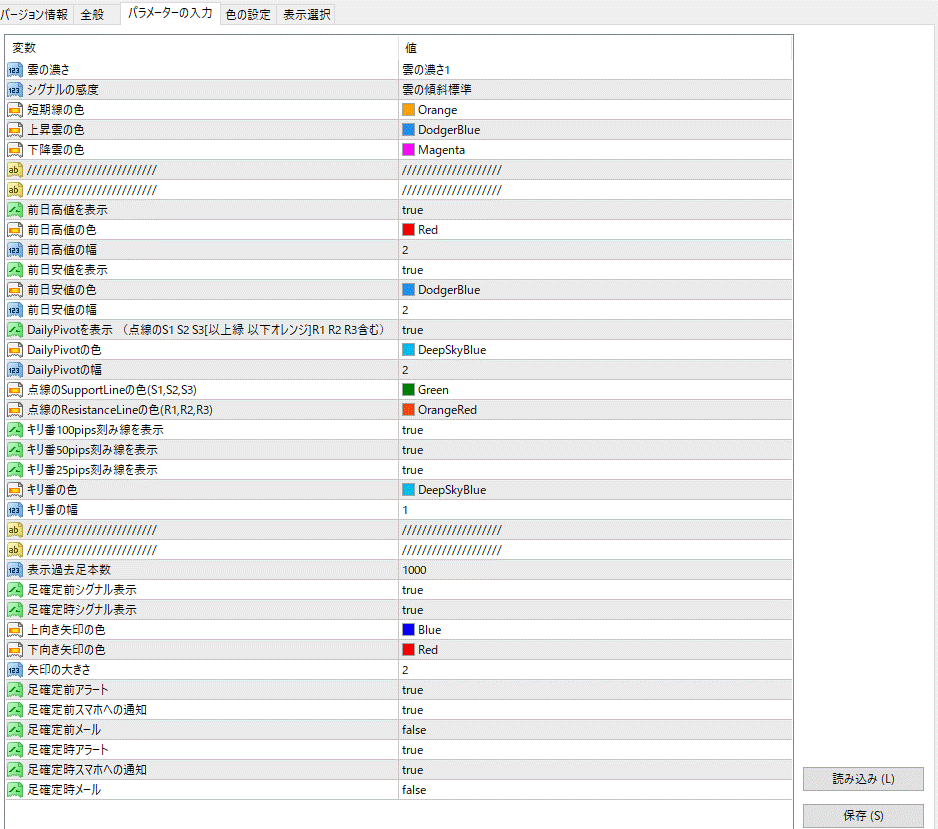 上図の設定画面の最上位項目で「雲の傾斜」が5段階で設定できます。
これがシグナルの感度となっております。
その他、「前日高値安値の表示」「ピボットポイントの表示」「キリ番の表示」「シグナル、メール、アラート、スマホへの通知」
などが設定できます。
また、同梱の「CR2_TrendMeter」の設定画面は下図の通りです。
TrendMeterはサブウィンドウに下位足から上位足のEMAのクロス状況を表します。
青は「短期足>長期足、かつ2本とも傾きが上方向」、緑は「短期足>長期足、かつ、どちらかが下向き」、
赤は「短期足<長期足、かつ2本とも傾きが下方向」、オレンジは「短期足<長期足、かつ、どちらかが上向き」
となっております。
トレンドメーターについては、下記のページをご参考ください。
https://www.gogojungle.co.jp/tools/indicators/28007
さらに同梱のラインボックスモニター「CR2_LineBox_Monitor」は、ボックスや水平線やトレンドラインを跨ぐとアラート、メールを行うツールです。
ラインボックスモニターについては下記のページをご参考ください。
https://www.gogojungle.co.jp/tools/indicators/28022
最後に同梱の通貨の強弱を検出する「CR2_CurPower」は下記のページをご覧ください。
https://www.gogojungle.co.jp/tools/indicators/27305
尚、同梱のテンプレートファイル「CloudFX.tpl」はMT4の「ファイル→データフォルダーを開く→templates」にコピー&ペーストしていただければ、チャート上で右クリックから定型チャートで選択していただければ、当ページのチャート画像のように表示されます。
<同梱のファイル>
バージョンは読み替えて下さい。
「CloudFX本体のインジケーターファイル」
CR2_CloudFX_v2.ex4(バージョンは適宜読み替えてください。)
「トレンドメーターのインジケーターファイル」
CR2_TrendMeter_v2.ex4(1分足から週足分まで計8個)
「ラインモニターのインジケーターファイル」
CR2_LineBox_Minitor_v3.ex4
「通貨の強弱の拡大と縮小をお知らせするインジケーターのファイル」
CR2_CurPower_v4.ex4
「上記のインジケーターを一括で設定するテンプレートファイル」
CloudFX.tpl
<動作環境>
Windows上のMT4上で動作いたします。
<インストール方法>
インジケーターファイルを以下のフォルダにコピー&ペーストしてMT4を再起動してください。
ファイル→データフォルダを開く→MQL4→Indicators
ナビゲーターのインディケータに表示されれば、あとはチャート上にドラッグしてOKをクリックするだけです。
<よくある質問>
Q1.アリゲーターについて概要を教えてください。
A1.アリゲーターは短期、中期、長期3本の移動平均線を未来に移動したトレンド指標です。
ワニの下アゴJaws(長期MA)と歯Teeth(中期MA)と唇Lips(短期MA)からなり、ワニが大きく口を開くと強いトレンドが出ている状態を示します。
CloudFXでは、ワニの下アゴJawsと歯Teethに挟まれた部分を雲として、唇Lipsが雲より上にあれば上昇トレンドとして、雲に当たって跳ね返った時にトレンド方向のシグナルが出るようにしております。
また、シグナルの感度を5段階で調節できます。
ご質問がございましたら、下記までご連絡ください。
https://www.gogojungle.co.jp/users/111873
FX・バイナリー戦略研究家 さとり
皆様のご成功をお祈りいたします!
上図の設定画面の最上位項目で「雲の傾斜」が5段階で設定できます。
これがシグナルの感度となっております。
その他、「前日高値安値の表示」「ピボットポイントの表示」「キリ番の表示」「シグナル、メール、アラート、スマホへの通知」
などが設定できます。
また、同梱の「CR2_TrendMeter」の設定画面は下図の通りです。
TrendMeterはサブウィンドウに下位足から上位足のEMAのクロス状況を表します。
青は「短期足>長期足、かつ2本とも傾きが上方向」、緑は「短期足>長期足、かつ、どちらかが下向き」、
赤は「短期足<長期足、かつ2本とも傾きが下方向」、オレンジは「短期足<長期足、かつ、どちらかが上向き」
となっております。
トレンドメーターについては、下記のページをご参考ください。
https://www.gogojungle.co.jp/tools/indicators/28007
さらに同梱のラインボックスモニター「CR2_LineBox_Monitor」は、ボックスや水平線やトレンドラインを跨ぐとアラート、メールを行うツールです。
ラインボックスモニターについては下記のページをご参考ください。
https://www.gogojungle.co.jp/tools/indicators/28022
最後に同梱の通貨の強弱を検出する「CR2_CurPower」は下記のページをご覧ください。
https://www.gogojungle.co.jp/tools/indicators/27305
尚、同梱のテンプレートファイル「CloudFX.tpl」はMT4の「ファイル→データフォルダーを開く→templates」にコピー&ペーストしていただければ、チャート上で右クリックから定型チャートで選択していただければ、当ページのチャート画像のように表示されます。
<同梱のファイル>
バージョンは読み替えて下さい。
「CloudFX本体のインジケーターファイル」
CR2_CloudFX_v2.ex4(バージョンは適宜読み替えてください。)
「トレンドメーターのインジケーターファイル」
CR2_TrendMeter_v2.ex4(1分足から週足分まで計8個)
「ラインモニターのインジケーターファイル」
CR2_LineBox_Minitor_v3.ex4
「通貨の強弱の拡大と縮小をお知らせするインジケーターのファイル」
CR2_CurPower_v4.ex4
「上記のインジケーターを一括で設定するテンプレートファイル」
CloudFX.tpl
<動作環境>
Windows上のMT4上で動作いたします。
<インストール方法>
インジケーターファイルを以下のフォルダにコピー&ペーストしてMT4を再起動してください。
ファイル→データフォルダを開く→MQL4→Indicators
ナビゲーターのインディケータに表示されれば、あとはチャート上にドラッグしてOKをクリックするだけです。
<よくある質問>
Q1.アリゲーターについて概要を教えてください。
A1.アリゲーターは短期、中期、長期3本の移動平均線を未来に移動したトレンド指標です。
ワニの下アゴJaws(長期MA)と歯Teeth(中期MA)と唇Lips(短期MA)からなり、ワニが大きく口を開くと強いトレンドが出ている状態を示します。
CloudFXでは、ワニの下アゴJawsと歯Teethに挟まれた部分を雲として、唇Lipsが雲より上にあれば上昇トレンドとして、雲に当たって跳ね返った時にトレンド方向のシグナルが出るようにしております。
また、シグナルの感度を5段階で調節できます。
ご質問がございましたら、下記までご連絡ください。
https://www.gogojungle.co.jp/users/111873
FX・バイナリー戦略研究家 さとり
皆様のご成功をお祈りいたします!
スキャルピングインジケーター CloudFX
アリゲーターベースの雲からの反発でシグナル表示、30,80対応のキリ番と前日高値安値とPivotを自動表示!1分足から週足分まで計8個のトレンドメーターと通貨の強弱で強い通貨をキャッチ!FX統合運用環境!
※v3でアリゲーターの表示非表示と00,50の次に使用頻度が高い30,80のキリ番表示に対応いたしました。 アクセスありがとうございます。 下図はユーロドル15分足にCloudFXと同梱のトレンドメーター、通貨の強弱を表示した例です。
サブウィンドウのトレンドメーターでは、下位足の1分足と5分足については最新のリアルタイムでのトレンド情報を、同位と上位足については過去足と最新のトレンド情報を色で表します。
上昇トレンド判定は、各足の5EMAと21EMAで行い、5EMAが21EMAより上にあって両方とも傾きが上なら青色で、どちらかが下向きなら緑で示されます。
下降トレンド判定は逆となり、赤とオレンジで示されます。
1分足から週足まで、つまり、下位足から上位足までトレンドの状態がリアルタイムで分かります。
下図はポンド円15分足にCloudFXと同梱のトレンドメーター、通貨の強弱を表示した例です。
下図はポンドドル1時間足にCloudFXと同梱のトレンドメーター、通貨の強弱を表示した例です。
上図において、1分足と15分足以外はほぼ青色なので、非常に強い上昇トレンドを示しています。
下図はユーロドル1分足にCloudFXと同梱のトレンドメーター、通貨の強弱を表示した例です。
上図において、1分足でスキャルピングをする際にも、4時間足や1時間足のトレンドが同時に見られるのは心強いです。
「スキャルピングインジケーターCloudFX」はデイトレやスキャルピングを行うトレーダーの方が使いやすいように、
感度を調整できるアリゲーターベースの雲からの反発シグナルの他に、高反発ポイントの定番前日高値安値、
世界中のトレーダーが注目するピボットポイント(S1,S2,S3,R1,R2,R3含む)、30,80対応のキリ番(ラウンドナンバー)などの
レジサポ転換になりやすいラインを自動で引き、さらには、通貨の強弱で相対的に強まっている通貨と弱まっている通貨をお知らせし、
自分で引いたトレンドラインや水平線をまたぐとアラートやメールでお知らせするという高機能FX統合運用環境です。
当環境を是非使い倒して、ご成功なさってください!
「CR2_CloudFX」の設定画面は下図のようになっております。
上図の設定画面の最上位項目で「雲の傾斜」が5段階で設定できます。
これがシグナルの感度となっております。
その他、「前日高値安値の表示」「ピボットポイントの表示」「キリ番の表示」「シグナル、メール、アラート、スマホへの通知」
などが設定できます。
また、同梱の「CR2_TrendMeter」の設定画面は下図の通りです。
TrendMeterはサブウィンドウに下位足から上位足のEMAのクロス状況を表します。
青は「短期足>長期足、かつ2本とも傾きが上方向」、緑は「短期足>長期足、かつ、どちらかが下向き」、
赤は「短期足<長期足、かつ2本とも傾きが下方向」、オレンジは「短期足<長期足、かつ、どちらかが上向き」
となっております。
トレンドメーターについては、下記のページをご参考ください。
https://www.gogojungle.co.jp/tools/indicators/28007
さらに同梱のラインボックスモニター「CR2_LineBox_Monitor」は、ボックスや水平線やトレンドラインを跨ぐとアラート、メールを行うツールです。
ラインボックスモニターについては下記のページをご参考ください。
https://www.gogojungle.co.jp/tools/indicators/28022
最後に同梱の通貨の強弱を検出する「CR2_CurPower」は下記のページをご覧ください。
https://www.gogojungle.co.jp/tools/indicators/27305
尚、同梱のテンプレートファイル「CloudFX.tpl」はMT4の「ファイル→データフォルダーを開く→templates」にコピー&ペーストしていただければ、チャート上で右クリックから定型チャートで選択していただければ、当ページのチャート画像のように表示されます。
<同梱のファイル>
バージョンは読み替えて下さい。
「CloudFX本体のインジケーターファイル」
CR2_CloudFX_v2.ex4(バージョンは適宜読み替えてください。)
「トレンドメーターのインジケーターファイル」
CR2_TrendMeter_v2.ex4(1分足から週足分まで計8個)
「ラインモニターのインジケーターファイル」
CR2_LineBox_Minitor_v3.ex4
「通貨の強弱の拡大と縮小をお知らせするインジケーターのファイル」
CR2_CurPower_v4.ex4
「上記のインジケーターを一括で設定するテンプレートファイル」
CloudFX.tpl
<動作環境>
Windows上のMT4上で動作いたします。
<インストール方法>
インジケーターファイルを以下のフォルダにコピー&ペーストしてMT4を再起動してください。
ファイル→データフォルダを開く→MQL4→Indicators
ナビゲーターのインディケータに表示されれば、あとはチャート上にドラッグしてOKをクリックするだけです。
<よくある質問>
Q1.アリゲーターについて概要を教えてください。
A1.アリゲーターは短期、中期、長期3本の移動平均線を未来に移動したトレンド指標です。
ワニの下アゴJaws(長期MA)と歯Teeth(中期MA)と唇Lips(短期MA)からなり、ワニが大きく口を開くと強いトレンドが出ている状態を示します。
CloudFXでは、ワニの下アゴJawsと歯Teethに挟まれた部分を雲として、唇Lipsが雲より上にあれば上昇トレンドとして、雲に当たって跳ね返った時にトレンド方向のシグナルが出るようにしております。
また、シグナルの感度を5段階で調節できます。
ご質問がございましたら、下記までご連絡ください。
https://www.gogojungle.co.jp/users/111873
FX・バイナリー戦略研究家 さとり
皆様のご成功をお祈りいたします!
商品概要
コミュニティ(0)
人気商品ランキング
おすすめ商品(キャンペーン商品)
GogoJungleを初めてご利用する方へ商品のご利用まではかんたん3ステップ!
GogoJungleでは、会員様向けに、あなたの投資生活を豊かにするサービスをご用意しております。また、商品をご購入いただけるのは、会員様のみとなっております。今すぐ会員登録をして、GogoJungleを活用してみませんか!
01
ユーザー情報を入力し会員登録
02
案内に従い購入
03
マイページからダウンロード
