
RSIとRSIの移動平均線を表示

Product outline
Community(0)
RSIとRSIの移動平均線を表示 Indicators/E-books
RSIとRSIの移動平均線を表示
RSIの移動平均期間、平均方法を指示し、RSIと共にその移動平均線をサブウインドウに表示する
Sales Result:
134本
Reviews:
Category:
How to provide:
Indicator
Sales from:
01/08/2021
Last Updated:
-
Version:
-
Available company:
Seller's last login time:3/24/2026 00:05:43
Read more seller information

【インジケータの概要】
RSIとその移動平均線(MA)を表示するMT4インジケータです。 MT4の標準機能で実現(*)できますが、(面倒なので)まとめて1つのインジケータの設定で済むようにしました。 (*)サブウィンドウに表示したRSI上に「Moving Average」のインジケータをドラック&ドロップすることで同様の表示ができます。
機能の概要は ・RSI、その移動平均線の期間等、必要な指示が可能 ・RSI、その移動平均線のラインの色の選択、またラインそのものの表示、非表示を選択可能 (RSI移動平均線のみの表示が可能) ・サブウィンドウの上下限値、レベルラインについても「パラメータの入力」タブ内で設定 (優先) 等…
【表示例】
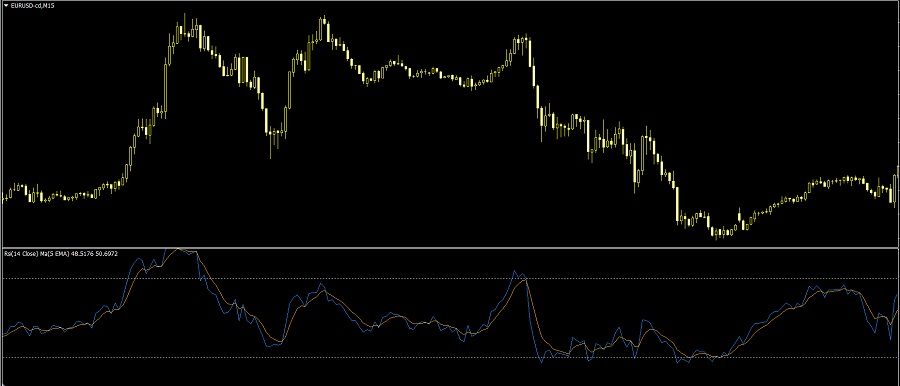
rsi_ma_v00.png
【パラメータ設定】(概要)
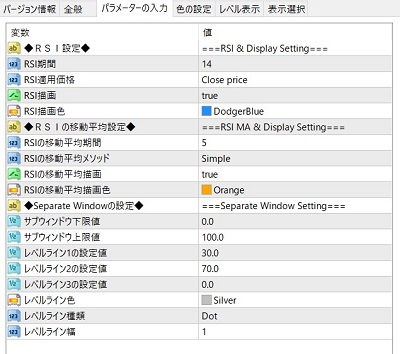
RSI_ma_Param.jpg ◆RSI設定◆ ・RSI期間 ・RSI適用価格<プルダウン>        Close             :終値        Open              :始値        High              :高値        Low               :安値        Median(HL/2)      :高値と安値の平均        Typical (HLC/3)   :高値、安値、終値の平均        Weighted Close(HLCC/4):高値、安値、終値、終値の平均(終値の比率を2倍) ・RSI描画<プルダウン>     true              :表示     false             :非表示 ・RSI描画色<プルダウン>
◆RSIの移動平均設定◆ ・RSIの移動平均期間 ・RSIの移動平均メソッド<プルダウン>        Simple            :単純移動平均        Exponential       :指数移動平均        Smoothed          :平滑移動平均        Linear Weighted   :加重移動平均 ・RSIの移動平均描画<プルダウン>     true              :表示     false             :非表示 ・RSIの移動平均描画色<プルダウン>
◆Separate Windowの設定◆ ・サブウィンドウ下限値・上限値        …「全般」タブにある下限設定、上限設定の値 (通常 0と100) ・レベルライン1・2・3の設定値        …「レベル表示」タブで設定するラインの設定値(3つまで)          (ライン不要時は0を指示するか下記レベルラインの色をNONEにする) ・レベルライン色<プルダウン> ・レベルライン種類<プルダウン>        Solid             :実線        Dash              :破線        Dot               :点線        Dashdot           :破線と点線        Dashdotdot        :破線と2重点線 ・レベルライン幅
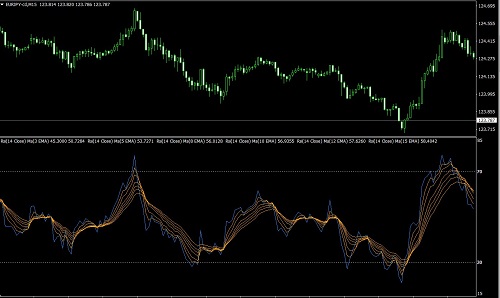
これを利用して出来そうなこと(あくまでも作者個人の考えです) ・RSIとその移動平均線で、RSIのゴールデンクロス・デッドクロスと閾値(30%や70%)で売買判断 ・RSIの移動平均線の山谷で、ダイバージェンスを見つける ・当インジケーターを複数ドラック&ドロップして移動平均線でGMMAと同様にトレンド・転換分析  (例:下記画像) 等…… RSI_ma_ex_gmma.jpg
尚、これは単なるツールなのでご自分で活用方法をお考え下さい。
【ご注意】  本インジケータはご自分の利用環境で十分に確認いただき自己責任の下、ご利用をお願いします。  本インジケータを使用して発生した如何なる損害に対しても作者は責任を一切負わないものとします。  本インジケータは使用による利益などを保証するものではありません。
 ★その他商品の抜粋です(ご参考)   マーケットの時刻を表示 簡単Market Clock   移動平均線乖離率とその移動平均線をサブウィンドウに表示… 【試用版】【MT4】ひと手間減らそう スクリーンショット! 保存フォルダもワンクリックでOpen! コマ撮りも! 【MT4】音源(音声設定)の音色を確認するインジケータ(ツール)  

Free
Product outline
Community(0)
Best Seller Ranking
Recommended Products (Campaigns)

For those using GogoJungle for the first timeEasy 3 steps to use the product!

At GogoJungle, we provide services to enrich your investment life for our members. In addition, product purchases are limited to members. Why not register as a member now and make use of GogoJungle!

01
Enter user information and register as a member
02
Follow the instructions to make a purchase
03
Download from My Page
GogoJungle Corporation
Registration Number for Financial Instruments Business: No. 1960 - Kanto Finance Bureau (Gold Trading)
A member of General Incorporated Association and Japan Investment Advisers Association
GogoJungle Corporation
Registration Number for Financial Instruments Business:
No. 1960 - Kanto Finance Bureau (Gold Trading)
A member of General Incorporated Association
Japan Investment Advisers Association
Financial Services AgencyJapan Investment Advisers AssociationFinancial Instruments Mediation Assistance CenterSecurities and Exchange Surveillance Commission

Copyright © 2026 GogoJungle Inc. All Rights Reserved.