
"ATS-25" Lecture Part 2: "Learn More About 'ATS-25' — There's a Present!"
Thank you always for using our service, and we appreciate it.
This time is a very important session to help you use『ATS-25』more effectively and to earn more money.
We believe you will also understand the greatness of『ATS-25』this time as well, so thank you in advance.
Now, there is a gift this time!
You can learn how the calculations of『ATS-25』are performed.
Now, let’s get started.
■ Launching the Viewer System ■
This system does not require any other files besides the main unit.
To use it without new downloads or setups, it is plugged into「ATS-25」.
① Open the parameters of「ATS-25」and enter「2025」in the «PassCode» field.
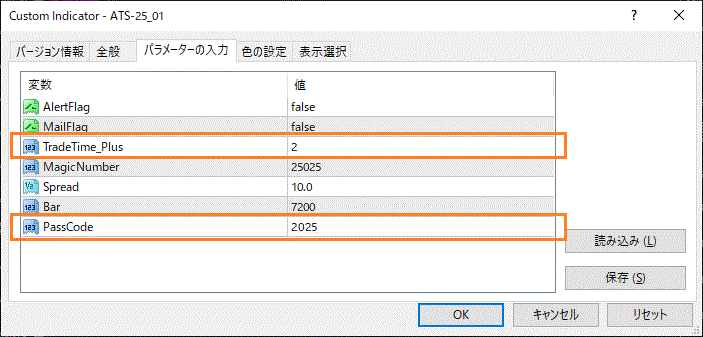
② Restart MT4 or press the「UpDate」button.
③ When the gauge reaches 100%, in addition to the usual arrow sign, you will see the settlement flag, earned points, and cumulative points.
Additionally, some background colors will change.
■ Earned Points ■
The starting price of the candle with the arrow sign is the reference.
『ATS』 does not remap the signal, and there is no “late-entry” signal after a long candle.
When the candle shifts and a new candle begins, the arrow sign appears immediately.
Therefore, it is calculated based on the starting price.
■ Settlement Signal ■
Settlement points occur when the opposite arrow sign appears.
Here, as described in the earned points section, the starting price is the reference.
■ Spreads ■
In order to improve accuracy, the system properly accounts for spreads in calculations.
Please consider this in the same way as EA backtests.
For Buy positions, at acquisition the「starting price」has the「spread」added.
In other words, it assumes Ask. The settlement point assumes starting price with Bid.
For Sell positions, at acquisition the price remains starting price with Bid, and at settlement the starting price plus the「spread」to assume Ask.
【!】Things to be aware of
As you trade more, the spread can widen and have a negative impact.
This accumulation can be substantial; even just 1 pip can become “100 pips” = “1 yen” after 100 trades.
This is a negative factor that should not be ignored, so it is reflected in the system as well.
Spread settings can be configured in the parameter「Spread」.
Like the EA backtests, for USDJPY, a value of「10」means「0.01 (1 pip)」.
■ Trading Time Window (Important) ■
For『ATS』, this time window is very important.
We will explain while looking at the attached images.
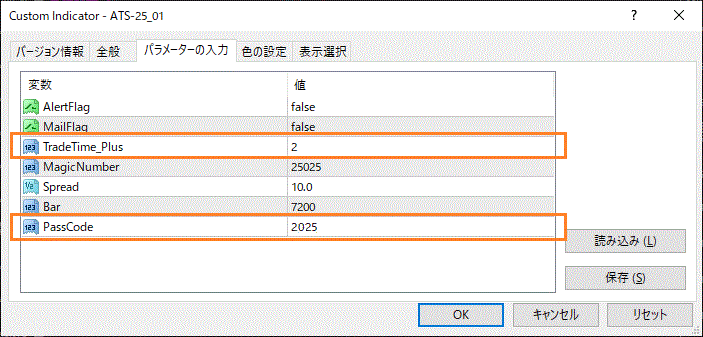
① First, please look at the image「Parameters」. It shows “TradeTime_Plus” = “2.”
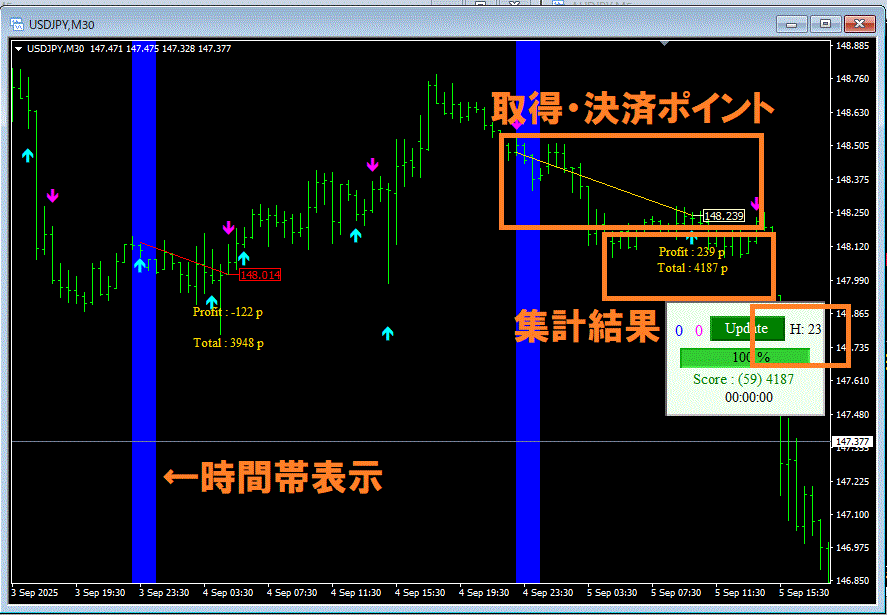
② Then in the chart image, the panel displays「H23」, indicating that the server time was searched in the 23 o’clock hour.
⇒ This determines the time period to validate in steps ① and ②. In this case, it is from 23:00 to 2:00, with the target time being 23:00–01:00.
Signals are acquired and counted only during this period.
Other time periods have different optimal values and are not included here.
Even for excluded periods, signals are displayed using the current time’s optimal values, so please understand this point.
In excluded time periods, signals may appear at inopportune moments for this reason.
As shown in the image, the viewer system clearly colors the target time window to indicate it.
■ About the Target Time Window ■
Markets have different characteristics depending on currency pairs and timeframes, and they do not move identically 24 hours a day. Different countries and regions have different active economic hours, and market opening times vary as well.
Be mindful of「currency pair × timeframe」and「time window」, and trade under conditions that match the present. This is the basic idea of this system.
As you can see even from publicly available information, there are time windows that do not become profitable even if you search for optimal values (shown in red).
There are currency pair × timeframe combinations that become profitable when you consider all 24 hours.
However, when examined by time window, not all times are efficient.
『ATS-25』 enables this kind of temporal granular analysis and is a fundamental part of the design.
■ (Re) Search ■
One to two hours after starting trading, please press the「UpDate」button.
And then trade again using the optimal values current to the time.
■ Cautions ■
・To reduce machine load, when you do not need the results displayed, set the PassCode to「0」 to turn off the Viewer System.
We have explained how ATS calculates things.
We sincerely wish for you to gain many benefits from using this.
We look forward to your continued support.
× ![]()