

【Saikix-RSI×Automatic trading】MT4 signal tool judged by AI
This time, we will introduce a verification video that links the popular free signal tool “Saikix-RSI” with the fully automated trading EA “One-Click FX Arrows”.
Because trades are executed in response to the arrows, you can verify the performance of the signals themselves without any discretionary input. After each trade, we will also present objective analysis results by AI judgment.
What is Saikix-RSI?
“Saikix-RSI” is a free MT4 indicator released by Saikix. Based on RSI (Relative Strength Index), it displays reversal signals from overbought/oversold conditions.
- Detects reversal points simply with RSI thresholds (70/30)
- Green and red arrows clearly indicate entry points
- Displayed on the close bar to reduce repaint risk
- Alert features (pop-up, sound, email, push notifications)
- RSI period, thresholds, arrow colors and display position are customizable
- Lightweight, backtest-compatible
- Supports FX scalping/day trading and binary options trading
The blog explains usage, settings examples, recommended timeframes, and more in detail.
In this video, the arrows from this tool trigger fully automatic entries and exits on MT4. We will evaluate performance through actual signal accuracy and AI-based analysis results.
Settings and testing environment for One-Click FX Arrows
Connecting this signal to automated trading is done with “One-Click FX Arrows.” This time, we demonstrate in a MT4 environment, using USDJPY as the currency pair and 15-minute candles (M15).
The test environment settings are as follows:
- Currency pair: USDJPY
- Timeframe: 15 minutes (M15)
- Verification period: 2017-04-05 to 2017-05-11
- Model: Control Point
- Spread: Fixed at 0.2 pips
- Take profit / stop loss: Not set
- Trailing stop: AVG SHORT (uses short-term average)
- Signal immediate entry (no repaint)
- Reversal arrows trigger reverse-entry
- Maximum concurrent positions: 1 (no additional entries, no hedging)
With these settings, automated trading executes based solely on the signal tool’s entry instructions, without any discretionary input.
Automated trading execution and video structure
Launch Strategy Tester,One-Click FX Arrowsand select it. Then set the period, currency pair, and model, and begin testing in visual mode.
When the chart starts moving, the Saikix-RSI indicator appears and arrows show up according to the signals. First, we will verify that entries occur correctly in response to the signals.
Typically, arrows appear when the RSI chart at the bottom rises above 70 or falls below 30. Arrows may appear in rapid succession in the same direction due to fast reversals, so many arrows can appear. Since the maximum position is set to one, no additional entries occur in the same direction.
When arrows appear, entries are executed automatically, and when arrows in the opposite direction appear, the position is closed and a reverse-entry is made одновременно.
Since the automated trading operation has been confirmed to function normally, we will disable the automatic stop and proceed with full-scale trading.
The real-time profit and loss graph is displayed at the bottom of the screen, so even at higher playback speeds you can clearly see the trading status.
Also, since the maximum position count is 1, even if signals in the same direction appear consecutively, no additional entries are made. When this happens, an error message indicating that the position limit has been reached is displayed at the bottom left of the screen.
In this video, because about three weeks of historical data are used, playback speed is increased. Actual trading processing takes about four minutes to complete.
Period end and aggregation results
Three weeks of trading have ended. A CSV file for AI judgment and a folder with generated images automatically open. Also,One-Click FX Arrowsperforms automatic aggregation and presents statistics such as total profit/loss, win rate, and profitability factor on the screen.
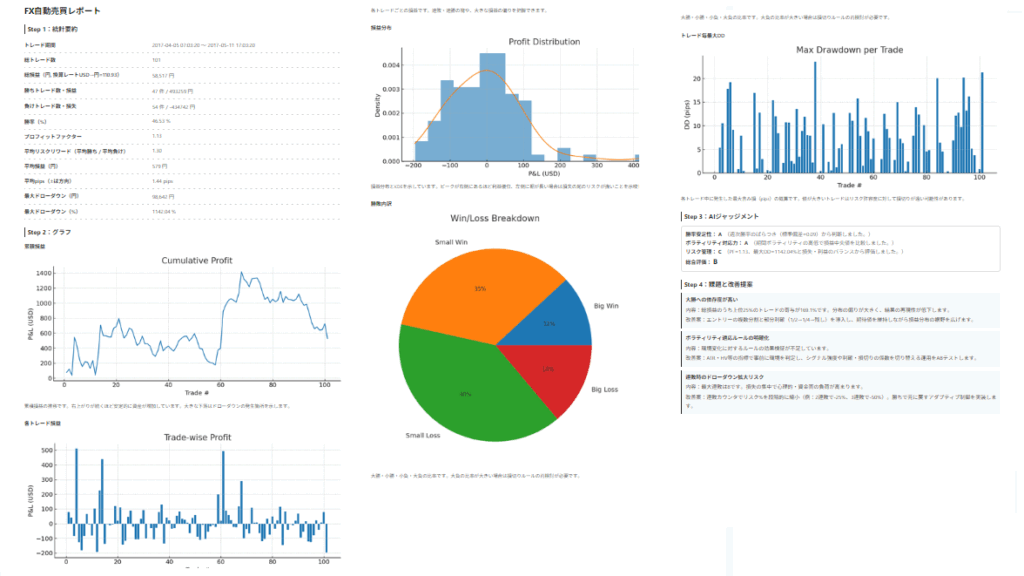
AI Judgment Analysis Results
Let’s review the AI analysis results.
Step 1: Statistical Summary
- Trading period2017-04-05 07:03:20 〜 2017-05-11 17:03:20
- Total trades101
- Total profit/loss (JPY, USD to JPY conversion rate 110.93)58,517 JPY
- Winning trades / profit47 trades / 493,259 JPY
- Losing trades / loss54 trades / -434,742 JPY
- Win rate (%)46.53 %
- Profit factor1.13
- Average risk-reward (average win / average loss)1.30
- Average profit/loss (JPY)579 JPY
- Average pips (direction indicated)1.44 pips
- Maximum drawdown (JPY)98,642 JPY
- Maximum drawdown (%)1142.04 %
Step 2: Graphs and Comments
Cumulative Profit
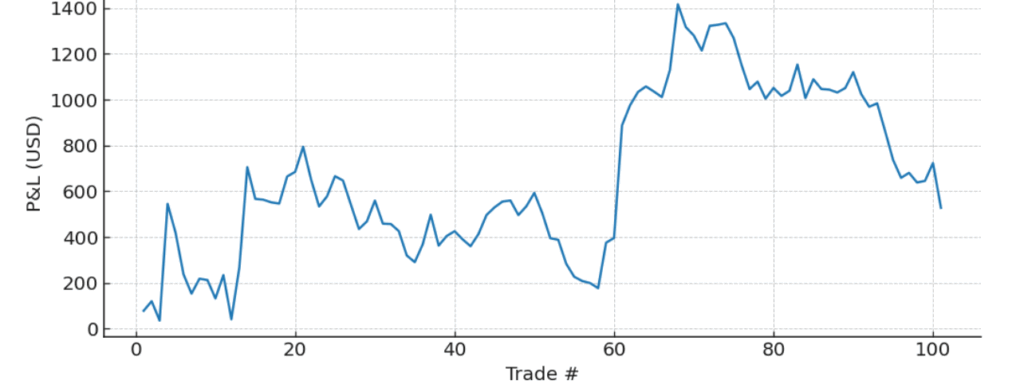
This shows the progression of cumulative profit. A steady upward trend indicates increasing assets; major declines mark drawdown points.
Trade-wise Profit
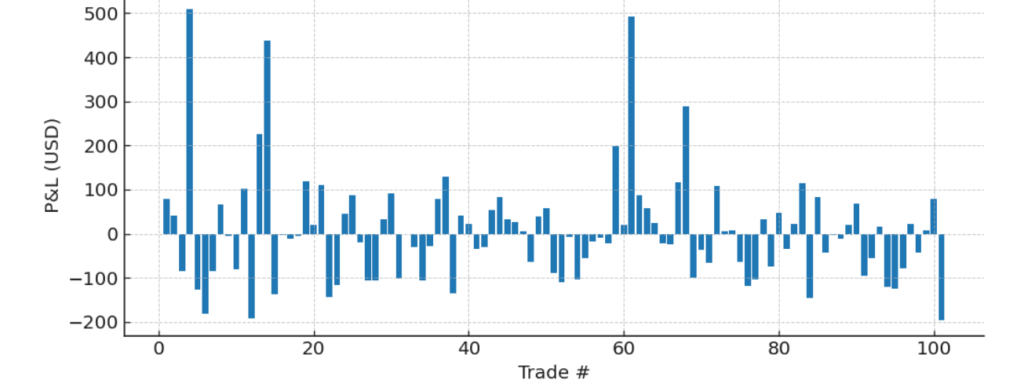
Profit or loss for each trade. Useful for identifying streaks of wins/losses and large skew in profits.
Profit Distribution
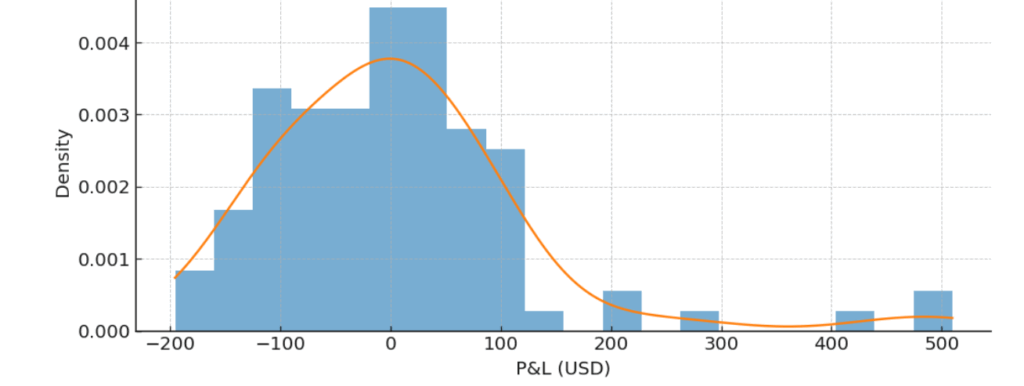
Shows profit distribution and a KDE. A peak shifted to the right indicates profit dominance, while a long tail on the left suggests higher risk of losses.
Win/Loss Breakdown
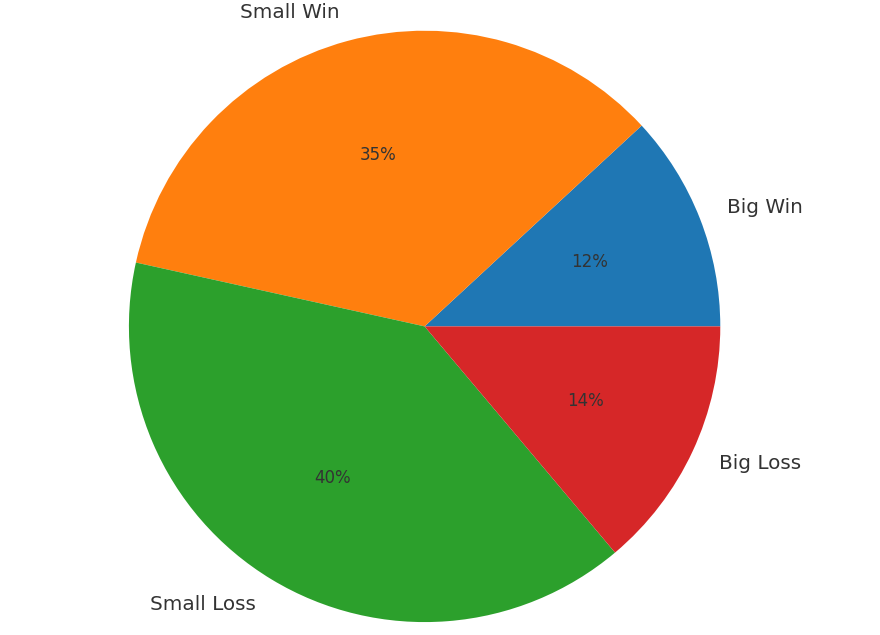
Proportions of big wins, small wins, small losses, and big losses. A high proportion of big losses suggests reevaluation of stop-loss rules.
Max Drawdown per Trade
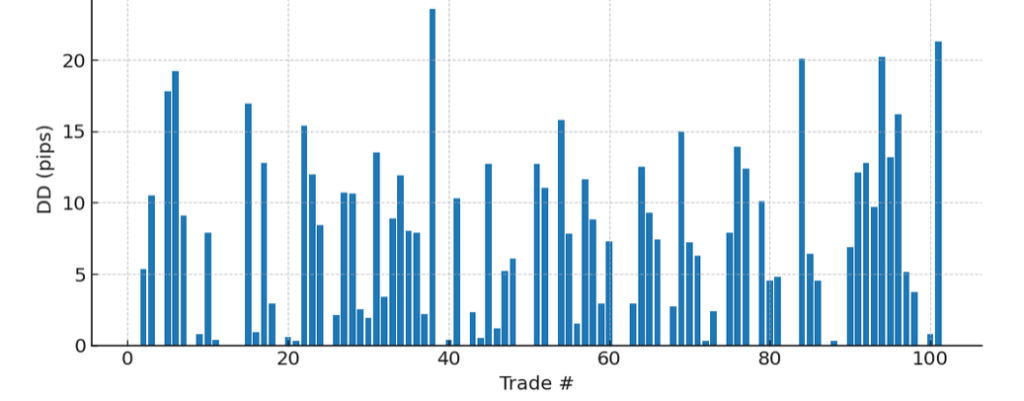
Approximate maximum unrealized loss (in pips) occurred during each trade. Large values indicate that stop-loss distance may be far relative to risk tolerance.
Step 3: AI Judgment
Stability of win rate: A (assessed from weekly win-rate variation, standard deviation = 0.09)
Volatility adaptability: A (compared median P/L across varying period volatility)
Risk management: C (PF=1.13, max DD=1142.04%, evaluated from balance of loss and profit)
Overall rating: B
Step 4: Issues and Improvement Proposals
■ High dependence on big wins
■ Clarify volatility-adaptation rules
■ Drawdown risk during losing streaks
Note that the results shown here are just one example.
Results vary greatly depending on market conditions, signal settings, and time period, so please view this as a reference.
Practice and verify freely with a completely risk-free trade simulator!
Details page for One-Click FX Training MAX