
【Free Indicator】Display RCI with BB, show arrow signs when price breaks above the upper BB or below the lower BB of RCI (10 or 12 lines)
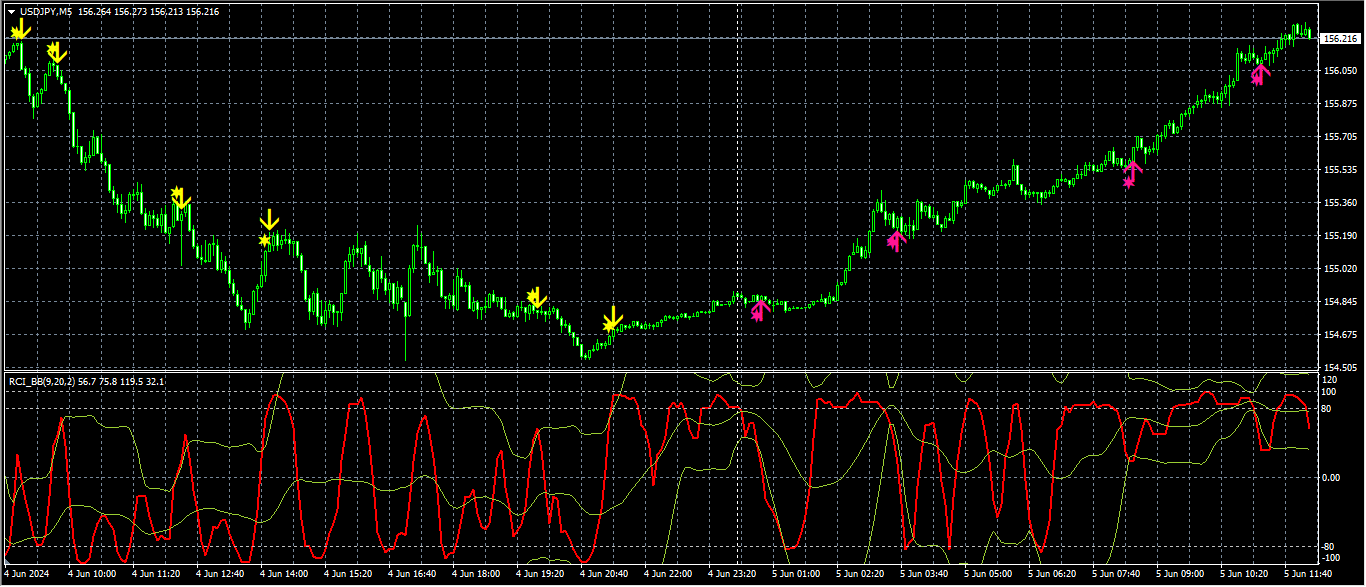
※This article explains the special indicators related to the special video you viewed.
【Special Video】
https://www.youtube.com/watch?v=biPk290uRSk
Indicator to display RCI (10 lines) or RCI (12 lines) and an indicator to display Bollinger Bands on RCI
https://www.gogojungle.co.jp/tools/indicators/46340
◆Introduction (Indicators included in this product)
This product includes the following four indicators.(1)【RCI_BB】
MT4 indicator that displays RCI and its Bollinger Band
(2)【RCIBBUL】
MT4 indicator that displays arrows when RCI Bollinger Band upper/lower limits are breached
【RCI_BB】 and【RCIBBUL】 display examples
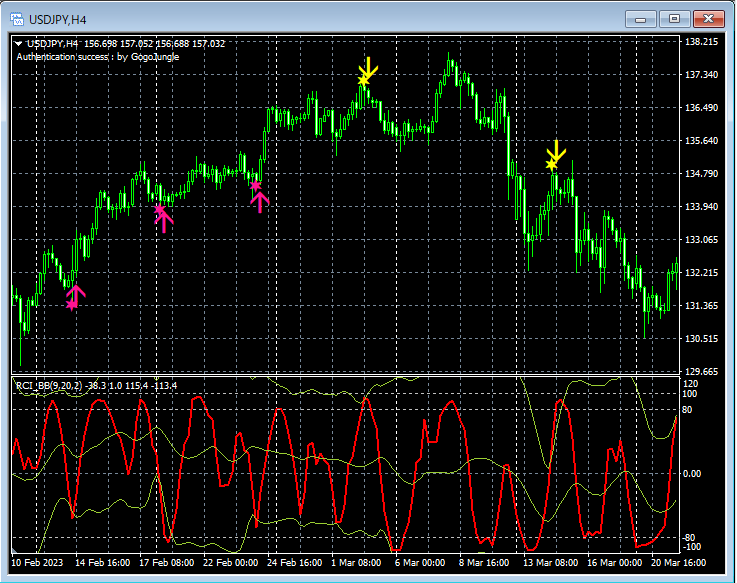
Main window: 【RCIBBUL】
Sub window: 【RCI_BB】
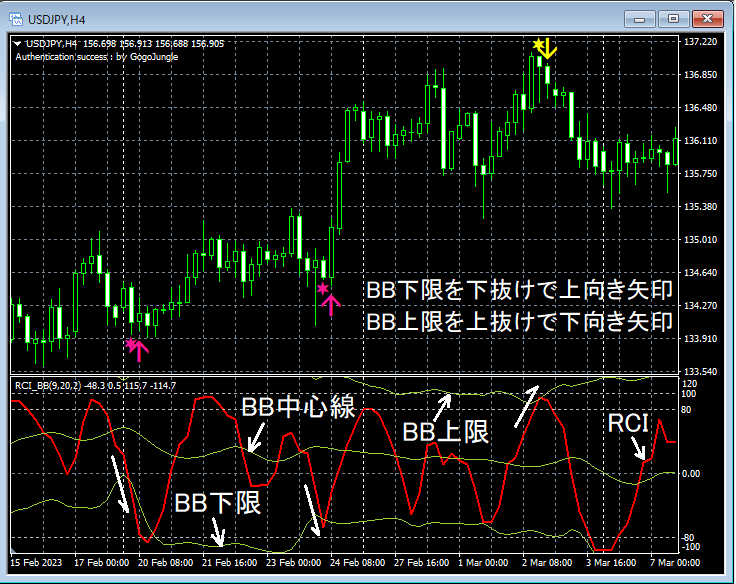
“If RCI is below -80, it may be considered oversold”In certain market conditions, even if RCI is above -80,“RCI has breached the lower Bollinger Band and is oversold”may be considered oversold.
“If RCI is above +80, it may be considered overbought”In certain market conditions, even if RCI is below +80,“RCI has breached the upper Bollinger Band and is overbought”may be considered overbought.
※Even if【RCI_BB】 is not displayed, signals from【RCIBBUL】 can be shown.
Description of signals for【RCIBBUL】
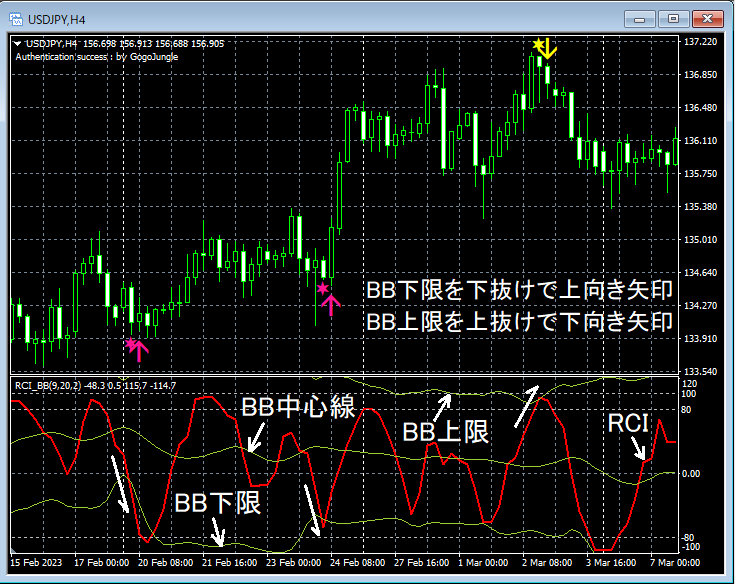
Main window: 【RCIBBUL】
Sub window: 【RCI_BB】
(3)【RCI10Lines_LimitedBars】
MT4 indicator that displays any 10 RCI lines
Example of display for【RCI10Lines_LimitedBars】
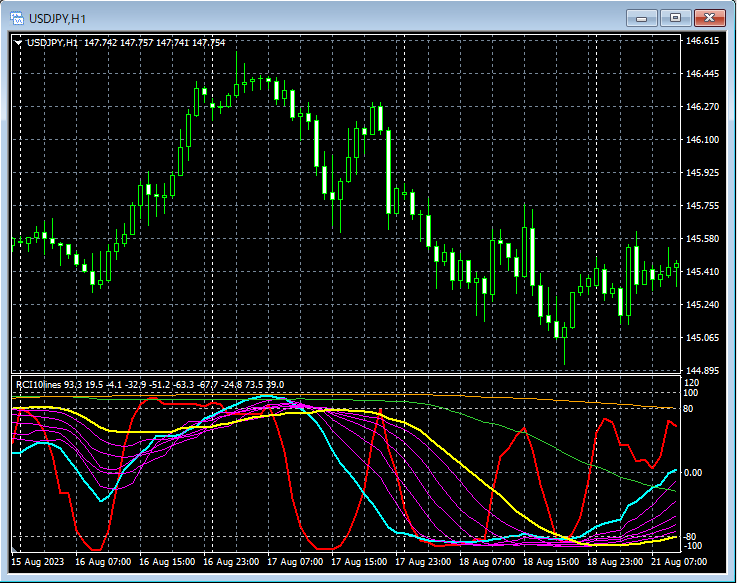
One characteristic of RCI is that when multiple RCIs align in the same direction, price movement in that direction may become larger.
(4)【RCI12Lines_LimitedBars】
MT4 indicator that displays any 12 RCI lines
Example of display for【RCI12Lines_LimitedBars】
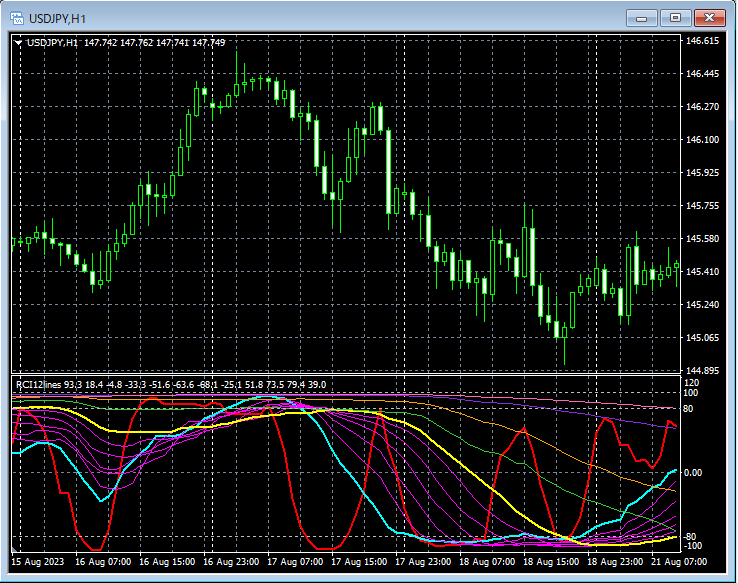
One characteristic of RCI is that when multiple RCIs align in the same direction, price movement in that direction may become larger.
◆Tips for using RCI
Tips for using RCI are summarized in the free PDF below. We hope you will find it helpful to make the indicators above more effective.
Tips for using RCI【Free PDF】
https://www.gogojungle.co.jp/tools/indicators/16863
◆Settings for【RCI_BB】
As shown below, you need to check “Allow DLL imports.”
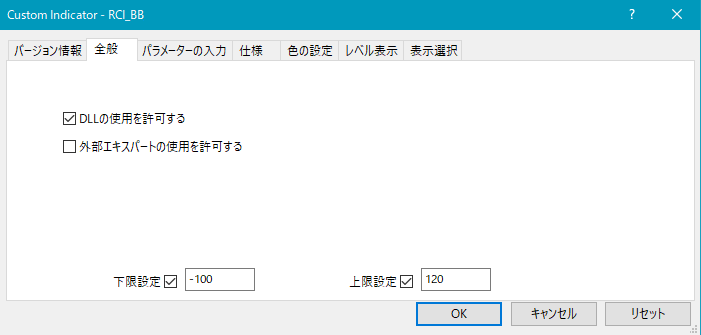
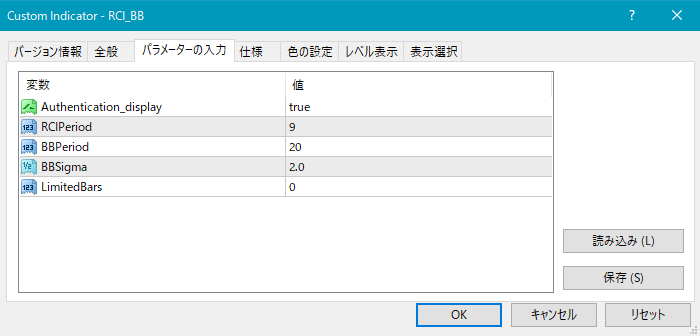
As shown above, you need to configure both “RCI” and “RCI Bollinger Bands.”
RCIPeriod1: period of the RCI
BBPeriod: period of the RCI Bollinger Band
BBSigma: standard deviation of the RCI Bollinger Band
Also, by setting the value of “LimitedBars,” you can limit the number of candlesticks (bars) used for calculating/displaying the RCI. If 0, there is no limit. The default is 0.
If you feel the indicator is heavy, adjust the number of bars calculated/displ ayed for RCI by setting this item.
◆【RCIBBUL】 Settings
As shown below, you need to check “Allow DLL imports.”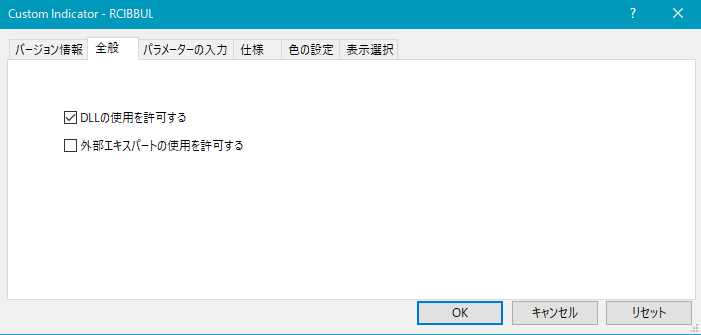
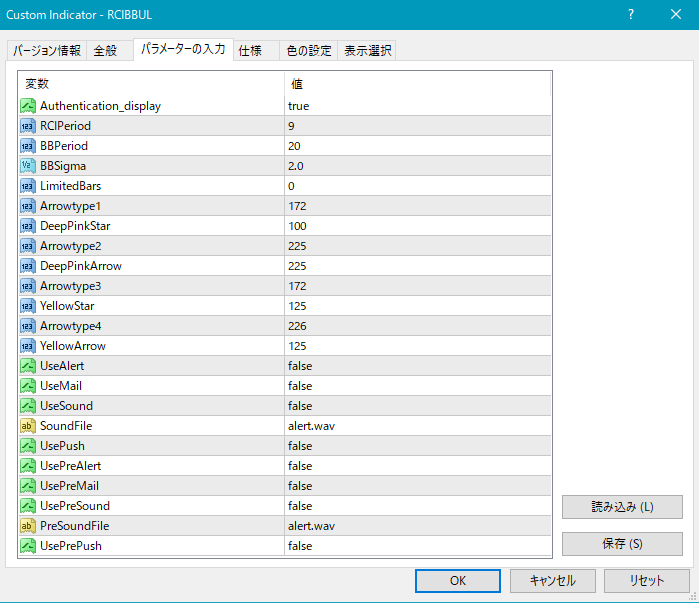
Settings for star marks and arrows
As shown above, you need to configure both the “RCI” and the “RCI Bollinger Band.”
RCIPeriod1: RCI period
BBPeriod: RCI Bollinger Band period BBSigma: RCI Bollinger Band deviation
Also, by setting the value of “LimitedBars,” you can limit the number of candlesticks (bars) used for calculating/displaying the RCI. If 0, there is no limit. The default is 0.
If you feel the indicator is heavy, adjust this item to fine-tune the number of bars used for RCI calculation/display.
Settings for the position of star marks and arrows
If the star marks or arrows are too close to the candlesticks or too far away so that they sometimes go off-screen, you can adjust the display height using the values below. Larger values move them farther from the candlesticks.
Initial pink star → DeepPinkStar
Initial pink arrow → DeepPinkArrow
Initial yellow star → YellowStar
Initial yellow arrow → YellowArrow
Also, by changing the values below, you can modify the shapes of the star marks or arrows.
Initial pink star → Arrowtype1
Initial pink arrow → Arrowtype2
Initial yellow star → Arrowtype3
Initial yellow arrow → Arrowtype4
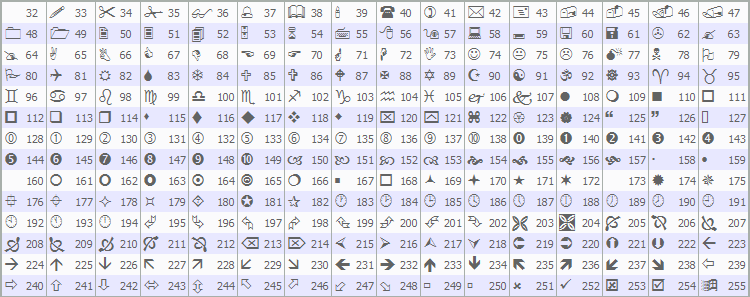
Additionally, the symbols that can be used for stars/arrows or as substitutes and their corresponding numbers are as shown in the table below.
Settings related to alerts
(1) Alerts when the arrow sign lights up
UseAlert:
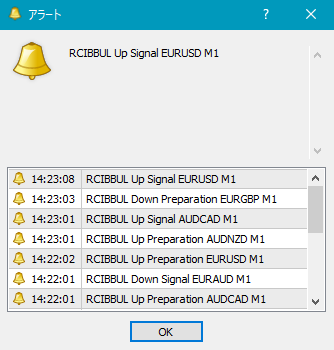
If you want to notify sign occurrence with an alert dialog like the image below, choose true. If not, choose false.
UseMail:
If you want to notify sign occurrence by email, choose true. If not, choose false.
UseSound:
If you want to notify sign occurrence with a sound, choose true. If not, choose false.
SoundFile:
Enter the file name of the sound to use for alerts.
UsePush:
If you want to notify sign occurrence via push notification, choose true. If not, choose false.
(2) Alerts on initial illumination of star sign
UsePreAlert:
If you want to notify sign occurrence with an alert dialog, choose true. If not, choose false.
UsePreMail:
If you want to notify sign occurrence by email, choose true. If not, choose false.
UsePreSound:
If you want to notify sign occurrence with a sound, choose true. If not, choose false.
PreSoundFile:
Enter the file name of the sound to use for pre-alerts.
UsePrePush:
If you want to notify sign occurrence via push notification, choose true. If not, choose false.
An example of MT4 settings when using email for sign notification
Tools → Options → E-mail
Image
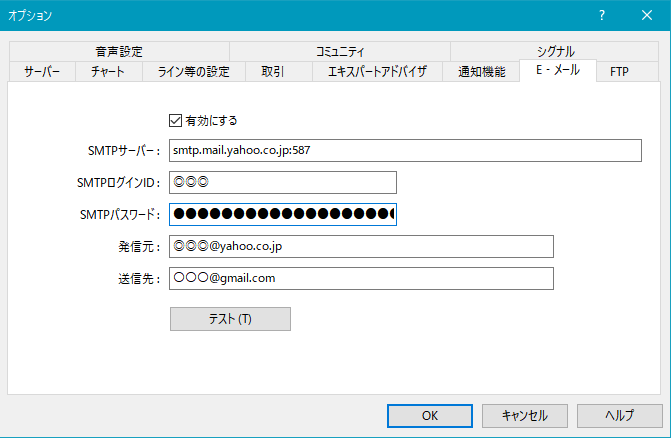
※It seems you need to restart MT4 after changing settings.
◆Settings for【RCI10Lines_LimitedBars】
As shown below, you need to check “Allow DLL imports.”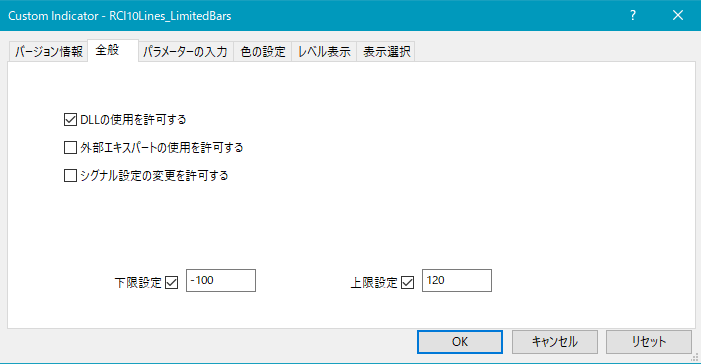
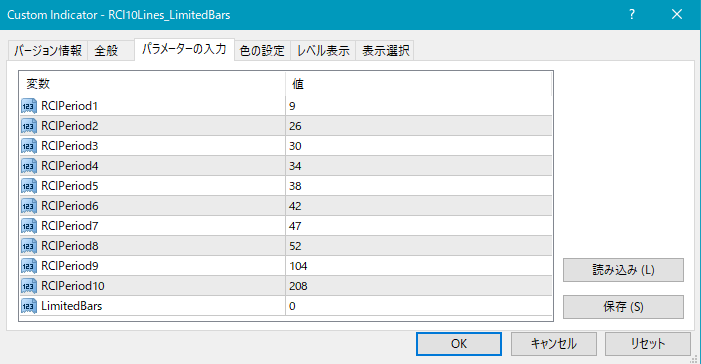
As shown above, you need to configure 10 RCIs.
Also, by setting the value of “LimitedBars,” you can limit the number of candlesticks (bars) used for calculating/displaying the RCI. If 0, there is no limit. The default is 0.
If you feel the indicator is heavy, adjust this item to fine-tune the number of bars used for RCI calculation/display.
◆Settings for【RCI12Lines_LimitedBars】
As shown below, you need to check “Allow DLL imports.”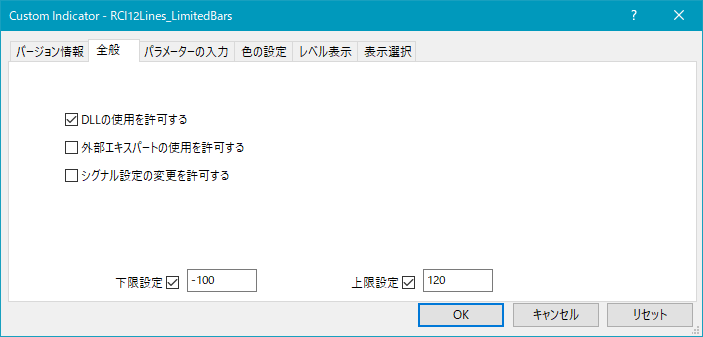
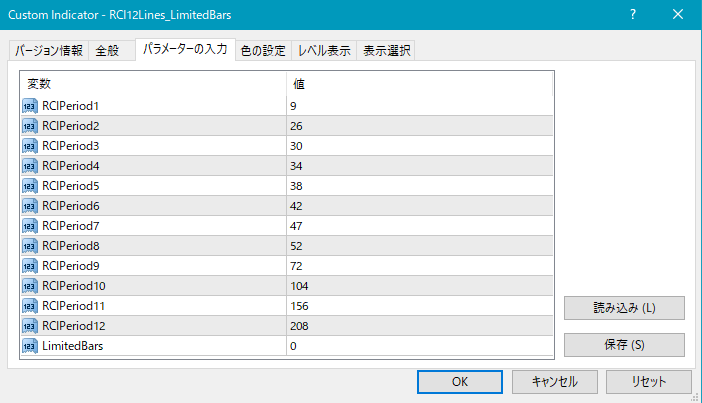
As shown above, you need to configure 12 RCIs.
Also, by setting the value of “LimitedBars,” you can limit the number of candlesticks (bars) used for calculating/displaying the RCI. If 0, there is no limit. The default is 0.
If you feel the indicator is heavy, adjust this item to fine-tune the number of bars used for RCI calculation/display.
◆About mBDSR (sold separately)
An indicator that shines when used in combination with RCI:【BODSOR・mBDSR】★GogoJungle AWARD 2020 winner★https://www.gogojungle.co.jp/tools/indicators/11836
Here, we introduce examples of the signs from the above sold product.
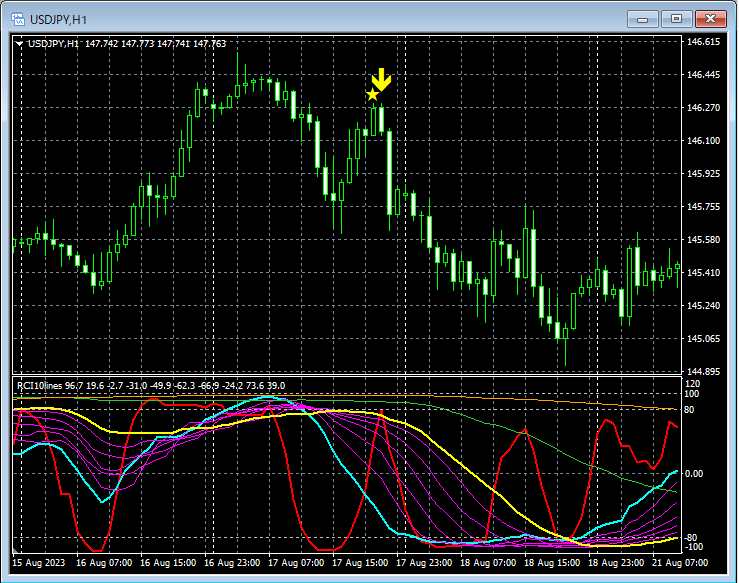
Main window: signs from mBDSR
Sub window: 10 RCIs【RCI10Lines_LimitedBars】
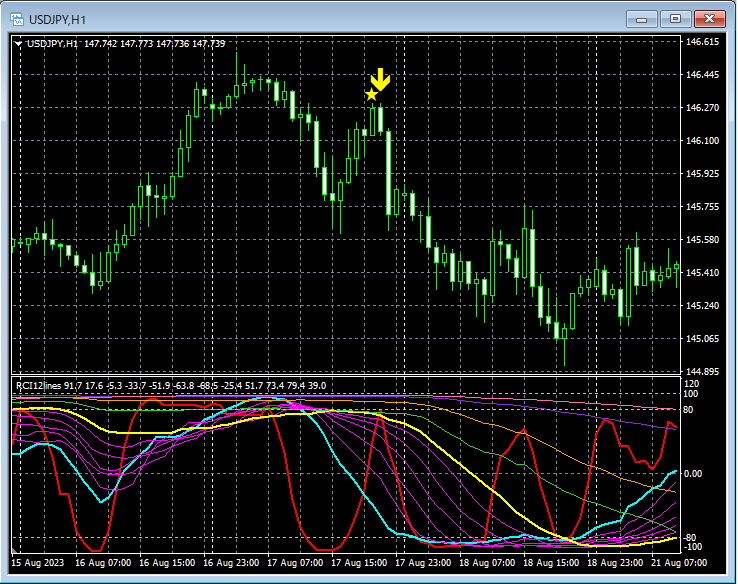
Main window: signs from mBDSR
Sub window: 12 RCIs【RCI12Lines_LimitedBars】
For details of mBDSR (sold separately), please see the product overview page above.