
About the major indicator version upgrade of 【mBDSR】
◆Introduction
Indicator【BODSOR・mBDSR】that shines when combined with RCI
and its methods & case studies (PDF) ★GogoJungle AWARD 2020 winner★
https://www.gogojungle.co.jp/tools/indicators/11836

Included in the above productsMT4 Indicator【mBDSR】includesNo filter,Filter with RCI, andFilter with MA.
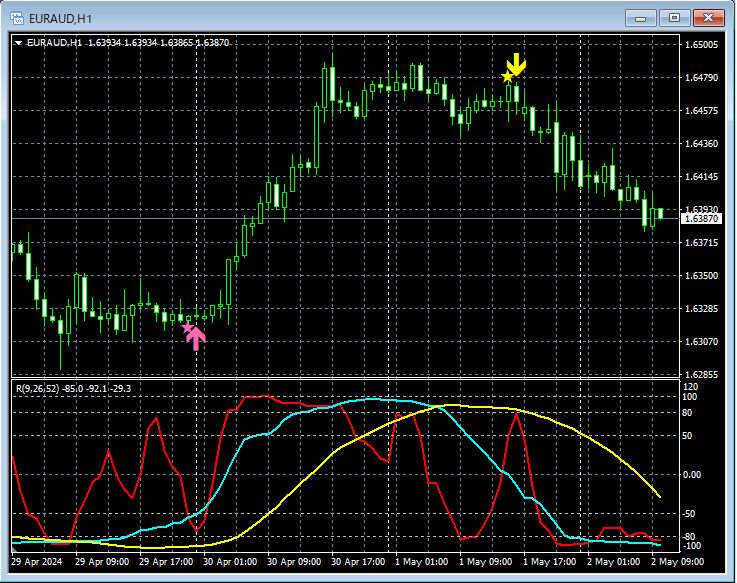
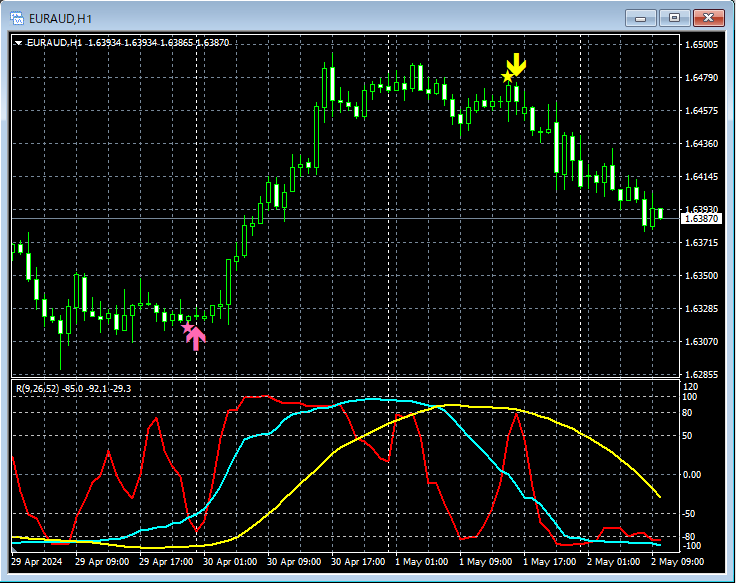
Example of signals for【mBDSR】RCI two-filter version
This article explains the settings of the three indicators (1)–(3) among the multiple indicators included in the above product.
(1) mBDSR_PreAlert2_WDT_XXXXXXXXX.ex4
No filter
(2) mBDSR_2RCI_PreAlert2_WDT_XXXXXXXXX.ex4
Two RCIs used as filters
(3) mBDSR_MA2_PreAlert2_WDT_XXXXXXXXX.ex4
Two MAs used as filters
The three indicators (1),(2),(3) above are versions upgraded based on user requests to three indicators (4),(5),(6) below. Currently, indicators (1)–(3) are provided as beta versions.
(4) mBDSR_VAP_XXXXXXXXX.ex4
No filter
(5) mBDSR_2RCI_VAP_XXXXXXXXX.ex4
Two RCIs used as filters
(6) mBDSR_MA2_VAP_XXXXXXXXX.ex4
Two MAs used as filters
Change log / corrections are as follows.
[1] In the conventional (4)–(6) indicatorsAlerts only when arrow signs light up were possible, but in the (1)–(3) indicatorsalerts also occur when the star sign first lights up, making alerts possible at first star signal.
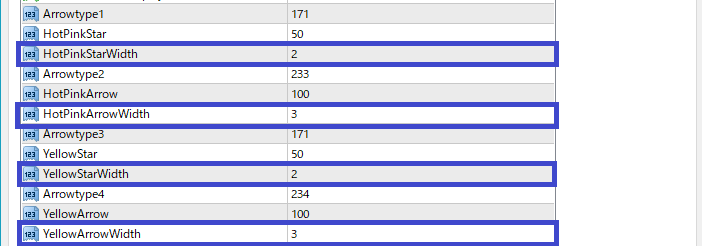
[2] In the conventional (4)–(6) indicators, changing the size of star and arrow as shown below was possible via“Color Settings”, but in that case the size could only be adjusted within a range of 1–5.4K monitor support“Parameter Input”section, adding parameters. As a result, stars and arrows can be displayed even larger than before.
(4)–(6) (before upgrade) settings in “Color Settings”

(1)–(3) (after upgrade) settings in “Parameter Input”
◆Settings for the three indicators
Here we explain the settings for the three indicators (1)–(3) mentioned above.
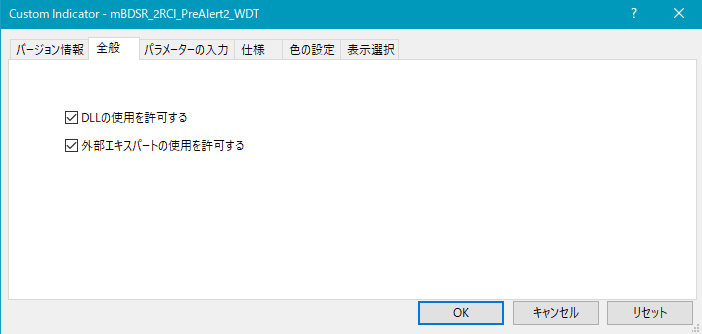
As shown below, you need to check “Allow DLL imports.”
In the case of mBDSR_PreAlert2_WDT_XXXXXXXXX.ex4
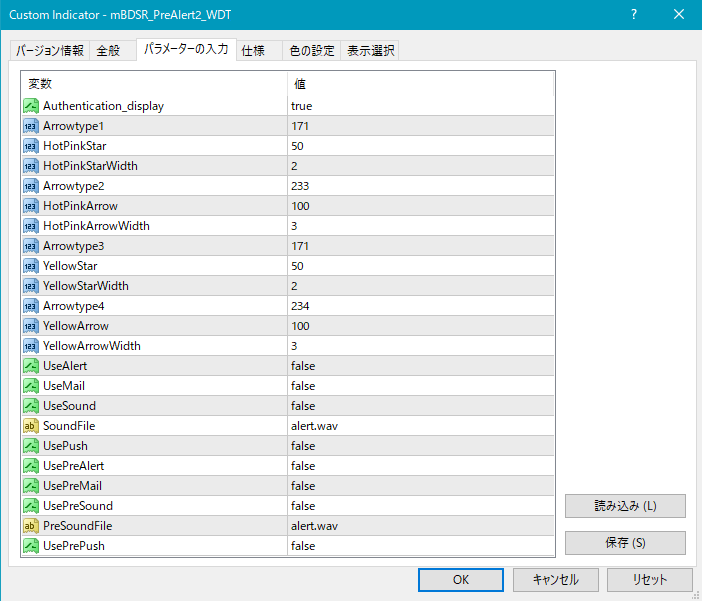
In the case of mBDSR_2RCI_PreAlert2_WDT_XXXXXXXXX.ex4

In the case of mBDSR_MA2_PreAlert2_WDT_XXXXXXXXX.ex4
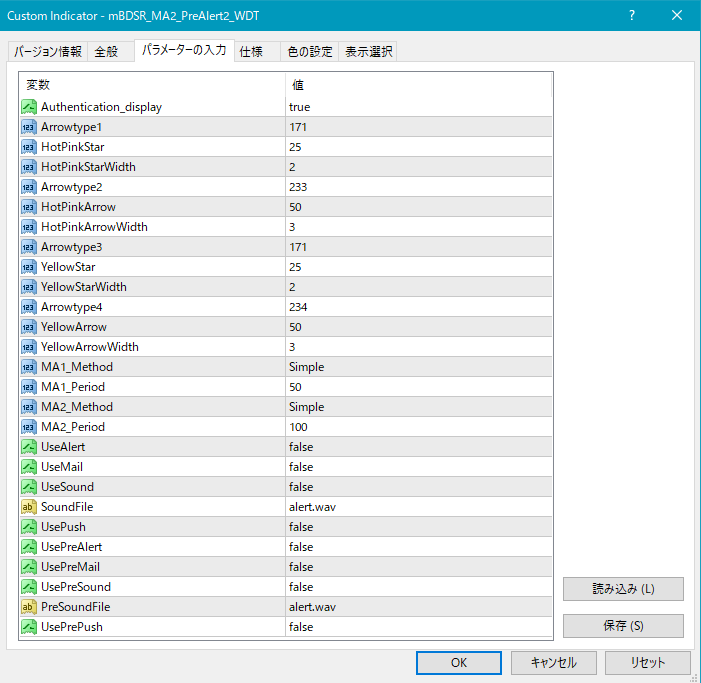
Settings regarding Web authentication display by Gogojungle
Authentication_display:
If you want to display Gogojungle Web authentication results at the upper left of the chart, select true; if not, select false.
Settings for the display position and size of stars and arrows
If the display position of stars and arrows is too close to the candles or too far away, making it sometimes off-screen, you can adjust the height for displaying these marks by changing the values in the following settings. Higher values move the display farther from the candles.
Star (pink) → HotPinkStar
Arrow (pink) → HotPinkArrow
Star (yellow) → YellowStar
Arrow (yellow) → YellowArrow
By changing the values of the items below, you can change the size of stars and arrows.
Star (pink) → HotPinkStarWidth
Arrow (pink) → HotPinkArrowWidth
Star (yellow) → YellowStarWidth
Arrow (yellow) → YellowArrowWidth
By changing the values below, you can change the shape of stars and arrows.
Pink star → Arrowtype1
Pink arrow → Arrowtype2
Yellow star → Arrowtype3
Yellow arrow → Arrowtype4
Note that the symbols that can replace stars and arrows and their corresponding numbers are listed in the table below.
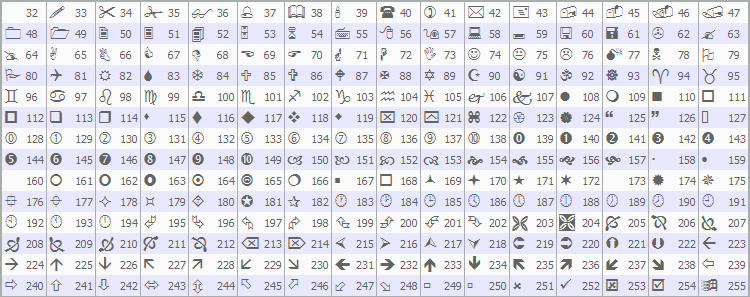
For changes to stars or arrows, please see the article below on Investment Navi+.
https://www.gogojungle.co.jp/finance/navi/359/19177
Settings related to alert functions
[1] Alerts when arrow signs light up
UseAlert:
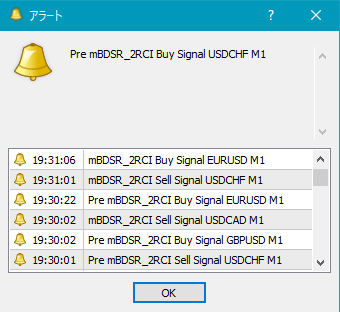
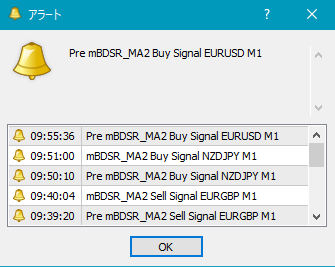
If you want to notify signs via an alert dialog as shown below, select true; if not, select false.
(1) In the case of mBDSR_PreAlert2_WDT_XXXXXXXXX.ex4
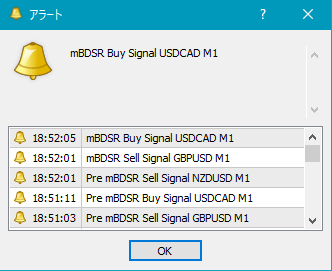
(2) In the case of mBDSR_2RCI_PreAlert2_WDT_XXXXXXXXX.ex4
(3) In the case of mBDSR_MA2_PreAlert2_WDT_XXXXXXXXX.ex4
UseMail:
If you want to notify signs by email, select true; otherwise false.
UseSound:
If you want to notify signs by alert sound, select true; otherwise false.
SoundFile:
Enter the filename of the sound to use for alerts.
UsePush:
If you want to notify signs by push notification, select true; otherwise false.[2] Alerts for the first lighting of star mark
[2] Alerts for the first lighting of star mark
UsePreAlert:
If you want to notify signs via an alert dialog when the star first lights, select true; otherwise false.
UsePreMail:
If you want to notify signs by email, select true; otherwise false.
UsePreSound:
If you want to notify signs by alert sound, select true; otherwise false.
PreSoundFile:
Enter the filename of the sound to use for pre-alerts.
UsePrePush:
If you want to notify signs by push notification, select true; otherwise false.
An example of MT4 settings when using email alerts
Tools → Options → E-mail
Image

*It seems you need to restart MT4 after changing these settings.
Settings related to filters
(1) About mBDSR_PreAlert2_WDT_XXXXXXXXX.ex4
mBDSR_PreAlert2_WDT_XXXXXXXXX.ex4 has no filter.
(2) About mBDSR_2RCI_PreAlert2_WDT_XXXXXXXXX.ex4
In mBDSR_2RCI_PreAlert2_WDT_XXXXXXXXX.ex4, you can set two RCIs as filters as follows.

RCIPeriod1: Period of the first RCI used as a filter
RCIPeriod2: Period of the second RCI used as a filter
(3) About mBDSR_MA2_PreAlert2_WDT_XXXXXXXXX.ex4
In mBDSR_MA2_PreAlert2_WDT_XXXXXXXXX.ex4, you can set two moving averages as filters as follows.

MA1_Method: Select the type of the first moving average
Simple (SMA: Simple Moving Average)
Exponential (EMA: Exponential Moving Average)
Smoothed (SMMA: Smoothed Moving Average)
Linear weighted (LWMA: Linear Weighted Moving Average)
MA2_Method: Select the type of the second moving average
Simple (SMA: Simple Moving Average)
Exponential (EMA: Exponential Moving Average)
Smoothed (SMMA: Smoothed Moving Average)
Linear weighted (LWMA: Linear Weighted Moving Average)
MA2_Period: Period of the second moving average
That’s all.