
【Q8】How to change the colors of the chart?
Q8. How to change the color of the chart?
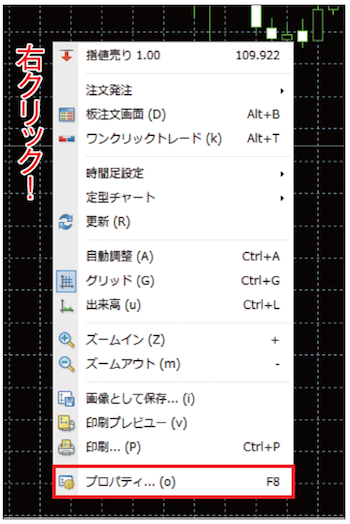
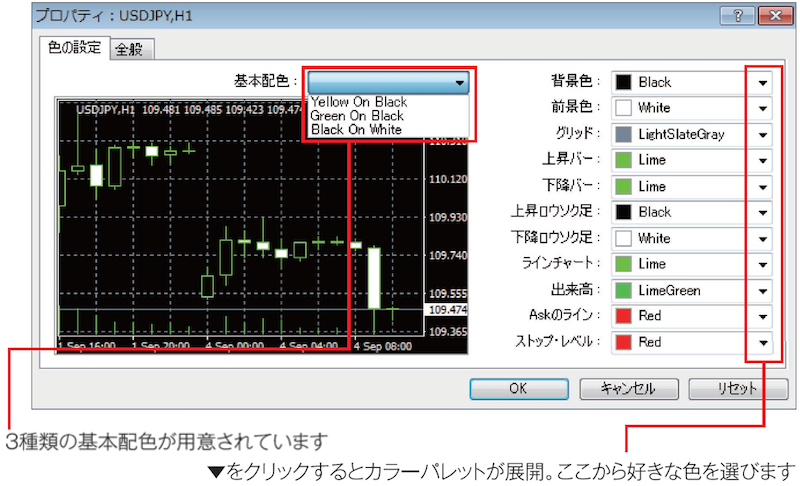
A8. Right-click the chart background → "Properties" → "Color settings"
Resolve MT4 questions with a list of 43 inquiries!
- 01. Table of contents
- 02. Not only chart analysis—things you can do in MT4
- 03. Basic knowledge before/after MT4 introduction and initial settings to start analysis
- Q1. How do I open a chart?
- Q2. The chart isn’t a candlestick chart
- Q3. How to switch the time frame?
- Q4. How to go back in time on a chart?
- Q5. The chart moves on its own
- Q6. Can I view multiple charts?
- Q7. It sometimes makes a sound. Can I stop it?
- Q8. How to change the chart color?
- Q9. What is the基本配色 (default color scheme)?
- Q10. Which items’ colors can I change?
- Q11. I want to display multiple charts side by side
- Q12. How many charts can I arrange?
- Q13. How to enlarge one of the arranged charts?
- Q14. How to insert technical indicators into a chart?
- Q15. How to insert moving averages?
- Q16. How many moving averages can be displayed?
- Q17. How to delete a technical indicator?
- Q18. How to insert Bollinger Bands?
- Q19. How to insert RSI?
- Q20. How to enlarge the sub-window?
- Q21. How to delete a sub-window?
- Q22. How to insert Stochastics?
- Q23. How to display multiple oscillators?
- Q24. It’s hard to see with too many sub-windows, right?
- Q25. How do I save my own chart analysis environment?
- Q26. Can I save chart combinations?
- Q27. How to draw lines on a chart?
- Q28. How to move an drawn line?
- Q29. How to delete a line?
- Q30. Can I draw a short diagonal line?
- Q31. Can I draw a horizontal line at a round-number price?
- Q32. How to draw a Fibonacci retracement?
- Q33. How to draw shapes?
- Q34. How to draw arrows?
- Q35. Tell me about automated trading
- Q36. How can I create an EA?
- Q37. Is MetaEditor the English version?
- Q38. How can I run an EA?
- Q39. Do I need programming knowledge to use EA?
- Q40. How to use custom indicators?
- Q41. What are custom indicators?
- Q42. Where are custom indicators located?
- Q43. What’s the difference between MT5 and MT4?
Visit FX攻略.com official site too!!

"FX攻略.com" is a domestic, monthly FX-special information magazine launched in 2008 (published on the 21st each month / [print] 750 yen [digital] 600 yen). It delivers the latest information while condensing the timeless basics of investing and the essence of FX on its pages. If you haven’t read it yet, grab a copy at bookstores nationwide (also available online).
■ FX攻略.com Official Site
http://fx-koryaku.com/
■ FX攻略.com Official Twitter
https://twitter.com/fx_koryaku_com
■ FX攻略.com Official Facebook
https://www.facebook.com/fxkoryaku/
FX攻略.com MT4 feature

This MT4 feature is for those interested in MT4 but feel it's difficult, provided by the FX攻略.com official site.
FX攻略.com editorial staff is giving away the [MT4 Start Manual] to all applicants!!!!
For details on how to obtain the manual, please check the following:MT4 Comprehensive Feature | Learn how to use MetaTrader 4 from zero.