
【intro02】Not just chart analysis — know what you can do with MT4
A Representative Trading Tool Expanding the World of FX
MT4 is a charting software trusted by traders worldwide, offering very advanced features for free. It is a versatile trading platform that satisfies both beginners and advanced users, and with this one tool you can really do a wide range of things.
As you can see from the “12 Benefits You Should Use MT4 Right Now” listed below, MT4 is full of advantages, and among them, its chart analysis features are outstanding, with many professional traders conducting daily market analysis on MT4. Its high customization capability, allowing anyone to easily build the same environment as professionals, is also one of its charms. In addition, MT4 is valuable not only for automated trading but also as a discretionary trading tool, enabling a variety of trading. As you master its use, MT4 becomes indispensable.
12 Benefits You Should Use MT4 Right Now
Even a quick glance reveals so many benefits!!
Benefit 1. Completely free to use

The biggest advantage of MT4 is that a feature-rich, highly usable FX trading platform is available to anyone for free. There is no doubt it has greatly contributed to the development of the FX industry.
Benefit 2. Excellent customization
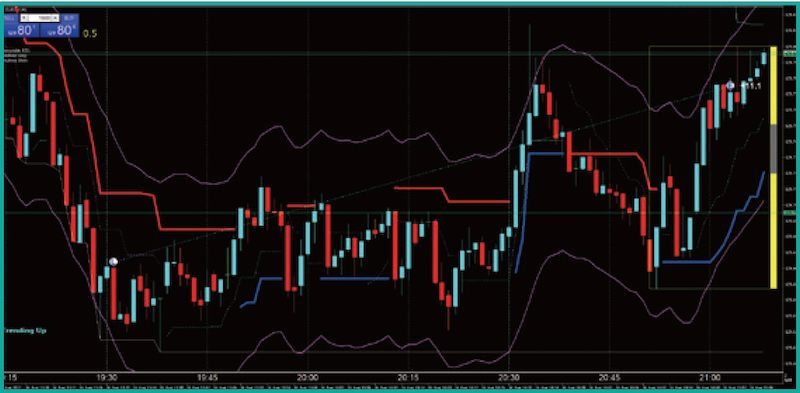
In MT4 you can display multiple indicators on a single chart and arrange multiple charts neatly. It’s attractive because you can freely build your preferred FX environment.
Benefit 3. Lightweight performance

Designed to run on computers as they were in 2005, today’s more powerful PCs will run it very smoothly compared to that era.
Benefit 4. High design freedom
Backgrounds, candlestick bodies, lines, and curves can all be freely recolored.
Benefit 5. Immediate automated trading
If you have an Expert Advisor (EA), you can start automated trading immediately.
Benefit 6. Custom indicators
One of MT4’s major attractions is the ability to freely add your own independently developed indicators.
Benefit 7. Widely used by professionals
Many professional traders use MT4 for chart analysis and trading.
Benefit 8. Analysis possible on weekends
MT4 can fetch past rates even on weekends, so chart analysis is possible.
Benefit 9. Discretionary trading also possible
Although automated trading is prominent, MT4 also excels at discretionary trading.
Benefit 10. MT4 on smartphones
Chart analysis and discretionary trading with the default indicators can be done without issue.
Benefit 11. Global user base
With users around the world, you can also obtain custom indicators created by international users.
Benefit 12. Latest version “MT5”
MT5 succeeded MT4 in 2010, but for now MT4 remains more mainstream.
Focus Here! Free-Style Customizable “Chart Analysis”
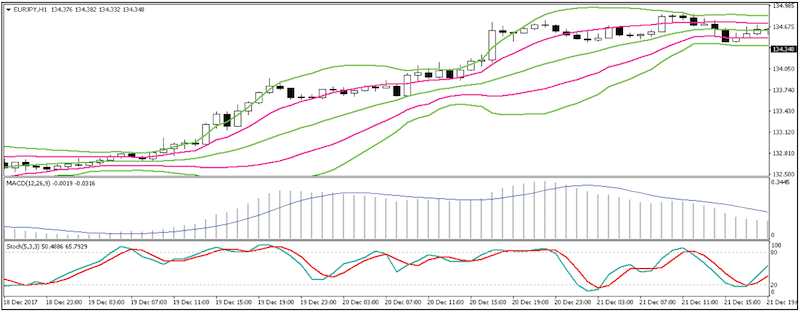
Checkpoints
- Standard 50+ technical analyses are pre-installed
- Can add custom indicators
- Can draw lines and shapes on charts
- Save your own analysis patterns for quick recall
- Save configurations of multiple chart combinations for easy recall
The range of analysis options is infinite!
In addition to abundant technical indicators, custom indicators, and drawing tools on charts, there are features like saving chart patterns and saving combinations of charts, making it a highly useful set of features.
Focus Here! “Automated trading” Used by Traders Worldwide
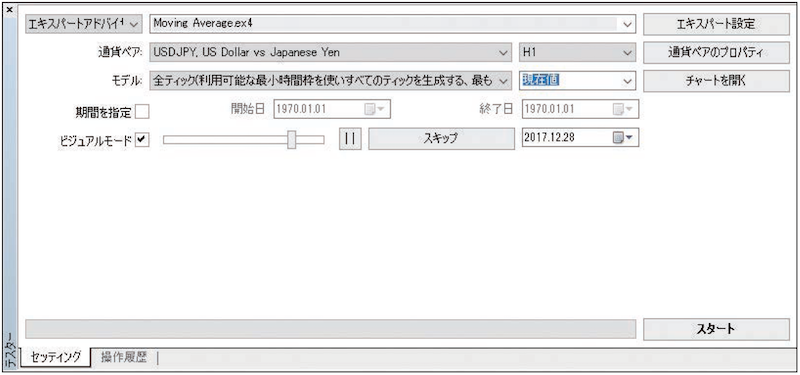
Checkpoints
- By obtaining EA, you can start automated trading immediately
- If you have programming knowledge, you can create an EA
- Backtesting shows how an EA would perform against historical candle data stored in MT4
With EAs you don’t need to stay glued to the market
In MT4, you use programs called EAs (Expert Advisors) to perform automated trading. Generally, the advantage of EAs is confirmed via backtesting.
Focus Here! Actually Convenient and Comfortable “Discretionary Trading”
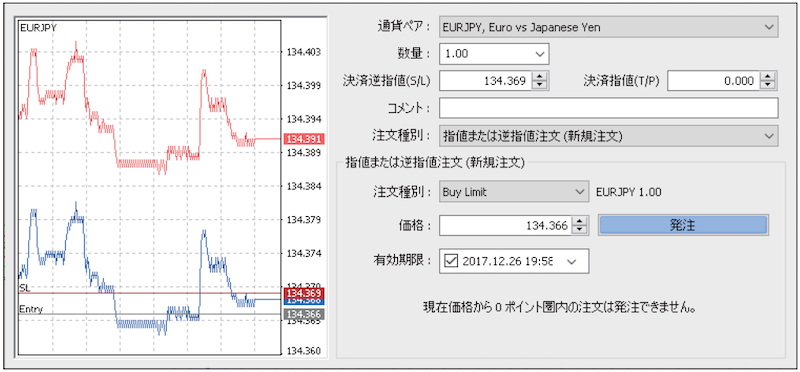
Checkpoints
- All basic order types such as market orders, limit orders, and stop orders are available
- Quick order function is also available
- Prices where orders are placed are shown as lines on the chart
- Orders can be completed on the chart, simplifying the trading environment
Manual trading is also feasible
In addition to automated trading, MT4’s discretionary trading is appealing. Because you can trade directly on the chart, there is no need to open a separate trading screen.
Resolve all your MetaTrader questions with a list of 43 queries!
<Introduction>
- 01. Table of contents
- 02. Not only chart analysis — learn what MT4 can do
- 03. Basic knowledge before and after MT4 setup and initial settings to start analysis
<Q&A>
- Q1. How to open a chart?
- Q2. The chart isn’t a candlestick chart
- Q3. How to switch timeframes?
- Q4. How to go back in time on a chart?
- Q5. The chart moves by itself
- Q6. Can I view multiple charts?
- Q7. It sometimes makes sounds. Can I stop it?
- Q8. How to change chart colors?
- Q9. What are the default colors?
- Q10. Which items can have their colors changed?
- Q11. I want to arrange multiple charts side by side
- Q12. How many charts can be arranged?
- Q13. How to enlarge one of the arranged charts?
- Q14. How to insert technical indicators into a chart?
- Q15. How to insert moving averages?
- Q16. How many moving averages can be displayed?
- Q17. How to delete a technical indicator?
- Q18. How to insert Bollinger Bands?
- Q19. How to insert RSI?
- Q20. How to enlarge the sub-window?
- Q21. How to delete a sub-window?
- Q22. How to insert Stochastic?
- Q23. How to display multiple oscillators?
- Q24. Too many sub-windows make it hard to read?
- Q25. How to save your own chart analysis environment?
- Q26. Can you also save chart combinations?
- Q27. How to draw lines on a chart?
- Q28. How to move drawn lines?
- Q29. How to delete a line?
- Q30. Can you draw short diagonal lines?
- Q31. Can you draw horizontal lines at clean price levels?
- Q32. How to draw Fibonacci retracements?
- Q33. How to draw shapes?
- Q34. How to draw arrows?
- Q35. Tell me about automated trading
- Q36. How can I create an EA?
- Q37. Is Meta Editor the English version?
- Q38. How can I run an EA?
- Q39. If you can’t program, can you still use an EA?
- Q40. How can I use a custom indicator?
- Q41. What is a custom indicator?
- Q42. Where are custom indicators located?
- Q43. How is MT5 different from MT4?
Visit FX攻略.com Official Site Too!!

“FX攻略.com” is a monthly FX specialist information magazine, founded in 2008, the only monthlyFX magazine in Japan (print version 750 yen, digital version 600 yen). It delivers the latest information while condensing the fundamentals of investing and the essence of FX that never changes over time. If you haven’t read it yet, pick it up at bookstores nationwide (also available online)!
■ FX攻略.com Official Site
http://fx-koryaku.com/
■ FX攻略.com Official Twitter
https://twitter.com/fx_koryaku_com
■ FX攻略.com Official Facebook
https://www.facebook.com/fxkoryaku/
FX攻略.com MT4 Feature
This MT4 feature on FX攻略.com is for those who are interested in MT4 but are hesitant because it seems difficult.
FX攻略.com editors are giving away the【MT4 Start Manual】to all applicants!!!!
For details on how to obtain the manual, please check “MT4 Comprehensive Feature|Introduction to How to Use Meta Trader 4 from Zero Knowledge.”