

Translation (preserving HTML format, no line breaks, standard decode applied): Astat 225❻ Appendix ② Four-value DL / Trading hours conversion method
Download of OHLC (Four-Point) Data (Manual replacement for 1DataDownload)
Overview
This is the method to download OHLC data for Nikkei 225 Mini futures for each time frame and the daily chart from the site. Please pre-register as a member on “225Labo” (free) beforehand.
Steps
- Log in to 225Labo.
- Click the “Download” option in the top menu.
- Scroll down to the middle to the “Free downloads of various data.”
- Click “Nikkei 225 Futures (mini)” to proceed to the download page.
- Click the download button (red) to download the required files.
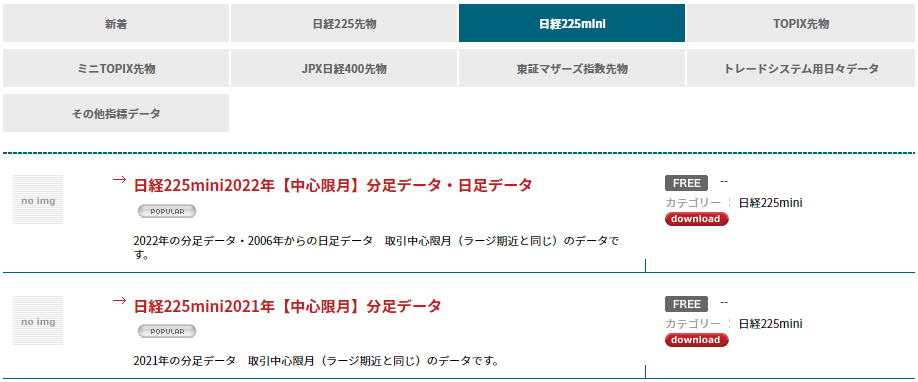
- The files are in zip format, so double-click to open, extract and unzip.
- The extracted files are in workbook format; each sheet is for a different time frame.
・If converting time manually: proceed with the workbook format as is.
・If converting time with a tool: save the sheet as CSV format.
When saving the downloaded workbook as CSV format, rename the trading-day data as “TD” and the business-day data as “BD.”
Convert Trading Days to Actual Dates (2ConvertTime Manual Substitution)
Overview
Convert Nikkei 225 trading days (date starting from 16:30 of the previous business day) to actual dates. This is explained using the download files from 225Labo, but the same method applies to files saved as CSV from the sheets.
Steps
- Open the OHLC data file in Excel, then create a new workbook.
- Drag and drop the tabs of the time-frame sheets to the new workbook to extract them.
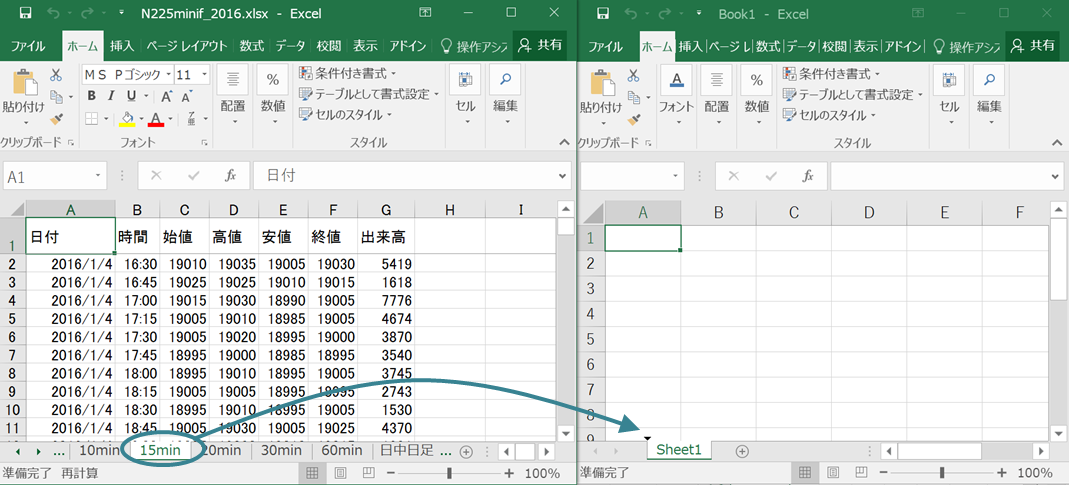
- Rename the extracted sheet to “SHT.” If the start is not the daytime opening, delete any extra lines above so that the first is the opening (column B at 8:45).
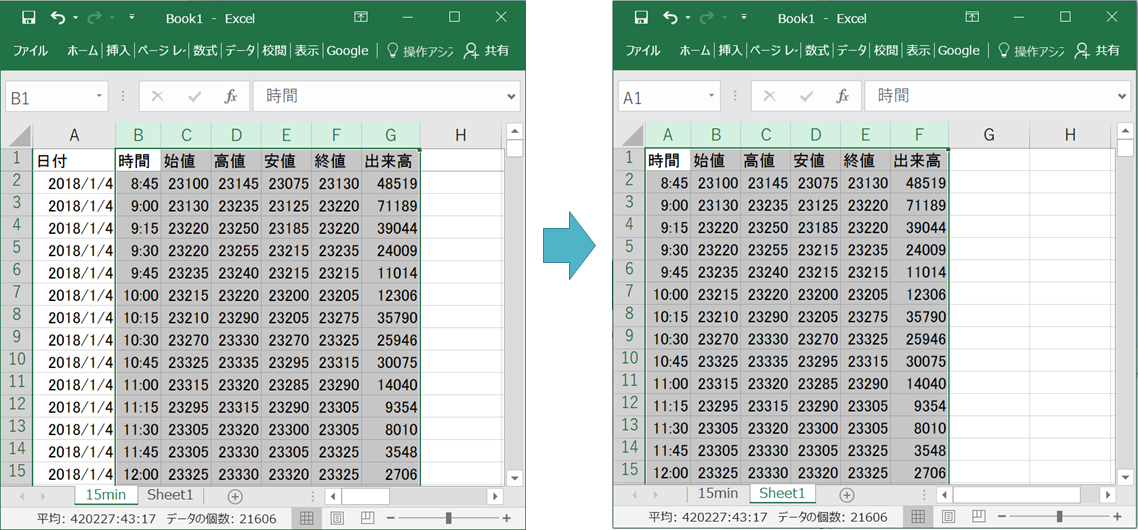
- Copy all columns except column A (Date) into “Sheet1.”
- In “Sheet1 cell A2,” copy and paste the following formula.
● For time-frame data
=IF(AND(HOUR('SHT'!B2)>7,HOUR('SHT'!B2)<16),TEXT('SHT'!A2,"yyyy.mm.dd"),IF(AND(HOUR('SHT'!B2)=0,MINUTE('SHT'!B2)=0),TEXT(DATEVALUE(MID(A1,1,4)&"/"&MID(A1,6,2)&"/"&MID(A1,9,2))+1,"yyyy.mm.dd"),LEFT(A1,10)))&TEXT('SHT'!B2," hh:mm"br>
● For trading-day data
=TEXT('SHT'!A1,"yyyy.mm.dd")&" 16:30"
● For business-day data
=TEXT('SHT'!A2,"yyyy.mm.dd")&" 08:45" - Auto-fill the cell with the formula in A2 down to A3 and beyond.
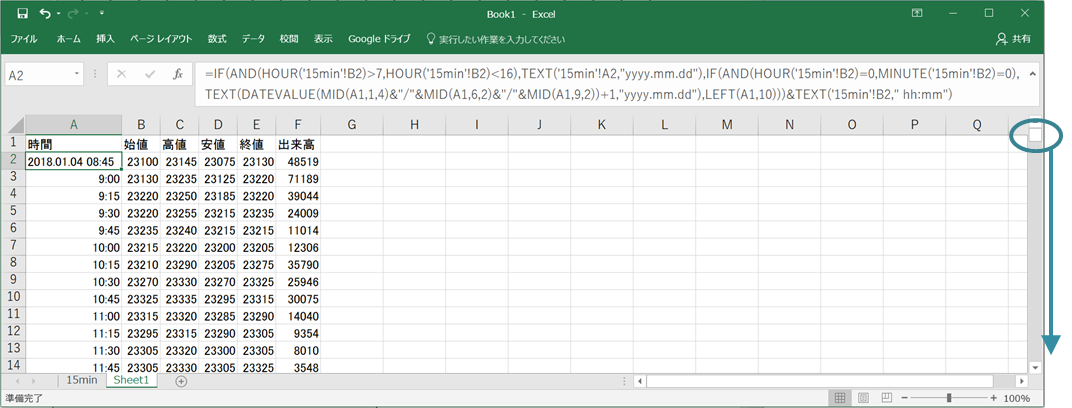
・With A2 selected, press Ctrl+C to copy.
・Then use the scrollbar to move to the bottommost row.
・In the last cell of column A, hold Shift and left-click.
・Now that all of column A from A2 onward is highlighted, press Ctrl+V to paste. - Name Sheet1 and save as CSV format.
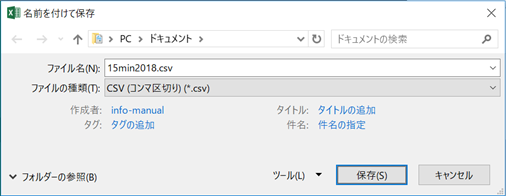
If used in ASTAT, append the suffix “_t” to the file name.
Results
The times in the created files are converted as shown.
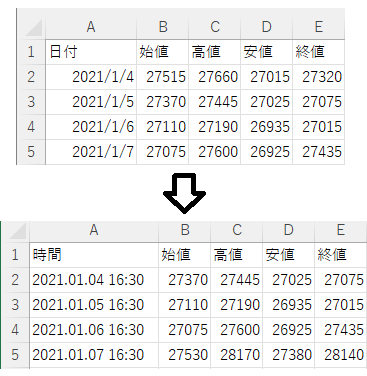
If there are multiple files, first merge them and then perform the conversion. Otherwise, if there is data before the opening, each file may have gaps.
【Navigation Menu】
General Overview
Three Stages of Strategy Verification
How to Use Tools
Examples of Basic Logic
Appendix 1: MT4 Utilization Manual
Appendix 2: OHLC Download and Trading Time Conversion Method