

Translation (keep HTML format, single line, decoded before translation): Candle Monkeys MQL programming one-point explanation② "About real-time conditions and confirm-bar conditions"
Hello, this is Candle Mats.
In this series, we will introduce frequently asked questions about MQL programs!
This time「About Real-time Conditions and Confirmed Bar Conditions」discussing it.
We often receive many questions in the school as well, so we will explain them in this article!
First, there is no exact official name for the terms “real-time condition” and “confirmed bar condition”; they are names I personally use.
「Real-time condition」 ⇒ a condition that passes on every tick of the latest candlestick
「Confirmed bar condition」 ⇒ a condition that passes once for each already-confirmed candlestick
In broad terms, these are the kinds of conditions.
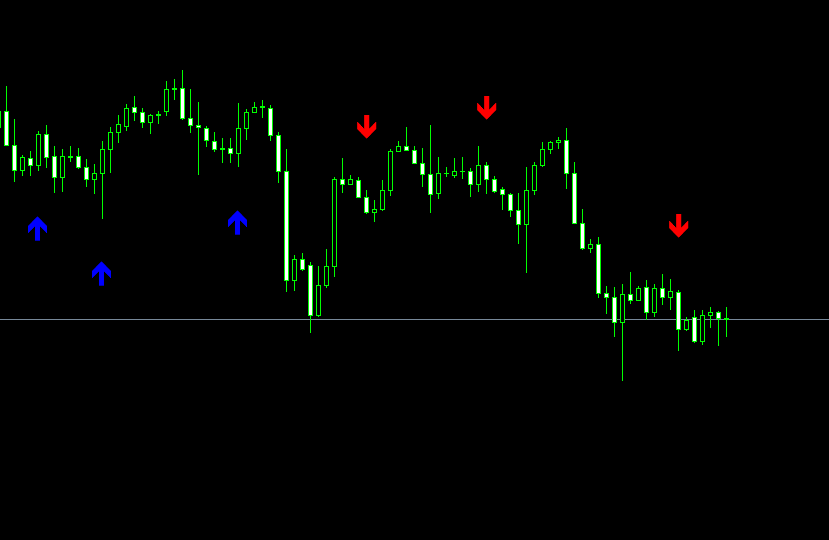
If this is still a little hard to understand, to explain a little more,when applying the signal tool to a chart, some signal tools display signals on past candlesticks as wellI believe.
That meansthe “Confirmed bar condition”is being passed (the image shows the signal tool in its initial state after applying it).
Also, depending on the movement of the latest bar,there are signal tools where signals appear or disappear before the bar is confirmedthat isthe “Real-time condition”is being passed.
When loading a signal tool, it is convenient to separate the conditions that display signals on past candlesticks from the code that displays signals on past bars; there are many situations where you need to do this, so I alwaysseparate the Real-time conditionandthe Confirmed bar condition.
For example, when calculating win rate or when changing the wording of alerts, you can configure many different settings.
So how to separate and write the Confirmed bar condition and the Real-time condition? It goes like this:
/////////////////////////////////////////////////////////////////
int OnCalculate()
{
int limit = Bars - IndicatorCounted()-1;
for(int i=limit; i>=0; i--){ //Real-time condition
//Code here for real-time signal display
if(i>1 || (i==1 && NowBarsNowBars = Bars;//Code here for confirmed-bar signal display}}//////////////////////////////////////////////////////////////////In short, it looks like this.It may be a bit hard to read, butthere is a for loop inside OnCalculate (the Real-time condition), and inside that is the Confirmed bar condition.OnCalculateexecutes on every tick.for loop (Real-time condition)passes through all the candlesticks only at the very start, and thereafter only runs on every tick.Confirmed bar conditionalso passes through all candlesticks at the start, but after that, it runs once for each bar as it is confirmed.At first, as long as you get the basic idea, you can remember this as a template.If you understand why the blocks are written this way, you’ll gradually get it as you create tools.For more detailed content, it would become a lot, so I will cover it in another article!Free CampaignCurrentlyFree programming courseis also available, and if you register for LINE via the link below, daily homework-style messages will be sent.https://lin.ee/WopXG2GWith a simple signal tool, you can create at a free level, so please take advantage of it!(^^)/Additionally, as a campaign, I’m now offeringan advanced paid EA for freeas a gift!From the link below, register for LINE and follow the steps to submit the application form to receive the gift!https://lin.ee/AMveJlu⇓ Here are the backtest results of the gift EA ⇓Recommended Paid Tools・Binary options high-win-rate signal tool “Skyhook” capable of over 500% annual return“Skyhook” backtest resultsUSDJPY 2020 one year 192 entriesWin rate: 61%EURJPY 2020 one year 188 entriesWin rate: 61%GBPJPY 2020 one year 215 entriesWin rate: 61%AUDJPY 2020 one year 181 entriesWin rate: 60%NZDJPY 2020 one year 119 entriesWin rate: 63%EURGBP 2020 one year 112 entriesWin rate: 71%EURUSD 2020 one year 132 entriesWin rate: 61%GBPUSD 2020 one year 141 entriesWin rate: 62%USDCHF 2020 one year 112 entriesWin rate: 66%■ Profit in one year with 10,000 yen BET:2,279,500 yen!!※If you set a 50,000 yen BET, the result would exceed10,000,000 yen.Moreover, right now this signal tool ison sale for19,800 yen!Product pagehereThank you for reading until the end!
NowBars = Bars;
//Code here for confirmed-bar signal display
}
}
//////////////////////////////////////////////////////////////////
In short, it looks like this.
It may be a bit hard to read, butthere is a for loop inside OnCalculate (the Real-time condition), and inside that is the Confirmed bar condition.
OnCalculateexecutes on every tick.
for loop (Real-time condition)passes through all the candlesticks only at the very start, and thereafter only runs on every tick.
Confirmed bar conditionalso passes through all candlesticks at the start, but after that, it runs once for each bar as it is confirmed.
At first, as long as you get the basic idea, you can remember this as a template.
If you understand why the blocks are written this way, you’ll gradually get it as you create tools.
For more detailed content, it would become a lot, so I will cover it in another article!
CurrentlyFree programming courseis also available, and if you register for LINE via the link below, daily homework-style messages will be sent.
With a simple signal tool, you can create at a free level, so please take advantage of it!(^^)/
Additionally, as a campaign, I’m now offering
an advanced paid EA for freeas a gift!
From the link below, register for LINE and follow the steps to submit the application form to receive the gift!
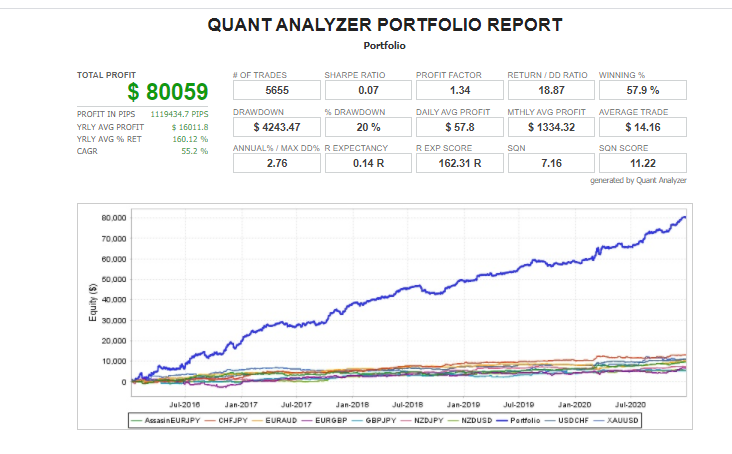
⇓ Here are the backtest results of the gift EA ⇓
Recommended Paid Tools
・Binary options high-win-rate signal tool “Skyhook” capable of over 500% annual return