

TradeStation trading environment: Recommended environment
This is a series about TradeStation,
and this is the fourth installment.
Why TradeStation?
How to set up TradeStation
Trading environment: transaction fees
That is what we have introduced so far.
This time, we will introduce the environment for installing TradeStation.
We will explain the supported environments.
TradeStation can be used on
PC (Windows)
Smartphone (Android, iPhone)
and others.
Now, for each, let's check the recommended environment.
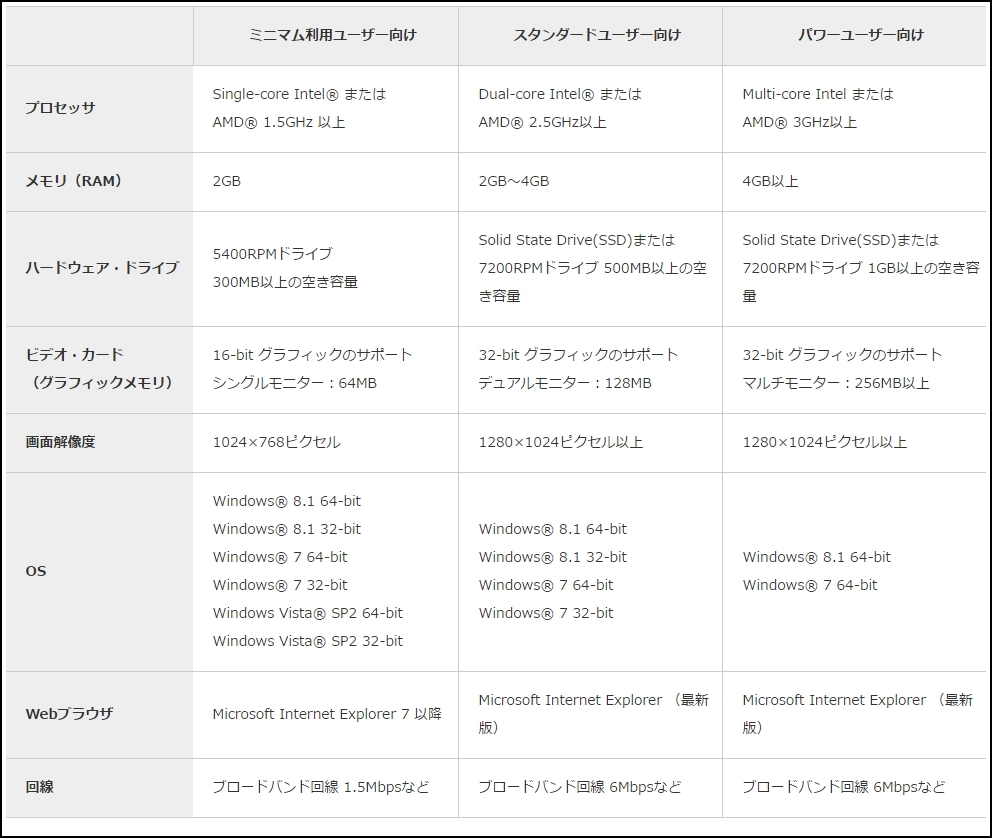
★ PC
One point of concern is that Windows 10 is not included in the OS.
It’s strange that there are no notes either, but ….
If it’s simply not listed, that would be fine, but ….
★ Mobile
The mobile environment supports iOS and Android.
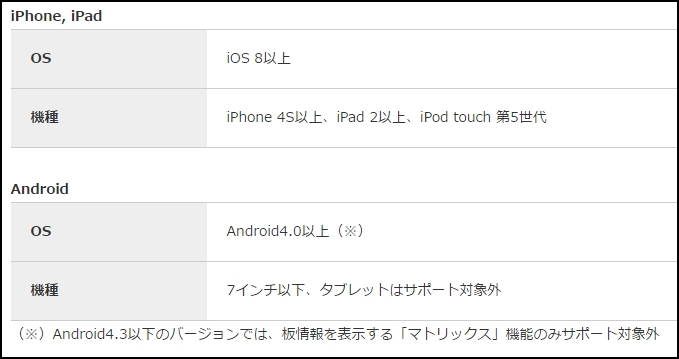
However, the smartphone app for iOS 10, Android 7.0 has
completed compatibility testing as of October 21, 2016,
according to the site.
Frankly, they should at least update the compatibility table…, but I suppose.
Android \"7 inches or smaller, tablets not supported\"
is a bit disappointing, isn’t it?
Well, I think you can rely on user reports to adapt.
This time, we introduced TradeStation’s recommended environments..
Next time, we will finally cover downloading and
installing TradeStation.
On the blog 'FX Auto-Trading for Stable Income'
we will also introduce the progress of stock trading using TradeStation.
× ![]()