

Investigating the differences between ADX14 and ADX100
Hello!
I am Satori, researching Binary & FX.
Today, using USDJPY 15-minute chart, I examined the difference between ADX calculation period 14 and ADX calculation period 100.
ADX is a technical indicator that shows trend strength and the strength of buying and selling forces on a single sub-chart; MT4's default calculation period is 14.
The figure below is a balance graph from a backtest of an EA with ADX100 settings run for six months.
Case with 25 pips take-profit and 35 pips stop-loss at 0.1 lot.
It has a fairly clean, upward-right trend, hasn’t it?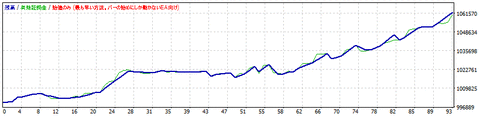
https://livedoor.blogimg.jp/fxmt4indicator/imgs/d/7/d77486c7.gif
Next, this is the backtest balance graph when running an EA with ADX14 settings for six months.
Same logic, same 25 pips take-profit and 35 pips stop-loss at 0.1 lot.
Somehow the number of trades is extremely small, and it isn’t profitable.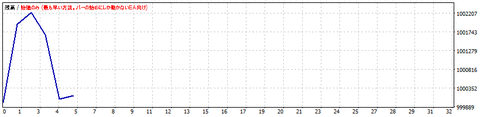
https://livedoor.blogimg.jp/fxmt4indicator/imgs/4/2/42ca6fb3.gif
Up to now, I used MT4’s default setting of period 14 without question, so honestly I was quite shocked.
Why such results occurred, I decided to actually look at ADX100 and ADX14.
The figure below is the ADX100 chart.
The main chart displays EMA100.
It seems you can grasp the trend.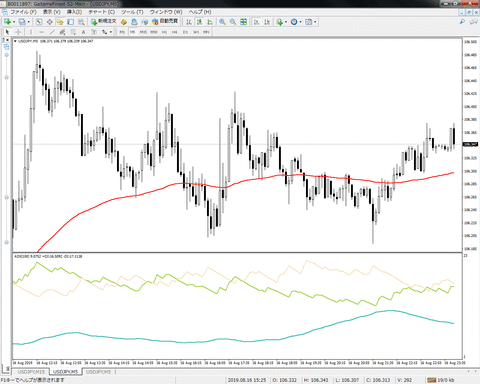
https://livedoor.blogimg.jp/fxmt4indicator/imgs/3/a/3aea9fd8.gif
Now the ADX14 chart.
The main chart shows EMA14.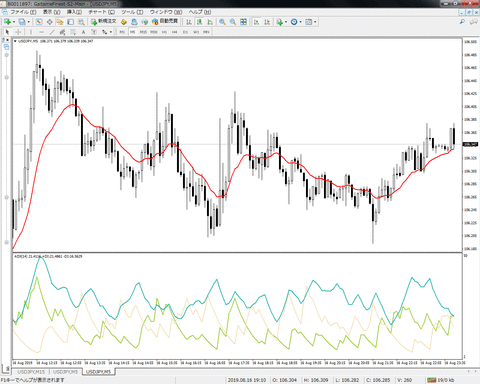
https://livedoor.blogimg.jp/fxmt4indicator/imgs/6/5/6574a0de.gif
Remarkably, the sub-chart ADX14 graph does not resemble a form that clearly captures the trend.
While EMA14 can indicate direction, with ADX14 it tends to pick up noise too sensitively and cannot be practically used.
Thus, depending on the currency, time frame, and indicators, there are cases where you cannot actually use them unless you adjust the calculation period. Currently, many people use the MT4 default periods of 14 or 20 without question.
To answer these questions, we have released a set of an entry & exit signal indicator for ADX and a tester EA, with data updates provided as appropriate to help you adjust the signals.
The figure below shows an example of the initially set signals.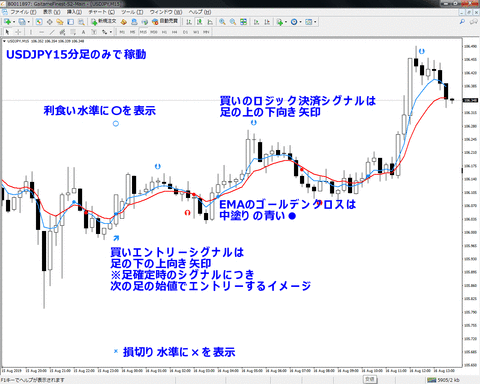
https://livedoor.blogimg.jp/fxmt4indicator/imgs/6/6/66d03055.gif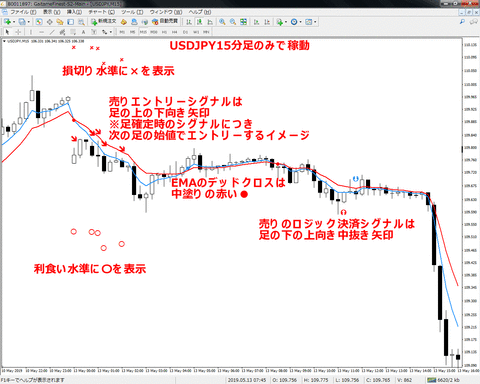
https://livedoor.blogimg.jp/fxmt4indicator/imgs/5/e/5e4e682b.gif
The EA includes long-term data sets such as 5 years and 10 years.
A video explains how to update the data, and once you get used to it, it’s easy.
For the data period, it is better not to include anomalous swings such as the Apple shock in January 2019, so you can better capture normal currency volatility, times of day, and weekday characteristics.
Also, signals are not all to be triggered; they are selectively used depending on the situation.
In particular, pay attention to the direction on daily or 4-hour charts when entering; if the market conditions are against your position, cut losses earlier, or if aligned with market conditions, extend profits.
risk-management and alert signals via email, along with an indicator
and a tester EA to update data as needed.