
My trade room introduction [Yuzukko]
It is said that trading performance can vary greatly depending on the trading environment. Many people are curious about what kind of trading environment other traders use in their day-to-day trading. Here, FX trader and four-panel manga artist Yuzukko will introduce her trading room. This could be a good opportunity to review your own trading environment, too.
*This article is a republished and edited version of an article from FX攻略.com, September 2019 issue. Please note that the market information stated in the main text may differ from current market conditions.
Yuzukko Profile

After graduating from a private university with a law degree, I worked in school meals for one year and in office work for seven years. Feeling uneasy about working full-time until retirement, I began studying FX during maternity leave. At 29, I left salaried employment and have been active as a freelancer since April 2017. My current titles are FX trader, manga illustrator, and snack shop owner.
Blog:https://yuzuusagi.com/
Twitter:https://twitter.com/yuzukkofx
Analyzing on PC, Trading on smartphone
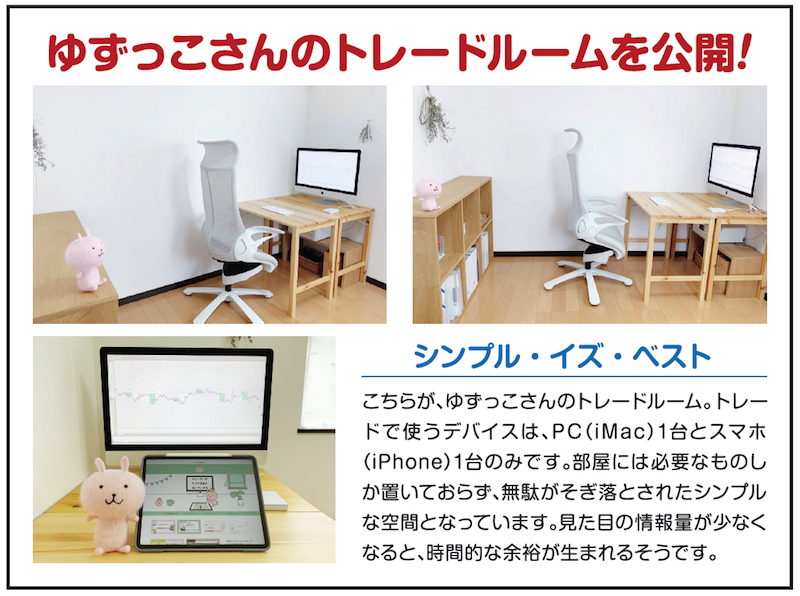
Hello everyone, I’m Yuzukko, the manga artist who trades. This time, I’ll introduce my trading room.
I trade about once a month to three times. The information and communication devices I use for trading are a PC (iMac) and a smartphone (iPhone). The former is used to view MT4, and the latter is used to place trades. Essentially, I check the weekly direction and Tokyo session high/low on MT4 on the iMac, and place orders from the MT4 app on the iPhone.
By the way, MT4 on the iMac shows garbled text in the initial setup. I explain how to fix the garbled text on my blog “Yuzuu-sama” (search the web for “Yuzuu-sama garbled text” and you’ll find it near the top).
Preparing a printer for trading notes
Also, as something essential for trading, I prepare a printer to print charts and a trading notebook. When I used Windows, I would cut out MT4 charts with the “Snipping Tool,” paste them into PowerPoint, print them, and record trading details in the margins to create a trading notebook. On the iMac, I use (shift + command + 4) to capture MT4 charts and paste them into “Keynote.”
Without a trading notebook, it’s hard to reflect on past trades. I improve my trading accuracy by cycling through experience, testing, and refinement, and when I’m unsure or pause, the trading notebook helps me.