MT4 Convenience Indicators
MT4's “a bit of a hassle”
reducing indicators
We are building indicators to make time frame switching, scrolling, and redrawing lines and other daily fine operations easier.
When using MT4, there are surprisingly many operations that have nothing to do with the market.
Looking for the small buttons on the toolbar to change the timeframe, or scrolling to find a scene found on 1-hour chart again on a 5-minute chart. Re-drawing reference lines every time you switch instruments, or opening the quote display to check the spread before placing an order.
All of these take only a few seconds, but doing them many times a day can quietly wear you out. This is the indicator set introduced here, created to reduce such “slightly bothersome” tasks one by one.
I’ll introduce them along the trading flow
I lined up the steps from opening the chart to settlement.
1. Prepare the chart
Every time you re-open indicators, you have to find them in the navigator and re-enter the period and colors
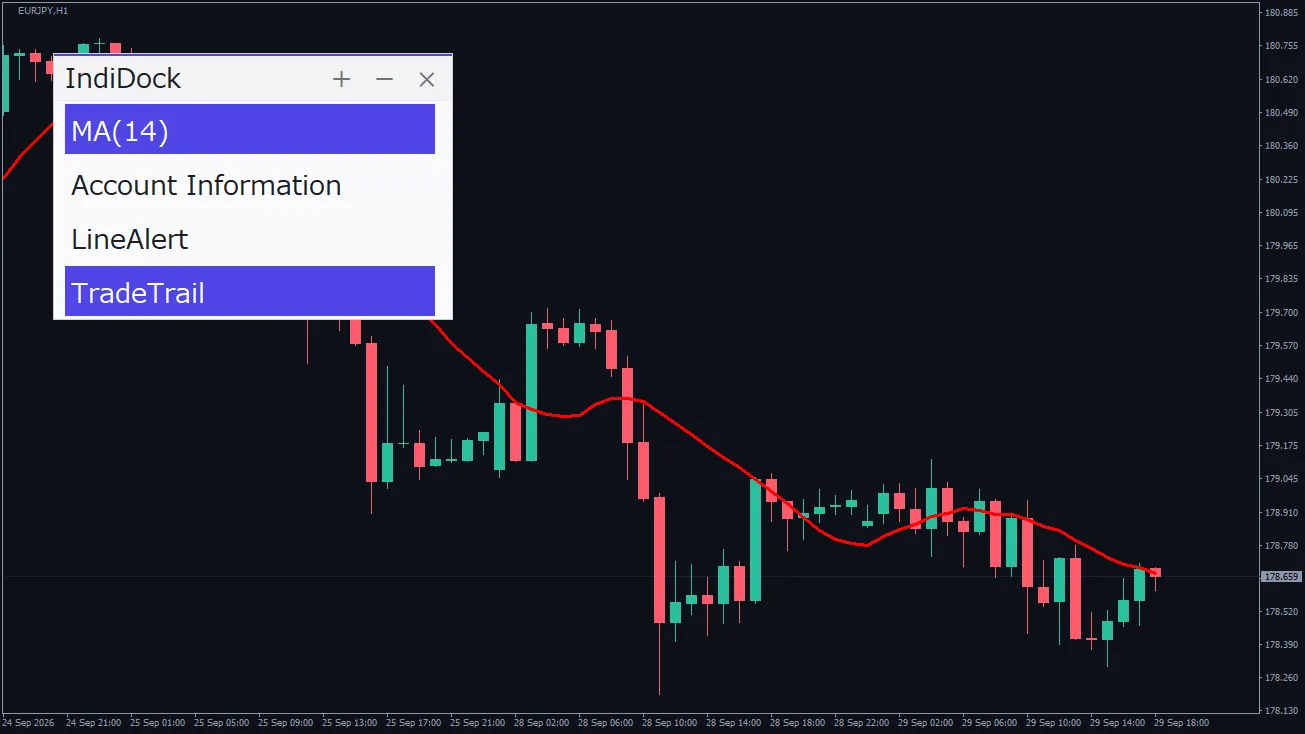
IndiDockallows you to register each setting andtoggle with one clickand use it
2. Scan the market
Timeframes via toolbar, and currency pairs by dragging from the quote display
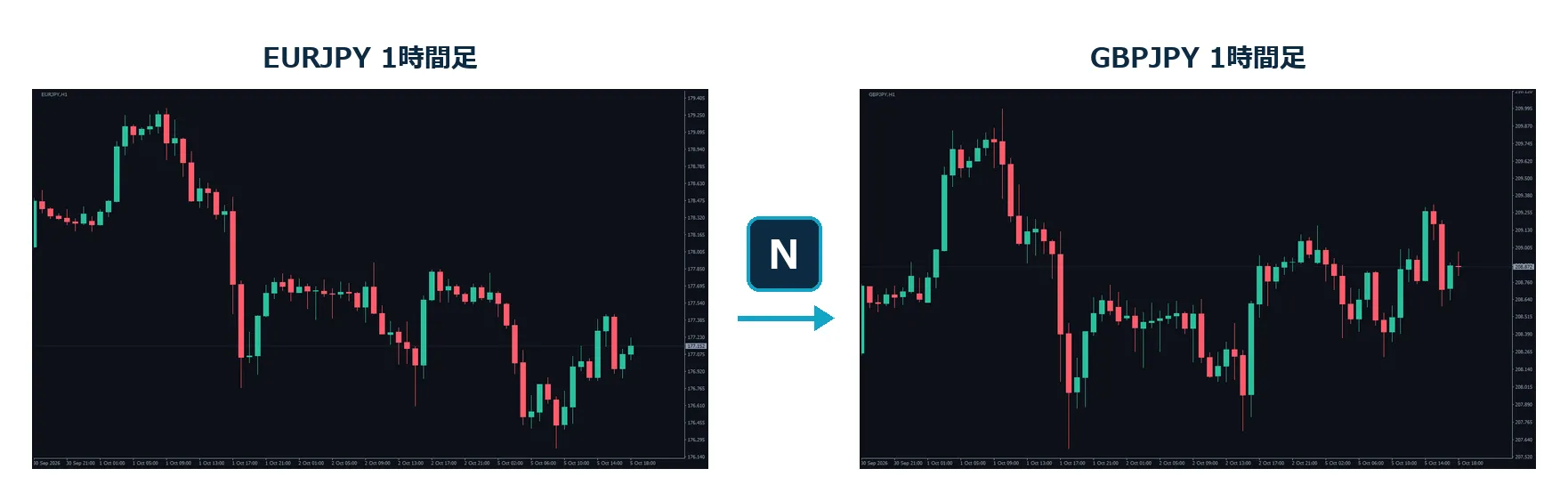
ChartSwitchboth can be done withone key presseach
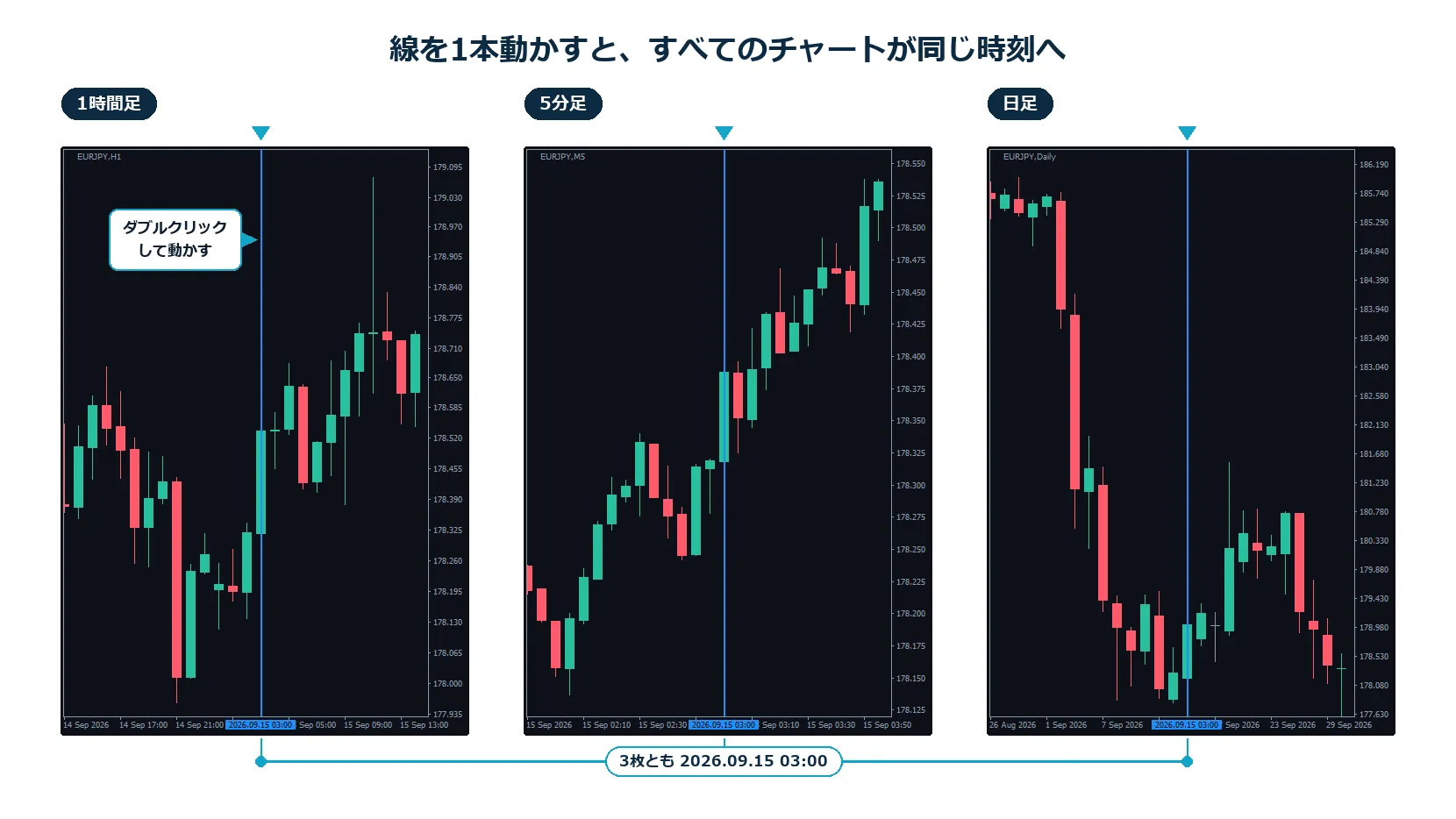
ChartSyncVLinethen,move one lineto synchronize all arranged charts to the same time
3. Confirm pivotal levels
When changing instruments, redraw the key-number line by hand
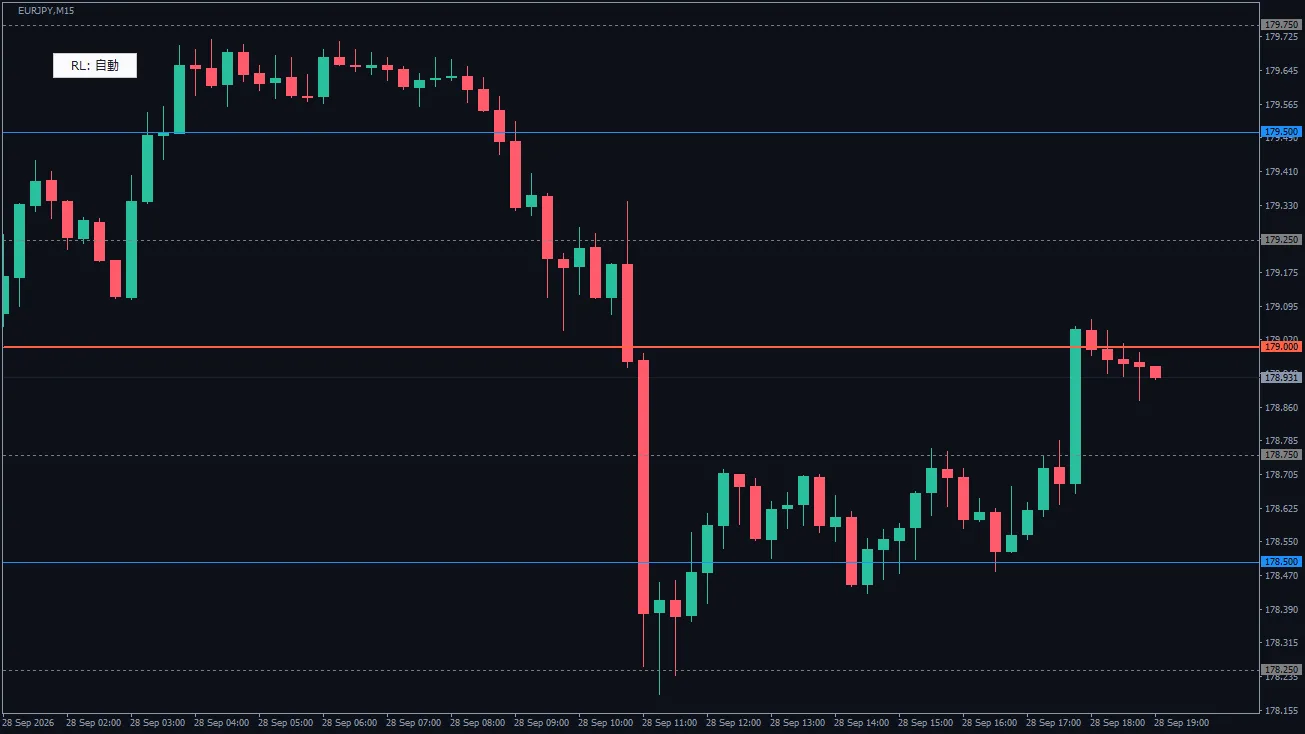
RoundLevelswill automatically draw at intervals suitable for the instrumentin three scales: large, medium, small
4. Just before placing an order
There have been times when I placed an order without noticing a widened spread
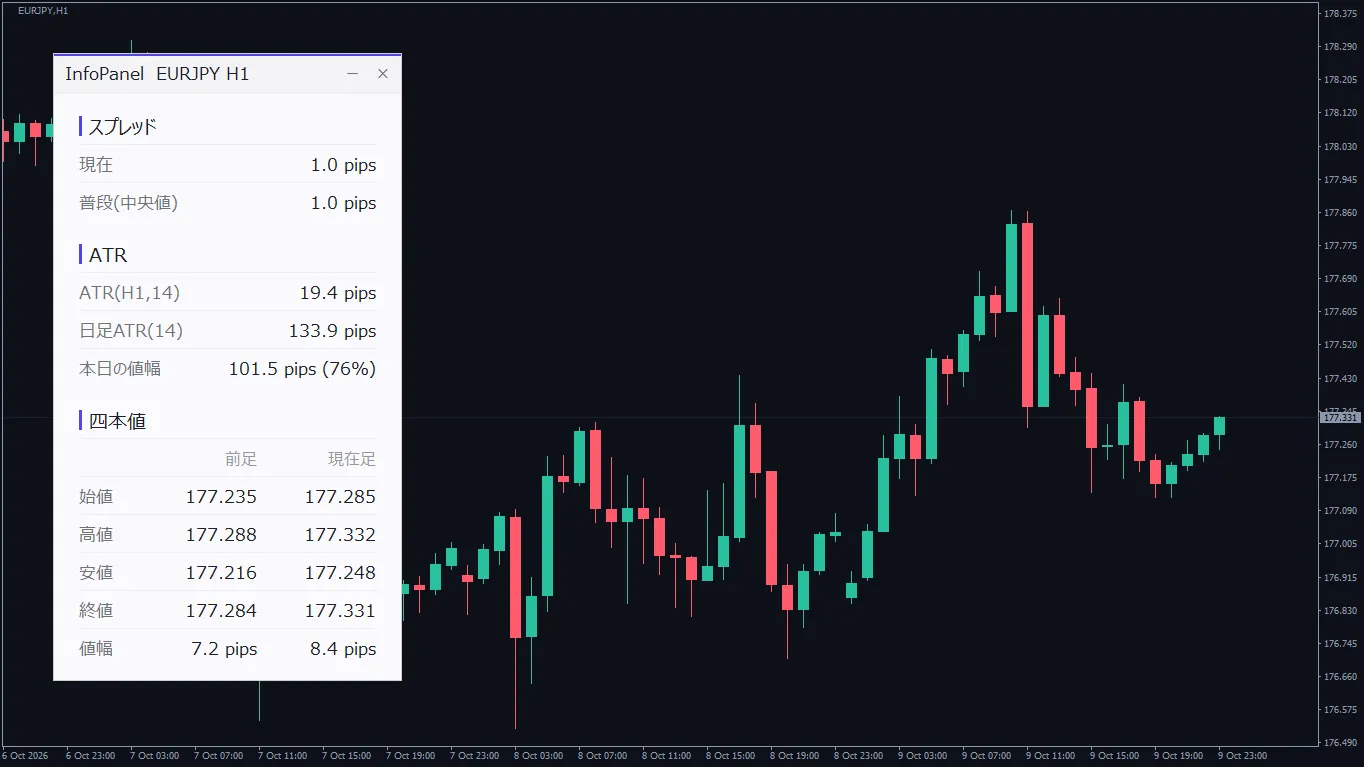
InfoPanelwill show a color change when spreads widen, making it easy to notice
5. While holding a position
To check maintenance margin, I would open the “Trading” tab each time
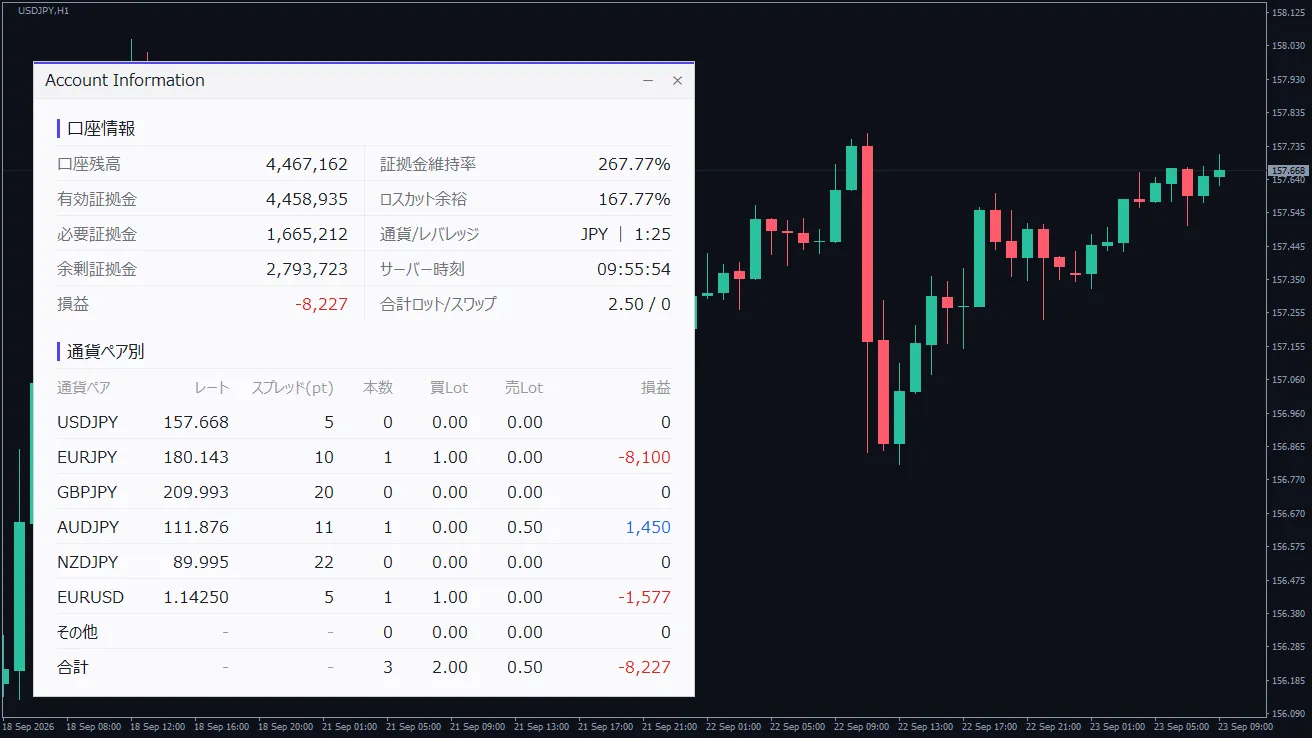
Account_Information_Dialogshows the account status andP/L by currency pairon the chart
What I am careful about when creating
01
No buy/sell signals
None of them emits buy/sell signals. They are designed to be used alongside your current method and indicators, simply added to the side.
02
Ready to use as soon as you install
Works out of the box when added to the chart with default settings. I’ve reduced configuration items as much as possible; ChartSyncVLine has 3, IndiDock has 2.
03
Do one thing with one line
I haven’t stuffed too many features; I’ve kept it focused on one purpose per indicator. Please select and include only what you need.
Prepare the chart
IndiDock
One-click on/off the indicator
Register commonly used indicators with their period and color settings. Press to show, press again to hide.
Scan the market
ChartSwitch
Toggle timeframe and currency with one key
Switch timeframes with U/D and currencies with N/P (default). No need to switch your mouse. Only the opened chart changes.
Scan the market
ChartSyncVLine
Move a line to synchronize all charts
Even charts with different timeframes can be aligned to the same time with one line. You can verify on the lower timeframe right away a scene spotted on the higher timeframe.
Confirm pivotal levels
RoundLevels
Automatically draw numbered lines with emphasis
For currencies pairs, the dollar index, gold, etc., it automatically determines intervals per instrument. On higher timeframes, lines reduce, so charts don’t get cluttered with lines.
Just before placing an order
InfoPanel
One sheet for pre-order checks
The spread is judged as “several times the usual,” so you don’t need to set per currency pair. The ATR and OHLC data are also viewable in the same panel.
While holding a position
Account_Information_Dialog
Account and P/L at a glance
Shows margin maintenance, buffer to stop-out, and per-currency pair lots and P/L together.
If you’re unsure where to start
Place multiple timeframes side by side and view from higher to lower
ChartSyncVLine + ChartSwitch
Swap indicators according to market conditions
IndiDock
Hold positions across multiple currency pairs
Account_Information_Dialog + InfoPanel
Enter with awareness of key numbers and pivots
RoundLevels
| Product | One-liner | |
|---|
| IndiDock | One-click on/off the indicator | Learn more |
| ChartSwitch | Toggle timeframe and currency with one key | Learn more |
| ChartSyncVLine | Move a line to synchronize all charts | Learn more |
| RoundLevels | Automatically draw pivotal lines with emphasis | Learn more |
| InfoPanel | One sheet for pre-order checks | Learn more |
| Account_Information_Dialog | Account and P/L at a glance | Learn more |
All are for MetaTrader 4. Some are free to use, so please check the product pages for details.
What I introduced this time is what is currently available. I am also preparing other items for chart operation and trade review.
If you find a place that feels troublesome while using it, I plan to add one by one.
Thank you for reading to the end.
If something catches your eye, please try it on a chart.
The tools introduced in this article are intended to assist market analysis and do not constitute a recommendation for any particular trading. The author bears no responsibility for results from trading using these tools. Please make investment decisions at your own risk. Depending on the version of MetaTrader 4, the broker you use, and the instrument, display may differ from expectations.