
How to perform a backtest in MT5 when the future is unclear — pitfalls of manual scrolling and practice of playing back one by one
Introduction
Have you ever tried practicing with past charts and experienced something like this?
- When you scroll a chart back to the left, the price action on the right becomes visible
- You knew the answer before deciding to “buy here”
- It was tedious to transcribe the records into a table, so you stopped after 3 days
Backtesting (calling your own judgments using past charts) is the foundation of discretionary trading practice. However, depending on how you do it, it may not be effective practice.
What you’ll learn in this article
- What gets in the way of practice when you manually scroll back in backtesting
- Ways to minimize “looking ahead” when doing it by hand
- A step-by-step procedure to play back each past bar one by one and place orders and record results in MT5
Pitfalls of manual scrolling backtesting
The simplest form of backtesting in MT5 is to scroll the chart to the left and progress to the right bit by bit. No tools needed. You can start today.
However, this method has three pitfalls.
1. The next bar appears at the edge of the screen
Even when you rewind the chart, the next bar isn’t gone. It’s on the right side of the screen. If you scroll a little too far, the subsequent price action becomes visible.
Once you’ve seen a move, you can’t forget it. When you feel like “this should go up,” you can’t tell whether that’s your judgment or the answer you just saw.
2. You can’t observe the bar as it forms
What you can see with scrolling is only completed bars. In real markets, a bar forms as prices move up and down within it.
Even in situations where you’d enter because you know it will close higher, you would be unsure while the bar is forming. You can’t practice that moment of indecision.
3. Recording becomes a separate task
You must manually write down the entry price, the stop loss, and the result in a table or notebook. If this transcription becomes burdensome, recording becomes harder than the practice itself, making it hard to continue.
Ways to keep from “looking ahead” when doing it by hand
If you want to keep going without tools, decide the following three things to reduce hindsight (judgment after the fact):
- Write before you proceed.Before moving to the next bar, write in one line the decision to Buy, Sell, or Pass and the reason. Then proceed.
- Also write the stop loss and take profit first.If you decide to enter, write the stop loss and take profit prices before proceeding. If you move them later, record that as well.
- If you see it, don’t count that moment.If you can already see the future, skip that moment from your results.
Note: this is a method governed by willpower. When you’re tired, you tend to proceed before you write. If you create the “next bar is not visible on the screen” state with a tool, you won’t have to rely on willpower.
Practice by playing back each past bar one by one
From here, the procedure is for using the MT5 indicator “FX Backtest Trainer.” (Indicator: a component placed on the chart for MT5. It is not an automated trading program and does not place any orders.)
The next bars are not hidden; they do not exist
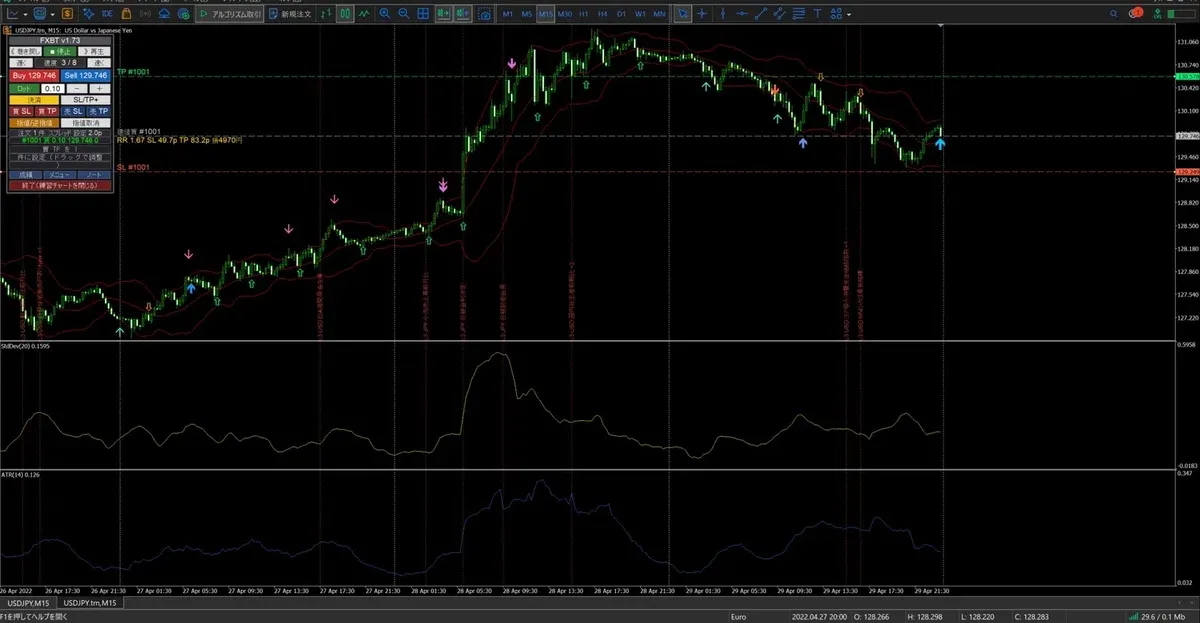
This tool creates a practice instrument (e.g.,USDJPY.trn) and you load past bars into it one by one. Bars ahead that you haven’t loaded yet do not exist as data. Even if you scroll to the right, you cannot see what happens next.
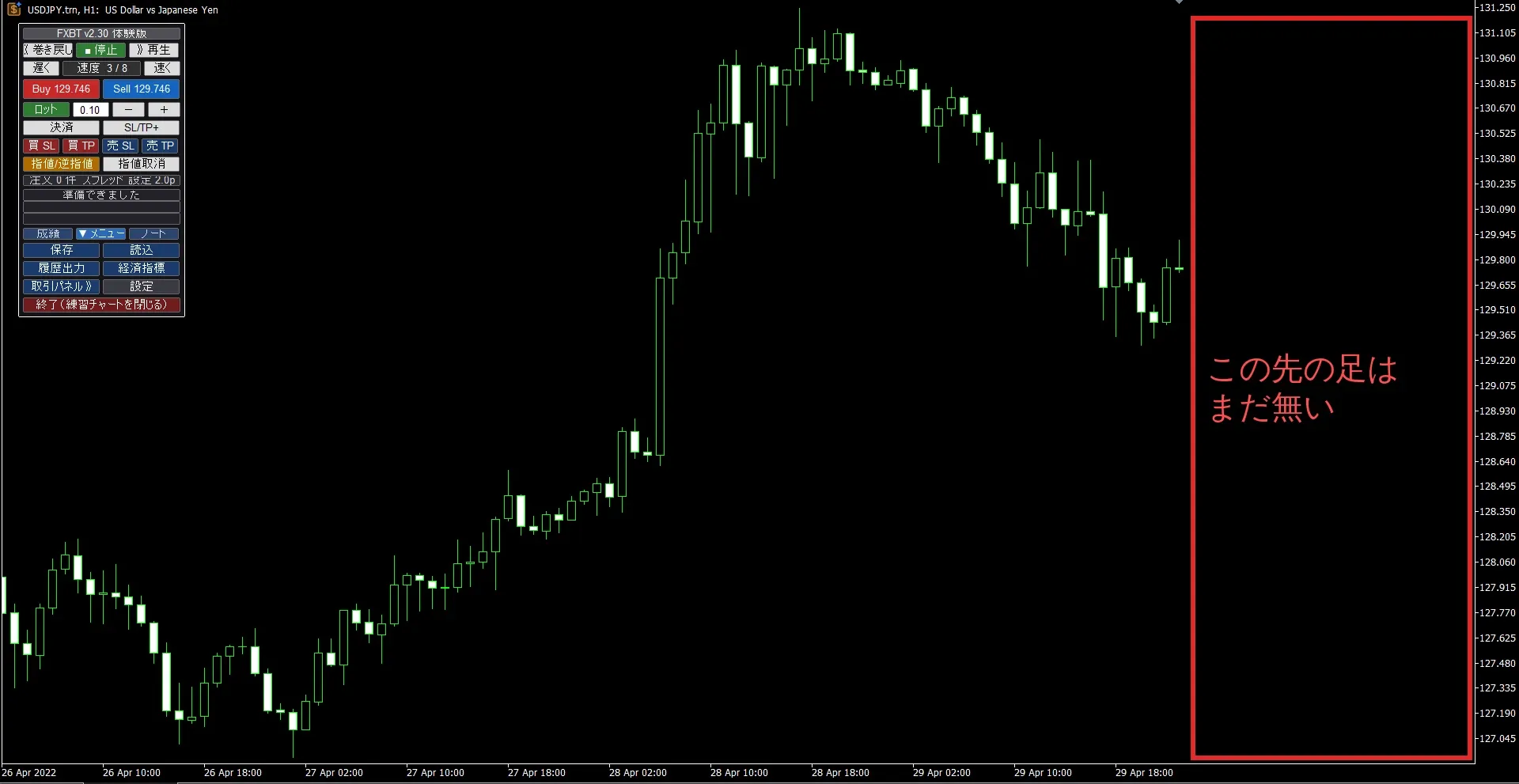
On the far right edge, nothing has been loaded yet. Scrolling will not reveal the next bar.
Step 1: Install the free version
Here we’ll use the free version distributed by Gogojan. The free version allows practicing with all features, all currency pairs, and all timeframes up to 30 completed trades (cumulative). There is no expiration.
- From the product page of the free version at the end of the article, download the zip
- Unzip it and place two files (.ex5) (the main file and beacon) into the MT5 folder
MQL5\\Indicators(Open MT5 → File → Data Folder → MQL5 → Indicators) - In MT5, go to Tools → Options → Expert Advisors,check “Allow DLL imports”and enable it
- In the Navigator, right-click on Indicators and select Refresh
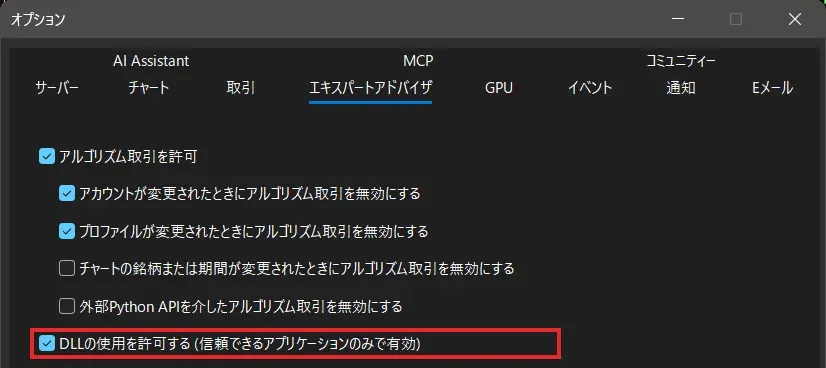
“Allow automated trading” is not required for this tool (having it checked does not cause issues).
Step 2: Load historical data
To play back, we use historical data (history) saved in MT5. Because we simulate fine price movements, you need1-minute data.
- Open the chart of the currency pair you want to practice1-minute chart (M1).
- Press the keyboard Home key and wait until the loading indicator at the bottom left stops
Even if you press Home on a higher timeframe chart, the 1-minute data does not increase. This is because MT5 stores data separately for each timeframe.
Step 3: Place the main chart on your usual chart
- Open the chart of the currency pair you want to practice.Use your usual indicator-loaded chart.
- Drag the indicator
FXBacktestTrainer_free_ggjonto the chart (FXBacktestTrainerBeaconwill not be loaded onto the chart) - The loaded chart becomes a black control chart, and a practice chart named
<通貨ペア>.trnopens separately. Do not close the black chart.
The practice chart mirrors your usual indicators and color schemes. Immediately after opening, it shows a brief “Preparing” message for a few seconds. Please wait until it disappears.
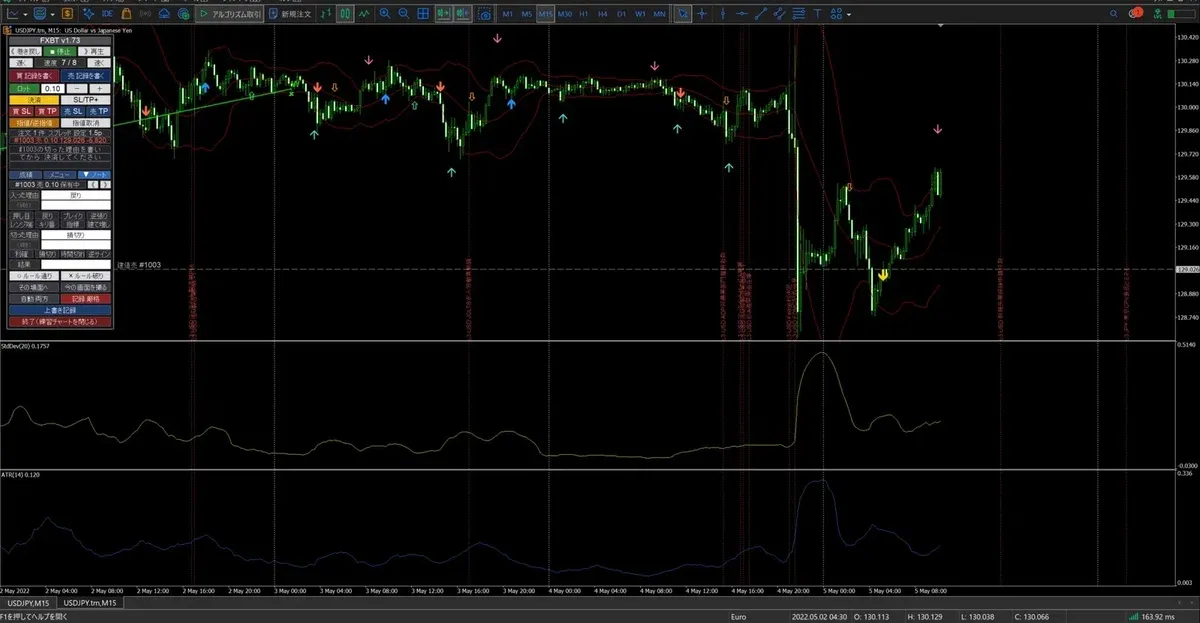
Step 4: Progress bar by bar and place orders
》 Playto playback,■ Stopto halt. Use the keyboard→to advance one bar at a time- When the speed (
↑/↓) is 0–6, you advance one minute at a time, allowing you to see how bars on higher timeframes form Buy/Sellfor market orders- Stop loss and take profit are set with
Buy SL・Buy TP(for a sell,Sell SL・Sell TP) and you drag the lines on the chart to set them. After setting, pressBuy/Sell. - Limit orders and stop orders can also be used
Step 5: Write the reason for entry first
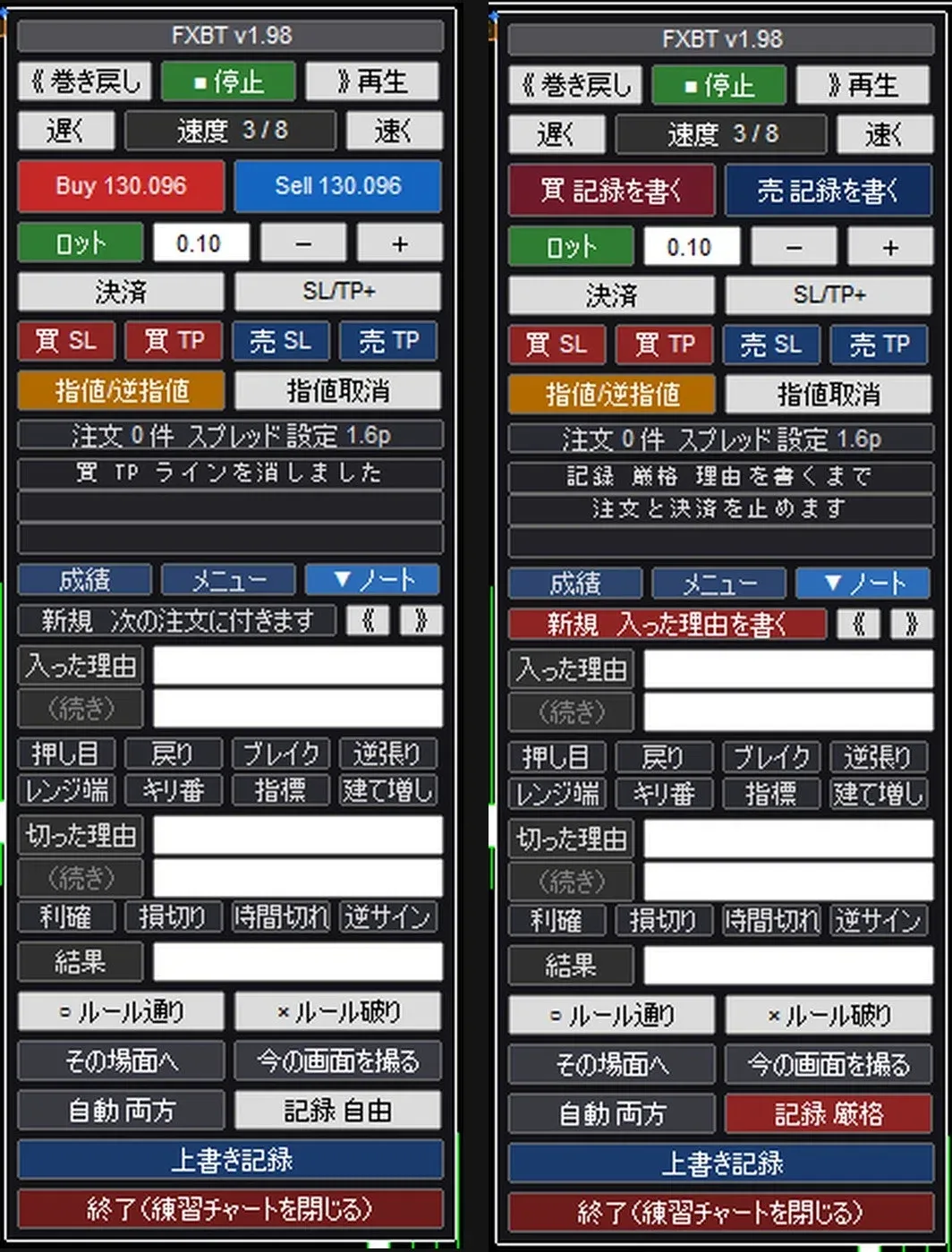
In the panel’sNotetab, before placing an order you can write the “reason for entry.” The written content will be attached to the next order.
If you enable the “Record mode”strict, you won’t be able to place orders until you write the reason. You can enforce the “write before you proceed” rule not by will but with tools.
Step 6: Stop in the middle and continue tomorrow
Each time you close a trade, the progress is automatically saved every 5 minutes. Even if MT5 is closed, when you next start it will show “There is a continuation from the previous session,” so you can resume fromLoad and continue.
What this tool cannot do
A heads-up first.
- Fees, swaps, and partial closes are not included in calculations. No margin or forced liquidation
- Finer price movements than the configured minimum bar (1 minute) are not reproduced
- Most standard indicators will work as-is, but not all. Indicators that read other currency pairs directly (like relative currency strength) or those that rely on today’s date/time may not function correctly
- Base currency is Japanese Yen only, compatible only with MT5 (Windows)
The compatibility of your indicators is best checked with the free version first.
The practice steps are summarized in another article.
▶ How to perform backtesting in MT5 when you can’t see ahead — pitfalls of manual scrolling and practice by playing back bar by bar
https://www.gogojungle.co.jp/finance/navi/articles/126682
Conclusion
- Manual backtesting leaves the next bar visible on screen, making hindsight easy to slip in
- If doing it by hand, decide “write before proceeding” and “don’t count scenes you’ve already seen”
- If you play back one bar at a time on a chart where the next bar is not visible, you can practice making judgments without knowing the answer
Related articles
▶ Reasons why seeing ahead prevents practice — three scenarios where hindsight enters backtesting
https://www.gogojungle.co.jp/finance/navi/articles/126818
▶ What is FX backtesting (backtest)? Full guide on how-to and continuation
https://www.gogojungle.co.jp/finance/navi/articles/126878
About the practice tools
The practice described in this article can be done with the MT5 indicator “FX Backtest Trainer.” It’s a practice tool that plays back past charts bar by bar, enabling orders, recording, and review in a simulated account.
There is a free version.It allows practicing all features, currency pairs, and timeframes up to 30 completed trades (cumulative). No expiration. You can first verify compatibility with your MT5 and indicators.
▶ Free version (Product ID 86772)https://www.gogojungle.co.jp/tools/indicators/86772
If you want to practice without worrying about limits, see the Pro version. Trades written in the free version can be opened in the Pro version as well.
▶ Pro version (Product ID 86765)https://www.gogojungle.co.jp/tools/indicators/86765
Note
- This tool is for practice purposes. It does not guarantee profits and does not place real orders.
- This article introduces practice methods and does not advocate specific trading strategies.