

?MT5 Standard AI Assistant Complete Start Guide! Even beginners can start using it in 5 minutes
Have you ever thought, even after hearing that we live in an era where AI teaches trading, that “the setup seems difficult” or “it’s still too early for me”?
Actually, with the AI Assistant standardly built into MT5 as of the July 2026 update, you can start for free without needing to install special EAs or indicators—it’s a convenient feature.
While looking at the charts, just ask in Japanese, “Is this an uptrend now?” or “Is this position risky?” It feels like consulting with an experienced trader.
Of course, the AI cannot guarantee profitable trades. However, there is no doubt it will be a strong partner to help you understand the market.
In this article, we’ll first introduce what the AI Assistant can do, and then, to help beginners not get lost, we’ll explain how to get started step by step.
? What is the MT5 Standard AI Assistant?
The MT5 Standard AI Assistant is an AI feature officially provided by MetaQuotes.
Its biggest feature is that you don’t need to memorize specialized commands.
For example,
- “Tell me the current situation of EURUSD”
- “Is this chart in an uptrend?”
- “Which of my current positions is dangerous?”
- “Analyze last month’s trades and tell me how to improve”
In this way, you can simply ask in everyday Japanese, and the AI will read charts, positions, and trading history to respond.
For beginners, it’s much easier to understand than reading heavy technical books, and even seasoned traders can use it as a tool to objectively review the market.
On the other hand, there is currently no function for the AI to automatically trade or draw trendlines on charts. It’s best to think of it as an “assistant that supports analysis.”
? Start in 5 Minutes! MT5 AI Assistant Setup Guide
Now we’ll go through the actual steps to start using it.
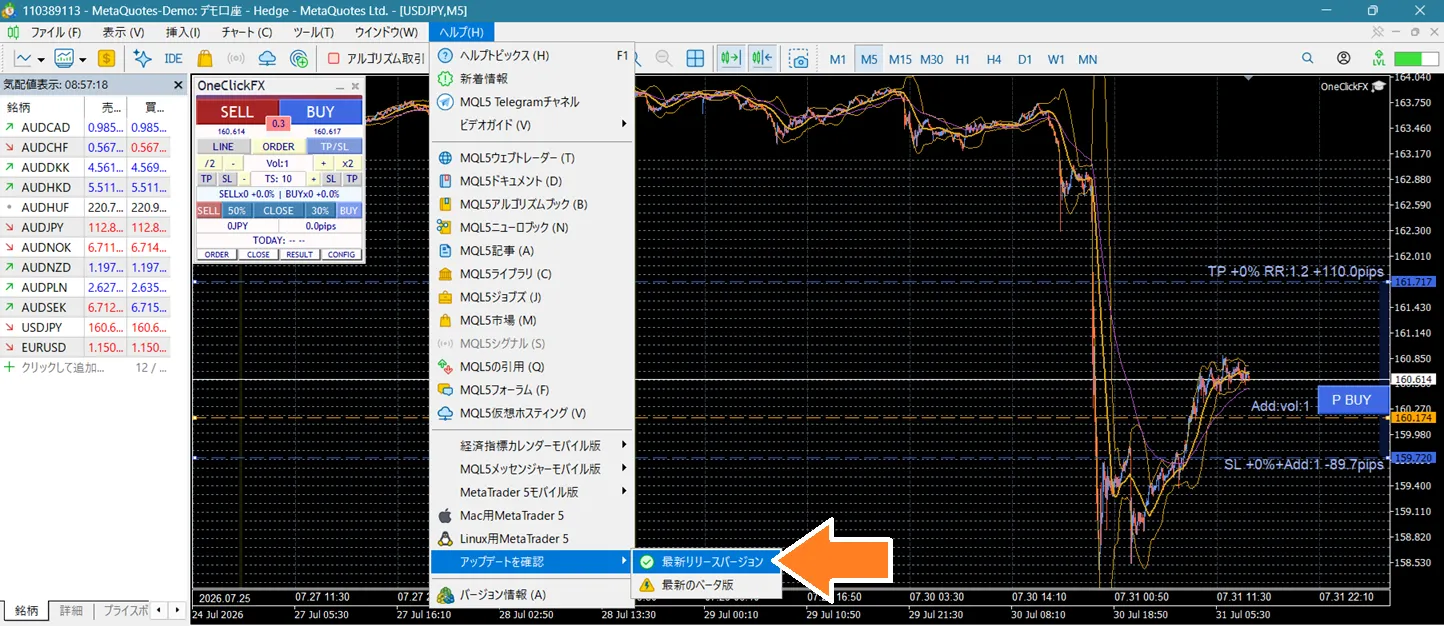
① Update MT5 to the latest version
The AI Assistant is a relatively new feature.
First, launch MT5 and“Help” → “Check for updates”to update to the latest version.
After updating, restart MT5.
② Create an MQL5.community account
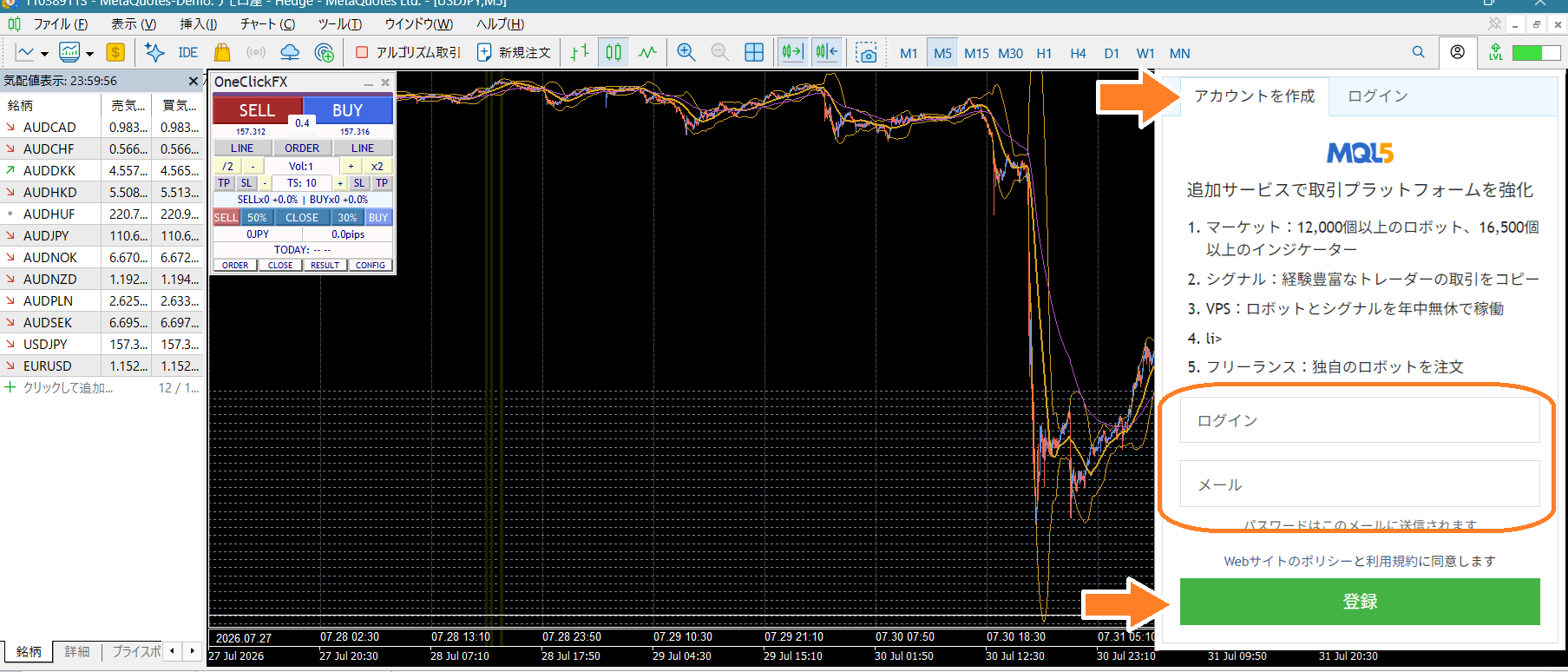
To use AI, you need a free MQL5.community account.
All you need is
- Email address
- Login name
- Password
and you’re set.
After registration, click the link in the confirmation email to activate your account.
③ Log in from MT5
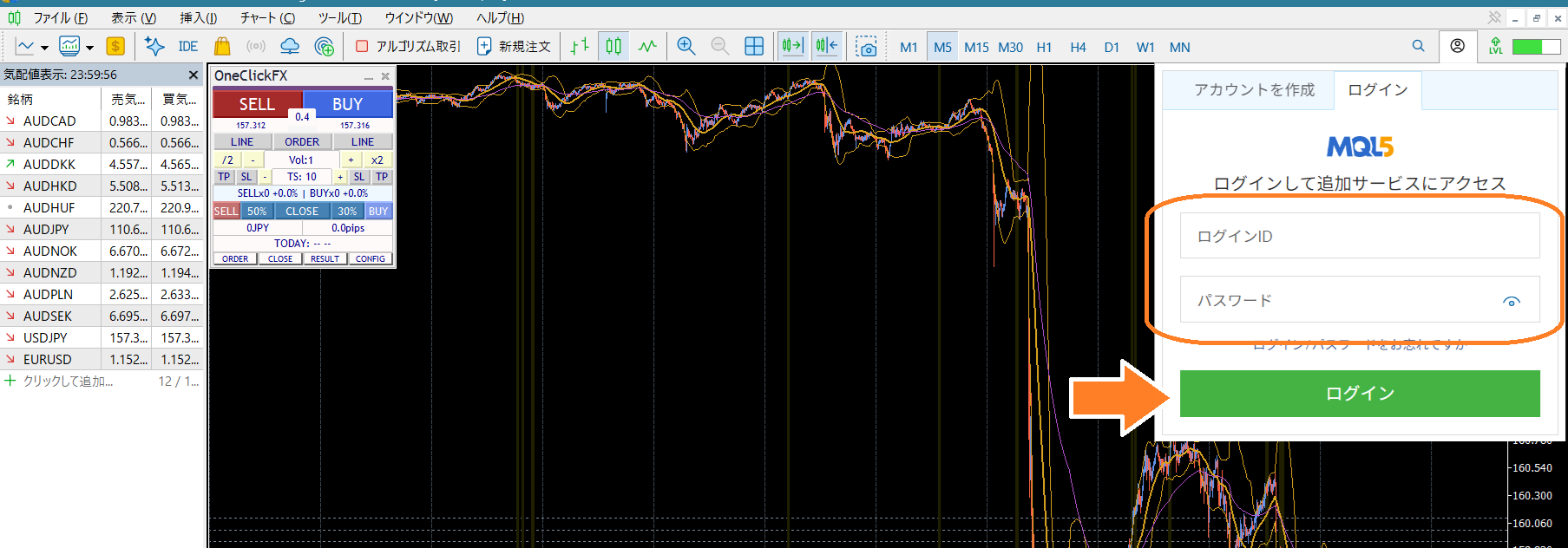
Return to MT5 and click the chat bubble icon (or the person icon) in the top-right corner.
Enter your previously registered
- Login name
- Password
to log in.
Now you can use the freeMQL5 Lite planand the AI Assistant will be available.
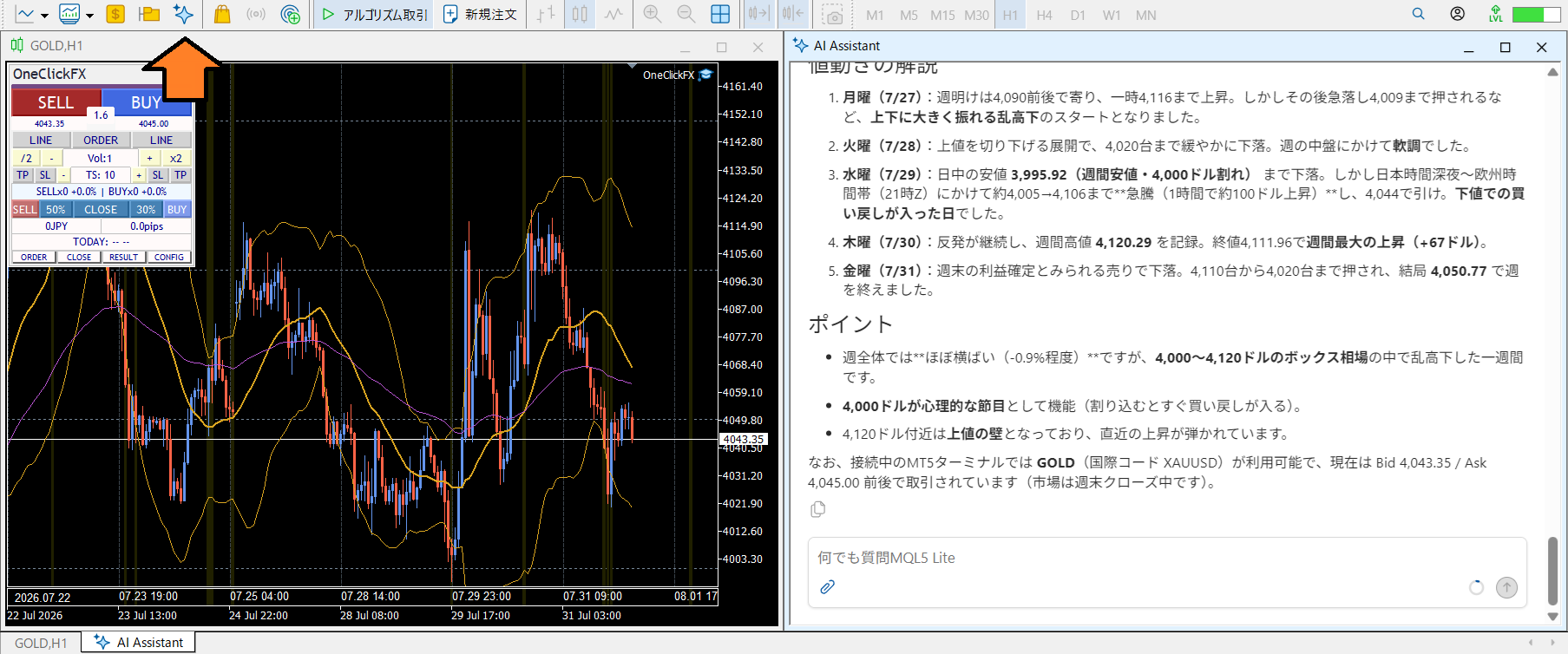
④ Launch the AI Assistant
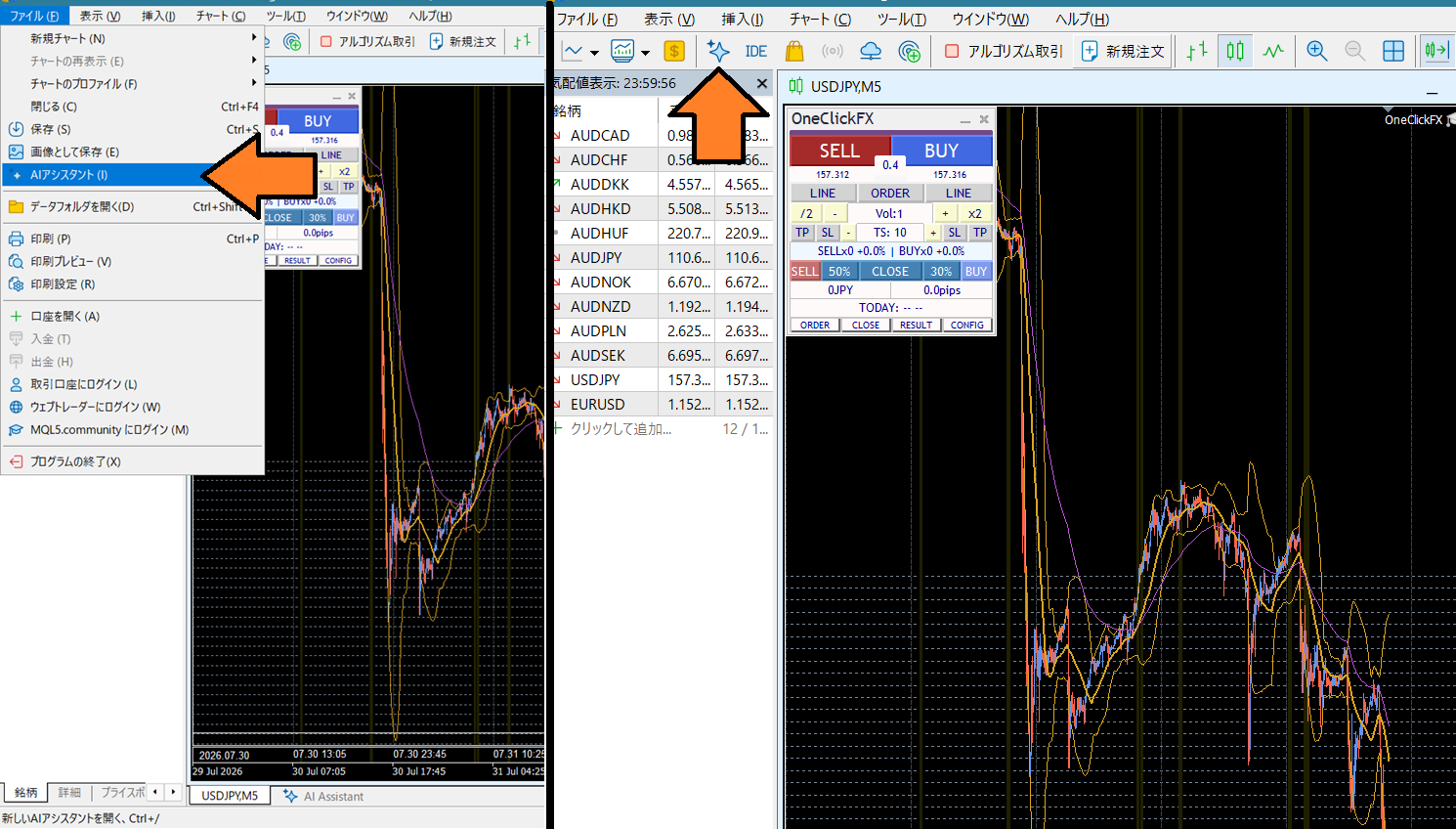
After logging in,“Open a new AI Assistant”to open the AI chat screen.
You can also open it from the menu: File → Open AI Assistant.
⑤ Just ask in Japanese
That’s all. Then just type your question in the input field.
For example,
Chart Analysis
- “Please analyze the current situation of USDJPY on the H1 timeframe.”
- “Tell me the trend of XAUUSD.”
Position Analysis
- “Please analyze my current holdings.”
- “Which position is the riskiest?”
Trade History Analysis
- “Analyze the past month of trades and tell me how to improve.”
In this way, no special phrasing is required.
⑥ If it doesn’t work well
If the AI doesn’t appear, try
- Checking that MT5 is up to date
- Ensuring you’re logged in to MQL5.community
- Restart MT5
and other checks.
In particular, the AI Assistant will not work unless you are logged into MQL5.community. This is a server login separate from logging into your broker account, so please note.

? Want to chat with AI? Surprisingly normal conversations are possible
MT5’s AI Assistant isn’t only good at market analysis.
For example,
- “Explain in Kansai dialect”
- “Teach me like a passionate teacher”
- “Guide me in a maid-like style”
If you request it, it will chat in that style.
Furthermore,
- “What should I have for dinner today?”
- “It’s hot lately; tell me how to prevent heat stroke”
- “What’s useful to bring on a trip?”
It will answer general questions not related to trading in a normal way.
However, it’s not particularly good at researching the latest news, politics, or economics in depth. Compared to general generative AI, its information-gathering ability is modest, and you may find it lacking for the latest reports or broad research.
In short, the MT5 AI Assistant is better described as a “partner you can chat with while watching charts and trades in MT5,” rather than a pure “information search service.” Start by casually talking to see what it can do, and you may discover something new.

? Summary
The MT5 Standard AI Assistant is a beginner-friendly companion for learning about the market. It requires hardly any difficult setup or specialized knowledge, and you can start immediately by creating a free MQL5.community account.
First, try a simple request like, “Please analyze the current chart.” By using the AI as an adviser, you can gradually sharpen your own judgment, which is a shortcut to staying in the market for the long term.
Completely risk-free trading simulator for free practice and validation!
Details page of One-Click FX Training