
EAの成績と「寿命」をひと目で「EA_Health_Monitor」(MT4)

Product outline
Community(0)
EAの成績と「寿命」をひと目で「EA_Health_Monitor」(MT4) Indicators/E-books
EAの成績と「寿命」をひと目で「EA_Health_Monitor」(MT4)
口座の履歴をEAごとに集計。最近の成績が普段より悪すぎないかを黄・赤で知らせ、スマホにも通知
Sales Result 0 items
Reviews ★ 0.0 (0)
Category:
How to provide:
Indicator
Sales from:
11/04/2026
Last Updated:
11/04/2026
Version:
1.03
Web Authentication:
Enable
Available company:

Follow 0 ❘ Followers 1
Seller's last login time: 11/4/2026 22:04:41
Read more seller information
¥2,980 (taxed)
Provider/Distributor:
Sales site:
GogoJungle

●Payment

Mastercard Visa JCB Bank FamilyMart D2 D1

複数のEAを動かしていると、「このEAは今も普段どおり動いているのか、それとも相場に合わなくなっているのか」が分かりにくくなります。 EA_Health_Monitor は、口座の取引履歴をEA(マジック番号)ごとに集計して表にし、最近の成績が「普段の成績から見て悪すぎないか」を自動で判定します。
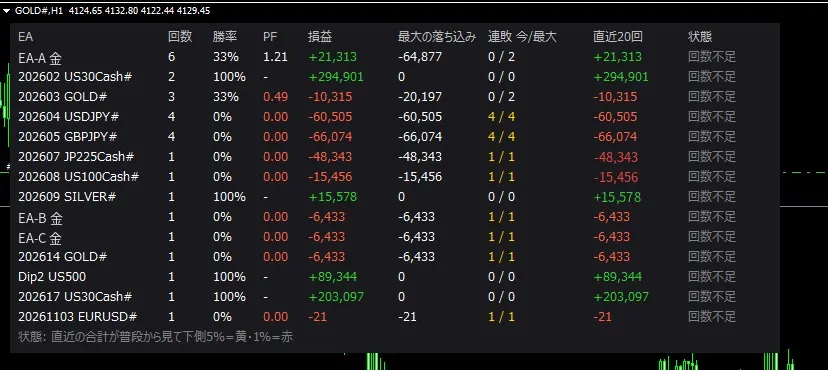
※表示例(デモ口座の実際の画面。EA名の一部は伏せています)

■ 表に出るもの(EAごと) 回数 / 勝率 / PF / 損益 / 最大の落ち込み / 連敗(今・過去最大) / 直近N回の合計 / 状態(正常・黄・赤・回数不足) ■ 寿命チェックのしくみ そのEAのこれまでの1回あたりの損益の平均とばらつきから、「普通に動いていても起きる直近N回の合計の範囲」を計算し、 今の直近N回の合計がその下側5%を下回ったら黄、1%を下回ったら赤にします。 勝率の低いトレンド系EAの連敗を「いつものこと」なのか「異常」なのか、感覚ではなく数字で判断する助けになります。 ■ できること ・EA名の対応表(マジック番号=名前)で見やすく表示 ・状態が黄・赤に変わったとき、連敗が過去最大を更新したときにスマホへ通知 ・誤発注などを集計から外す設定、集計する年の指定 ・注文は一切出しません(見るだけ)。チャート1枚に入れるだけ ■ 使い方 1. ゴゴジャンのマイページで、このツールを使うMT4の口座番号を登録する(1口座。何度でも変更できます) 2. ダウンロードした .ex4 を、ファイル名を変えずに MT4 の MQL4\Indicators に入れる 3. MT4の「口座履歴」タブで右クリック →「全期間」を選ぶ 4. チャートに入れ、設定画面の「全般」タブで「DLLの使用を許可する」にチェック 5. チャートの左上に「Authentication success」と出て、表が表示されれば準備完了 くわしい説明書(PDF)が付いています。 ■ お試し版 デモ口座で使える無料のお試し版もあります(2027年2月28日まで、機能は製品版と同じ)。 ■ ご注意 ・表示は過去の取引の集計で、EAの今後の成績を予測・保証するものではありません ・「赤」は普段の成績から見てかなり悪いという目安で、普通に動いていても時々起きます。EAを止めるかどうかはご自身で判断してください

¥2,980 (taxed)
Provider/Distributor:
Sales site:
GogoJungle

●Payment

Mastercard Visa JCB Bank FamilyMart D2 D1
Product outline
Community(0)
Best Seller Ranking

For those using GogoJungle for the first time Easy 3 steps to use the product!

At GogoJungle, we provide services to enrich your investment life for our members. In addition, product purchases are limited to members. Why not register as a member now and make use of GogoJungle!

01
Enter user information and register as a member
02
Follow the instructions to make a purchase
03
Download from My Page
■ Important Matters and Risk Warnings Regarding Investment Products 【Financial Instruments Business Operator】
GogoJungle Inc.
Registration: Director-General of the Kanto Local Finance Bureau (Financial Instruments Business) No. 1960
【Member Association】
Investment Trusts Association, Japan
【Fees and Expenses】
The use of software, e-books, investment advisory services, etc., provided on our platform involves purchase prices determined for each product.
Additionally, when conducting actual financial instrument transactions (such as FX or CFD trading), costs such as transaction fees and spreads (the difference between the sell and buy price) may be incurred through the connected brokerage firms.
【Margin and Risk of Loss】
Transactions such as FX (Foreign Exchange Margin Trading) and CFD (Contract for Difference) allow for trading in amounts exceeding the deposited margin.
Therefore, due to sudden fluctuations in target indices (currency, commodity prices, etc.), there is a risk of incurring losses that exceed the deposited margin (loss exceeding principal).
Furthermore, financial instrument transactions involve risks such as price fluctuations, which may result in losses falling below or exceeding the initial investment principal.
【Nature of Services and Trading Entity】
The Company operates a platform (marketplace) providing investment software and information; we do not engage in the buying, selling, mediation, brokerage, or agency of financial instruments on behalf of customers.
The services and information provided are intended as reference for investment decisions and do not guarantee future profits or specific results.
While some services include investment advice, they do not constitute a mandate or solicitation to trade specific financial instruments.
Final investment decisions and the execution of trades must be made at the customer’s own risk and discretion.
