Flat Manual Trader for MT4 | ロット自動計算対応のトレードアシスト(デモ口座専用)

Product outline
Community(0)
Flat Manual Trader for MT4 | ロット自動計算対応のトレードアシスト(デモ口座専用) Indicators/E-books
Flat Manual Trader for MT4 | ロット自動計算対応のトレードアシスト(デモ口座専用)
ロット自動計算で裁量トレードを支援するMT4用ツール。全機能をデモ口座でそのまま試せます。プレビューライン、建値移動、トレーリング、部分決済に対応。製品版も販売中。
Sales Result 0 items
Reviews ★ 0.0 (0)
How to provide:
Indicator
Sales from:
11/03/2026
Last Updated:
11/03/2026
Version:
1.12
Available company:

Follow 0 ❘ Followers 3
Seller kotoha
Seller's last login time: 11/5/2026 16:58:13
Read more seller information
【デモ口座専用】本商品はデモ口座専用です。全機能をデモ口座でそのまま試せます。

MT4用 裁量トレード管理ツール(EA)

エントリーは自分で。
ロット計算と決済管理は、ツールに任せる。

Flat Manual Trader for MT4 は、エントリー判断はご自身で行いながら、発注と発注後の管理をルール化したい裁量トレーダー向けの補助ツールです。中心にあるのはロットの自動計算。発注前には、BUY / SELL それぞれのSL・TP・トレーリング開始位置をチャート上にライン表示して確認できます。

一番の特長 ロット自動計算(3方式)発注前に プレビューライン建値移動・トレーリング部分決済・分割損切りスマホ・手動ポジション管理
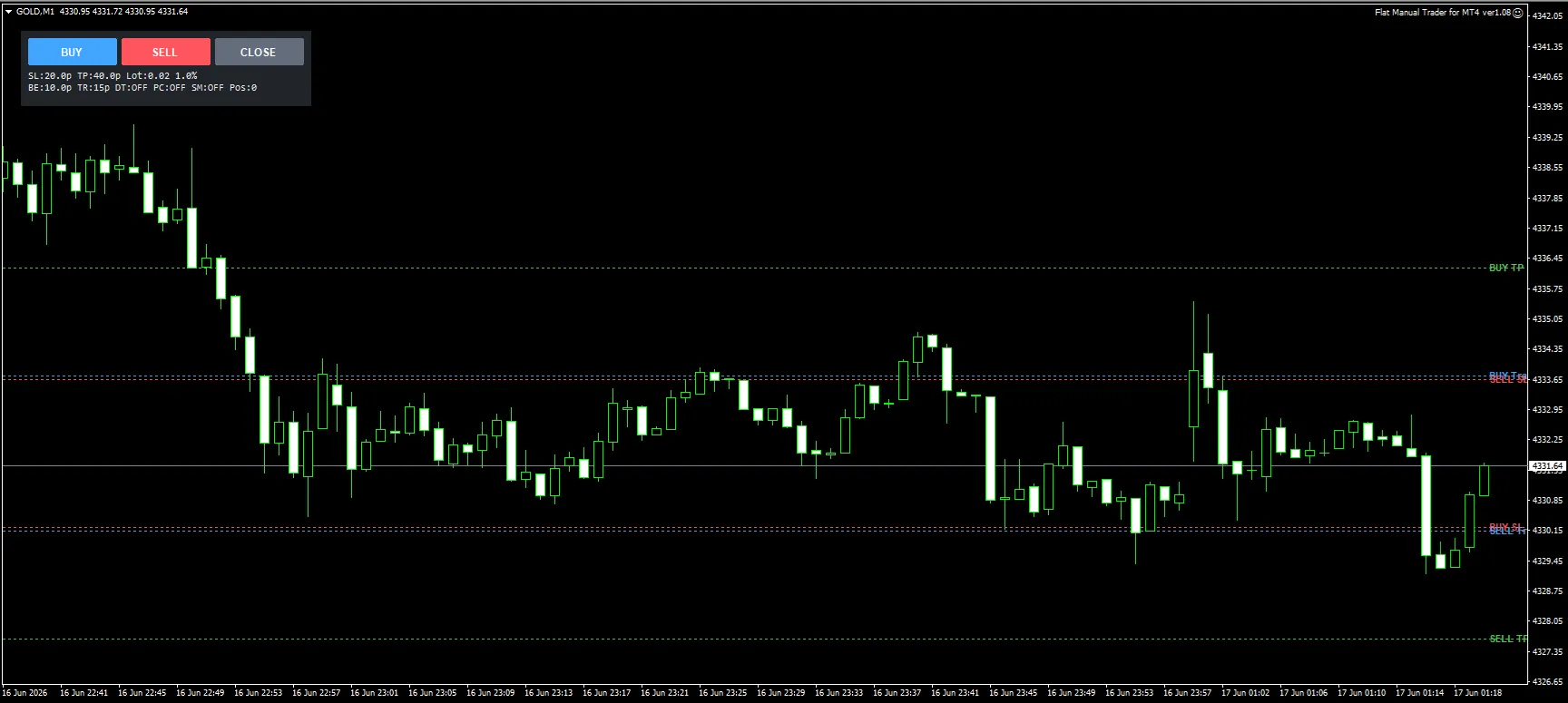
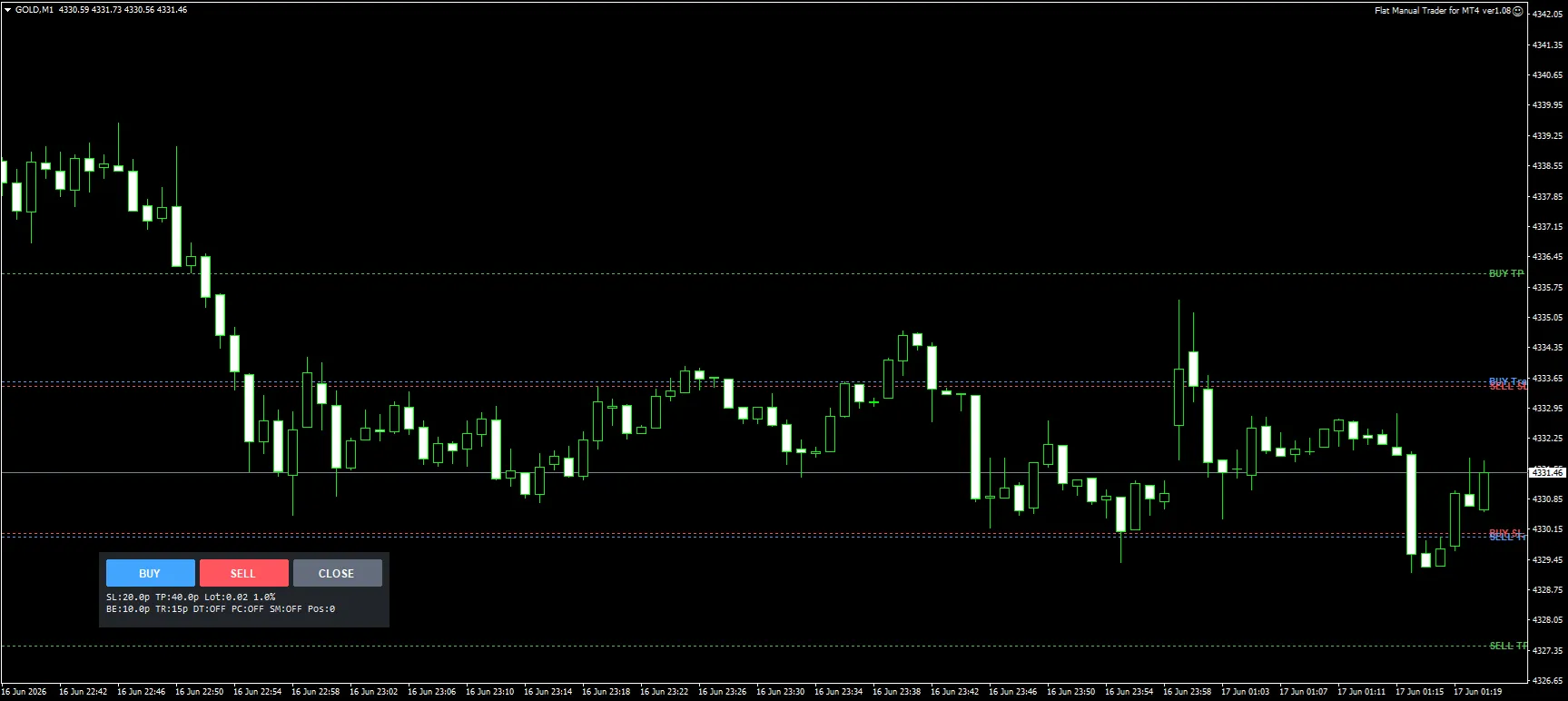
チャート上の操作パネルと、BUY / SELL のSL・TPライン表示(ラベル付き)

気に入っていただけたら、製品版へ。本デモ版と全機能が同一の製品版は、リアル口座でご利用いただけます。→ 製品版 Flat Manual Trader for MT4(9,800円)はこちら

01 こんな手間や不安を、毎回のトレードから無くすために

ロット計算が面倒
SL幅が変わるたびに適正ロットを計算し直すのが手間で、つい固定ロットや感覚で入ってしまう。
発注前に距離感が掴めない
数値だけでは、SLやトレーリング開始位置までの距離感が分かりづらい。
決済がルール通りにいかない
建値移動や部分決済を決めていても、相場を見ていると手動ではブレてしまう。

02 一番の特長:ロットの自動計算

ロット計算は、運用に合わせて3方式から選べます。SL距離は PIPS方式/ATR倍率方式 を切り替え可能で、SL幅が変わればロットはそれに合わせて自動で計算されます。

資金
残高/有効証拠金
× リスク
% または固定金額
÷ SL距離
PIPS/ATR×倍率
→ 自動計算
適正ロット

※固定ロット方式も選択できます。リスク%(または固定金額)に設定すれば、SLに到達したときの損失額を毎回同じ水準に揃えられます。

発注前に、ラインで距離感を確認

エントリー前には、BUY / SELL それぞれのSL・TP・トレーリング開始位置をチャート上にライン表示できます。ライン名も表示できるため、どの価格が何の条件なのか判別しやすくなっています。
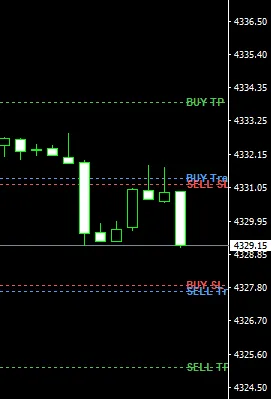
プレビューラインのラベル表示(BUY TP / SELL SL など)

03 エントリー後は、管理をルール通りに自動化

建値移動・トレーリング
・建値移動:PIPS/ATR倍率/R倍率/指定価格で発動、オフセット指定も可能
・トレーリング:固定PIPS方式とATR方式に対応
・遅延トレーリング:開始条件到達後にトレーリング開始、開始時の建値移動にも対応
部分決済・分割損切り
・部分決済(利確側):条件到達時の部分決済、決済後の建値移動に対応
・分割損切り:含み損が進んだら、一部を先に決済
過剰取引の防止
・同時ポジション数制限
・日次損失制限:到達時は新規エントリーをブロック
スマホ・手動ポジション管理
・手動ポジションの採用:スマホ等で手動発注したポジション(Magic=0)も管理対象にできます
・SL自動設定:採用したポジションへのSL自動付与、既存SLの尊重、削除時の再設定に対応

04 シンプルなパネルと使い方

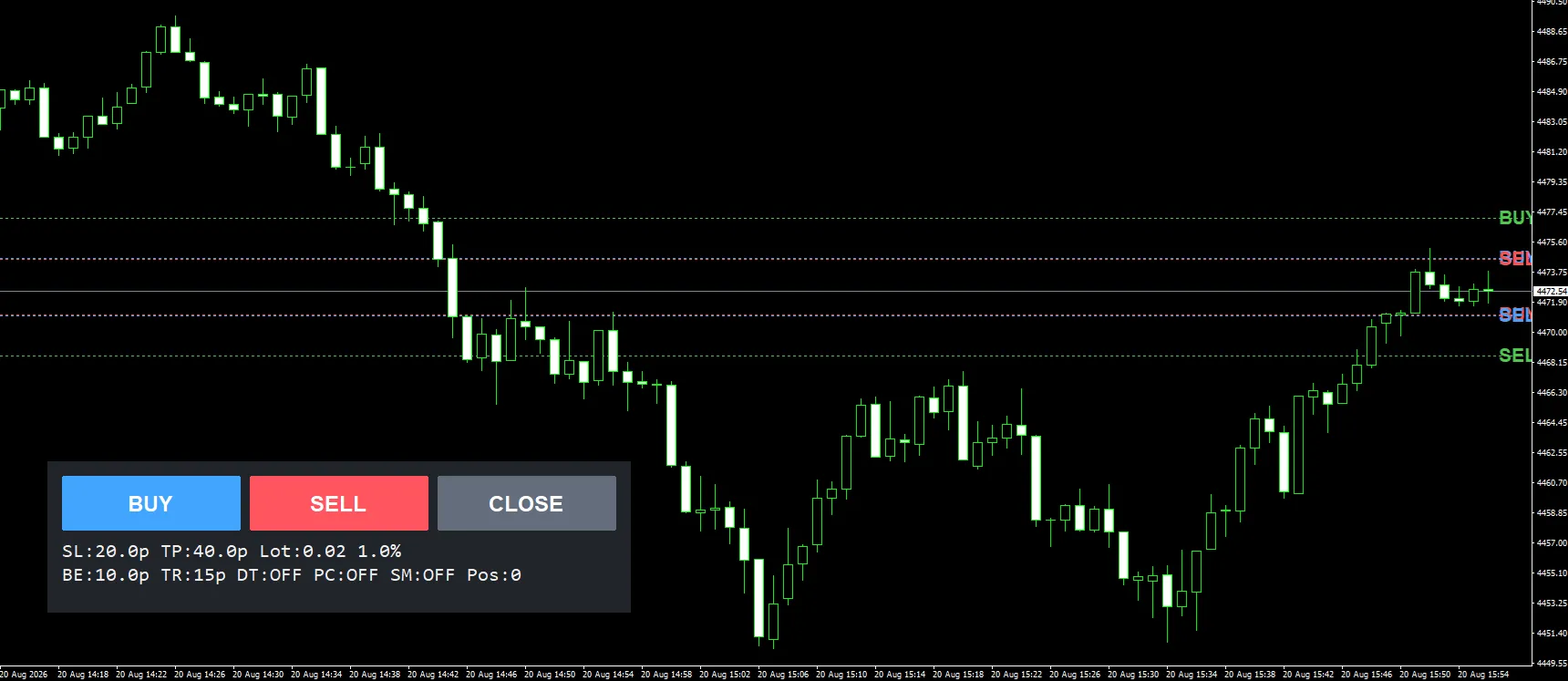
操作は BUY / SELL / CLOSE の3ボタンが中心です。SL、TP、ロット、建値移動、トレーリング、遅延トレーリング、部分決済、スマホ・手動管理の状態をコンパクトに確認できます。パネルはチャート上の好きな場所へ移動でき、表示サイズ(UI倍率など)も調整できます。
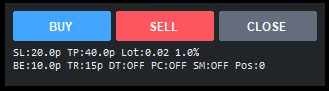
操作パネル:3ボタンと現在の設定値(SL / TP / Lot / BE / TR など)を一覧表示

1 確認
プレビューラインで、BUY / SELL それぞれのSL・TPまでの距離感を確認します。
2 発注
パネルの BUY / SELL ボタンから成行注文。ロットは設定した方式で自動計算されます。
3 管理は自動
発注後のSL/TP・建値移動・トレーリング・部分決済は、設定したルールで自動実行されます。CLOSEボタンで対象ポジションの決済もできます。

パネルはチャート上の任意の位置へ移動できます

05 画面イメージ

SL / TP ラインとパネルを表示したチャート
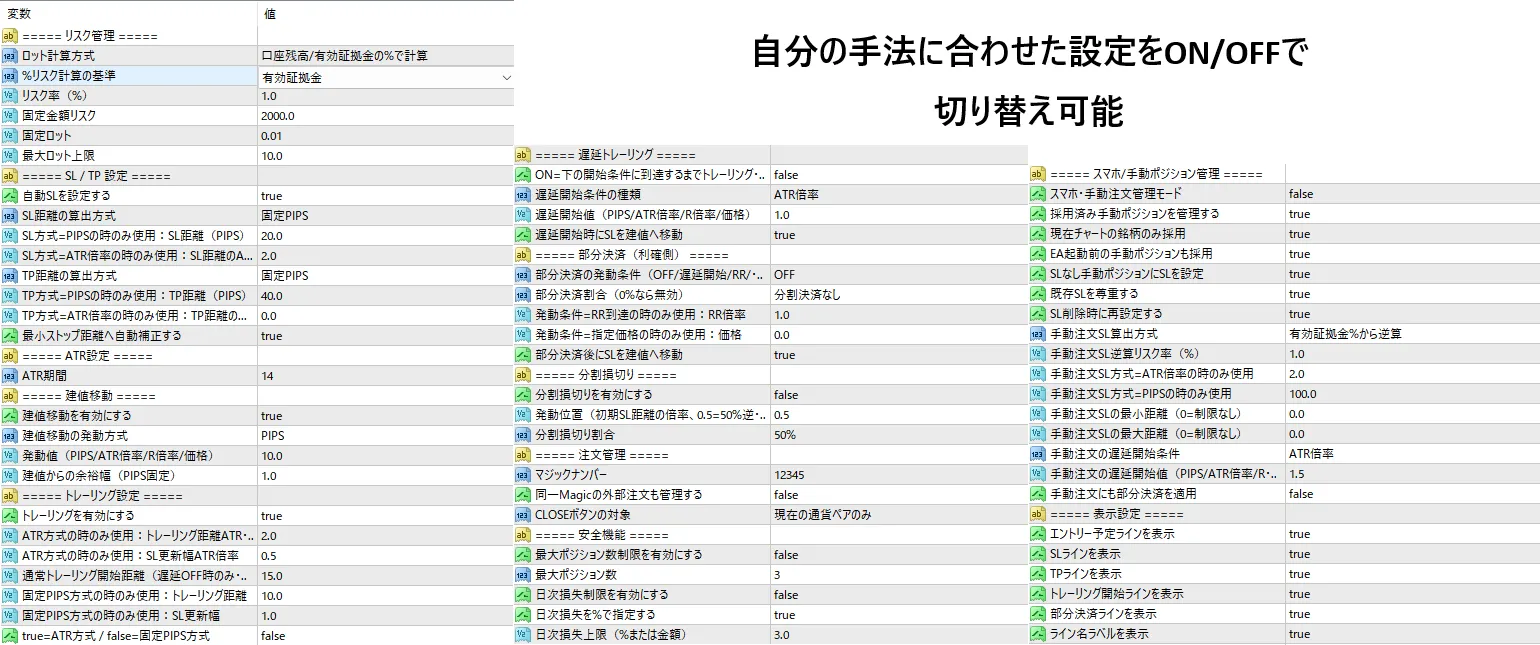
パラメーターは日本語表示。使う機能だけをON/OFFで選べます

06 外部で発注した注文の管理について

本ツールに、外部インジケーターのシグナルを読み取る連携機能はありません。

その代わり、設定を有効にすると「同じマジックナンバーの注文」も管理対象にできます。他の方法で発注した注文に、本ツールのSL/TP設定・建値移動・トレーリング・部分決済といった管理機能を組み合わせて使うための機能です。

07 対応環境・ご注意

対応環境MetaTrader 4 専用(MT5版は別商品「Flat Manual Trader」です)。使用前にMT4側で自動売買を許可してください
対応銘柄全通貨ペア・全時間足(手動トレード用パネルツール)
種別売買判断を代行しない、裁量トレードの管理支援ツール(EA)です
・本ツールは売買判断を代行するものではなく、利益を保証するものでもありません。
・ご利用環境・銘柄設定・スプレッド・約定条件により、動作結果が異なる場合があります。
・実運用の前に、デモ環境などで十分に動作確認を行ってください。

08 製品版のご案内

気に入っていただけたら、リアル口座で使える製品版をご検討ください。製品版は Flat Manual Trader for MT4(製品版) のページで販売中です。本デモ版と機能は同一で、口座の制限なくご利用いただけます。

Free
Provider/Distributor:
Sales site:
GogoJungle
Product outline
Community(0)
Best Seller Ranking

For those using GogoJungle for the first time Easy 3 steps to use the product!

At GogoJungle, we provide services to enrich your investment life for our members. In addition, product purchases are limited to members. Why not register as a member now and make use of GogoJungle!

01
Enter user information and register as a member
02
Follow the instructions to make a purchase
03
Download from My Page
■ Important Matters and Risk Warnings Regarding Investment Products 【Financial Instruments Business Operator】
GogoJungle Inc.
Registration: Director-General of the Kanto Local Finance Bureau (Financial Instruments Business) No. 1960
【Member Association】
Investment Trusts Association, Japan
【Fees and Expenses】
The use of software, e-books, investment advisory services, etc., provided on our platform involves purchase prices determined for each product.
Additionally, when conducting actual financial instrument transactions (such as FX or CFD trading), costs such as transaction fees and spreads (the difference between the sell and buy price) may be incurred through the connected brokerage firms.
【Margin and Risk of Loss】
Transactions such as FX (Foreign Exchange Margin Trading) and CFD (Contract for Difference) allow for trading in amounts exceeding the deposited margin.
Therefore, due to sudden fluctuations in target indices (currency, commodity prices, etc.), there is a risk of incurring losses that exceed the deposited margin (loss exceeding principal).
Furthermore, financial instrument transactions involve risks such as price fluctuations, which may result in losses falling below or exceeding the initial investment principal.
【Nature of Services and Trading Entity】
The Company operates a platform (marketplace) providing investment software and information; we do not engage in the buying, selling, mediation, brokerage, or agency of financial instruments on behalf of customers.
The services and information provided are intended as reference for investment decisions and do not guarantee future profits or specific results.
While some services include investment advice, they do not constitute a mandate or solicitation to trade specific financial instruments.
Final investment decisions and the execution of trades must be made at the customer’s own risk and discretion.