

ワンクリック発注パネル「Trading Panel」for MT5

Product outline
Community(0)
ワンクリック発注パネル「Trading Panel」for MT5 Indicators/E-books
ワンクリック発注パネル「Trading Panel」for MT5
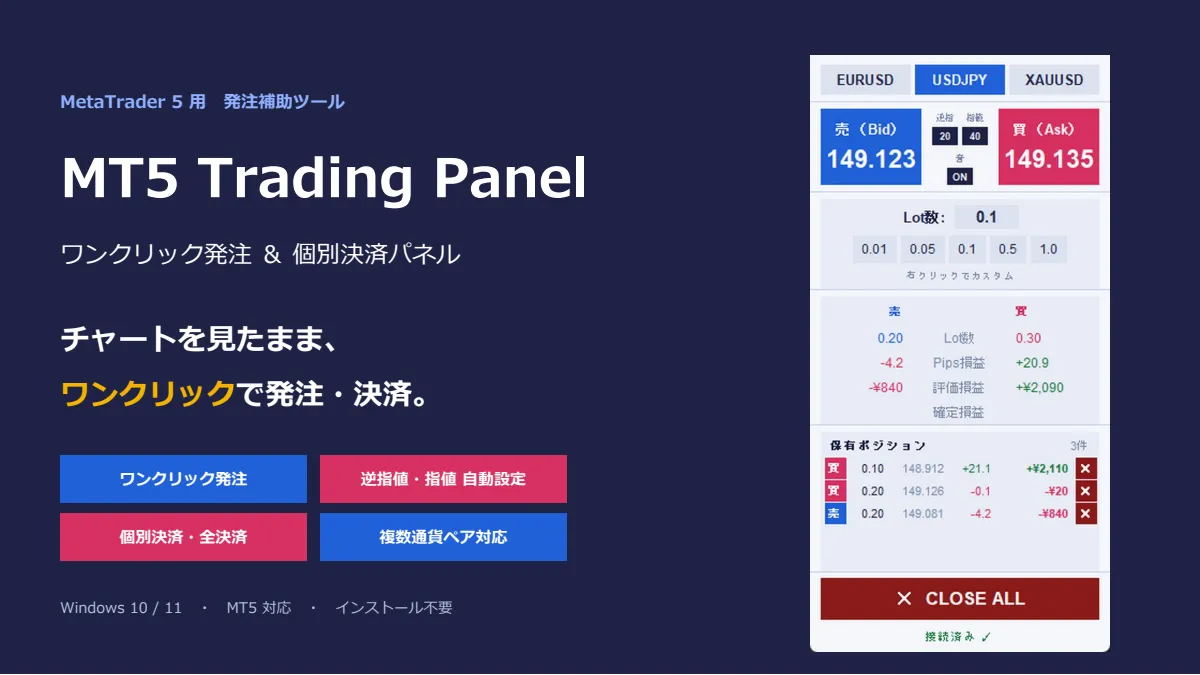
チャートを見たまま、ワンクリックで発注・決済。裁量トレードの操作をもっと速く、もっと確実に。
Sales Result 0 items
Reviews ★ 0.0 (0)
Category:
How to provide:
Indicator
Sales from:
09/28/2026
Last Updated:
09/30/2026
Version:
1
Web Authentication:
Enable
Available company:

Follow 0 ❘ Followers 2
Seller いち
Seller's last login time: 10/1/2026 00:25:53
Read more seller information
¥1,980 (taxed)
10left
Next price: (Tax Inc.)
$undefined ¥3,980
Provider/Distributor:
Sales site:
GogoJungle

●Payment

Mastercard Visa JCB Bank FamilyMart D2 D1

チャートを見ながら、ワンクリックで「売り」「買い」「決済」。 MT5 Trading Panel は、MT4 のチャートとは別に表示される小さな専用パネルから、 成行注文と決済をワンクリックで行える「発注補助ツール」です。 MT5 標準の注文画面を開いて、数量を選んで、損切りを入力して……という手間を省き、 狙ったタイミングを逃さずにエントリー・決済できます。 ※本ツールは自動売買(EA)ではありません。売買の判断と操作は、すべてお客様ご自身で行います。 ■ こんな方におすすめです ・スキャルピングやデイトレードで、エントリーと決済をすばやく行いたい ・毎回、損切り・利益確定の注文を入れるのが面倒、入れ忘れが怖い ・ナンピンや分割エントリーで持ったポジションを、1 つずつ決済したい ・複数の通貨ペアやゴールドを、1 つの画面で切り替えながら取引したい ・今の損益(Pips・金額)を常にひと目で確認したい ■ 主な機能
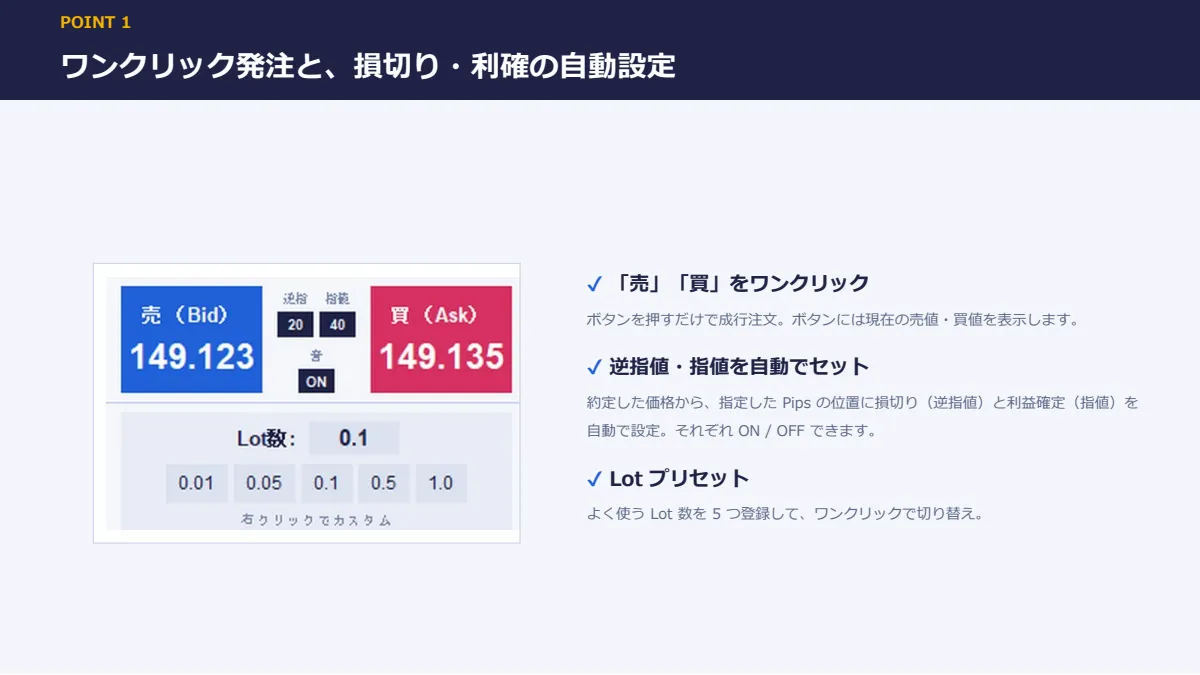
【ワンクリック発注】  「売」「買」ボタンを押すだけで成行注文。ボタンには現在の売値・買値を表示します。 【逆指値(損切り)・指値(利益確定)の自動設定】  あらかじめ Pips を決めておけば、約定と同時に損切り・利益確定の注文を自動でセット。  約定した価格を基準に計算するので、スリッページがあっても設定した幅のまま入ります。  逆指値・指値はそれぞれ ON / OFF できます。
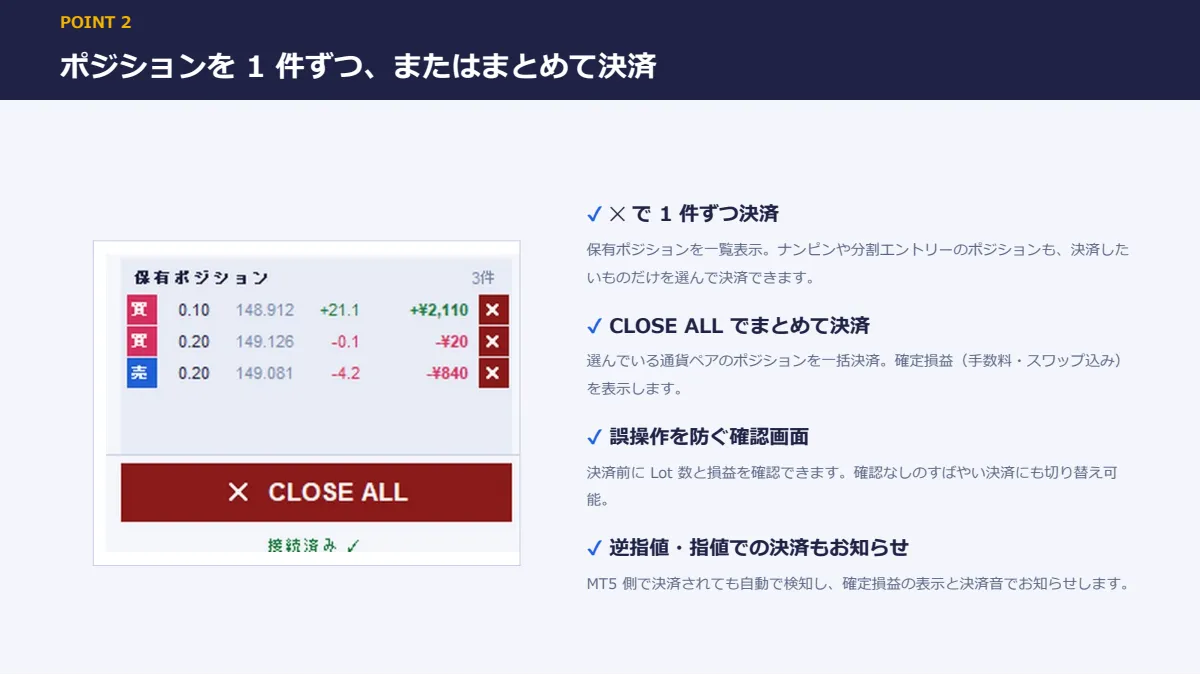

【個別決済・全決済】  保有ポジションを 1 件ずつ一覧表示。各ポジションの「✕」でそのポジションだけを決済できます。  「CLOSE ALL」ボタンで、その通貨ペアのポジションをまとめて決済することもできます。  誤操作を防ぐ確認画面つき(ON / OFF 切り替え可)。
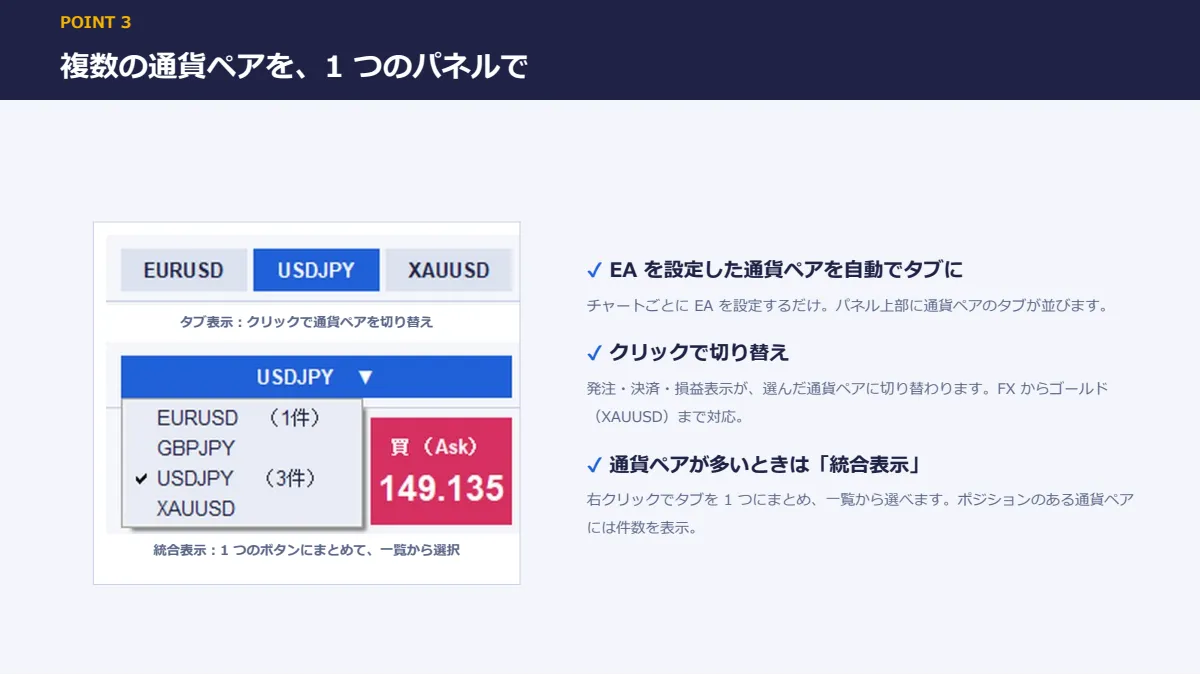

【複数の通貨ペアをタブで切り替え】  EA を設定したチャートの通貨ペアが、パネル上部にタブで並びます。  タブをクリックするだけで、操作する通貨ペアを切り替え。  通貨ペアが多いときは、1 つのボタンにまとめて一覧から選ぶ「統合表示」も使えます。
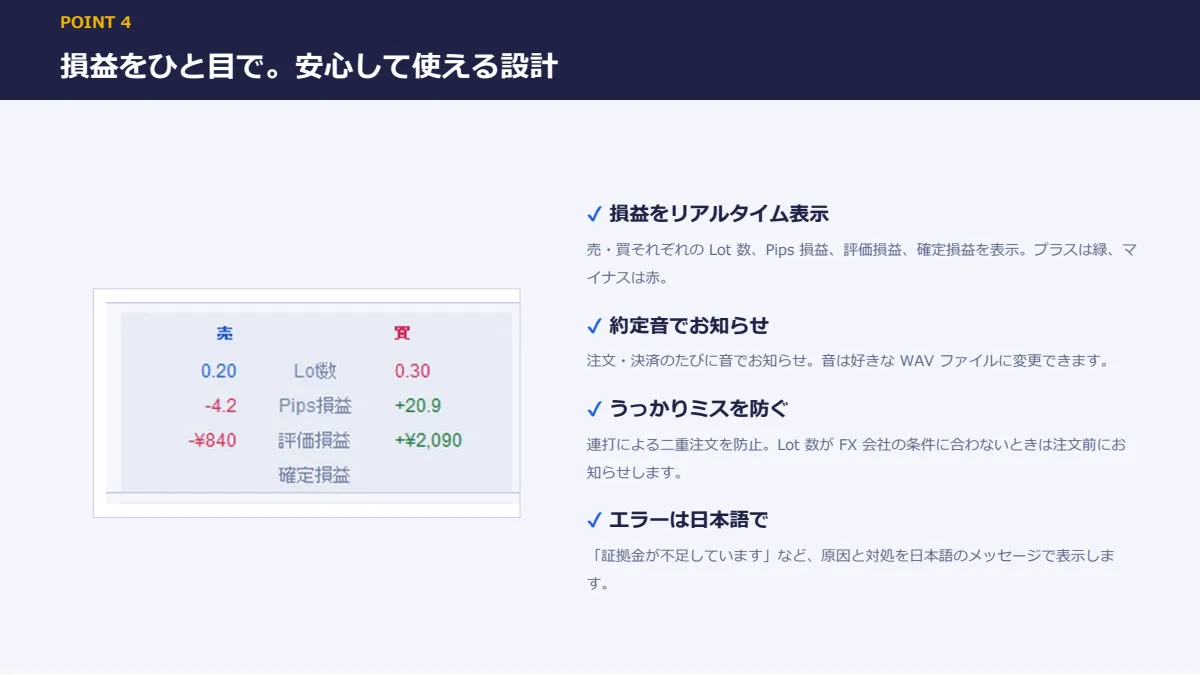

【損益をリアルタイム表示】  売・買それぞれの合計 Lot、Pips 損益、評価損益、決済後の確定損益(手数料・スワップ込み)を表示。  プラスは緑、マイナスは赤で、ひと目でわかります。 【Lot プリセット】  よく使う Lot 数を 5 つ登録して、ワンクリックで切り替え。 【約定音】  注文時・決済時に音でお知らせ。逆指値・指値にかかって決済されたときも鳴るので、  チャートから目を離していても気づけます。音は WAV ファイルで自由に変更できます。 【設定の自動保存】  Lot 数、逆指値・指値、音、ウィンドウの位置、選んでいた通貨ペアなどを保存し、次回起動時に復元します。 【FX からゴールド(XAUUSD)まで対応】  5 桁・3 桁の FX 通貨ペアのほか、ゴールドにも対応しています。 ■ 安心して使うための工夫 ・注文を処理している間は次の注文を受け付けず、連打による二重注文を防ぎます ・Lot 数が FX 会社の最小・最大 Lot や刻み(0.01 単位など)に合わないときは、注文前にお知らせします ・注文や決済がうまくいかなかったときは、原因と対処を日本語のメッセージで表示します  (例:「証拠金が不足しています」「現在、市場はクローズ中です」など) ・注文は約定したのに損切りの設定だけ失敗した場合も、見逃さないよう警告を表示します ■ 動作環境
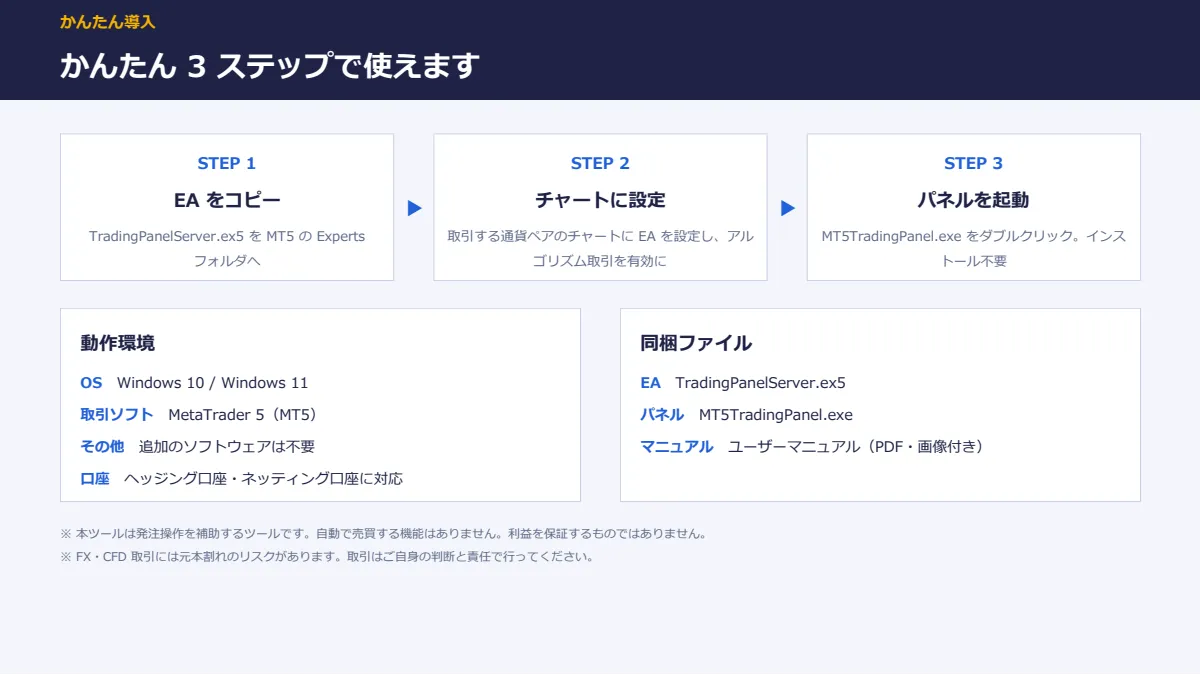
・OS:Windows 10 / Windows 11 ・取引ソフト:MetaTrader 5(MT5) ・その他:追加のソフトウェアは不要です ・ご利用いただける口座:リアル口座 1 つ・デモ口座 1 つ(口座の変更はマイページから何度でも可能) ・EA の設定で「DLL の使用を許可する」にチェックが必要です(口座認証のため) ・Mac 版 MT5、スマートフォン版 MT5 には対応していません ・MT5 を提供している国内・海外の FX 会社で、通常ご利用いただけます  (はじめにデモ口座で動作をご確認いただくことをおすすめします) ■ 同梱ファイル ・TradingPanelServer.ex5(MT4 に組み込む EA。パネルと MT4 をつなぎます) ・MT4TradingPanel.exe(操作パネル本体。インストール不要) ・UserManual.pdf(ユーザーマニュアル。画像付きで導入手順から操作方法まで解説) ■ ご利用までの流れ 1. EA(TradingPanelServer.ex4)を MT5 の Experts フォルダにコピー 2. MT5 の「自動売買」を有効にする  (EA の設定画面では「自動売買を許可する」と「DLL の使用を許可する」にチェック) 3. 取引したい通貨ペアのチャートに EA を設定(複数の通貨ペアで使う場合はそれぞれのチャートに設定) 4. MT5TradingPanel.exe をダブルクリックして起動  → パネルに通貨ペアと価格が表示されれば準備完了です 詳しい手順は、同梱のユーザーマニュアルで画像付きで解説しています。


■ ご注意 ・本ツールは発注操作を補助するツールです。売買のタイミングを判断する機能や、自動で売買する機能はありません。 ・成行注文専用です。新規の指値・逆指値注文(予約注文)や、Lot の一部だけの決済は MT5 の画面から行ってください。 ・パネルに表示・決済されるのは、パネルから注文したポジションのみです。  MT5の画面から手動で注文したポジションや、他の EA のポジションは対象外です。 ・同じ通貨ペアに設定できる EA は 1 つです。 ・MT5 が起動していて、インターネットに接続されている必要があります。 ・パソコンの環境によっては、初回起動時に Windows の確認画面が表示されることがあります  (「詳細情報」→「実行」で起動できます)。 ・相場の急変時には、注文や逆指値・指値が指定した価格から離れて約定することがあります。

¥1,980 (taxed)
10left
Next price: (Tax Inc.)
$undefined ¥3,980
Provider/Distributor:
Sales site:
GogoJungle

●Payment

Mastercard Visa JCB Bank FamilyMart D2 D1
Product outline
Community(0)
Best Seller Ranking

For those using GogoJungle for the first time Easy 3 steps to use the product!

At GogoJungle, we provide services to enrich your investment life for our members. In addition, product purchases are limited to members. Why not register as a member now and make use of GogoJungle!

01
Enter user information and register as a member
02
Follow the instructions to make a purchase
03
Download from My Page
■ Important Matters and Risk Warnings Regarding Investment Products 【Financial Instruments Business Operator】
GogoJungle Inc.
Registration: Director-General of the Kanto Local Finance Bureau (Financial Instruments Business) No. 1960
【Member Association】
Investment Trusts Association, Japan
【Fees and Expenses】
The use of software, e-books, investment advisory services, etc., provided on our platform involves purchase prices determined for each product.
Additionally, when conducting actual financial instrument transactions (such as FX or CFD trading), costs such as transaction fees and spreads (the difference between the sell and buy price) may be incurred through the connected brokerage firms.
【Margin and Risk of Loss】
Transactions such as FX (Foreign Exchange Margin Trading) and CFD (Contract for Difference) allow for trading in amounts exceeding the deposited margin.
Therefore, due to sudden fluctuations in target indices (currency, commodity prices, etc.), there is a risk of incurring losses that exceed the deposited margin (loss exceeding principal).
Furthermore, financial instrument transactions involve risks such as price fluctuations, which may result in losses falling below or exceeding the initial investment principal.
【Nature of Services and Trading Entity】
The Company operates a platform (marketplace) providing investment software and information; we do not engage in the buying, selling, mediation, brokerage, or agency of financial instruments on behalf of customers.
The services and information provided are intended as reference for investment decisions and do not guarantee future profits or specific results.
While some services include investment advice, they do not constitute a mandate or solicitation to trade specific financial instruments.
Final investment decisions and the execution of trades must be made at the customer’s own risk and discretion.
