
MT5 時間足ショートカット|数字キー1〜9で切り替え【無料】

Product outline
Community(0)
MT5 時間足ショートカット|数字キー1〜9で切り替え【無料】 Indicators/E-books
MT5 時間足ショートカット|数字キー1〜9で切り替え【無料】
MT5の時間足を数字キー1〜9で切り替える無料ショートカット
Sales Result 1 items
Reviews 0.0 (0)
Category:
How to provide:
Indicator
Sales from:
08/30/2026
Last Updated:
08/30/2026
Version:
1.0
Available company:

Follow 0 Followers 2
Seller tack
Seller's last login time: 9/21/2026 12:56:03
Read more seller information

MT5で時間足を切り替えるたびに、ツールバーからM1、H1、H4、D1……と選び直すのが面倒だったので作りました。

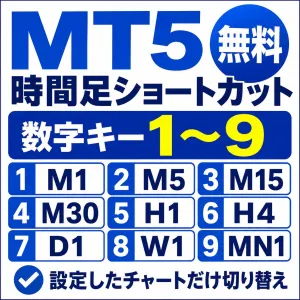
このツールをチャートへ設定すると、キーボード上段の数字キー、またはテンキーの1〜9を押すだけで、現在操作しているチャートの時間足を切り替えられます。

キーの割り当ては固定です。

1:M1(1分足)
2:M5(5分足)
3:M15(15分足)
4:M30(30分足)
5:H1(1時間足)
6:H4(4時間足)
7:D1(日足)
8:W1(週足)
9:MN1(月足)

例えば、H1を見たあとH4、D1と確認したいときも、マウスで時間足を選び直さず、5→6→7と数字キーを押して切り替えられます。

キーボード上段の数字キーとテンキーの両方で動作確認しています。

変更されるのは、現在アクティブになっているチャートだけです。
複数チャートを開いていても、ほかのチャートの時間足は変更しません。

チャート上には、数字キーと時間足の対応を確認できるキー一覧ラベルを表示できます。

インジケーターの設定画面から、次の項目を変更できます。

・ラベルの表示・非表示
・ラベルの文字色
・ラベルのX位置
・ラベルのY位置

チャートの背景色や画面サイズに合わせて、表示位置や文字色を調整できます。

本ツールに注文、決済、売買判断、売買シグナルの機能はありません。

MT5の時間足を数字キーで切り替えるためだけのシンプルな操作補助ツールです。

インストールは、ダウンロードしたファイルをMT5の「MQL5\Indicators」フォルダへ入れ、チャートへ設定します。
詳しい手順は商品マニュアルに記載しています。

無料で利用できます。

【動作確認環境】

OS:Windows 11
MT5:Build 6140
証券会社:OANDA証券
形式:カスタムインジケーター

動作確認済み入力:

・キーボード上段の数字キー1〜9
・テンキー1〜9

Free
Already 1 users using!
Provider/Distributor:
Sales site:
GogoJungle
Product outline
Community(0)
Best Seller Ranking
Recommended Products (Campaigns)

For those using GogoJungle for the first time Easy 3 steps to use the product!

At GogoJungle, we provide services to enrich your investment life for our members. In addition, product purchases are limited to members. Why not register as a member now and make use of GogoJungle!

01
Enter user information and register as a member
02
Follow the instructions to make a purchase
03
Download from My Page
■ Important Matters and Risk Warnings Regarding Investment Products 【Financial Instruments Business Operator】
GogoJungle Inc.
Registration: Director-General of the Kanto Local Finance Bureau (Financial Instruments Business) No. 1960
【Member Association】
Investment Trusts Association, Japan
【Fees and Expenses】
The use of software, e-books, investment advisory services, etc., provided on our platform involves purchase prices determined for each product.
Additionally, when conducting actual financial instrument transactions (such as FX or CFD trading), costs such as transaction fees and spreads (the difference between the sell and buy price) may be incurred through the connected brokerage firms.
【Margin and Risk of Loss】
Transactions such as FX (Foreign Exchange Margin Trading) and CFD (Contract for Difference) allow for trading in amounts exceeding the deposited margin.
Therefore, due to sudden fluctuations in target indices (currency, commodity prices, etc.), there is a risk of incurring losses that exceed the deposited margin (loss exceeding principal).
Furthermore, financial instrument transactions involve risks such as price fluctuations, which may result in losses falling below or exceeding the initial investment principal.
【Nature of Services and Trading Entity】
The Company operates a platform (marketplace) providing investment software and information; we do not engage in the buying, selling, mediation, brokerage, or agency of financial instruments on behalf of customers.
The services and information provided are intended as reference for investment decisions and do not guarantee future profits or specific results.
While some services include investment advice, they do not constitute a mandate or solicitation to trade specific financial instruments.
Final investment decisions and the execution of trades must be made at the customer’s own risk and discretion.