
Product outline
Community(0)
ChartSyncVLine Indicators/E-books
ChartSyncVLine
MetaTrader 4 で複数のチャートを並べて見るとき、垂直線を1本動かすだけで、同じグループのチャートすべてが同じ時刻を指すインジケータです。
Reviews:
Category:
How to provide:
Indicator
Sales from:
08/16/2026
Last Updated:
-
Version:
-
Available company:
Seller HiTS Agent
Seller's last login time: 8/16/2026 11:16:40
Read more seller information
¥980 (taxed)
Provider/Distributor:
Sales site:
GogoJungle

Payment

Mastercard Visa JCB Bank FamilyMart D2 D1
ChartSyncVLine
線を動かせば全チャート同期

MetaTrader 4 で複数のチャートを並べて見るとき、垂直線を1本動かすだけで、同じグループのチャートすべてが同じ時刻を指すインジケータです。

MT4専用 時間足をまたいで同期 設定は3項目
こんな作業をしていませんか
1時間足で気になった場面を5分足でも確かめたいのに、時刻の目盛りを読みながらスクロール位置を探している。
チャートを並べて分析するたびに、同じ時刻の垂直線をそれぞれのチャートへ引き直している。
別の時間足へ切り替えているうちに、さっき見ていた場面がどこだったのか分からなくなる。
ChartSyncVLine は、この3つを 線1本 にまとめます。
実際の画面

インジケーターを入れたチャートには、垂直線が1本表示されます。線をダブルクリックして見たい時刻へドラッグし、もう一度ダブルクリックして選択を外すだけで、同じグループのチャートがすべて同じ時刻へ移動します。
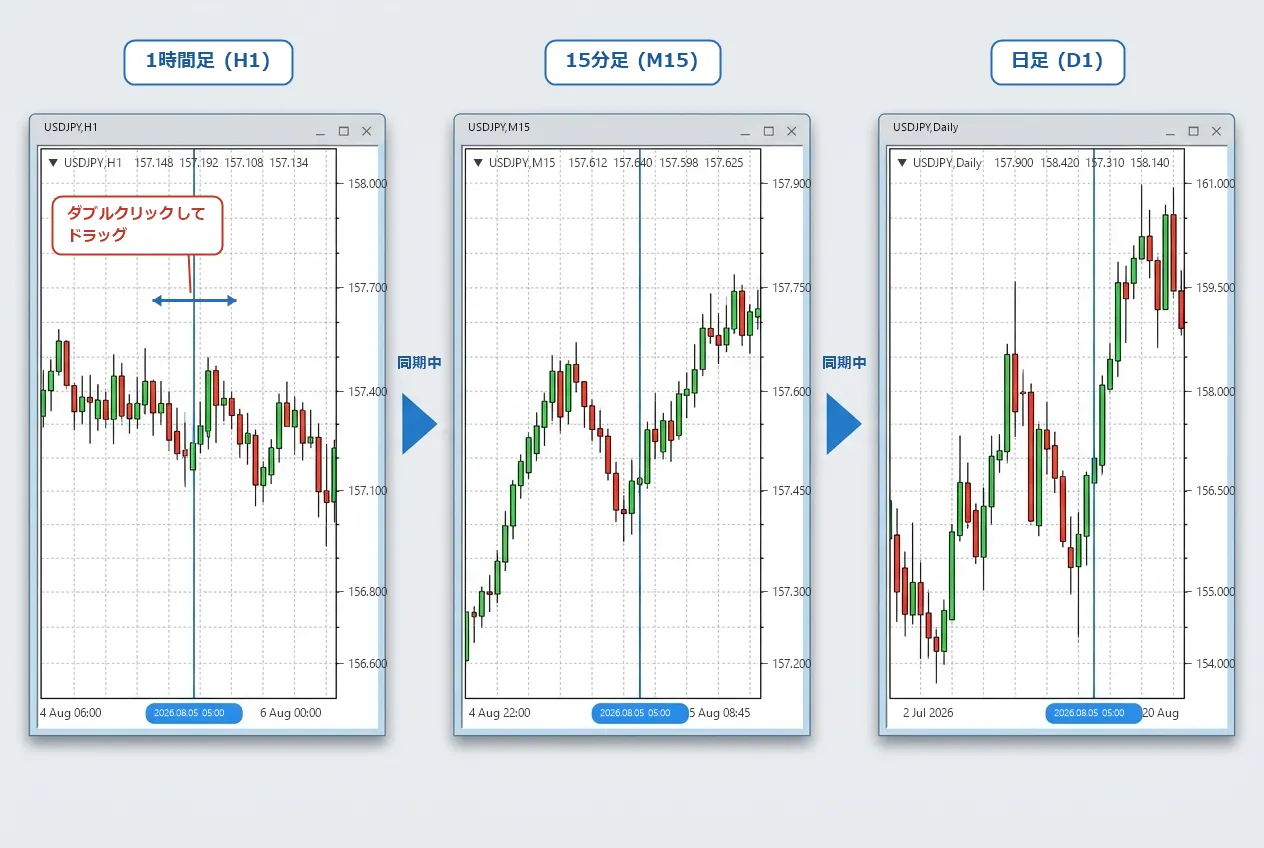
1時間足・15分足・日足の垂直線が同じ時刻で同期している画面
1時間足の線を動かすと、15分足と日足も同じ時刻へ移動
主な機能
01
線1本で全チャートが揃う

どれか1つのチャートで線を動かせば、同じグループのチャートすべてに同じ時刻が伝わります。チャートの枚数は問いません。

02
その時刻まで自動でスクロール

同期先のチャートは、線の位置が画面に入るように自動でスクロールします。表示位置を手で合わせる必要がありません。

03
グループ番号で使い分け

同期する仲間を番号で分けられます。通貨ペアごとに番号を変えれば、別の通貨ペアの線に引きずられません。

04
入れるだけで使える

垂直線は自動で作られます。あとから開いたチャートも、そのグループが今指している時刻に線が立った状態で始まります。

時間足が違っても、同じ瞬間を指す

チャート同士がやり取りしているのは「時刻」そのものです。そのため、1時間足・15分足・日足のように時間軸が違うチャートでも、それぞれの足で同じ瞬間を指します。通貨ペアが違うチャートを並べているときも同じように揃います。

H1M15D1  →  2026.08.05 05:00
どの時間足で見ても、線が指しているのは同じ時刻

上位足で全体の流れをつかみ、そのまま下位足で同じ場面の値動きを確かめる、という見方が、線を1本動かすだけでできます。

使い方
STEP 1
同じ番号を設定する

同期したいチャートすべてに ChartSyncVLine を入れ、同期グループ番号を同じ値にします。初期値は 1 なので、1つのグループで使うなら変更は不要です。

STEP 2
線を見たい時刻へ動かす

どれか1つのチャートで垂直線をダブルクリックして選択し、そのままドラッグして移動します。この間、他のチャートはまだ動きません。

STEP 3
もう一度ダブルクリックして確定する

線をもう一度ダブルクリックして選択を外すと、その時刻が確定し、同じグループの他のチャートへ反映されます。

ご購入前にご確認ください
先にお伝えしておきたいこと
  • 同期できるのは、同じ MetaTrader 4 で開いているチャート同士に限られます。MT4 を2つ以上起動している場合、別々の MT4 のチャート同士は同期しません。
  • 同期して表示位置を移動するとき、そのチャートの「自動スクロール」は解除されます。最新の足へ戻したい場合は、MT4 の自動スクロールをオンに戻してください。
  • 垂直線は常に1本表示された状態になります。線を削除しても自動で引き直されるため、線を消したままにはできません。表示したくないときは、チャートからインジケーターを外してください。
対応プラットフォームMetaTrader 4 専用です。MetaTrader 5 では動作しません。
同期の範囲同じ MT4 の中で、同じ同期グループ番号を設定したチャートすべてです。時間足が違っても、通貨ペアが違っても同期します。
反映のタイミング線をもう一度ダブルクリックして選択を外した時点です。他のチャートへは1秒ほどで反映されます。
チャートへの表示垂直線が1本表示されるだけです。ローソク足や他のインジケーターの表示を妨げません。
終了時の動作インジケーターを外したチャートからは線が消えます。そのグループの最後の1つを外すと、共有していた時刻も破棄され、次に使うときは新しく引き直しになります。
業者・口座業者固有の機能は使用していません。通貨ペア名の表記(接尾辞など)に依存する処理もありません。
設定画面

設定は3項目だけです。初期設定のまま入れるだけで同期が始まります。番号を変えるのは、グループを分けて使いたいときだけです。
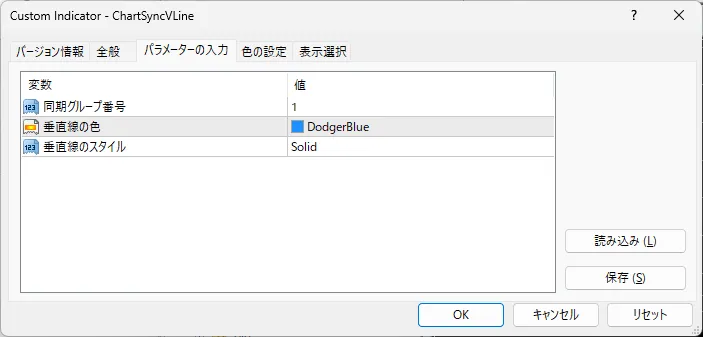
MT4 のパラメータ設定タブ
MT4 のパラメーター設定タブ
パラメータ一覧(全3項目)
同期グループ番号
同期する仲間を決める番号です。同じ番号を設定したチャート同士だけが線を共有します。USDJPY を並べたチャートは 1、EURUSD を並べたチャートは 2、というように通貨ペアごとに番号を分けておくと、別の通貨ペアを見ているチャートの線に引きずられません。
垂直線の色
垂直線の色です。グループごとに色を変えておくと、どのグループの線なのかが一目で分かります。チャートの背景やローソク足に埋もれない色を選んでください。
垂直線のスタイル
実線・点線・破線などから選べます。すでにチャートへ引いてある他の線と重なって見分けにくいときは、スタイルを変えてください。
ChartSyncVLine — MetaTrader 4 用インジケーター
¥980 (taxed)
Provider/Distributor:
Sales site:
GogoJungle

Payment

Mastercard Visa JCB Bank FamilyMart D2 D1
Product outline
Community(0)
Best Seller Ranking
Recommended Products (Campaigns)

For those using GogoJungle for the first time Easy 3 steps to use the product!

At GogoJungle, we provide services to enrich your investment life for our members. In addition, product purchases are limited to members. Why not register as a member now and make use of GogoJungle!

01
Enter user information and register as a member
02
Follow the instructions to make a purchase
03
Download from My Page
■ Important Matters and Risk Warnings Regarding Investment Products 【Financial Instruments Business Operator】
GogoJungle Inc.
Registration: Director-General of the Kanto Local Finance Bureau (Financial Instruments Business) No. 1960
【Member Association】
Japan Investment Advisers Association
【Fees and Expenses】
The use of software, e-books, investment advisory services, etc., provided on our platform involves purchase prices determined for each product.
Additionally, when conducting actual financial instrument transactions (such as FX or CFD trading), costs such as transaction fees and spreads (the difference between the sell and buy price) may be incurred through the connected brokerage firms.
【Margin and Risk of Loss】
Transactions such as FX (Foreign Exchange Margin Trading) and CFD (Contract for Difference) allow for trading in amounts exceeding the deposited margin.
Therefore, due to sudden fluctuations in target indices (currency, commodity prices, etc.), there is a risk of incurring losses that exceed the deposited margin (loss exceeding principal).
Furthermore, financial instrument transactions involve risks such as price fluctuations, which may result in losses falling below or exceeding the initial investment principal.
【Nature of Services and Trading Entity】
The Company operates a platform (marketplace) providing investment software and information; we do not engage in the buying, selling, mediation, brokerage, or agency of financial instruments on behalf of customers.
The services and information provided are intended as reference for investment decisions and do not guarantee future profits or specific results.
While some services include investment advice, they do not constitute a mandate or solicitation to trade specific financial instruments.
Final investment decisions and the execution of trades must be made at the customer’s own risk and discretion.
