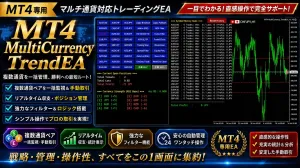

Product outline
Product Manual
Community(0)
MT4_MultiCurrency_TrendEA Indicators/E-books
MT4_MultiCurrency_TrendEA
「チャンスは『色』が教えてくれる。プロの環境認識をパネルに凝縮したトレードの右腕。」
Reviews:
Category:
How to provide:
Indicator
Sales from:
07/24/2026
Last Updated:
07/24/2026
Version:
4_31
Web Authentication:
Enable
Available company:
Seller 複素数
Seller's last login time: 7/28/2026 16:52:54
Read more seller information
¥14,000 (taxed)
2left
Next price: (Tax Inc.)
$undefined ¥18,000
Provider/Distributor:
Sales site:
GogoJungle

Payment

Mastercard Visa JCB Bank FamilyMart D2 D1


ダウンロードしたプログラムは、エキスパートアドバイザ(EA)フォルダに入れてください。 通貨ペア(27種)参照しますので、通貨ペア(気配値表示)ではすべて表示とします。 プログラムをチャートにアタッチします。 DLLにチェックを入れ、アルゴリズム取引とします。 初期状態では、表示された通貨ペアや各種ボタンスイッチがFF(灰色)なので、ON(有効)にしてください。


MultiCurrency_Trend 裁量トレード支援EA 取扱説明書 

1. 概要

本ツールは、複数通貨ペア(最大27通貨)のテクニカル指標(MA、ADX、Matrixなど)のシグナルをリアルタイムで監視し、ダッシュボード形式で一覧表示する半自動裁量トレード支援EAです。

完全自動売買ではなく、シグナルを視覚的に検知した後に人間がチャートや注文パラメータ(指値・逆指値・成行、SL/TP)を最終確認・調整して手動発注を行う、安全かつ柔軟な運用を目的としています。

2. 画面構成と主要パネル

チャート上に表示されるUIは、主に以下のパーツで構成されています。

① マルチ通貨ペア監視パネル

  • 概要: 監視対象の各通貨ペア(EURUSD, GBPUSD など)がボタンとして一覧配置されます。

  • ボタンの挙動とステータス表示:

    • トレードなし(通常時): 文字色は 。クリックすることで、その通貨ペアを「監視対象(ON)」から「監視外(グレーアウト・OFF)」に切り替えられます。

    • トレード中(ポジション保有時):

      • 文字色で損益状況をリアルタイム表示(プラス時は 緑系 / Lime、マイナス時は 赤系 / DarkRed)。

      • ポジション保有中の通貨ボタンを押すと、新規オーダーパネルではなく「Manual Closeパネル」が展開され、素早い手動決済が可能になります。

    • トレード推奨時(シグナル発生時):

      • 条件を満たしたシグナル(Buy / Sell)を検知すると、ボタンの背景色が暗い緑(Buy)または暗い赤(Sell)に変化して通知します。

      • ※ただし、ポジション保有中の場合は背景色が通常の青色に戻り、発注済みであることが視覚的に分かりやすくなります。

② フィルター・機能設定パネル

  • 各種フィルターON/OFFボタン: Matrix、ADX、Breakout、News Filterなどの有効・無効をワンクリックで切り替えられます。

  • Test Buy / Test Sellボタン: シグナルの発生を待たずに、任意の通貨ペアで強制的にテスト発注やライン描画の挙動を確認・実行するための手動テスト用スイッチです。押すとそれぞれ緑・赤に点灯します。


3. 基本的な操作フロー(使い方)

ステップ1: シグナルの検知

  • ダッシュボードの通貨ペアボタンの背景が暗い緑(Buy推奨) または 暗い赤(Sell推奨)に変化するのを待ちます。

  • ※シグナルを無視したい場合は、ボタンをクリックして「グレーアウト(監視外)」にすることも可能です。

ステップ2: チャートの切り替えとオーダーパネルの展開

  • 通知の出ている通貨ペアボタン(またはTestボタン点灯後の通貨ボタン)をクリックします。

  • 自動挙動: EAを適用しているマスターチャートの表示通貨ペアが自動でその通貨に切り替わり、画面右上に「Manual Orderパネル」が展開されます。

  • 仮ラインの描画: チャート上には、エントリー価格(黄)、損切ライン(赤点線)、利食いライン(緑点線)が自動で描画されます。

ステップ3: 注文内容の調整と決定

  • ラインの微調整: チャート上のSL/TPのラインは、ダブルクリックして選択してドラッグすることで、任意の価格へ自由に移動・調整できます。

  • 注文種別の選択: パネル上で「Market(成行)」または細分化された「Pending(Buy Stop / Buy Limit / Sell Stop / Sell Limit)」を選択します。

  • 発注(CONFIRM): 内容に問題がなければ「CONFIRM」ボタンを押して発注を完了させます。見送る場合は「CANCEL」を押します。

4. 運用上の注意点・仕様メモ

  • MT4環境での制限事項: チャートの通貨ペアを動的に切り替える仕組み上、過去データの「ストラテジーテスター(バックテスト)」ではUIやチャート切り替えが正常に動作しません。検証を行う際は、デモ口座でのリアルタイム(フォワード)テストを行ってください。

  • サフィックス(接尾辞)の手動設定: ブローカー固有の銘柄名(例: EURUSD.pro など)に対応するため、環境に合わせてプロパティ設定の SymbolSuffix に文字列を直接入力して使用します。

  • 履歴リセット機能: Statsパネルの「Reset History」ボタンにより、集計カウンターや利益金額をいつでも「0」にリセット・保持することができます(MT4のグローバル変数で自動保存されます)。

¥14,000 (taxed)
2left
Next price: (Tax Inc.)
$undefined ¥18,000
Provider/Distributor:
Sales site:
GogoJungle

Payment

Mastercard Visa JCB Bank FamilyMart D2 D1
Product outline
Product Manual
Community(0)
Best Seller Ranking
Recommended Products (Campaigns)

For those using GogoJungle for the first time Easy 3 steps to use the product!

At GogoJungle, we provide services to enrich your investment life for our members. In addition, product purchases are limited to members. Why not register as a member now and make use of GogoJungle!

01
Enter user information and register as a member
02
Follow the instructions to make a purchase
03
Download from My Page
■ Important Matters and Risk Warnings Regarding Investment Products 【Financial Instruments Business Operator】
GogoJungle Inc.
Registration: Director-General of the Kanto Local Finance Bureau (Financial Instruments Business) No. 1960
【Member Association】
Japan Investment Advisers Association
【Fees and Expenses】
The use of software, e-books, investment advisory services, etc., provided on our platform involves purchase prices determined for each product.
Additionally, when conducting actual financial instrument transactions (such as FX or CFD trading), costs such as transaction fees and spreads (the difference between the sell and buy price) may be incurred through the connected brokerage firms.
【Margin and Risk of Loss】
Transactions such as FX (Foreign Exchange Margin Trading) and CFD (Contract for Difference) allow for trading in amounts exceeding the deposited margin.
Therefore, due to sudden fluctuations in target indices (currency, commodity prices, etc.), there is a risk of incurring losses that exceed the deposited margin (loss exceeding principal).
Furthermore, financial instrument transactions involve risks such as price fluctuations, which may result in losses falling below or exceeding the initial investment principal.
【Nature of Services and Trading Entity】
The Company operates a platform (marketplace) providing investment software and information; we do not engage in the buying, selling, mediation, brokerage, or agency of financial instruments on behalf of customers.
The services and information provided are intended as reference for investment decisions and do not guarantee future profits or specific results.
While some services include investment advice, they do not constitute a mandate or solicitation to trade specific financial instruments.
Final investment decisions and the execution of trades must be made at the customer’s own risk and discretion.
