Product outline
Community(0)

Auto trendlines インジケーター
Auto Trendlines – 高精度な取引を実現
Reviews:
Keywords:
How to provide:
Indicator
Sales from:
06/19/2026
Last Updated:
-
Version:
-
Available company:

Vietnam
Follow 0 ❘ Followers 0
Follow
Seller Hinh
Seller's last login time: 6/21/2026 23:25:10

指標名:オートトレンドライン
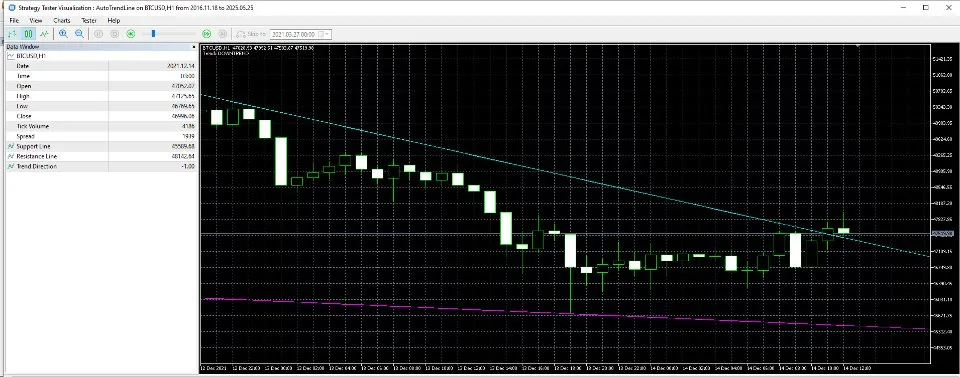
説明:最適化されたトレンド方向検出機能で自動的にトレンドラインを描画します。
主な機能:
1.自動トレンドライン描画:
2本の主要ラインを描画します:
サポートライン– 色:マゼンタ
レジスタンスライン– 色:シアン
ラインの計算基準:
2つの極値(高値/安値)
または極値とデルタ(カスタムオフセット)
2.トレンド方向検出:
インジケータは現在のトレンドを次のように判定します:
TREND_UP(上昇トレンド値 = 1)
TREND_DOWN(下降トレンド値 = 0)
TREND_NEUTRAL(横ばい値 = -1)
チャート上にトレンド情報を表示することもできます。
3.ユーザー入力パラメータ:
| パラメータ | 説明 |
|---|---|
| InpLineType | ライン計算方法(極値またはデルタ) |
| InpLeftExmSide | 極値を見つける左側のバー数 |
| InpRightExmSide | 極値検出の右側バー数 |
| InpFromCurrent | 現在のバーからのオフセット(デルタ法で使用) |
| InpPrevExmBar | 極値の前のバーを含めるか |
| InpShowObjects | グラフィックなトレンドラインオブジェクトを表示するか |
| InpExtendLines | トレンドラインをチャートの右側まで延長する |
| InpTrendThreshold | トレンド方向を決定する角度閾値 |
| InpShowTrendInfo | テキストのトレンド情報を表示する(有効/無効) |
| InpMaxBarsToProcess | 処理する最大バー数 |
4.カスタマイズオプション:
サポートおよびレジスタンスラインのカラーとライン幅はカスタマイズ可能です。
¥10,000 (taxed)
Provider/Distributor:
Sales site:
GogoJungle
●Payment





Product outline
Community(0)
Best Seller Ranking
Recommended Products (Campaigns)
For those using GogoJungle for the first time Easy 3 steps to use the product!
At GogoJungle, we provide services to enrich your investment life for our members. In addition, product purchases are limited to members. Why not register as a member now and make use of GogoJungle!
01
Enter user information and register as a member
02
Follow the instructions to make a purchase
03
Download from My Page
