

1クリック注文
GogoJungleでのサービス購入が、かんたん・スピーディーで便利になります。
※コンビニ・銀行支払いの場合は、注文完了しますが入金の確認がされるまでは、商品をダウンロードすることは出来ません。
※クレジットカードの場合はカード情報の入力が必要になります。
●お支払い方法





Gonzo Special Lite v4.00
Gonzo Special Liteがv4.00にアップデート。これまでの低頻度な通常モードに加え、取引機会を増やすアグレッシブモードを選べるようになりました。最大1ポジションのシンプルさはそのままです。
XAUUSD / GOLDMetaTrader 5 EAv4.00GogoJunglev4.00アップデート
v4.00では、従来の通常モードに加えて、取引機会を増やすアグレッシブモードを追加しました。あわせて、ポジションの安定化処理、ロールオーバー/週末の新規停止、リスク%計算も見直しています。
通常モード(初期設定):v3.00から引き継いだ、エントリー条件を厳しく絞るモードです。初期設定はこちらです。
アグレッシブモード(任意):Gonzo Special v4.00のロジックからLiteに合うものを厳選し、通常モードより取引機会を増やしました。必要に応じて切り替えられます。
安定化処理:相場状況に応じて、保有中のポジションを保護する仕組みを追加しました。両モードのメインロジックで自動的に働くため、追加設定は不要です。
ロールオーバー/週末制御:スプレッドが不安定になりやすいロールオーバー前後と週末は、初期設定で新規エントリーを停止します。保有中のポジションを時間だけで決済することはありません。
最大1ポジションと注文コメント:Liteは従来どおり、同じ銘柄・マジックナンバーで最大1ポジションです。ピラミッディングや追加建ては行いません。注文履歴では、GSL4:Specialがメイン、GSL4:Special+がアグレッシブで追加されるロジックです。
Special v4.00方式のリスク計算:Gonzo Special v4.00と同じ方式へ変更しました。残高または有効証拠金と、実際のSLまでの距離に合わせてロットを計算します。初期設定は固定0.01ロットです。
Liteで使える機能:Gonzo矢印、Session、Volume、P/D、Fibo、前高安などを利用できます。SpecialのA/B/C分析、通知マトリクス、フルSMC分析は搭載していません。
日本語商品ページ
Gonzo Special Liteは、Gonzo Specialの機能を必要なものに絞り、最大1ポジションでシンプルに運用できるXAUUSD専用EAです。
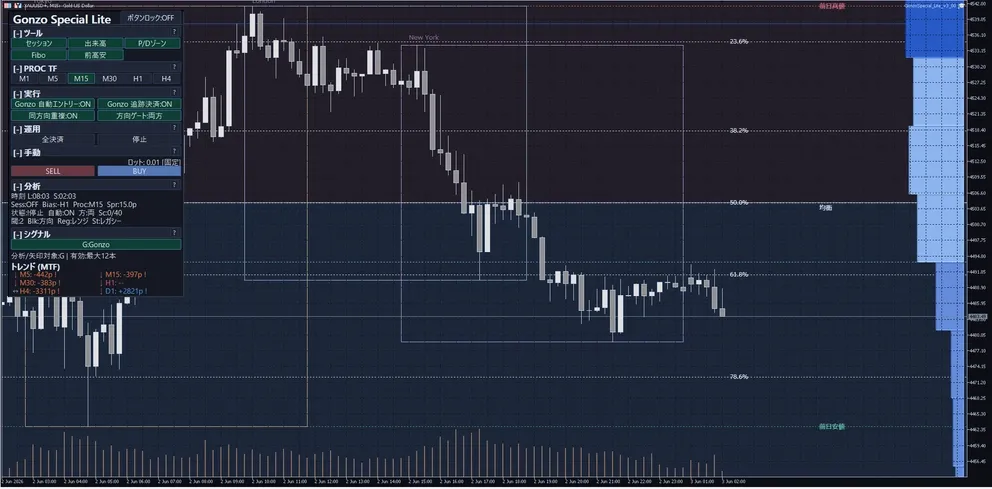
商品概要
| 項目 | 内容 |
|---|---|
| 対象 | XAUUSD / GOLD |
| プラットフォーム | MetaTrader 5 EA |
| バージョン | 4.00 |
| 初期売買モード | 通常 |
| 切替モード | アグレッシブ |
| ポジション数 | 同じ銘柄・マジックナンバーで最大1。ピラミッディング/追加建てなし。 |
| 安定化処理 | 両モードのメインロジックで自動的に働きます。追加設定は不要です。 |
| 基本ロット | 初期設定は固定0.01ロット。リスク%方式にも切り替えられます。 |
| リスク%方式 | Gonzo Special v4.00と同じ方式。残高または有効証拠金と、実際のSLまでの距離からロットを計算します。 |
| 共通の新規停止 | ロールオーバー23:00~01:00、週末は金曜18:00~月曜01:00。初期値ON、サーバー時刻。 |
| 通常モード金曜制御 | 金曜16:00以降の新規停止。初期値ON。既存ポジションは通常管理。 |
| 表示・分析 | Gonzo矢印、Session、Volume、P/D、Fibo、前高安を利用できます。A/B/C・通知マトリクス・フルSMC分析はありません。 |
| 注文コメント | GSL4:Special=メイン、GSL4:Special+=アグレッシブの追加ロジック |
| 公式ページ | GogoJungle Japanese product page |
Gonzo 3商品の位置づけ
| 商品 | 位置づけ | 向く運用 | 主な違い |
|---|---|---|---|
| Gonzo Special | 多機能モデル | 自動売買に加えて表示・通知・手動操作も使いたい方 | A/B/C/G、通知、フルSMC分析、パネル操作、任意ピラミッディング |
| Gonzo Nexus | 別ロジックモデル | Specialとは異なる売買タイミングも組み合わせたい方 | A/B/C/G NX、Specialとは別系統の売買ロジック |
| Gonzo Special Lite | シンプルモデル | 必要な機能に絞り、最大1ポジションで運用したい方 | 通常/アグレッシブ、Gonzo矢印、軽量表示 |
バックテスト概要
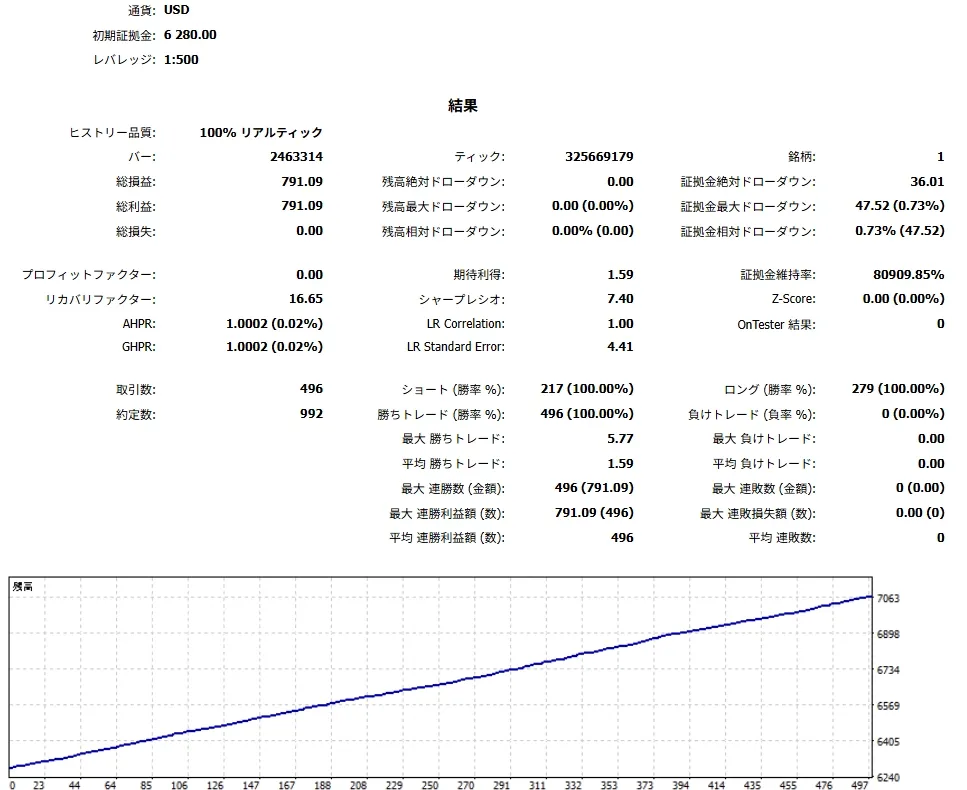
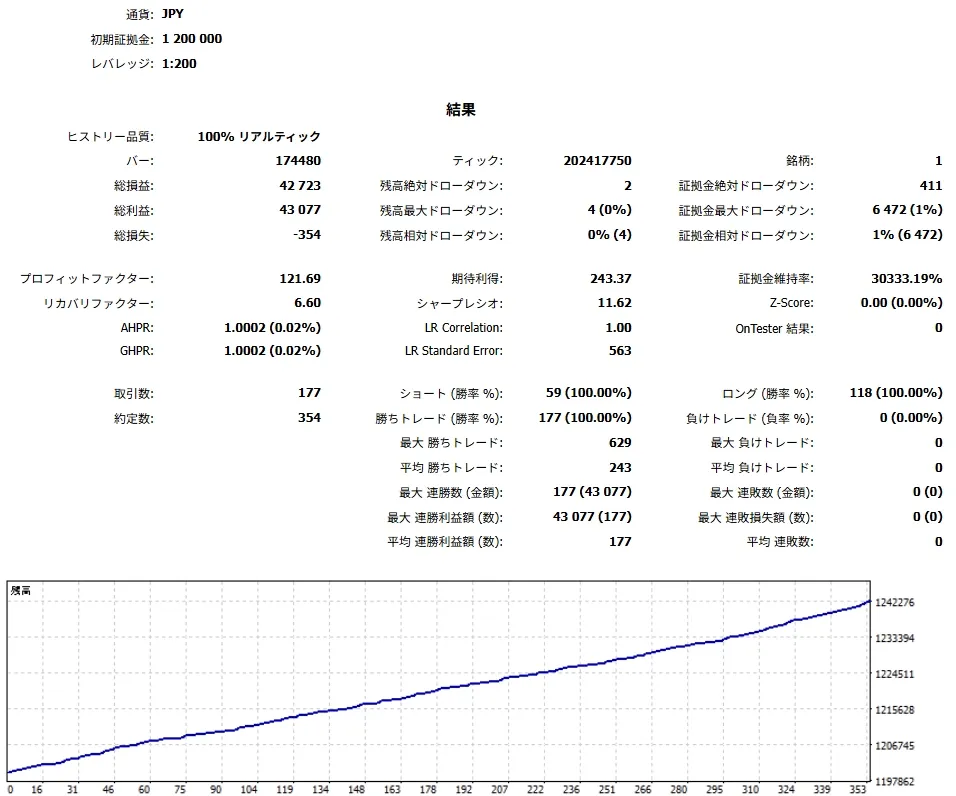
以下は通常モードでのヒストリカルバックテストの要約です。将来の利益、勝率、最大DD、損失回避を保証するものではありません。
| 期間 | 銘柄 | 時間足 | 取引数 | 勝率 | PF | RF | 純益 | 最大DD |
|---|---|---|---|---|---|---|---|---|
| 2019.01.01 - 2025.12.31 | XAUUSD | M1 | 496 | 100.00% | ∞ | 16.65 | 791.09 USD | 0.73% |
| 2023.12.11 - 2026.05.29 | XAUUSD | M1 | 177 | 100.00% | 121.69 | 6.60 | 42,723 JPY | 1.00% |
日本語操作マニュアル
最初は初期設定の通常モード、固定0.01ロットのまま、デモ口座かストラテジーテスターで動作をご確認ください。設定画面には29項目が表示されます。
1. 初回セットアップ
| 手順 | 内容 | 注意 |
|---|---|---|
| 1 | XAUUSD / GOLDのチャートにEAをセットし、MT5側とEA側の自動売買許可を確認します。 | ブローカーにより銘柄名が異なる場合があります。 |
| 2 | 通常モード、固定ロット0.01、PROC TF M15、ロールオーバー/週末新規停止ONで確認を始めます。 | 初回からアグレッシブやロット増加へ変更しないでください。 |
| 3 | 運用モード、Spr、State、Blk、Auto、Dirを確認します。 | Sprが広い時はエントリー、決済、SL/TP、追跡結果が悪化しやすくなります。 |
| 4 | 複数商品・複数チャートではマジックナンバーを分けます。 | Close Allや自動決済の対象範囲を混ぜないためです。 |
2. 3つの時間足の役割
| 時間足 | 役割 |
|---|---|
| MT5上部の時間足 | チャートの見た目を切り替える時間足です。ローソク足の形や見やすさを確認するために使います。自動売買ロジックそのものを直接切り替えるものではありません。 |
| PROC TF | EA内の分析・描画・シグナル表示の基準です。パネル上で切り替えられ、設定画面の「分析基準TF」は起動時にパネルへ反映される初期値です。 |
| 内部ロジック時間足 | 売買ロジック本体が内部で参照する時間足です。ユーザーがパネルや設定画面から直接変更するものではありません。 |
3. パネル表示・ボタンの読み方
| 表示箇所 / Panel area | ラベル / Visible label | 表示される値・状態 / Values or states | 操作した時の動き / Action | 注意点 / Caution |
|---|---|---|---|---|
| Header | 商品名、ロック、コンパクト/状態行 | 商品名、ボタンロック、RUN/停止状態 | パネル移動・固定・状態確認 | ロック中は配置変更が制限されます。 |
| TOOLS | Session / Volume / P/D / Fibo / Prev H/L | Liteで使える軽量表示 | 表示ON/OFFを切り替えます。 | OB/FVG/EQH/EQL/Swing/InternalのフルSMC操作はありません。 |
| PROC TF | M1 / M5 / M15 / M30 / H1 / H4 | 選択中の分析基準TF | 分析・描画・Gonzo表示の基準を切り替えます。 | MT5上部の時間足や内部売買時間足とは別です。 |
| EXEC | Auto Entry / Auto Close / Direction | 各機能のON/OFFまたは方向 | 新規、決済・追跡、方向を切り替えます。 | 旧来のOverlap表示が見える場合も、Lite管理対象は最大1ポジション固定で、重複建てやピラミッディングを有効にしません。売買モードはMT5のEA設定で選びます。 |
| OPS | Close All / Stop / Compact / Reset | 確認待ち、実行中、停止中 | 全決済、停止、表示整理、状態リセットを行います。 | 銘柄とマジックナンバーの範囲を確認してください。 |
| MANUAL | Lot / SELL / BUY / Manual SL/TP | 固定または発注時の自動計算ロット | パネルから手動BUY/SELLを行います。 | リスク%モードでは計算と発注に必要な初期SLを必ず付けます。 |
| ANALYTICS | Time / Session / Bias / Proc / Spr / State / Auto / Dir / Blk | 現在状態とブロック理由 | スプレッド、方向、準備状態を確認します。 | 表示は利益保証ではありません。 |
| SIGNAL | Gonzo矢印 / G表示 | Liteの売買候補表示 | 自動売買の確認や手動判断の補助に使います。 | A/B/C表示や通知マトリクスはありません。 |
パネル略語
| 略語 | 意味 |
|---|---|
| Spr | 現在スプレッド。xx.xpのようにpipsで表示され、狭スプレッド運用の確認に使います。 |
| State | READY / SETUP / BLOCKEDなど、現在の準備状態。 |
| Blk | 現在エントリーを止めている理由。方向、時間、スプレッド、スコア、リスク制御など。 |
| Sc | 現在スコア。x/yのように条件充足度を示します。 |
| Thr | 必要しきい値。Scが十分かを見る基準です。 |
| Reg | 市場レジームの文脈ラベル。保証ではなく状況把握です。 |
| St | 戦略・状態ラベル。文脈確認用です。 |
| Sig | シグナルの年齢や残り有効時間の目安。 |
4. Liteのシグナル読み方
| 表示 | 読み方 |
|---|---|
| Gonzo矢印 / G表示 | Liteで中心になる売買候補表示です。方向、時間帯、Spr、State、Blkと合わせて確認します。 |
| 通常モード | v3.00から引き継いだ、低頻度・厳選のロジックです。履歴コメントはGSL4:Specialです。 |
| アグレッシブモード | Gonzo Special v4.00からLite向けに厳選したロジックを使います。履歴にはGSL4:SpecialとGSL4:Special+が表示されます。 |
| 安定化処理 | 両モードのメインロジックで自動的に働きます。設定項目はありません。アグレッシブの追加ロジックには働きません。 |
| A/B/C・フルSMC | Special/NexusのA/B/CやSMC画面はLiteにはありません。 |
| 注意 | シグナルと注文コメントは識別・判断補助です。利益や将来の勝率を保証しません。 |
5. リスク%ロット計算仕様
リスク%方式では、選択した口座資金と実際の初期SLから発注ロットを計算します。初期設定は固定0.01ロットです。まず固定ロットで動作を確認し、必要な場合だけ切り替えてください。
| 手順 | 仕様 |
|---|---|
| 1. 有効条件 | ロット計算モードで『1取引あたりのリスク%』を選び、リスク率を0より大きくすると使われます。固定ロットを選んだ場合は固定ロット値を使います。 |
| 2. 基準資金 | 『リスク計算に使う資金』で、残高または有効証拠金を選びます。初期値は残高です。 |
| 3. リスク金額 | リスク金額 = 選択した基準資金 × リスク率 ÷ 100です。1.00は1%、0.50は0.5%です。初期値は1.00です。 |
| 4. 1ロットあたりの想定損失 | 発注直前の現在ASK/BIDと実際の初期SLを使い、OrderCalcProfitで1.00ロットがSLまで動いた場合の口座通貨建て損失を計算します。 |
| 5. ロット算出 | リスク金額を1ロットあたりの想定損失で割り、ブローカーの最大ロット以下に制限し、ロット刻みに合わせて切り下げます。 |
| 6. 発注しない条件 | 初期SLが不正、損失計算に失敗、または計算ロットが最小ロット未満の場合は注文を出しません。固定ロットへ退避しません。 |
| 7. 手動エントリー | リスク%方式ではロット計算と発注に初期SLが必要です。『手動エントリー時にSL/TPを付帯』がfalseでも、必要な初期SLを付けて発注します。 |
| 8. 注意 | リスク%はロット算定の基準であり、固定金額や口座損益によるエントリーフィルタではなく、実損失の上限保証でもありません。滑り、窓開け、スプレッド、約定条件で実損失は変わります。 |
6. Liteの軽量表示
| 用語 | 説明 |
|---|---|
| Sessions | 東京・ロンドン・ニューヨークなどの時間帯を確認する補助表示です。 |
| Volume | 価格帯ごとの出来高の偏りを見る補助表示です。 |
| P/D zone | 現在価格が相対的に高い側か安い側かを見る補助ゾーンです。 |
| Fibo | 戻り率の目安を表示します。単独で売買を決めるものではありません。 |
| Prev H/L | 前回高値・安値の目安を表示します。 |
| 非搭載 | OB、FVG、EQH/EQL、Swing、Internal、A/B/C分析、通知マトリクスはLiteでは利用できません。 |
7. 半裁量・手動運用フロー
| 運用 | 手順 |
|---|---|
| 通常モード全自動 | 売買モード=通常、自動売買=true、Gonzo自動エントリー=true、自動決済・追跡=true、固定0.01、ロールオーバー/週末新規停止ONから始めます。 |
| アグレッシブ全自動 | 通常で確認後、取引機会を増やしたい場合だけ売買モードをアグレッシブへ変更します。共通の新規停止時間はそのまま有効です。 |
| 観察のみ | 自動売買を許可=falseにします。新規だけ止める場合はGonzo自動エントリー=falseにします。 |
| シグナル監視+手動 | Gonzo矢印、軽量表示、Spr、State、Blkを確認し、ロットと方向が許容できる時だけBUY/SELLを使います。 |
| 手動エントリー+EA管理 | Gonzo自動エントリー=false、自動決済・追跡=true。手動SL/TPと管理範囲を必ず確認します。 |
| Close Allと停止 | 銘柄とマジックナンバー範囲を確認して実行し、既存ポジションの状態を別途確認します。 |
| 新規停止時間 | ロールオーバー/週末の新規停止は両モードに適用され、通常だけ金曜16:00以降の新規停止も適用されます。既存ポジションは時間到来だけでは決済しません。 |
| ポジション数 | 同一銘柄・同一マジックナンバーのLite管理対象は最大1です。ピラミッディングや追加建ては行いません。 |
やってはいけないこと
- 同じXAUUSD口座で複数商品を同じマジックナンバーのまま動かさない。
- 初回からアグレッシブへの切替とロット増加を同時に行わない。
- 表示だけの切替を、自動売買条件の変更や利益保証として扱わない。
- A/B/C・通知マトリクス・フルSMC機能がLiteにもあると考えない。
- Overlap表示を、最大1ポジション制限の解除やピラミッディング機能として扱わない。
- 自動決済・追跡をfalseにしたまま、EAが出口管理すると期待しない。
8. 設定一覧
以下はv4.00のMT5設定画面に表示される29項目だけを、表示順・グループ別に整理したものです。
| MT5の設定画面の項目名 / MT5 setting item | 初期値 / Initial value | 表示値・入力例 / Visible value or input example | 何を変えるか / What it controls | 変更する場面 / When to change | 注意点 / Caution |
|---|---|---|---|---|---|
| マジックナンバー / Magic number | 507201 | 数値入力 / numeric input | このEAが管理するポジション・注文を識別します。 | 複数商品・複数チャートで変更します。 | 同じXAUUSDで複数EAを動かす場合は分けてください。 |
| 取引方向 / Trade direction | 両方 / Both | 買いのみ / Buy only、売りのみ / Sell only、両方 / Both、停止 / Disabled | 自動エントリー方向を制限します。 | 方向を意図的に絞る場合に変更します。 | 表示だけでなく売買結果も変わります。 |
| ロット計算モード / Lot sizing mode | 固定ロット / Fixed lot | 固定ロット / Fixed lot、1取引あたりのリスク% / Risk % per trade | 固定ロット運用か、Special v4.00と同じ注文時リスク計算方式かを選びます。 | 固定0.01で確認後、必要な場合だけリスク%へ変更します。 | リスク%は損失上限を保証しません。 |
| 固定ロット / Fixed lot | 0.01 | 数値入力 / numeric input | 固定ロットモードだけで使う発注ロットです。 | 最小に近い値から確認します。 | リスク%の計算失敗時に、この値へ退避することはありません。 |
| 1取引あたりのリスク率(1.00=1%) / Risk per trade (1.00=1%) | 1.00 | 数値入力 / numeric input | 発注直前の現在ASK/BIDと実際の初期SLから1ロット時の口座通貨建て損失を求め、選択した資金×設定率に収まる計算上のロットを刻み単位で切り下げます。 | 資金量と許容DDを確認後に調整します。 | SL不正・計算失敗・最小ロット未満では注文を出しません。リスク額はロット算定だけに使います。 |
| リスク計算に使う資金 / Capital basis for risk | 残高 / Balance | 残高 / Balance、有効証拠金 / Equity | リスク%ロットの計算元を、Special v4.00と同じく残高または有効証拠金から選びます。 | 含み損益を反映した資金基準を使う場合だけ有効証拠金へ変更します。 | 初期値は残高です。固定ロットモードでは発注ロットに影響しません。 |
| MT5の設定画面の項目名 / MT5 setting item | 初期値 / Initial value | 表示値・入力例 / Visible value or input example | 何を変えるか / What it controls | 変更する場面 / When to change | 注意点 / Caution |
|---|---|---|---|---|---|
| 自動売買を許可 / Allow auto trading | true | true / false | EA側の売買アクション全体を許可します。 | 売買を止める場合はfalseにします。 | MT5側の自動売買許可も必要です。 |
| Gonzo自動エントリー / Gonzo auto entry | true | true / false | Gonzoの新規自動エントリーを許可します。 | 監視・手動中心ではfalseにします。 | 自動決済・追跡とは別です。 |
| Gonzo自動決済・追跡 / Gonzo auto close and tracking | true | true / false | 自動決済と保有後の追跡を許可します。 | 既存ポジションをEA管理する場合はtrueにします。 | falseではEA由来の管理が止まります。 |
| 運用モード / Operating mode | 通常(v3互換・厳選) / Normal | 通常 / Normal、アグレッシブ / Aggressive | 低頻度・厳選の通常と、取引機会を増やすアグレッシブを選びます。 | 通常で確認後、頻度を上げたい場合だけ変更します。 | 安定化処理は別モードではなく、両方で自動的に働きます。 |
| MT5の設定画面の項目名 / MT5 setting item | 初期値 / Initial value | 表示値・入力例 / Visible value or input example | 何を変えるか / What it controls | 変更する場面 / When to change | 注意点 / Caution |
|---|---|---|---|---|---|
| 分析基準TF / Analysis timeframe | M15 | M1 / M5 / M15 / M30 / H1 / H4 | 分析・描画・Gonzo表示の基準です。 | 見え方を変える場合に変更します。 | 内部売買時間足とは別です。 |
| Gonzoの矢印を表示 / Show Gonzo arrows | true | true / false | Gonzo矢印を表示します。 | 候補方向を見たい場合に使います。 | 利益保証ではありません。 |
| セッション帯を表示 / Show session zones | true | true / false | 主要セッション帯を表示します。 | 動きやすい時間帯の確認に使います。 | ブローカー時間差に注意してください。 |
| 出来高プロファイルを表示 / Show volume profile | true | true / false | 価格帯ごとの出来高偏りを表示します。 | 滞留帯を見たい場合に使います。 | 補助表示です。 |
| P/Dゾーンを表示 / Show premium/discount zones | true | true / false | 相対的な割高・割安ゾーンを表示します。 | 位置確認に使います。 | 単独で売買を決めないでください。 |
| Fiboを表示 / Show Fibonacci levels | true | true / false | 戻り率の目安を表示します。 | 位置確認に使います。 | 単独で売買を決めないでください。 |
| 前高安を表示 / Show previous highs/lows | true | true / false | 前回高値・安値を表示します。 | 反応候補の確認に使います。 | 急変動とスプレッドに注意してください。 |
| 手動エントリー時にSL/TPを付帯 / Attach SL/TP to manual entries | true | true / false | 固定ロットモードで、パネル手動BUY/SELLへSL/TPを付けるか決めます。 | 手動運用時に変更します。 | リスク%モードではfalseでも、ロット計算と発注に必要な初期SLを必ず付けます。 |
| MT5の設定画面の項目名 / MT5 setting item | 初期値 / Initial value | 表示値・入力例 / Visible value or input example | 何を変えるか / What it controls | 変更する場面 / When to change | 注意点 / Caution |
|---|---|---|---|---|---|
| ロールオーバー新規停止 / Block entries around rollover | true | true / false | 両モードでロールオーバー前後の新規を止めます。 | 停止を使わない場合はfalseにします。 | 初期値はON。時刻はサーバー時刻です。 |
| 停止開始(サーバー時間) / Stop start, server time | 23:00 | HH:MM | ロールオーバー新規停止の開始時刻です。 | ブローカー時間に合わせます。 | 日本時間等へ自動変換されません。 |
| ロールオーバー基準 / Rollover reference | 00:00 | HH:MM | ロールオーバーの基準時刻です。 | ブローカーに合わせます。 | 既存ポジションの強制決済時刻ではありません。 |
| 新規再開(サーバー時間) / Entry resume, server time | 01:00 | HH:MM | ロールオーバー後の新規再開時刻です。 | スプレッド回復に合わせます。 | 長くすると取引機会が減ります。 |
| 週末の新規停止 / Block weekend entries | true | true / false | 両モードで金曜から週明けまで新規を止めます。 | 週末停止を使わない場合はfalseにします。 | 初期値はON。既存ポジションは時間到来だけでは決済しません。 |
| 金曜停止(サーバー時間) / Friday stop, server time | 18:00 | HH:MM | 週末新規停止の開始時刻です。 | ブローカー時間に合わせます。 | 金額や口座損益を決済条件にしません。 |
| 再開曜日 / Resume day | 月曜 / Monday | 日曜 / Sunday、月曜 / Monday | 週末後の再開曜日を選びます。 | 市場開始に合わせます。 | 市場が閉じている間は発注できません。 |
| 週末後の新規再開 / Weekend entry resume | 01:00 | HH:MM | 再開曜日の新規再開時刻です。 | スプレッド回復に合わせます。 | サーバー時刻です。 |
| MT5の設定画面の項目名 / MT5 setting item | 初期値 / Initial value | 表示値・入力例 / Visible value or input example | 何を変えるか / What it controls | 変更する場面 / When to change | 注意点 / Caution |
|---|---|---|---|---|---|
| 金曜後半の新規停止 / Block new entries late Friday | true | true / false | 通常モードの金曜後半新規を止めます。 | 金曜停止を使わない場合はfalseにします。 | アグレッシブには適用されず、既存ポジションを閉じません。 |
| 新規停止開始時刻 / Entry block start hour | 16 | 0~23 | 金曜新規停止の開始時刻です。 | サーバー時刻に合わせます。 | 早めるほど機会が減ります。 |
| MT5の設定画面の項目名 / MT5 setting item | 初期値 / Initial value | 表示値・入力例 / Visible value or input example | 何を変えるか / What it controls | 変更する場面 / When to change | 注意点 / Caution |
|---|---|---|---|---|---|
| 表示言語 / Display language | 日本語 / Japanese | 日本語 / Japanese、英語 / English | パネル表示言語を切り替えます。 | 表示言語を変える場合に使います。 | 売買ロジックには影響しません。 |
9. 新規停止時間の実例
両モード共通・新規停止時間の例
| シナリオ | 設定例 | 想定動作 | 注意点 |
|---|---|---|---|
| ロールオーバー新規停止 | 両モード、制御=true、23:00停止、01:00再開 | 停止時間中はGSL4:SpecialとGSL4:Special+の新規を止めます。 | 既存ポジションは通常管理を続けます。 |
| 週末新規停止 | 両モード、制御=true、金曜18:00停止、月曜01:00再開 | 週末時間中はGSL4:SpecialとGSL4:Special+の新規を止めます。 | 時刻はサーバー時刻です。 |
| 保有ポジション | 新規停止時間へ入った場合 | 時間到来を理由に強制決済しません。 | 通常のSL/TP・追跡管理を続けます。 |
通常モード・金曜新規停止の例
| シナリオ | 設定例 | 想定動作 | 注意点 |
|---|---|---|---|
| 通常モード | 新規停止=true、開始16時 | 金曜16:00以降の新規を止めます。 | 既存ポジションを閉じる設定ではありません。 |
| アグレッシブ | 売買モード=アグレッシブ | この金曜16:00制御は適用しません。 | 共通の週末停止は金曜18:00から有効です。 |
10. FAQ・トラブルシュート
| 質問 | 回答 |
|---|---|
| Q. 通常とアグレッシブの違いは? | 通常はv3.00から引き継いだ低頻度・厳選のモードです。アグレッシブはGonzo Special v4.00からLite向けに厳選したロジックで、取引機会を増やします。 |
| Q. 最初はどちらのモードを使えばよいですか? | 初期設定の通常モードから始めてください。動作とロットを確認したうえで、取引機会を増やしたい場合だけアグレッシブへ切り替えます。 |
| Q. 注文コメントの違いは? | GSL4:Specialはメインロジック、GSL4:Special+はアグレッシブで追加されるロジックです。 |
| Q. 安定化処理は選べますか? | 設定は必要ありません。両モードのメインロジックで自動的に働きます。アグレッシブの追加ロジックには働きません。 |
| Q. SMCやA/B/C分析は使えますか? | 使えません。LiteはGonzo矢印とSession、Volume、P/D、Fibo、前高安などの軽量表示に限定しています。 |
| Q. ロールオーバー/週末制御は通常でも使われますか? | はい。両モードで初期設定ONです。新規だけを止め、時間到来を理由に既存ポジションを強制決済しません。 |
| Q. ポジションは複数持ちますか? | 同一銘柄・同一マジックナンバーのLite管理対象は最大1です。ピラミッディングや追加建ては行いません。 |
| Q. リスク%を1%にしたい時は? | 『1取引あたりのリスク率』へ1.00と入力します。0.50は0.5%、0.01は0.01%です。 |
| Q. リスク%ロットはどのように計算しますか? | Special v4.00と同じ注文時計算方式です。計算資金は残高/有効証拠金から選び、発注直前の現在ASK/BID、実際の初期SL、OrderCalcProfitによる1ロット時の口座通貨建て損失を使い、ロット刻みで切り下げます。 |
| Q. リスク%なら損失は設定率以内ですか? | いいえ。設定率はロット計算の基準であり、損失上限の保証ではありません。約定滑り、窓開け、スプレッドにより実損失は計算値を上回る場合があります。 |
| Q. 取引が出ません。 | 自動売買許可、Gonzo自動エントリー、運用モード、方向、Spr、State、Blk、時間制御、MT5側の許可を確認してください。リスク%モードでは、初期SL不正、損失計算失敗、計算ロットが最小未満の場合も発注しません。 |
| Q. 複数のGonzo商品を同時に使えますか? | 使えますが、マジックナンバーを分け、口座全体のロット、同方向重複、DD許容を合算して管理してください。 |
English product page
Gonzo Special Lite is a streamlined XAUUSD EA that keeps the essential parts of Gonzo Special and manages at most one position for a simple setup.
What's new in v4.00
Normal mode (default): Carries forward the selective, lower-frequency style of v3.00. This is the default setting.
Aggressive mode (optional): Uses logic selected from Gonzo Special v4.00 to suit Lite and creates more trade opportunities than Normal.
Stability management: Adds automatic protection for open positions when market conditions call for it. It works on the main logic in both modes without extra settings. It does not apply to the additional Aggressive logic.
Rollover and weekend control: New entries are paused by default around rollover and over the weekend, when spreads can become unstable. Open positions are not closed simply because the clock reaches those times. Normal also has a late-Friday entry block.
Maximum one position and comments: Lite still holds at most one position for the same symbol and magic number. There is no pyramiding or scale-in. GSL4:Special marks the main logic, while GSL4:Special+ marks the logic added in Aggressive.
Special v4.00 risk sizing: Risk-percent sizing now uses the same method as Gonzo Special v4.00. Lot size is based on Balance or Equity and the actual distance to the SL. Fixed 0.01 lot remains the default.
Features included in Lite: Gonzo arrows, Sessions, Volume, P/D, Fibo and previous highs/lows are available. Special's A/B/C analysis, notification matrix and full SMC analysis are not included.
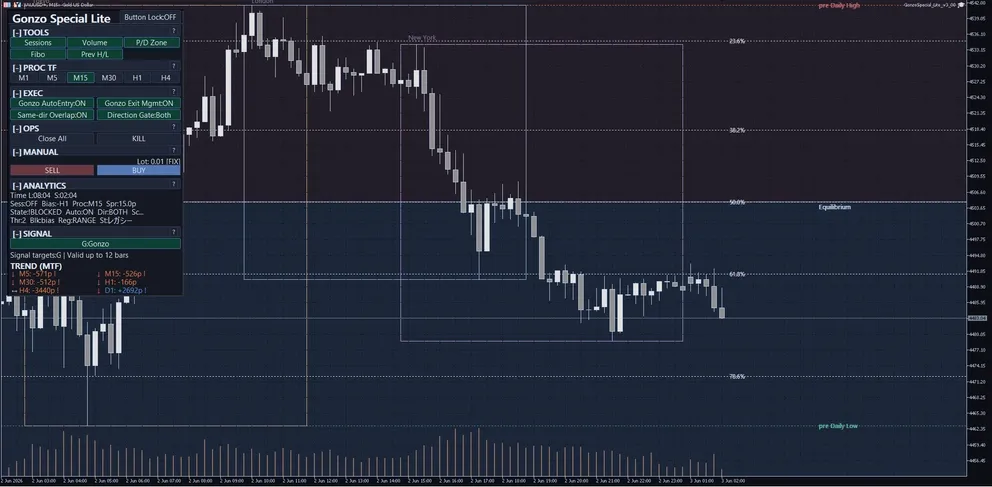
Product overview
| Item | Details |
|---|---|
| Target | XAUUSD / GOLD |
| Platform | MetaTrader 5 EA |
| Version | 4.00 |
| Default trading mode | Normal |
| Optional trading mode | Aggressive |
| Positions | At most one for the same symbol and magic number; no pyramiding or scale-in. |
| Stability management | Works automatically on the main logic in both modes. No extra setting is needed. |
| Starting lot | Fixed 0.01 lot by default, with optional Risk % per trade. |
| Risk-based lot | Same method as Gonzo Special v4.00. Uses Balance or Equity and the actual distance to the SL. |
| Shared entry blocks | Rollover 23:00-01:00 and weekend Friday 18:00-Monday 01:00; ON by default, broker server time. |
| Normal Friday control | Blocks new Normal entries after Friday 16:00; ON by default; does not close existing positions. |
| Display and analysis | Gonzo arrows, Sessions, Volume, P/D, Fibo and previous highs/lows are available. A/B/C, the notification matrix and full SMC analysis are not included. |
| Order comments | GSL4:Special = main logic; GSL4:Special+ = logic added in Aggressive |
| Official page | GogoJungle English product page |
Position in the Gonzo lineup
| Product | Positioning | Best fit | Main difference |
|---|---|---|---|
| Gonzo Special | Full-feature model | Automatic trading with display, notifications and manual analysis | A/B/C/G, notifications, full SMC analysis and panel controls |
| Gonzo Nexus | Separate-logic model | Combining timing that differs from Special | A/B/C/G NX and a separate trading-logic family |
| Gonzo Special Lite | Streamlined model | Keeping the setup simple with the features you need and at most one position | Normal/Aggressive, Gonzo arrows and lightweight aids |
Backtest overview
Historical backtest summary only. It does not guarantee future profit, win rate, drawdown, or loss avoidance.
| Period | Symbol | Timeframe | Trades | Win rate | PF | RF | Net profit | Max DD |
|---|---|---|---|---|---|---|---|---|
| 2019.01.01 - 2025.12.31 | XAUUSD | M1 | 496 | 100.00% | N/A | 16.65 | 791.09 USD | 0.73% |
| 2023.12.11 - 2026.05.29 | XAUUSD | M1 | 177 | 100.00% | 121.69 | 6.60 | 42,723 JPY | 1.00% |
English operation manual
Start with the default Normal mode and fixed 0.01 lot on a demo account or in the Strategy Tester. Version 4.00 shows 29 settings in MT5 Inputs.
1. First setup
| Step | Action | Caution |
|---|---|---|
| 1 | Attach the EA to an XAUUSD / GOLD chart and enable auto trading in both MT5 and the EA. | Broker symbol names can differ. |
| 2 | Start with Normal mode, fixed lot 0.01, PROC TF M15 and rollover/weekend entry blocks ON. | Do not start by increasing lot or enabling Aggressive. |
| 3 | Check Operating mode, Spr, State, Blk, Auto and Dir. | Wide spread can degrade entries, exits, SL/TP and tracking. |
| 4 | Use separate magic numbers for multiple products or charts. | This prevents management scopes from mixing. |
2. Three timeframe roles
| Timeframe | Role |
|---|---|
| MT5 chart timeframe | Changes the visible chart appearance and candles. It is for visual checking and does not directly switch the EA trading core. |
| PROC TF | The basis for EA analysis, drawing, and signal display. It can be changed on the panel, and the MT5 settings Analysis timeframe is the startup default. |
| Internal logic timeframe | The trading core references its own internal timeframe basis. It is not directly changed by the user from the panel or MT5 settings. |
3. Panel labels and button behavior
| Panel area | Visible label | Values or states | Action | Caution |
|---|---|---|---|---|
| Header | Product name, lock, compact/status line | Product, lock and run/stop state | Check panel state and layout | Locking limits layout changes. |
| TOOLS | Session / Volume / P/D / Fibo / Prev H/L | Lite lightweight aids | Toggle the available aids | There are no full OB/FVG/EQH/EQL/Swing/Internal controls. |
| PROC TF | M1 / M5 / M15 / M30 / H1 / H4 | Selected analysis timeframe | Changes analysis/drawing/Gonzo display | Separate from chart timeframe and internal trading timeframe. |
| EXEC | Auto Entry / Auto Close / Direction | ON/OFF or direction | Controls new entries, tracking and direction | If a legacy Overlap label is visible, it does not lift Lite's maximum-one-position rule or enable pyramiding. Trading mode is selected in MT5 EA Inputs. |
| OPS | Close All / Stop / Compact / Reset | Confirming, running or stopped | Closes, stops or resets | Confirm symbol and magic-number scope. |
| MANUAL | Lot / SELL / BUY / Manual SL/TP | Fixed or order-time calculated lot | Places panel manual orders | Risk % mode always attaches the initial SL required for sizing and order placement. |
| ANALYTICS | Time / Session / Bias / Proc / Spr / State / Auto / Dir / Blk | Current state and blocker | Checks readiness and spread | Display does not guarantee profit. |
| SIGNAL | Gonzo arrow / G display | Lite trade-candidate display | Supports monitoring and manual decisions | There is no A/B/C display or notification matrix. |
Panel abbreviations
| Abbreviation | Meaning |
|---|---|
| Spr | Current spread, shown in pips such as xx.xp. Use it to confirm narrow-spread operation. |
| State | Current readiness such as READY, SETUP, or BLOCKED. |
| Blk | Current blocker reason, such as direction, time, spread, score, or risk-control window. |
| Sc | Current score, often shown as x/y. |
| Thr | Required threshold used to judge whether score is sufficient. |
| Reg | Market-regime context label, not a guarantee. |
| St | Strategy/state label for context. |
| Sig | Signal age or remaining validity when displayed. |
4. Lite signal reading
| Display | How to read it |
|---|---|
| Gonzo arrow / G display | The main Lite candidate display. Read it together with direction, session, Spr, State and Blk. |
| Normal mode | Carries forward the selective, lower-frequency logic of v3.00. Its trade comment is GSL4:Special. |
| Aggressive mode | Uses logic selected from Gonzo Special v4.00 to suit Lite. History can show GSL4:Special and GSL4:Special+ comments. |
| Stability management | Works automatically on the main logic in both modes, with no extra setting. It does not apply to the additional Aggressive logic. |
| A/B/C and full SMC | Special/Nexus A/B/C and SMC screens are not available in Lite. |
| Caution | Signals and comments are identification and decision aids, not profit or future-win-rate guarantees. |
5. Risk-percent lot-sizing formula
Risk % per trade calculates order volume from the selected account capital and the actual initial SL. Fixed 0.01 lot is the default. Check operation with fixed lot first, then enable risk sizing only when needed.
| Step | Specification |
|---|---|
| 1. Activation | Select Risk % per trade as Lot sizing mode and use a positive percentage. Fixed lot mode uses the Fixed lot value. |
| 2. Capital basis | Choose Balance or Equity under Capital basis for risk. Balance is the default. |
| 3. Risk money | Risk money = selected capital × Risk % ÷ 100. 1.00 means 1%, and 0.50 means 0.5%. The default is 1.00. |
| 4. Estimated loss per 1 lot | Immediately before sending, the EA uses current ASK/BID and the actual initial SL, then calls OrderCalcProfit for the account-currency loss of 1.00 lot at the SL. |
| 5. Volume | Risk money is divided by loss per lot, capped by the broker maximum volume, and rounded down to the broker volume step. |
| 6. Order-block conditions | An invalid initial SL, a failed loss calculation, or a calculated lot below broker minimum blocks the order. It does not fall back to Fixed lot. |
| 7. Manual entry | Risk % mode requires an initial SL for sizing and order placement. The required SL is attached even when Attach SL/TP to manual entries is false. |
| 8. Caution | Risk % is a sizing basis, not a fixed-money or account-P/L entry filter and not a guaranteed realized-loss cap. Slippage, gaps, spread and execution conditions can change the realized loss. |
6. Lite visual aids
| Term | Explanation |
|---|---|
| Sessions | Lightweight display of major trading sessions. |
| Volume | Supporting display of volume concentration by price area. |
| P/D zone | Supporting view of whether price is relatively high or low. |
| Fibo | Retracement reference; not a standalone trade rule. |
| Prev H/L | Reference for previous highs and lows. |
| Not included | OB, FVG, EQH/EQL, Swing, Internal, A/B/C analysis and the notification matrix are not available in Lite. |
7. Semi-discretionary and manual operation flow
| Workflow | Steps |
|---|---|
| Normal full-auto | Trading mode=Normal, auto trading=true, Gonzo auto entry=true, auto close/tracking=true, fixed 0.01, rollover/weekend blocks ON. |
| Aggressive full-auto | After checking Normal, switch to Aggressive only when you want more opportunities. Shared rollover/weekend entry blocks remain active. |
| Observation only | Set Allow auto trading=false. To stop only new entries, set Gonzo auto entry=false. |
| Signal monitor + manual | Use Gonzo arrows, lightweight aids, Spr, State and Blk; trade manually only when direction and lot are acceptable. |
| Manual entry + EA management | Set Gonzo auto entry=false and auto close/tracking=true; always confirm SL/TP and scope. |
| Close All and Stop | Confirm symbol and magic-number scope, then check any remaining positions manually. |
| Entry-time protection | Rollover/weekend blocks apply to both modes. Normal alone also blocks new entries after Friday 16:00. Clock time does not force-close existing positions. |
| Position count | Lite manages at most one position for the same symbol and magic number. It does not pyramid or scale in. |
What not to do
- Do not run several XAUUSD products with the same magic number.
- Do not switch to Aggressive and increase lot at the same time on your first run.
- Do not treat display changes as trading-performance guarantees.
- Do not assume Lite includes A/B/C, the notification matrix, or full SMC analysis.
- Do not treat a legacy Overlap display as a way to lift the maximum-one-position rule or enable pyramiding.
- Do not disable auto close/tracking and still expect EA exit management.
8. Settings reference
The tables below list only the 29 MT5 Inputs visible in v4.00, in release order.
| MT5 setting item | Initial value | Visible value or input example | What it controls | When to change | Caution |
|---|---|---|---|---|---|
| マジックナンバー / Magic number | 507201 | numeric input | Identifies positions and orders managed by this EA. | Change for multiple products/charts. | Keep XAUUSD EA magic numbers separate. |
| 取引方向 / Trade direction | 両方 / Both | Buy only / Sell only / Both / Disabled | Restricts auto-entry direction. | Use only for intentional direction restriction. | This changes trading results, not just display. |
| ロット計算モード / Lot sizing mode | 固定ロット / Fixed lot | Fixed lot / Risk % per trade | Selects fixed-lot operation or the Special v4.00 order-time risk-sizing method. | Enable risk sizing only after fixed-lot testing. | Risk sizing does not guarantee a loss cap. |
| 固定ロット / Fixed lot | 0.01 | numeric input | Order volume used only in Fixed lot mode. | Start near the broker minimum. | This value is never used as fallback after a risk-sizing failure. |
| 1取引あたりのリスク率(1.00=1%) / Risk per trade (1.00=1%) | 1.00 | numeric input | Immediately before sending, calculates the account-currency loss of 1 lot from current ASK/BID and the actual initial SL, then floors volume based on the selected capital basis to the broker lot step. | Adjust after reviewing capital and drawdown tolerance. | Invalid SL, calculation failure, or a below-minimum lot blocks the order. Risk money is used only for lot sizing. |
| リスク計算に使う資金 / Capital basis for risk | 残高 / Balance | Balance / Equity | Selects account Balance or Equity as the risk-sizing capital basis, exactly as in Special v4.00. | Use Equity only when floating P/L should be reflected in the sizing basis. | Balance is the default. This setting does not affect Fixed lot mode. |
| MT5 setting item | Initial value | Visible value or input example | What it controls | When to change | Caution |
|---|---|---|---|---|---|
| 自動売買を許可 / Allow auto trading | true | true / false | Master EA trading permission. | Set false to stop EA trading. | MT5 platform permission is also required. |
| Gonzo自動エントリー / Gonzo auto entry | true | true / false | Allows new automatic Gonzo entries. | Set false for monitoring/manual use. | Separate from exit/tracking. |
| Gonzo自動決済・追跡 / Gonzo auto close and tracking | true | true / false | Allows exits and post-entry tracking. | Keep true for EA management. | False stops EA-originated management. |
| 運用モード / Operating mode | Normal (v3 compatible) | Normal / Aggressive | Choose selective, lower-frequency Normal or Aggressive for more opportunities. | Change only after checking Normal. | Stability management works automatically in both modes; it is not a third mode. |
| MT5 setting item | Initial value | Visible value or input example | What it controls | When to change | Caution |
|---|---|---|---|---|---|
| 分析基準TF / Analysis timeframe | M15 | M1 / M5 / M15 / M30 / H1 / H4 | Basis for analysis/drawing/Gonzo display. | Change for a different view. | Separate from internal trading timeframe. |
| Gonzoの矢印を表示 / Show Gonzo arrows | true | true / false | Shows Gonzo arrows. | Use for candidate direction. | Not a profit guarantee. |
| セッション帯を表示 / Show session zones | true | true / false | Shows major sessions. | Use for session context. | Watch broker time differences. |
| 出来高プロファイルを表示 / Show volume profile | true | true / false | Shows volume concentration. | Use as a supporting view. | Display aid only. |
| P/Dゾーンを表示 / Show premium/discount zones | true | true / false | Shows relative premium/discount zones. | Use for location context. | Do not trade from the zone alone. |
| Fiboを表示 / Show Fibonacci levels | true | true / false | Shows retracement references. | Use for location context. | Do not trade from Fibo alone. |
| 前高安を表示 / Show previous highs/lows | true | true / false | Shows previous highs/lows. | Use for reaction context. | Watch volatility and spread. |
| 手動エントリー時にSL/TPを付帯 / Attach SL/TP to manual entries | true | true / false | Controls SL/TP attachment for panel manual orders in Fixed lot mode. | Change for manual workflows. | In Risk % mode, the initial SL required for sizing is attached even when this is false. |
| MT5 setting item | Initial value | Visible value or input example | What it controls | When to change | Caution |
|---|---|---|---|---|---|
| ロールオーバー新規停止 / Block entries around rollover | true | true / false | Blocks new entries in both modes around rollover. | Disable only if intentionally not used. | ON by default; broker server time. |
| 停止開始(サーバー時間) / Stop start, server time | 23:00 | HH:MM | Starts the rollover entry block. | Match broker time. | No local/UTC conversion. |
| ロールオーバー基準 / Rollover reference | 00:00 | HH:MM | Rollover reference time. | Match broker rollover. | Not a forced-close time. |
| 新規再開(サーバー時間) / Entry resume, server time | 01:00 | HH:MM | Resumes entries after rollover. | Match spread recovery. | Longer windows reduce opportunities. |
| 週末の新規停止 / Block weekend entries | true | true / false | Blocks new entries in both modes from Friday into the new week. | Disable only if intentionally not used. | ON by default; existing positions are not closed because of the clock. |
| 金曜停止(サーバー時間) / Friday stop, server time | 18:00 | HH:MM | Starts the weekend entry block. | Match broker server time. | Does not use money or account P/L as a close condition. |
| 再開曜日 / Resume day | Monday | Sunday / Monday | Selects the resume day. | Match market opening. | Orders cannot execute while the market is closed. |
| 週末後の新規再開 / Weekend entry resume | 01:00 | HH:MM | Resumes entries on the selected day. | Match spread recovery. | Broker server time. |
| MT5 setting item | Initial value | Visible value or input example | What it controls | When to change | Caution |
|---|---|---|---|---|---|
| 金曜後半の新規停止 / Block new entries late Friday | true | true / false | Blocks new Normal entries late Friday. | Disable only if intentionally not used. | Not applied to Aggressive; does not close existing positions. |
| 新規停止開始時刻 / Entry block start hour | 16 | 0-23 | Sets Friday entry-block start hour. | Match broker server time. | Earlier settings reduce opportunities. |
| MT5 setting item | Initial value | Visible value or input example | What it controls | When to change | Caution |
|---|---|---|---|---|---|
| 表示言語 / Display language | Japanese | Japanese / English | Switches panel language. | Change for preferred language. | Does not change trading logic. |
9. Entry-time protection examples
Shared Entry-Time Protection examples
| Scenario | Settings example | Expected behavior | Caution |
|---|---|---|---|
| Rollover entry block | Both modes; enabled; stop 23:00; resume 01:00 | Blocks new GSL4:Special and GSL4:Special+ entries during the window. | Existing positions continue normal management. |
| Weekend entry block | Both modes; enabled; Friday 18:00 to Monday 01:00 | Blocks new GSL4:Special and GSL4:Special+ entries over the weekend window. | Times are broker server time. |
| Existing positions | When an entry-block window begins | The clock does not force-close them. | Normal SL/TP and tracking management continues. |
Normal Friday entry-block examples
| Scenario | Settings example | Expected behavior | Caution |
|---|---|---|---|
| Normal | Entry block=true; start hour=16 | Blocks new Normal entries after Friday 16:00. | Does not close existing positions. |
| Aggressive | Trading mode=Aggressive | The Friday 16:00 Normal-only block does not apply. | The shared weekend block starts at Friday 18:00. |
10. FAQ and troubleshooting
| Question | Answer |
|---|---|
| Q. What is the difference between Normal and Aggressive? | Normal carries forward the selective, lower-frequency style of v3.00. Aggressive uses logic selected from Gonzo Special v4.00 to suit Lite and creates more trade opportunities. |
| Q. Which mode should I start with? | Start with the default Normal mode. After checking operation and lot size, switch to Aggressive only when you want more opportunities. |
| Q. What do the order comments mean? | GSL4:Special marks the main logic. GSL4:Special+ marks the logic added in Aggressive. |
| Q. Can I select stability management? | No extra setting is needed. It works automatically on the main logic in both modes. It does not apply to the additional Aggressive logic. |
| Q. Can Lite use SMC or A/B/C analysis? | No. Lite is limited to Gonzo arrows and lightweight Sessions, Volume, P/D, Fibo and previous-high/low aids. |
| Q. Do rollover/weekend controls affect Normal? | Yes. They default to ON in both modes, block new entries only, and do not force-close existing positions because of the clock. |
| Q. Can Lite hold several positions? | Lite manages at most one position for the same symbol and magic number. It does not pyramid or scale in. |
| Q. What value means 1% risk? | Enter 1.00 in Risk per trade. A value of 0.50 means 0.5%, and 0.01 means 0.01%. |
| Q. How is risk-based volume calculated? | It uses the same order-time method as Special v4.00. Select Balance or Equity as the capital basis, then the EA uses current ASK/BID, the actual initial SL, and the account-currency loss of 1 lot from OrderCalcProfit before flooring volume to the lot step. |
| Q. Does risk-based sizing guarantee loss stays within the percentage? | No. The percentage is a sizing basis, not a guaranteed loss cap. Slippage, gaps and spread can make realized loss exceed the calculation. |
| Q. No trades appear. | Check MT5 and EA auto-trading permissions, Gonzo auto entry, Operating mode, direction, Spr, State, Blk and time controls. In Risk % mode, an invalid initial SL, calculation failure, or below-minimum calculated lot also blocks the order. |
| Q. Can I run several Gonzo products together? | Yes, but separate magic numbers and aggregate total lot, overlap and drawdown tolerance at account level. |
1クリック注文
GogoJungleでのサービス購入が、かんたん・スピーディーで便利になります。
※コンビニ・銀行支払いの場合は、注文完了しますが入金の確認がされるまでは、商品をダウンロードすることは出来ません。
※クレジットカードの場合はカード情報の入力が必要になります。
●お支払い方法
GogoJungleを初めてご利用する方へ 商品のご利用まではかんたん3ステップ!
GogoJungleでは、会員様向けに、あなたの投資生活を豊かにするサービスをご用意しております。また、商品をご購入いただけるのは、会員様のみとなっております。今すぐ会員登録をして、GogoJungleを活用してみませんか!
