

トレンドラインを全自動で描画する分析インジケーター【MT5】

Product outline
Community(0)
トレンドラインを全自動で描画する分析インジケーター【MT5】 Indicators/E-books
トレンドラインを全自動で描画する分析インジケーター【MT5】
もう迷わない。トレンドラインは自動で引く時代へ。相場判断をシンプルに。
Sales Result:
0本
Reviews:
Category:
How to provide:
Indicator
Sales from:
01/11/2026
Last Updated:
01/23/2026
Version:
1.0
Available company:
Payment method:

Japan

フォロー 0 フォロワー 5
Sellermickey
Seller's last login time:4/4/2026 21:01:20
Read more seller information

【商品概要】


AUTO TREND LINES は、相場の高値・安値を自動解析し、トレンドラインとジグザグラインを全自動で描画するMT5専用インジケーターです。

長期・中期・短期の3つの時間軸を同時に分析し、それぞれに最適化されたラインを表示することで、トレンドの方向性・押し目・戻り売りポイントを一目で把握できます。

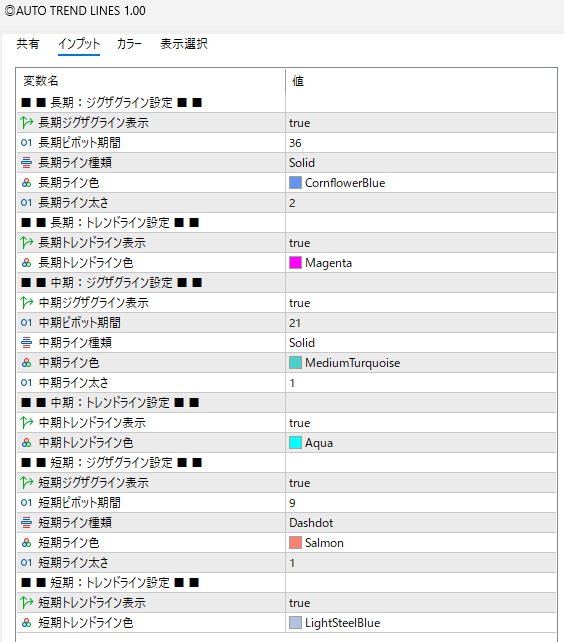
ラインの種類・色・太さ・表示/非表示も細かく設定でき、初心者から上級トレーダーまで、
自分のトレードスタイルに合わせた柔軟なカスタマイズが可能。

裁量に頼りがちなライン引きを自動化することで、判断のブレをなくし、再現性の高いトレード環境を実現します。


【パラメーター内容】


【ラインの挙動確認】

画像やテキストだけでは、相場の本当の動きはなかなか伝わりません。

ですが、動画ならその違いは一目瞭然。

実際のチャートの値動きやエントリーの瞬間を目で追うことで、理解度は文章の約3~5倍違うとも言われています。

知識を「情報」で終わらせず、「体感」に変えるために、ぜひ以下の動画をご覧ください。


M1


M5


M15

M30

H1 1時間足での反応が一番強い


H4


【MT5にインジケーターを設定する手順】

① インジケーターファイルを準備

  配布された

     .ex5 ファイルをPCに保存します。


② MT5のデータフォルダを開く

  1. MT5を起動

  2. 上部メニュー
    [ファイル]→[データフォルダを開く] をクリック

  3. フォルダが開いたら
    MQL5 → Indicators を開く

③ インジケーターファイルを入れる

  • 先ほどの .ex5 ファイルを
    Indicators フォルダ にコピー&貼り付け

④ MT5を再起動 or 更新

       方法はどちらかでOK

  • MT5を再起動する

  • ナビゲーターで右クリック → 更新

⑤ チャートに適用

  1. MT5左側の ナビゲーター を開く

  2. インディケータ → カスタム を展開

  3. 追加したインジケーターを
    チャートへ ドラッグ&ドロップ

⑥ 設定を確認してOK

  • 「入力」「カラー」「表示選択」などを調整

  • 問題なければ OK をクリック
     チャートにインジケーターが表示されます。


¥15,000(Tax included)
?About 1-Click Order
Product outline
Community(0)
Best Seller Ranking
Recommended Products (Campaigns)

For those using GogoJungle for the first timeEasy 3 steps to use the product!

At GogoJungle, we provide services to enrich your investment life for our members. In addition, product purchases are limited to members. Why not register as a member now and make use of GogoJungle!

01
Enter user information and register as a member
02
Follow the instructions to make a purchase
03
Download from My Page
■ Important Matters and Risk Warnings Regarding Investment Products 【Financial Instruments Business Operator】
GogoJungle Inc.
Registration: Director-General of the Kanto Local Finance Bureau (Financial Instruments Business) No. 1960
【Member Association】
Japan Investment Advisers Association
【Fees and Expenses】
The use of software, e-books, investment advisory services, etc., provided on our platform involves purchase prices determined for each product.
Additionally, when conducting actual financial instrument transactions (such as FX or CFD trading), costs such as transaction fees and spreads (the difference between the sell and buy price) may be incurred through the connected brokerage firms.
【Margin and Risk of Loss】
Transactions such as FX (Foreign Exchange Margin Trading) and CFD (Contract for Difference) allow for trading in amounts exceeding the deposited margin.
Therefore, due to sudden fluctuations in target indices (currency, commodity prices, etc.), there is a risk of incurring losses that exceed the deposited margin (loss exceeding principal).
Furthermore, financial instrument transactions involve risks such as price fluctuations, which may result in losses falling below or exceeding the initial investment principal.
【Nature of Services and Trading Entity】
The Company operates a platform (marketplace) providing investment software and information; we do not engage in the buying, selling, mediation, brokerage, or agency of financial instruments on behalf of customers.
The services and information provided are intended as reference for investment decisions and do not guarantee future profits or specific results.
While some services include investment advice, they do not constitute a mandate or solicitation to trade specific financial instruments.
Final investment decisions and the execution of trades must be made at the customer’s own risk and discretion.
