




TP/SLをラインで動かすだけ!発注・決済ができるワンクリックEA!

Product outline
Community(0)
TP/SLをラインで動かすだけ!発注・決済ができるワンクリックEA! Indicators/E-books
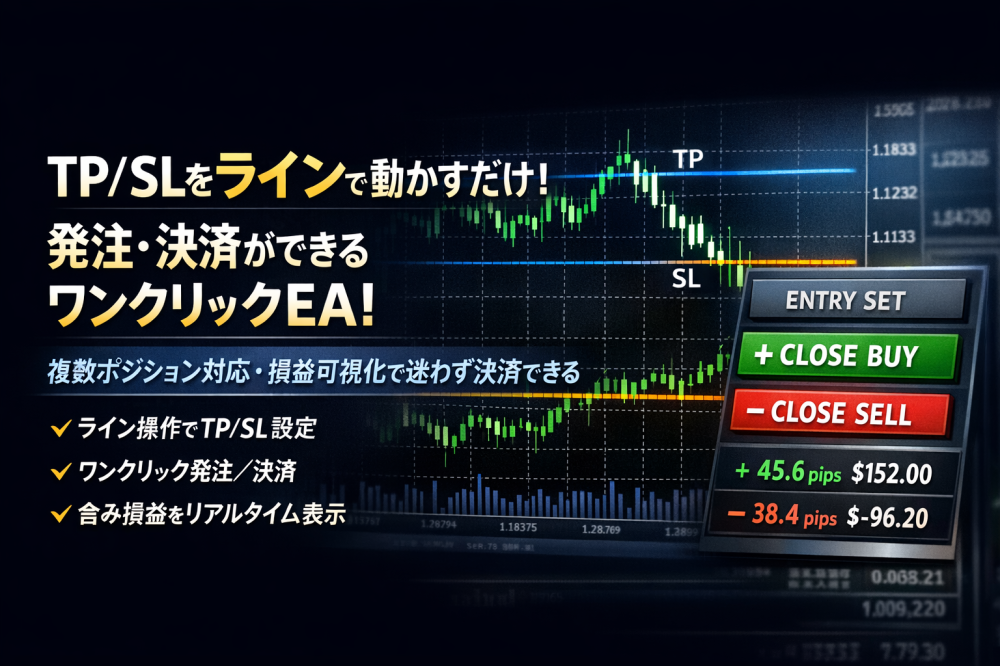
TP/SLをラインで動かすだけ!発注・決済ができるワンクリックEA!
複数ポジション対応・損益可視化で迷わず決済できる
SellerFX-skull
Seller's last login time:5/23/2026 01:18:31
Read more seller information
¥10,000(taxed)
Already 5 users using!
?About 1-Click Order
Provider/Distributor:
Sales site:
GogoJungle

Payment

MastercardVisaJCBBankFamilyMartD2D1
TP/SLライン操作 ワンクリックEA

TP/SLラインを動かすだけ。
自動計算ロットで即エントリー。

プロの資金管理を、直感的な操作で。

Trading Interface 
許容損失額で自動ロット計算 バージョンアップで、さらに使いやすく進化!

ビジュアル・リスク管理ワークフロー

Logic Panel 1
Logic Panel 2
Logic Panel 3
Logic Panel 4
Logic Panel 5
Logic Panel 6
Logic Panel 7
Logic Panel 8
Logic Panel 9
Logic Panel 10

■ 使い方動画(約2分)

※再生できない場合は、ブラウザの設定をご確認ください。

Concept Image

トレードは「損切りのリスク」から始まる

このEAでは、TPラインより先に、必ずSLラインから設定する設計になっています。 SLを決めずにエントリーする癖を防ぎ、リスクを意識したトレード判断を自然に身につけられます。

なぜ、SLラインからしか設定できないのか?

トレードの基本は、「どこでエントリーするか」ではなく、「どこにストップ(損切り)を置くか」からチャートを見ることです。

本当に重要なのは、ロットを小さくすることではなく、ストップをタイトに置ける相場で勝負しているかどうかです。 このEAでは、必ずSLラインから設定しないと、TPラインを動かせない設計にしています。

それは、「まずリスクを決めてからトレードを考える」という基本を、操作の流れそのものに組み込むためです。

鉄則:エントリー後、SLは絶対に動かさない。

TPは柔軟に。しかし、ストップは一度決めたら死守する。これが勝ち続けるための規律です。

実戦トレードデモ動画集

① XAUUSD M1|FXSkull SR RangeTrend インジを使ったスキャルピング

② XAUUSD M1|焦らず「待つ」戦略変更スキャル

③ XAUUSD M1|RangeEye「勢いに乗る」超短期スキャル

④ XAUUSD M1|レンジBOX逆張りスキャルピング

こんなトレーダーに特におすすめ

  • リスク管理を徹底したいが、計算が面倒だと感じる方
  • SL/TPラインを直感的に操作し、視覚的に戦略を立てたい方
  • エントリー前にリスクリワード比率を客観的に確認したい方
  • スキャルピングで、ロット計算の時間を短縮してチャンスを逃したくない方
  • 複数ポジションの管理や、誤操作による発注ミスを減らしたい方

・また日本円でリスクを管理したい方に特におすすめです。 ・規律を持ってトレードしたい方のための強力な補助ツールです。

よくある質問(Q&A)

Q. ロット数はどのように計算されますか?

A. 設定した「許容損失額(円)」と、SLラインまでの距離(pips)から、損失額を超えない最大のロット数を自動計算します。ブローカーの最小ロット単位に合わせて切り捨て処理されるため、実際の損失は設定額より若干少なくなる安全設計です。   

Q. サインツール(矢印インジケーター等)と併用できますか?

A. はい、非常に相性が良く、スピーディーな発注が可能です。 あらかじめ「LINES SET」をONにしてリスク額を入力し、ラインを表示させた状態で待機してください。サインが出た瞬間にSLラインを合わせるだけで、最適なロット計算が完了し即座にエントリーできます。 エントリー直後はリスクリワード1:1で固定されますが、発注後にTP(利確ライン)を自由に動かして利益を伸ばす調整を行えるため、サインツールの精度を最大限に活かせます。

Q. SLを深くしすぎるとどうなりますか?

A. 計算されたロットがブローカーの最小ロット(例: 0.01)を下回る場合、最小ロットで計算されます。その結果、損失予定額が設定した許容額を超える可能性があります。その際は、チャート上の損失額表示が赤色に変わり警告しますので、SL位置を調整してください。

Q. TP/SLラインの連動は解除できますか?

A. はい。初期状態では1:1で連動しますが、SLラインをダブルクリックして選択を解除(ドットを消す)すると、TPラインが独立して動かせるようになります。

Q. 複数ポジションをまとめて決済できますか?

A. はい。本EAのマジックナンバーで管理されている同一通貨ペア・同一方向のポジションは、パネルの「Close BUY」「Close SELL」ボタンで一括決済できます。ポジションがある時だけボタンが点灯します。

Q. 自動売買ですか?

A. いいえ。本EAは裁量トレードを強力にサポートする発注・資金管理ツールであり、エントリーと決済の最終判断はご自身で行います。

トレード動画で使用したインジケーター

デモ動画内で使用している FXSkull SR RangeTrend インジケーターは、以下のリンクからご確認いただけます。

FXSkull SR RangeTrend の詳細はこちら

インストール手順

  1. MT4を起動し、「ファイル」→「データフォルダを開く」を選択
  2. MQL4 → Experts フォルダに EA ファイル(.ex4)をコピー
  3. MT4を再起動、またはナビゲーターウィンドウを右クリックして「更新」
  4. ナビゲーターからEAをチャート上にドラッグ&ドロップ
  5. パラメーター設定画面の「全般」タブで、「自動売買を許可する」「DLLの使用を許可する」にチェックを入れる
  6. チャート右上に「LINES SET」ボタンなどが表示されれば準備完了です。

トレードは、もっとシンプルでいい。

TPとSLをラインで決める。
リスクを「円」で設定してからエントリーする。
ただそれだけです。

ご利用前の注意事項

  • 本EAは、必ずデモ口座で十分に動作確認を行ってから、実口座での運用を行ってください。
  • ブローカーや口座タイプによって、最小ロット・ロット単位・スプレッド・約定方式が異なります。実運用前に、ご利用のブローカー仕様を必ずご確認ください。
  • スプレッドが広がりやすい時間帯(指標発表前後・流動性の低い時間帯)では、想定どおりのTP/SL幅にならない、または意図した価格で約定しない場合があります。
  • 本EAの使用によって生じたいかなる損失についても、制作者は責任を負いかねます。あらかじめご了承のうえ、ご利用ください。
c 2025 FX-Skull All Rights Reserved.
¥10,000(taxed)
Already 5 users using!
Provider/Distributor:
Sales site:
GogoJungle
?About 1-Click Order

Payment

MastercardVisaJCBBankFamilyMartD2D1
Product outline
Community(0)
Best Seller Ranking
Recommended Products (Campaigns)

For those using GogoJungle for the first timeEasy 3 steps to use the product!

At GogoJungle, we provide services to enrich your investment life for our members. In addition, product purchases are limited to members. Why not register as a member now and make use of GogoJungle!

01
Enter user information and register as a member
02
Follow the instructions to make a purchase
03
Download from My Page
■ Important Matters and Risk Warnings Regarding Investment Products 【Financial Instruments Business Operator】
GogoJungle Inc.
Registration: Director-General of the Kanto Local Finance Bureau (Financial Instruments Business) No. 1960
【Member Association】
Japan Investment Advisers Association
【Fees and Expenses】
The use of software, e-books, investment advisory services, etc., provided on our platform involves purchase prices determined for each product.
Additionally, when conducting actual financial instrument transactions (such as FX or CFD trading), costs such as transaction fees and spreads (the difference between the sell and buy price) may be incurred through the connected brokerage firms.
【Margin and Risk of Loss】
Transactions such as FX (Foreign Exchange Margin Trading) and CFD (Contract for Difference) allow for trading in amounts exceeding the deposited margin.
Therefore, due to sudden fluctuations in target indices (currency, commodity prices, etc.), there is a risk of incurring losses that exceed the deposited margin (loss exceeding principal).
Furthermore, financial instrument transactions involve risks such as price fluctuations, which may result in losses falling below or exceeding the initial investment principal.
【Nature of Services and Trading Entity】
The Company operates a platform (marketplace) providing investment software and information; we do not engage in the buying, selling, mediation, brokerage, or agency of financial instruments on behalf of customers.
The services and information provided are intended as reference for investment decisions and do not guarantee future profits or specific results.
While some services include investment advice, they do not constitute a mandate or solicitation to trade specific financial instruments.
Final investment decisions and the execution of trades must be made at the customer’s own risk and discretion.
