
商品概要
コミュニティ(0)

勝率チェッカーB(マーチン対応)
そのサインツールの勝率を知りたくないですか?勝率を知ってより効率よく勝ちを獲りにいこう!
レビュー:
提供方法:
インジケータ
販売開始日:
2024/12/01
更新日時:
2024/12/22
バージョン:
1.10
Web認証:
あり
ご利用可能会社:

今お使いのサインツールで勝率は表示されていますか? 『このサインツールの勝率が知りたいんだよなぁ。。。』 とお思いの方がいましたら是非使ってみてください。 こちらはバッファ型に対応しているインジケーターとなります。 今お使いのサインツールがバッファ型かどうかを調べる方法も紹介していますので合わせてご覧ください^^
勝率表示がないサインツールの勝率が分かるインジケーター
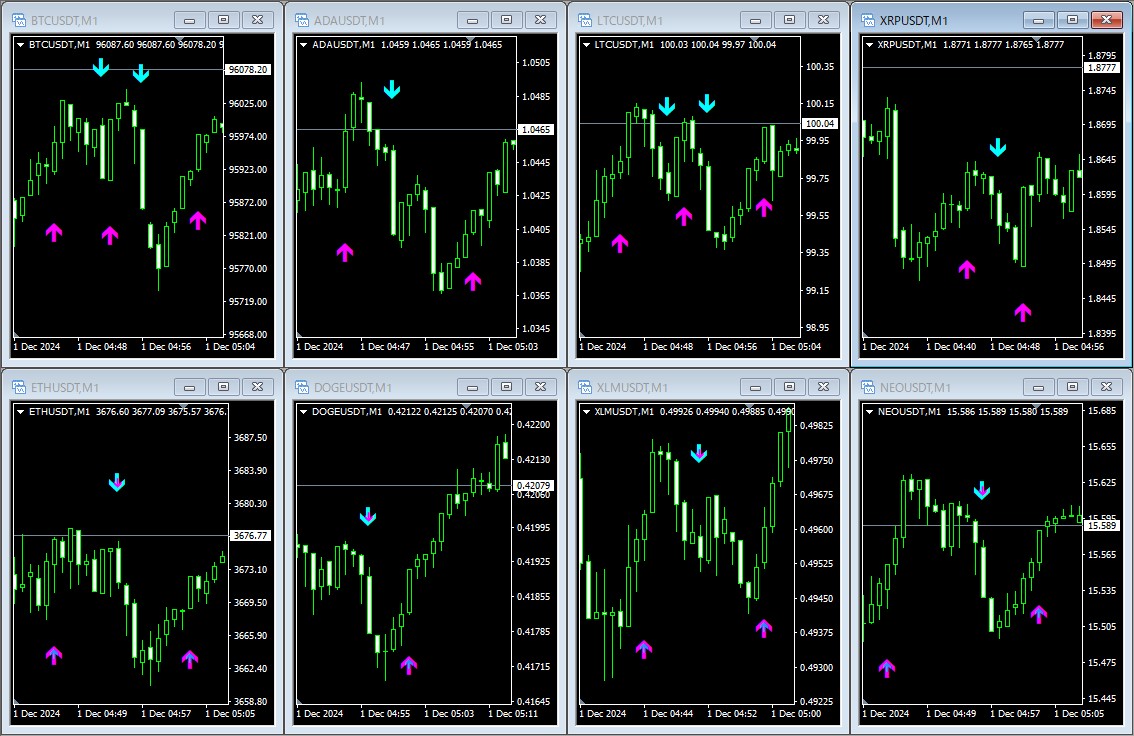
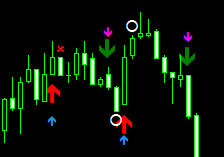
こちらが実際にMT4チャートへサインだけが出るインジケーターと勝率チェッカーBを表示させた状態。 大小の矢印がチャート上に表示されていますよね。 矢印が出ているローソク足を正しくとらえることができています。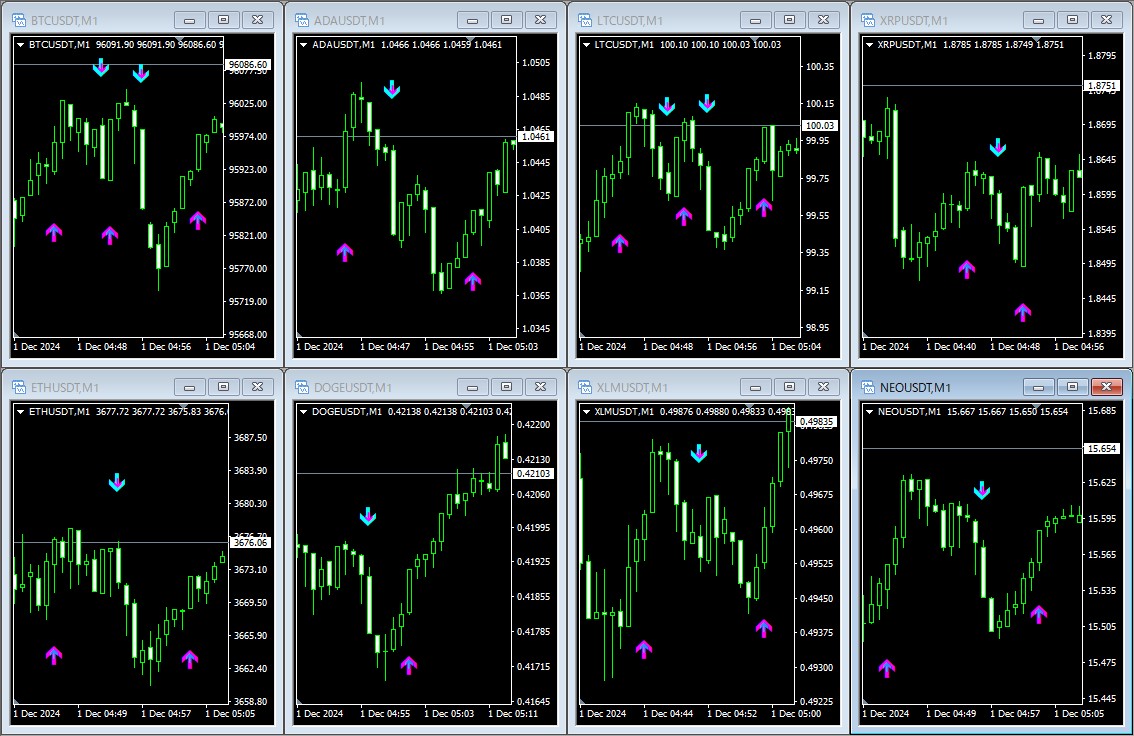 普段お使いのサインツールはMT4へ表示させなくても大丈夫。
indicatorsフォルダの中にそのサインツールファイルがあれば機能します。
下記画像の上段では勝率チェッカーBだけにしていますが、先ほどと同じ場所にサインが表示されていますよね。
普段お使いのサインツールはMT4へ表示させなくても大丈夫。
indicatorsフォルダの中にそのサインツールファイルがあれば機能します。
下記画像の上段では勝率チェッカーBだけにしていますが、先ほどと同じ場所にサインが表示されていますよね。
勝率チェッカーBの機能一覧
色々と機能をつけているので、ここでは一覧でまとめて紹介。 ・勝率表示機能 『単発勝率』『マーチン勝率』の2種類を表示させることができます ・アラート機能 お使いのサインツールにアラート機能がない場合、リアルタイムでポップアップ&アラートで知らせてくれます。必要のない場合はOFFにしておけばサインが点灯してもアラートは鳴りません ・アラート音変更機能 リアルタイムでアラートを鳴らす場合、音楽や効果音など好きな音源をアラートとして利用することができる機能も搭載 ・背景色お知らせ機能 リアルタイムでサインが出るのと同時にチャート上の背景色を変更して、サインが出たチャートを教えてくれます。複数枚の通貨ペアを表示させている場合、どのチャートでサインが出ているのかを一瞬で判別できる便利機能です ・通貨ペア、時間足表示 どの通貨ペアなのか?何分足なのか?一目で見やすいようチャート上に大きくテキストで表示させることができますお使いのサインツールがバッファ型かを調べる方法
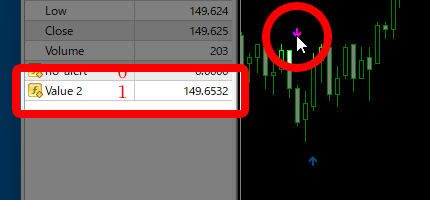
まずはMT4を起動後、お使いのサインツールをMT4へ挿入します。 その後、上部メニューの『データ・ウインドウ』アイコンをクリックします。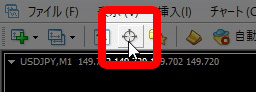 するとチャートの左側に『データ・ウインドウ』が現れます。
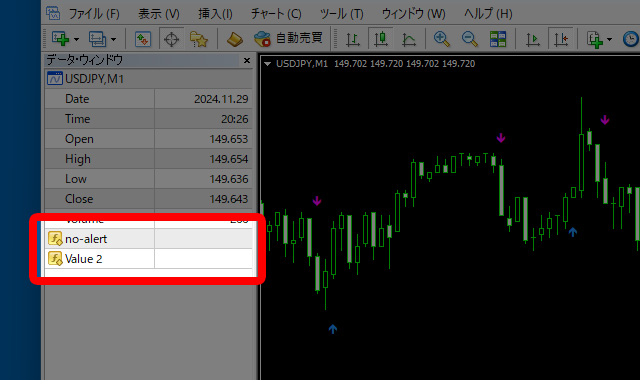
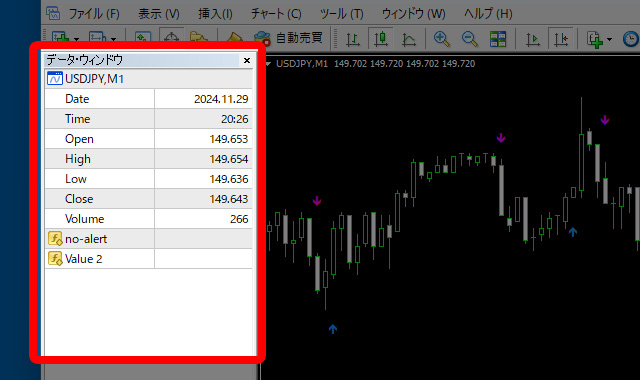 この時『Volume』より下にある項目が出力されているバッファです。
今回の場合は2つですが、インジケーターによってはたくさんある場合もあります。
この時『Volume』より下にある項目が出力されているバッファです。
今回の場合は2つですが、インジケーターによってはたくさんある場合もあります。
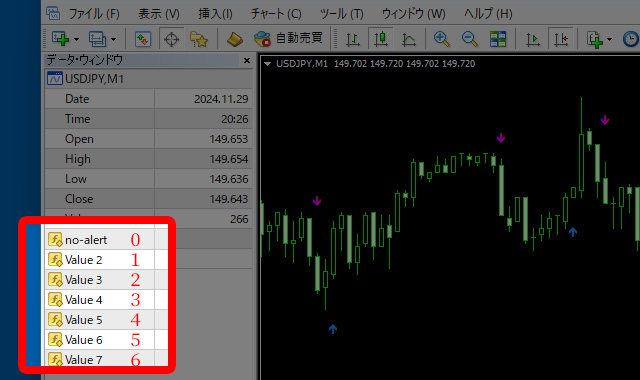
 バッファナンバーと言いますが、上から0,1,2,3,4・・・と続いていきます。
0から始まるということを覚えておいてください。
0にインジケーターの名前、1から下は開発者が名前を付けていればその名前で、付けていない場合は下記のように『Value ●』と表示されています。
バッファナンバーと言いますが、上から0,1,2,3,4・・・と続いていきます。
0から始まるということを覚えておいてください。
0にインジケーターの名前、1から下は開発者が名前を付けていればその名前で、付けていない場合は下記のように『Value ●』と表示されています。
 次に、チャート上に出ている矢印にマウスカーソルを合わせてください(上下どちらでもOK)。
バッファナンバー0の位置に価格が表示されましたね。
上矢印に関しては勝率チェッカーBに対応しているのが確認できました。
次は下矢印を見てみましょう。
次に、チャート上に出ている矢印にマウスカーソルを合わせてください(上下どちらでもOK)。
バッファナンバー0の位置に価格が表示されましたね。
上矢印に関しては勝率チェッカーBに対応しているのが確認できました。
次は下矢印を見てみましょう。
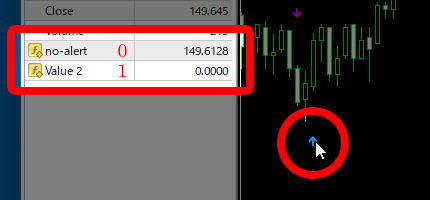 下矢印の場合はバッファナンバー1に価格が表示されました。
これで上下矢印どちらも拾うことができるというのが分かりました。
下矢印の場合はバッファナンバー1に価格が表示されました。
これで上下矢印どちらも拾うことができるというのが分かりました。
 今回のインジケーターは勝率チェッカーBに対応しているので、今日からでもお使いいただけます。
勝率チェッカーBの概要
パラメーターでカスタマイズができるようにしています。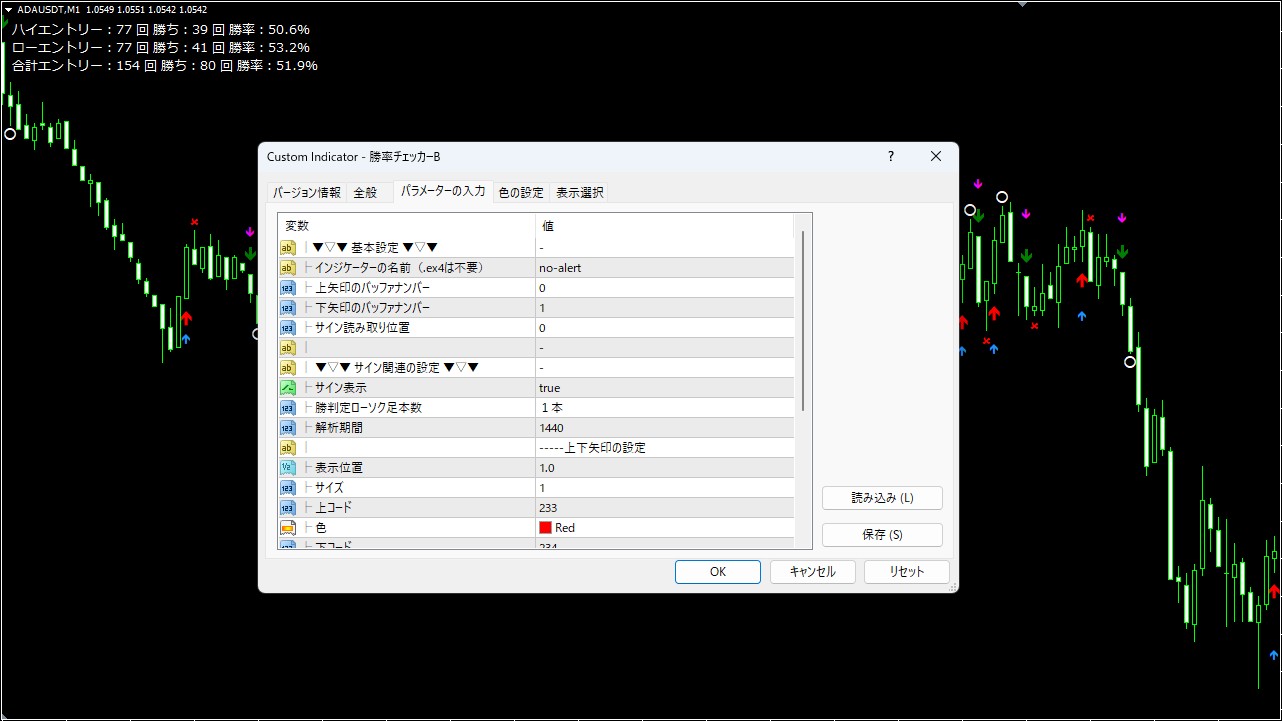
各種設定
基本設定
勝率を知りたいサインツールの名前を入力します。 後はバッファナンバーとサインの読み取り位置を入力するだけで勝率が表示されます。 サイン読み取り位置は基本的に0のままですが、サインが現行足ではなく1本前に出る場合などは 0 ⇒ 1 に変更して使用します。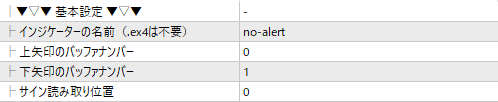
アラート関連の設定
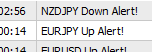
現行足でアラートを鳴らす場合にこちらの項目を設定します。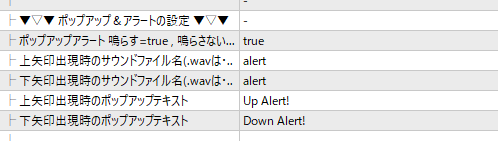 通常のアラート以外の音を鳴らしたい場合に設定します。※マニュアル同梱
ポップアップのテキストも『通貨ペア名+好きなテキスト』で表示させることができます。
通常のアラート以外の音を鳴らしたい場合に設定します。※マニュアル同梱
ポップアップのテキストも『通貨ペア名+好きなテキスト』で表示させることができます。
背景色の設定
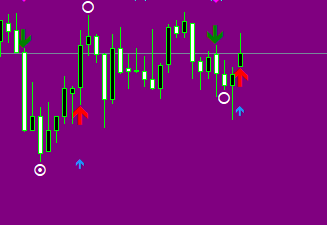
現行足で矢印が出た場合に背景色を変えることができます。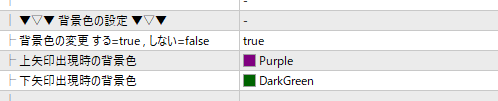 カラーパレットから好きな色を選んで変更することができます。
※下画像は上矢印出現時
カラーパレットから好きな色を選んで変更することができます。
※下画像は上矢印出現時
サイン関連の設定
サインの基本的な設定です。 【サイン表示】
サインの表示、非表示を選択することができます。
【サイン表示】
サインの表示、非表示を選択することができます。
 解析したいサインツールも入れて使った場合、同じところに矢印が出て邪魔になる場合があります。
その場合、勝率チェッカーBのサインを非表示にすることができます。
サインを非表示にしても勝率は表示されます。
解析したいサインツールも入れて使った場合、同じところに矢印が出て邪魔になる場合があります。
その場合、勝率チェッカーBのサインを非表示にすることができます。
サインを非表示にしても勝率は表示されます。
 【勝敗判定ローソク足本数】
サインが出たローソク足から1~5本目までのローソク足を選択することができます。
【勝敗判定ローソク足本数】
サインが出たローソク足から1~5本目までのローソク足を選択することができます。
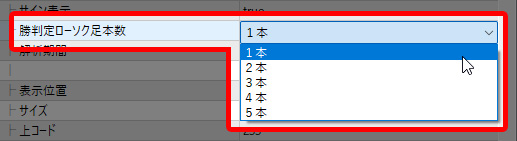 【解析期間】
過去何本分のローソク足の勝率を解析するか入力します。
本数が多すぎるとMT4が重たくなりますので、デフォルトでは1440(1分足で1日分)にしています。
【解析期間】
過去何本分のローソク足の勝率を解析するか入力します。
本数が多すぎるとMT4が重たくなりますので、デフォルトでは1440(1分足で1日分)にしています。

上下矢印の設定
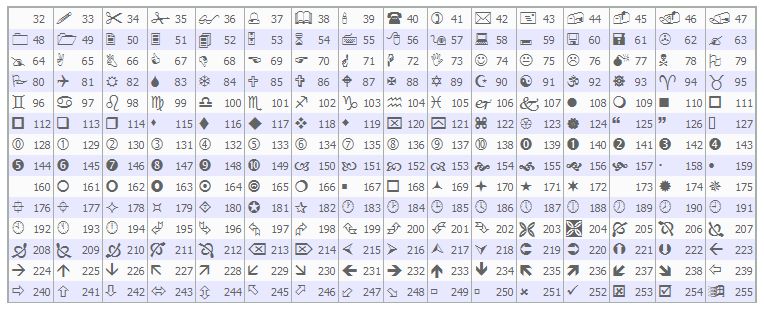
ローソク足からサインまでの距離やサイズ、色を変更することができます。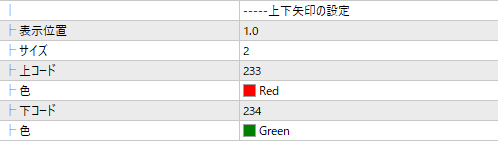 上下サインは矢印ですが、下記コードから選んで好きなアイコンに変更することができます。
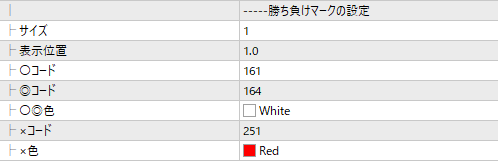
勝ち負けマークの設定
こちらは勝敗の〇×マークの設定です。 上下矢印と同様にお好きな表示方法へ変更することができます。
勝率表示設定
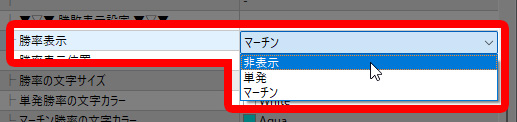
勝率関連の設定ができます。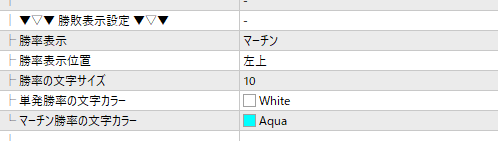 【勝率表示】
 初期は単発だけでしたが、『非表示』と『マーチン』を追加して3つの中から選択できるようになりました。
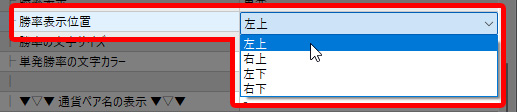
 【勝率表示位置】
チャート四隅の好きな場所へ表示させることができます。
【勝率表示位置】
チャート四隅の好きな場所へ表示させることができます。
 【勝率の文字サイズとカラー】
好きなサイズ、カラーに変更することができます。
【勝率の文字サイズとカラー】
好きなサイズ、カラーに変更することができます。

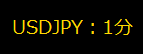
通貨ペア名・時間足の表示
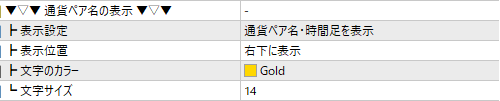 【表示設定】
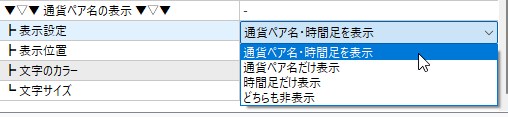 [表示設定] 表示、非表示を選択することができます。
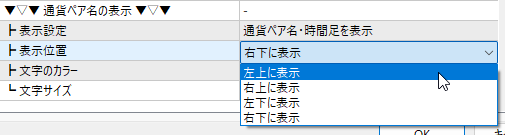
 [表氏位置] チャートの四隅(左上、右上、右下、左下)から選んで表示させることができます。
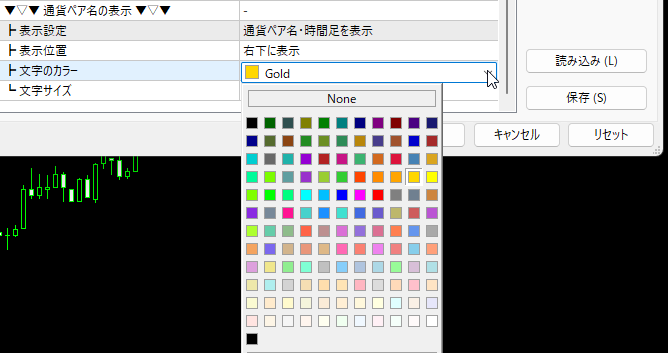
 [文字のカラー] カラーパレットよりお好きな色を選択することができます。
 [文字サイズ] 文字の大きさを変更することができます。

【セット内容】 ・勝率チェッカーインジケーター×1 ・アラート音を好きな音源へ変更する方法(PDF)
¥4,980 (税込)
提供元 / 販売元:
販売サイト:
GogoJungle
●お支払い方法





商品概要
コミュニティ(0)
人気商品ランキング
おすすめ商品(キャンペーン商品)
GogoJungleを初めてご利用する方へ 商品のご利用まではかんたん3ステップ!
GogoJungleでは、会員様向けに、あなたの投資生活を豊かにするサービスをご用意しております。また、商品をご購入いただけるのは、会員様のみとなっております。今すぐ会員登録をして、GogoJungleを活用してみませんか!
01
ユーザー情報を入力し会員登録
02
案内に従い購入
03
マイページからダウンロード
