



VoiceAlertインジケーターとは
VoiceAlertインジケーターは水平線にタッチすると音声で通知するボイスアラート機能搭載のMT4用インジケーターです。Windows10標準の音声合成エンジンを使うのでインジケーターだけ追加すれば使えるようになります。
水平線に下からタッチしたときには「水平線に下からタッチしました。価格は113.425です。」のように音声でお知らせします。音声の言語は日本語と英語、男性声と女性声を設定することができます。
※VoiceAlertインジケーター GOLD(有料)は水平線に加えて垂直線とトレンドラインのタッチを音声で通知する機能があります。

VoiceAlertインジケーターの使い方
VoiceAlertインジケーターをMT4に追加したら水平線を描画してください。VoiceAlertインジケーターの対象になる水平線にはラインの右側上部に価格が表示されます。
水平線はインジケーターで描画することも可能です。例えば直近の高値や安値を水平線で表示するようなインジケーターやキリ番の水平線を表示するようなインジケーターとあわせて利用すれば自分で線を引かなくても自動で音声通知ができるようになります。
VoiceAlertインジケーターは時間足の中で1度だけ音声通知をします。例えば1時間足でアラート発生した場合は次の1時間足になるまで音声通知を休止します。なお、水平線を編集したり時間足を切り替えると音声通知を再開します。
こんな使い方が想定されます。
1) 上値、下値のタッチアラートとして
高値と安値などの水平線を引くことでレンジの幅やレンジ期間を把握することができます。VoiceAlertインジケーターを使うと「水平線に下からタッチしました。価格はxxx.xxxです。」のように、どの方向からいくらでタッチしたかを音声で通知します。
2) ライントレードの補助ツールとして(GOLD)
トレンドラインは相場の方向性を把握し上値抵抗や下値支持の確認などに利用します。VoiceAlertインジケーター GOLDは水平線、垂直線、トレンドラインに対応しており、「トレンドラインに上からタッチしました。価格はxxx.xxxです。」のように音声で通知することができます。
3) 指標発表や市場オープンの備忘タイマーとして(GOLD)
重要な指標発表では相場が大きく動くことがあります。あらかじめ垂直線を設定しておけば「"米国雇用統計の10分前"にタッチしました。時刻はhh:mmです。」のように音声で通知することができます。市場オープンやクローズの前後も相場が動くタイミングなので、「"ニューヨーク市場がオープンする時間"にタッチしました。」のようなカスタマイズした音声通知も可能です。
VoiceAlertインジケーターの音声合成について
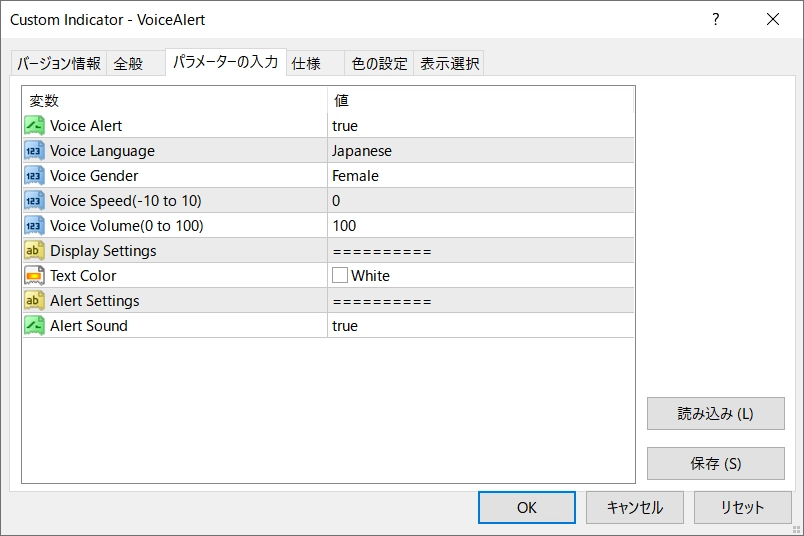
VoiceAlertインジケーターはWindows10標準の音声合成エンジンを使用します。インジケーターの全般メニューで「DLLの使用を許可する」にチェックを入れてください。
使用するDLLはWindowsの「shell32.dll」です。この「shell32.dll」の「ShellExecuteW」を使ってWindows10に標準で搭載されている音声合成エンジンを呼び出しています。
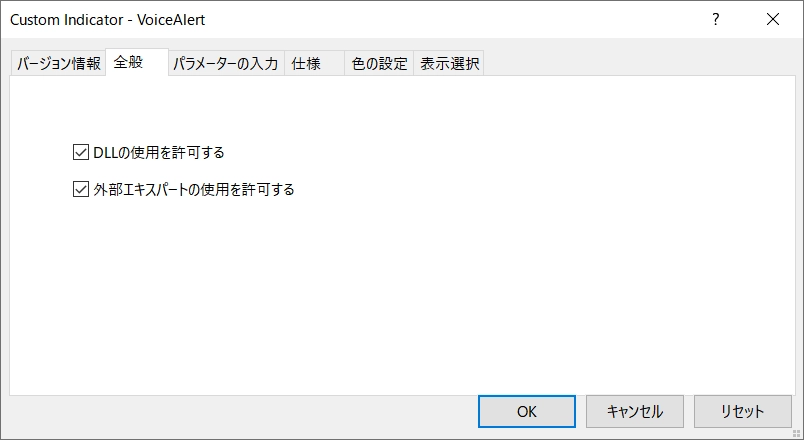
VoiceAlertインジケーターのパラメータ
Sound Alert …サウンドアラートのオンオフ: true / false
Voice Alert …ボイスアラートのオンオフ: true / false Voice Language …ボイスアラートの言語: Japanese(日本語) / English(英語) Voice Gender …ボイスアラートの性別: Femle(女性) / Male(男性) Voice Speed …ボイスアラートの読み上げ速度: 0 (-10 から 10) Voice Volume …ボイスアラートの音量: 100 (0 から 100) Text Color … 水平線に表示する文字の色: White
ボイスアラートの言語はJapanese(日本語)とEnglish(英語)のどちらか選択できます。 性別を選択することもできますがPCに対象の言語の音声パッケージがインストールされていないときは選択が無効になります。(男性の声はデフォルトでは入ってないかも)
VoiceAlertインジケーターの通常版とGOLD版の機能比較表
VoiceAlertインジケーターは通常版(無料)を拡張したGOLD版(有料)があります。ゴールド版は通常版の水平線に対するアラート機能に加えて垂直線とトレンドラインに対応し、さらにタッチした線の読み上げ方をカスタマイズできます。
| 名称 | VoiceAlertインジケーター | VoiceAlertインジケーター GOLD |
| ボイスアラート機能 | 〇 | 〇 |
ボイス言語設定(日本語/英語) | 〇 | 〇 |
ボイス性別設定(女性/男性) | 〇 | 〇 |
ボイススピード設定 | 〇 | 〇 |
ボイスボリューム設定 | 〇 | 〇 |
ライン名読み上げ機能 | - | 〇 |
| サウンドアラート機能 | 〇 | 〇 |
| ポップアップアラート 機能 | - | 〇 |
| モバイルアラート機能 | - | 〇 |
| メールアラート機能 | - | 〇 |
水平線タッチアラート | 〇 | 〇 |
垂直線タッチアラート | - | 〇 |
トレンドラインタッチアラート | - | 〇 |
| タッチ矢印表示機能(↑/↓) | - | 〇 |
| ライン文字色設定 | 〇 | 〇 |
| 料金 | 無料 | 有料 |


音声パッケージ(英語)の追加方法
日本のWindows10の標準の音声合成エンジンがデフォルトで対応している言語は英語と日本語で、声は女性の声が使えると思います。英語の音声パッケージを追加すると英語の男性(David)が利用できるようになるでしょう。
日本語の男性の声(Ichiro)はレジストリをコピーすると使えるようになるようですがあまりお勧めしません。
| 日本語 | 英語(米国) | |
| 女性の声 | デフォルト Haruka | デフォルト Zira |
| 男性の声 | ※裏技 [LINK] Ichiro | 英語の音声パッケージ David |
1. [スタート] ボタンを選択して 設定 > 時刻と言語 > 音声認識 のメニューを開きます。
※このときすでに英語(米国)がインストールされていれば追加は不要です。
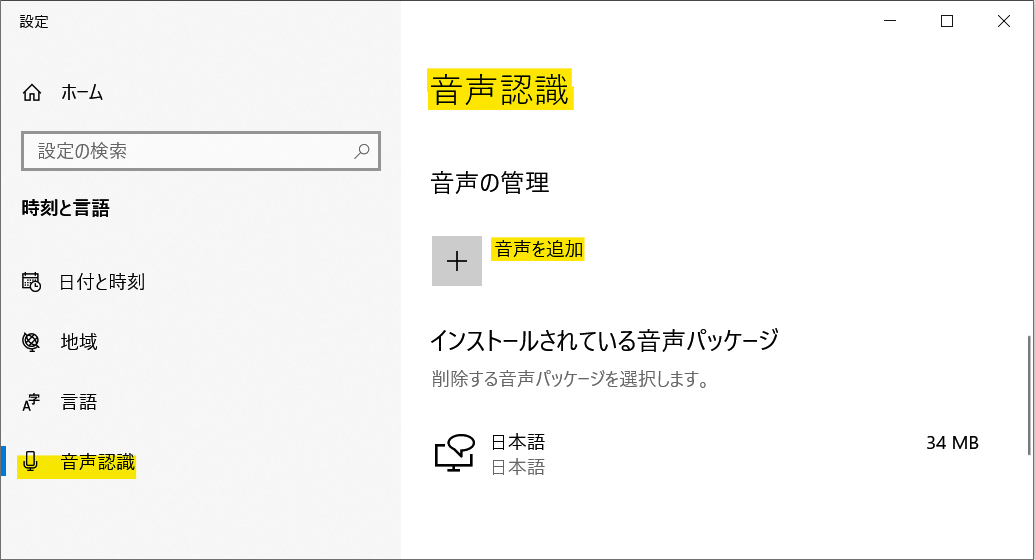
2.[音声の管理] の下にある [音声を追加] を選択します。
英語(米国)を選択したら追加ボタンを押します。
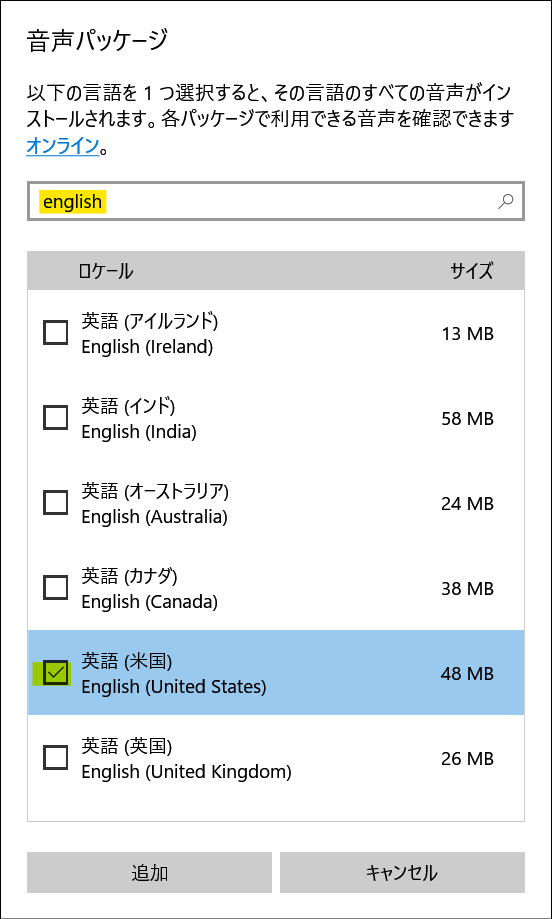
※注意事項※
・Windows 10 Home(20H2)で動作確認をしていますがPC環境により動作しない場合があるのでご了承ください。 ・Windows 11では動作確認をしていません。Windows11で動作を確認された方はコメントをいただけると幸いです。
For those using GogoJungle for the first time Easy 3 steps to use the product!
At GogoJungle, we provide services to enrich your investment life for our members. In addition, product purchases are limited to members. Why not register as a member now and make use of GogoJungle!
