
ラインタッチでLINE通知

Product outline
Community(0)
ラインタッチでLINE通知 Indicators/E-books
ラインタッチでLINE通知
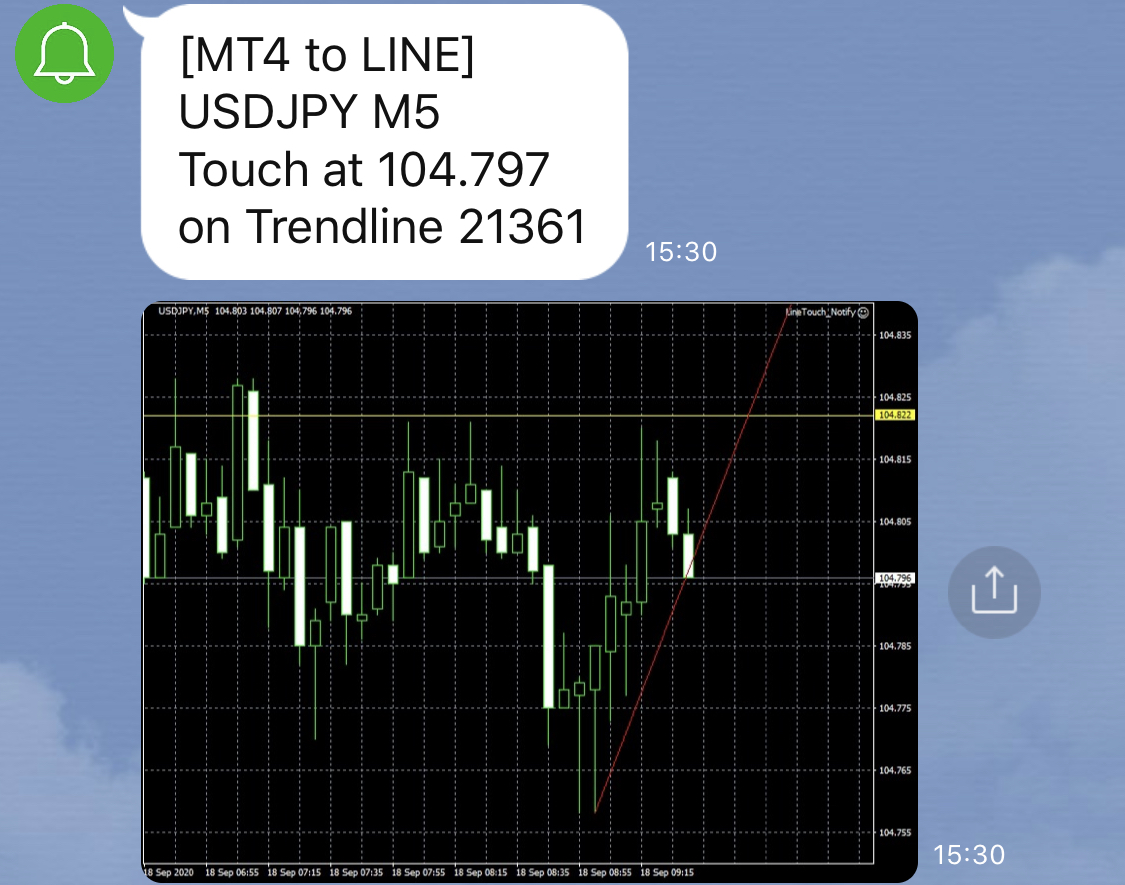
チャート画面に張り付き不要! 水平ライン・トレンドラインにタッチしたらLINEに通知。チャート画像付きで状況確認が簡単!

Sales Result:
46本
Reviews:
Category:
How to provide:
Indicator
Sales from:
09/18/2020
Last Updated:
-
Version:
-
Web Authentication:
Enable
Available company:
Payment method:

Japan

フォロー 0 フォロワー 12
Sellertokocafe
Seller's last login time:3/31/2026 08:22:48
Read more seller information
手動で設定した水平ライン・トレンドラインにタッチした際にLINEへ通知を行うEAです。 タッチ時のチャート画像も併せてLINEに通知することができます。 LINEアプリへはMT4の基本機能だけでは通知できません。 普段使い慣れていて、レスポンスの速いLINEに通知が来るので、 チャート画面に張り付く必要もなく、状況確認・対応がしやすくなります。 ■表示可能な時間軸 どの時間軸でもお使いいただけます。 ■表示可能な通貨ペア どの通貨ペアでもお使いいただけます。 ■パラメータ説明 ・アラートのON/OFF  → PCのMT4のアラート機能に通知 true = ON, false = OFF ・LINE通知のON/OFF  → LINEアプリへのテキスト通知 true = ON, false = OFF ・スクリーンショット送付のON/OFF  → LINEアプリへの画像通知 true = ON, false = OFF  ※LINE通知がONの時のみ有効 ・LINEアクセストークン  → LINE Notifyで作成したアクセストークンを入力(下記手順参照) <アクセストークン発行手順> 1.https://notify-bot.line.me/ja/ にLINEのIDとパスワードでログイン 2.右上の名前をクリックして「マイページ」をクリック 3.アクセストークンの発行(開発者向け)の下にある「トークンを発行する」をクリック 4.トークン名を入力し、「1:1でLINE Notifyから通知を受け取る」を選び「発行する」をクリック 5.「コピー」をクリックし、メモ帳などに貼り付けて保存する(上記EAのパラメータに入れる情報) <MT4の設定手順> 1.「ツール」の中にある「オプション」をクリック 2.「エキスパートアドバイザ」タブの「WebRequestを許可するリスト:」の入力欄をクリック 3.「https://notify-api.line.me/api/notify」を入力し、「OK」をクリック 注意: ・本商品はEAです。MQL/Expertsフォルダに保存し、MT4を再起動してからチャートに設置してください。 BA3EE6A3-4A28-4BDA-81F8-E43CF804F86E.jpeg
¥2,980(Tax included)
Product outline
Community(0)
Best Seller Ranking
Recommended Products (Campaigns)

For those using GogoJungle for the first timeEasy 3 steps to use the product!

At GogoJungle, we provide services to enrich your investment life for our members. In addition, product purchases are limited to members. Why not register as a member now and make use of GogoJungle!

01
Enter user information and register as a member
02
Follow the instructions to make a purchase
03
Download from My Page
■ Important Matters and Risk Warnings Regarding Investment Products 【Financial Instruments Business Operator】
GogoJungle Inc.
Registration: Director-General of the Kanto Local Finance Bureau (Financial Instruments Business) No. 1960
【Member Association】
Japan Investment Advisers Association
【Fees and Expenses】
The use of software, e-books, investment advisory services, etc., provided on our platform involves purchase prices determined for each product.
Additionally, when conducting actual financial instrument transactions (such as FX or CFD trading), costs such as transaction fees and spreads (the difference between the sell and buy price) may be incurred through the connected brokerage firms.
【Margin and Risk of Loss】
Transactions such as FX (Foreign Exchange Margin Trading) and CFD (Contract for Difference) allow for trading in amounts exceeding the deposited margin.
Therefore, due to sudden fluctuations in target indices (currency, commodity prices, etc.), there is a risk of incurring losses that exceed the deposited margin (loss exceeding principal).
Furthermore, financial instrument transactions involve risks such as price fluctuations, which may result in losses falling below or exceeding the initial investment principal.
【Nature of Services and Trading Entity】
The Company operates a platform (marketplace) providing investment software and information; we do not engage in the buying, selling, mediation, brokerage, or agency of financial instruments on behalf of customers.
The services and information provided are intended as reference for investment decisions and do not guarantee future profits or specific results.
While some services include investment advice, they do not constitute a mandate or solicitation to trade specific financial instruments.
Final investment decisions and the execution of trades must be made at the customer’s own risk and discretion.
