Product outline
Community(0)
MetaTrader4用インジケーター【TightChart(タイト・チャート)】
あなたのシグナルの制度を高めるチャートを生成するインジケ―ター
Reviews:
Keywords:
How to provide:
Indicator
Sales from:
12/18/2018
Last Updated:
-
Version:
-


Tight Chartインジケーターの詳細
ティック数&時間&値幅で制限したオフラインチャートを生成するMT4用インジケータです。 指定のティック数、指定の値幅(高安値)、指定の時間経過を満たさない間は新しいバーが生成されません。 つまり、ティックチャートやレンジバーチャートのような非時系列チャートと、通常の時系列チャートを合体させたチャートを表示させることができます。 例えばティック数を70、値幅を3pips、時間を1分として設定した場合、チャート上の1本のバーが生成されるためには、70ティックをカウントし、高安値が3pips以上となり、1分間以上経過するまでは新しいバーは形成されません。 これにより、薄商いの相場や、値動きの少ない相場では通常のチャートよりも生成されるバーの本数が少なくなり、1本1本のバーの意味合いが濃くなるとともに、インジケーターのシグナルの発生も限定され、だましのシグナルを減らすことを狙いとしています。- オフラインチャートにEAを適用させることも可能ですが、それにはOnTimer()を使い、秒間隔でトレードロジックを実行させる必要があります。 今後タイトチャートを利用したEAの販売も予定しています。
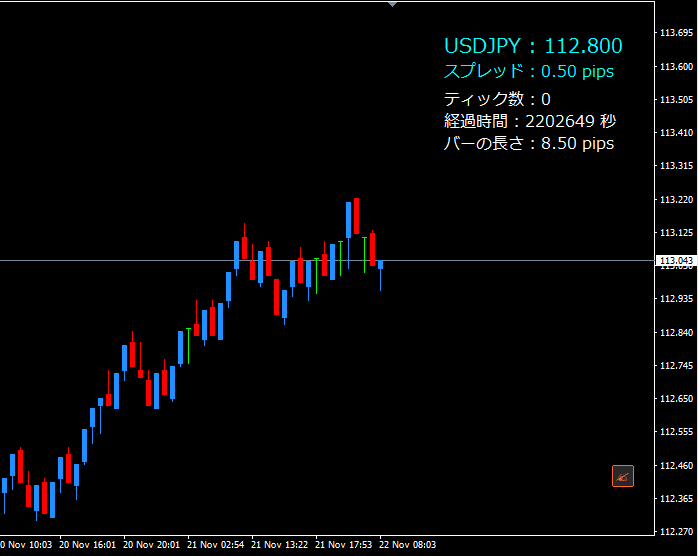
- また、商品にはチャート上に現在のTightチャート上のバーの状態を表示するインジケーター(BarInfo)も付属しています。
付属のBarInfoインジを適用したチャートの表示内容
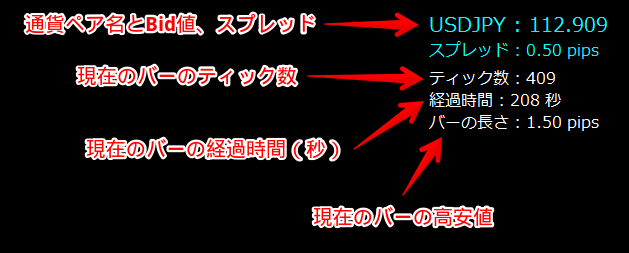 ※BarInfoインジは通常のチャートにも適用できます。
商品に含まれるファイル
| [TTB]TightChart.ex4 | オフラインチャートを書き出すインジケーターです。 |
|---|---|
| [TTB]BarInfo.ex4 | オフランチャートに適用すると、現在のバーの状態(経過時間、値幅、ティック数など)を表示します。 |
Tight Chartのパラメーター設定値
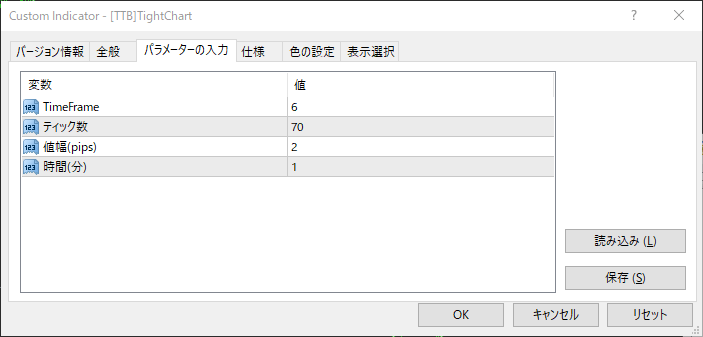
| パラメーター設定値 | 説明 |
|---|---|
| TimeFrame | タイトチャートのタイムフレーム(※)を指定します。 ※便宜的に他のタイムフレームと識別するためのタイムフレーム数値となります。 ※既存のタイムフレーム(1、5、15、30、60など)以外の数値を入力してください。 |
| ティック数 | バー1本分が生成されるまでに必要なティック数を入力します。 ティック数がこれ以上カウントされないと、新しいバーは生成されません。 ※0以下の場合は無視され、他の条件のみ判定されます。 |
| 値幅(pips) | 1本のバーの最小の値幅(高安値)をpips単位で設定します。 バーの値幅がこれ以上ないと、新しいバーは生成されません。 ※0以下の場合は無視され、他の条件のみ判定されます。 |
| 時間(分) | 1本のバーが生成されるまでの最小時間を分単位で設定します。 他の条件を満たしていても、指定時間が経過していなければ、新しいバーは生成されません。 ※0以下の場合は無視され、他の条件のみ判定されます。 |
BarInfoのパラメーター設定値
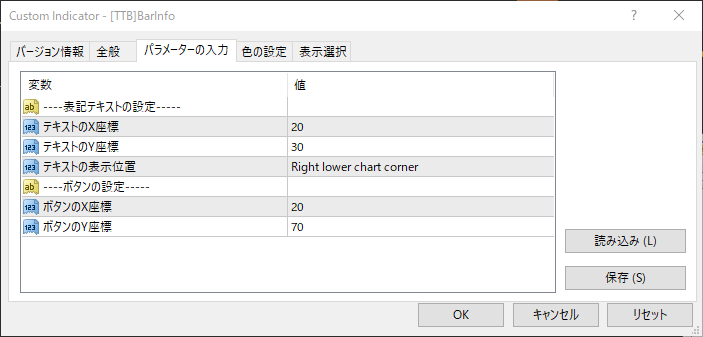
| パラメーター設定値 | 説明 |
|---|---|
| テキストのX座標 | テキストのコーナーからのX座標位置をピクセル単位で指定します。 |
| テキストのY座標 | テキストのコーナーからのY座標位置をピクセル単位で指定します。 |
| テキストの表示位置 | テキストの表示位置を指定します。
|
| ボタンのX座標 | ボタンのX座標位置をピクセル単位で指定します。 |
| ボタンのY座標 | ボタンのY座標位置をピクセル単位で指定します。 |
インジケーターのインストール方法
- 購入したファイル一式をダウンロードします(TightChart.zip)。
- ダウンロードしたzipファイルを解凍します。中に2つのファイルが入っています([TTB]TightChart.ex4、[TTB]BarInfo.ex4)。
- MT4のデータフォルダを開きます:[ファイル]⇒[データフォルダを開く]⇒MQL4、Indicatorsの順にフォルダを開く。
- Indicatorsフォルダの中に解凍した2つのファイルを入れます。
- MT4を再起動します。
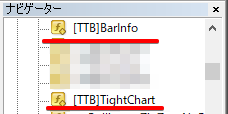
- インストールが成功すれば、ナビケ―ターにインジケ―ター名が表示されるはずです。
- これをチャートに適用します。
タイトチャートの作成方法
- タイトチャートを作成したい通貨ペアのチャートにTightChartを適用します。
※時間足は何でもかまいません。
パラメーター設定画面を開いたら、まず「全般」タブを開き「DLLの使用を許可する」にチェックを入れてください。
次に「パラメーターの入力」タブを開き、パラメーターに任意の値を入力し、OKボタンをクリックします。
- 「ファイル」メニューの「オフラインチャート」を開くと、タイトチャートが生成されています。
- タイトチャート名は「[通貨ペア名],M3」のようになっています。
これを選択し「開く」ボタンをクリックすれば、Tightチャートを開くことができます。
¥5,000 (taxed)
Provider/Distributor:
Sales site:
GogoJungle
●Payment





Product outline
Community(0)
Best Seller Ranking
Recommended Products (Campaigns)
For those using GogoJungle for the first time Easy 3 steps to use the product!
At GogoJungle, we provide services to enrich your investment life for our members. In addition, product purchases are limited to members. Why not register as a member now and make use of GogoJungle!
01
Enter user information and register as a member
02
Follow the instructions to make a purchase
03
Download from My Page
