



GVReceiverEA ― MT4のビジュアルモードで「実戦的な裁量トレード練習環境」を構築
視覚的 UI と堅牢な注文判定ロジックで、ライブの MT4 に近い裁量トレード体験(ワンクリック成行/待機注文/TP/SL のドラッグ操作 など)をテスター上で再現します。保有インジケーターをそのまま適用して、同じ環境内で検証・反復練習が可能です。
概要
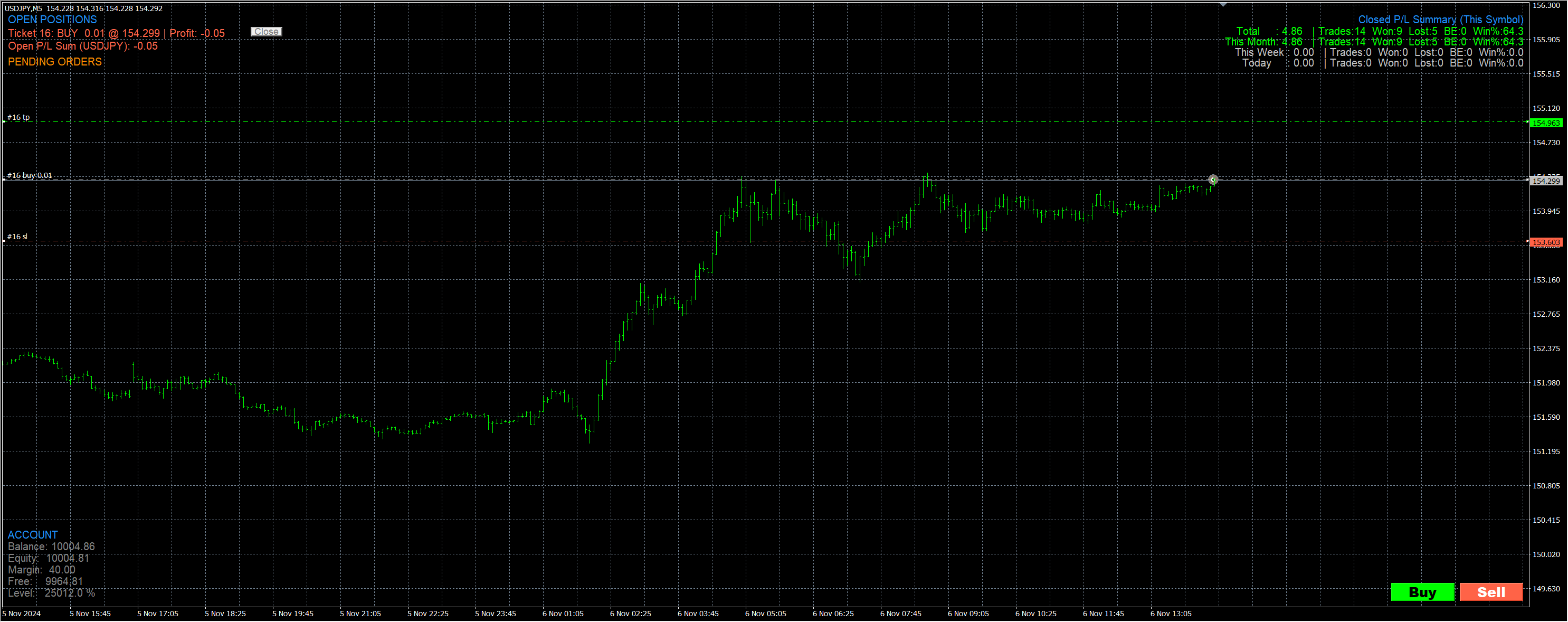
GVReceiverEA は MetaTrader 4 のストラテジーテスター(ビジュアルモード)専用の裁量トレード練習ツールです。お好きな MT4 インジケーターをチャートに適用し、そのシグナルに基づくエントリー/エグジットや TP/SL 運用を、同一のテスター環境で検証できます。
主な特徴
- 直感操作:チャート上のボタンとライン操作だけで、成行・指値/逆指値・TP/SL の作成・変更・取消が可能。
- 実運用に近い制約:ブローカーの Stop/Freeze レベル と ティックグリッド に自動準拠。
- トレード経過を可視化:ポジション一覧・口座パネル・期間別 P/L(合計/月/週/日)と勝率をチャート上に常時表示。
GogoJungle のシグナル系インジケーター検証に最適
保有する MT4 用シグナル系インジケーターをそのままチャートに適用し、シグナルに沿った裁量練習や TP/SL 運用の反復を、同じビジュアルモード内で行えます。
主な機能(ハイライト)
発注・編集
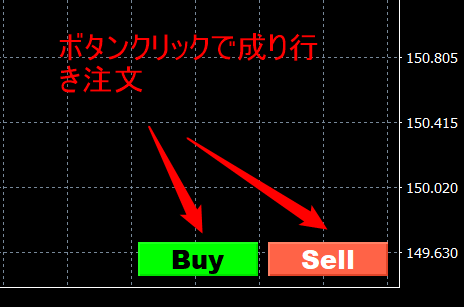
- ワンクリック成行:右下の Buy / Sell ボタン。
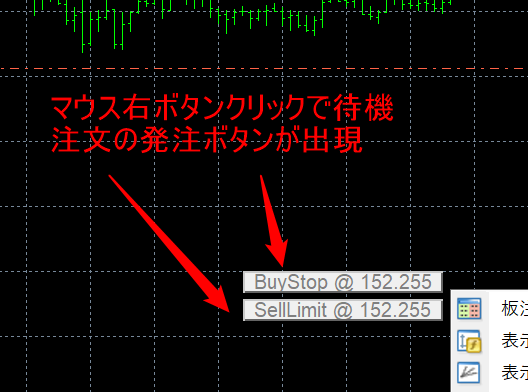
- 右クリックで即・待機注文:
- 上段ボタン:BuyLimit / BuyStop(価格に応じ自動切替)
- 下段ボタン:SellLimit / SellStop(価格に応じ自動切替)
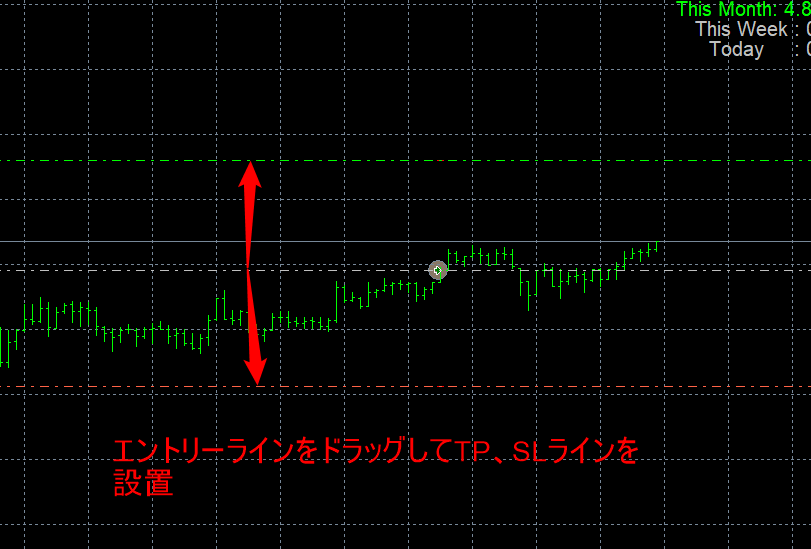
- ラインで TP/SL:ポジション上のラインを TP/SL 方向へドラッグして設置。作成後もドラッグで移動可能。
- 待機注文の価格変更:待機注文チケットのラインをドラッグして価格を変更。
クローズ/取消・パネル
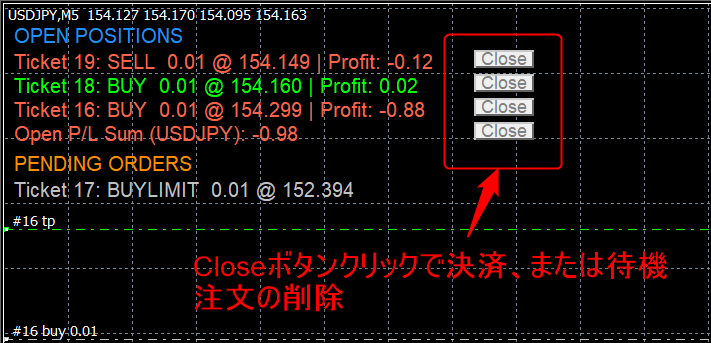
- クローズ/取消:左上の Close ボタンでポジション/待機注文を削除。待機注文は価格ラベル付近の × で即キャンセル。
- チャート上のパネル表示:ポジション一覧・口座パネル・期間別 P/L と勝率を常時表示。
使い方(クイックスタート|MT4)
- ファイルの配置:EA は
MQL4/Experts、インジケーターはMQL4/Indicatorsにコピー。
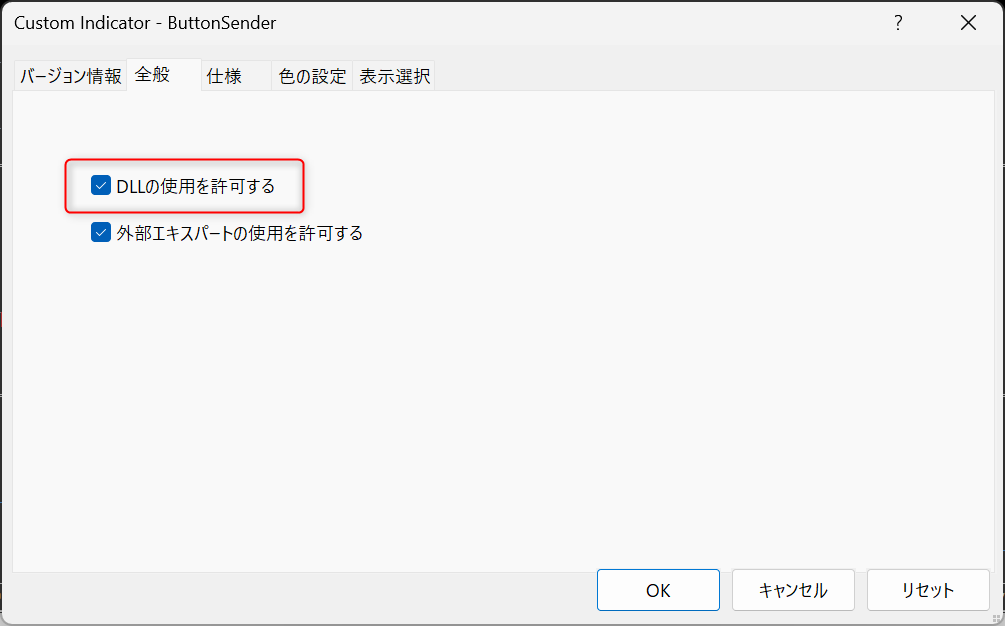
MT4 メニュー 「ファイル → データフォルダを開く」 から各フォルダを開きます。 - インジケーターの DLL を許可:インジケーターのプロパティ 「仕様」 タブで 「DLL の使用を許可する」 にチェック。
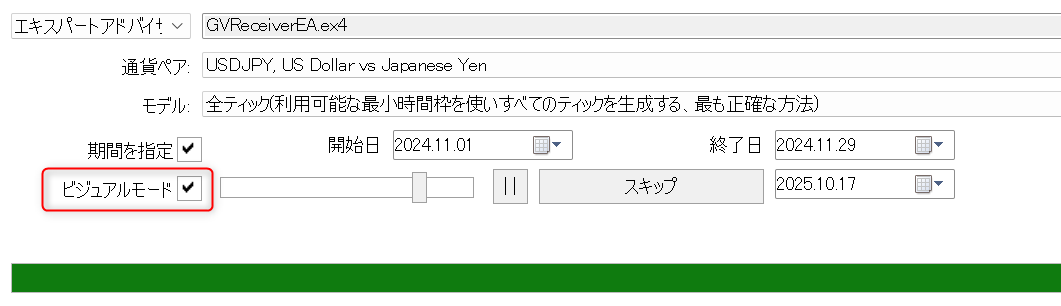
- ストラテジーテスターを起動:下部のテスターで本 EA を選択し、ビジュアルモードにチェック。
※ビジュアルモードの再生速度(スライダー):1〜31 に設定してください。MAXの32にするとUI 同期が乱れ正常に動作しません。
- テスト開始 → インジケーターを追加:テスト開始後、ナビゲータから検証したいインジをチャートへドラッグ&ドロップ。以降はチャート操作のみで練習可能。
- 発注と管理:
- 成行:右下の Buy / Sell ボタン
- 待機:チャートを 右クリック → 表示された Limit / Stop ボタンで即配置
- TP / SL:ポジション上のラインをドラッグで設定/既存 TP/SL はドラッグで変更
- 取消 / クローズ:× または Close ボタン
チャート上の情報表示
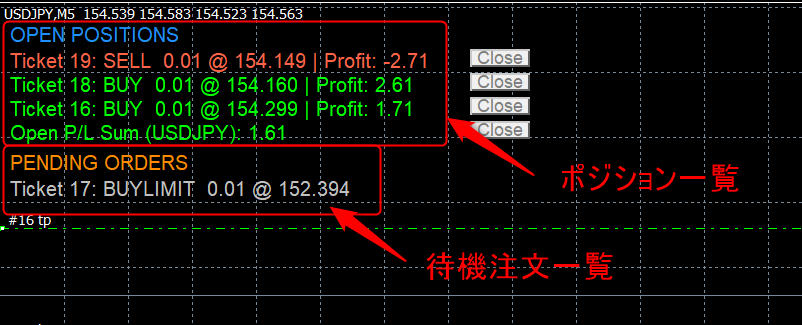
左上:ポジション一覧(OPEN POSITIONS / PENDING ORDERS)
- 成行例:Ticket 123456: BUY 0.10 @ 1.23456 | Profit: 12.34(プラス=ライム/マイナス=トマト/ゼロ付近=シルバーで色分け)。
- Profit 設定:
IncludeSwapCommission=trueでスワップ/手数料を含める(falseで除外)。 - 最下段に Open P/L Sum(シンボル):現シンボルの含み損益合計。
- 待機注文は BUYLIMIT/SELLLIMIT/BUYSTOP/SELLSTOP を表示。価格ラベル付近の × で即キャンセル(インジケーター UI)。
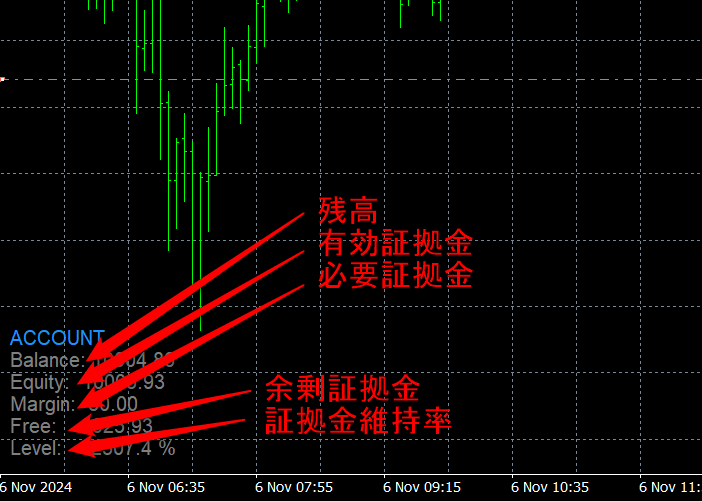
左下:口座パネル(ACCOUNT)
- Balance / Equity / Margin / Free / Level% を常時表示。
- Level は通常
(Equity / Margin) × 100で算出。
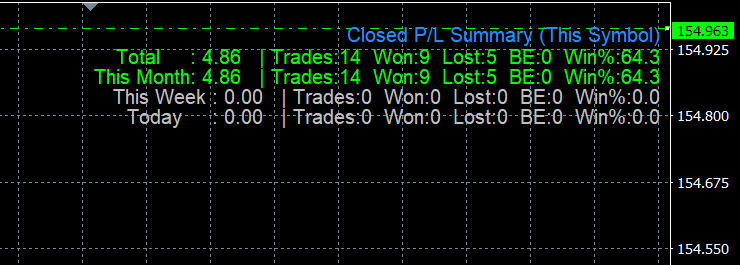
右上:P/L サマリー(Closed P/L Summary)
- 合計/今月/今週/本日 ごとに P/L、件数(Trades)、勝ち(Won)、負け(Lost)、引き分け(BE)、勝率(Win%)。
- Win% は
勝ち ÷(勝ち + 負け)(引き分けは母数から除外)。 IncludeSwapCommission=trueでスワップ/手数料を含めた損益計算。プラス=ライム、マイナス=トマト、ゼロ付近=シルバー。
色分けと表示ルール
- 色:プラス=ライム、マイナス=トマト、ゼロ付近=シルバー。
- 更新:各テスターのティックごとに最新状態へ更新。
どんな人におすすめ?
- 裁量トレーダー:エントリー/エグジットの型を反復で身体化したい方。
- デイトレ/スキャル練習:ライン操作で TP/SL を素早く置き、反省→再挑戦のサイクルを回したい方。
導入条件・対応環境
- プラットフォーム:MetaTrader 4(Windows)
- モード:ストラテジーテスター(ビジュアルモード)
- 権限:インジケーター側で 「DLL の使用を許可する」 にチェック(
user32.dllを使用してマウス状態を取得)
よくある質問(FAQ)
Q. ライブ口座のチャートで使えますか?
A. いいえ。ストラテジーテスター専用です。誤操作リスクを避け、安全に練習するための設計です。
Q. 右クリックのポップアップが出ません。
A. インジケーターのプロパティで『DLLの使用を許可する』にチェックを入れてください。
Q. ラインを動かしても値が変わらない/すぐ戻ることがあります。
A. Stop/Freeze レベルや方向不整合、現在値に近すぎる場合は拒否されます。ログに理由が表示され、ラインは元位置へ戻ります。
サポート
- アップデート:無償アップデート。販売ページ等でお知らせします。
- サポート:セットアップ手順・トラブルシュートのメールサポート。
収録物
GVReceiverEA.ex4(テスター制御 & 注文ロジック/UI 同期)ButtonSender.ex4インジケーター(チャート UI/右クリックポップアップ/ライン操作)
免責事項
本ツールは学習・検証を目的としたものであり、投資成果を保証するものではありません。
●Payment





For those using GogoJungle for the first time Easy 3 steps to use the product!
At GogoJungle, we provide services to enrich your investment life for our members. In addition, product purchases are limited to members. Why not register as a member now and make use of GogoJungle!
