
商品概要
コミュニティ(0)
「Sharp Trigger EA(バックテスト版)」FX MT4 EA 自動売買 GBPUSD 1分足 スキャルピング/デイトレード 無料
正式版「Sharp Trigger EA」をご購入する前に、ご自身でバックテストを行える評価用バージョン(無料)です。
レビュー:


Sharp Trigger EA(バックテスト版) 無料
本商品は、正式版(有料)「Sharp Trigger EA」に対するバックテスト版(評価用バージョン)(無料)です。
バックテスト版では、MT4のテスターを使用したバックテストのみ動作可能です。バックテスト以外では動作させることができません。
【商品内容一覧】
zipファイル(500KB程度)の中身は、以下の通りです。
・SharpTriggerEA_backtest.ex4 (実行ファイル)
・取扱説明書(バックテスト版).pdf
【正式版「Sharp Trigger EA」をご購入前にご自身でバックテストしたい方へ】
MT4のテスターを使用したバックテストを、正式版「Sharp Trigger EA」をご購入前にご自身で試してみたいと思われた方は、「Sharp Trigger EA(バックテスト版)」の方をダウンロード(無料)してお試しください。
バックテスト版のex4ファイルは、バックテスト以外では使用できないように制限をいれています。
バックテスト版には、ソース(mq4ファイル)は含まれません。
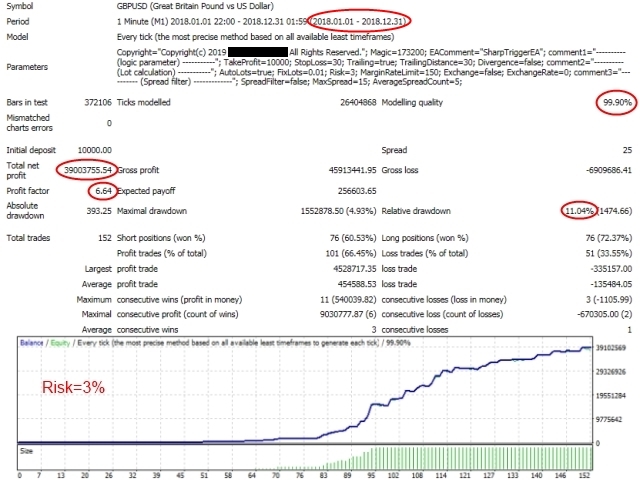
バックテストをする時には、Tickstoryなどを利用して、必ず99.9%の品質のティックデータをご使用ください。
このEAはtickの動きにとても敏感です。通常のバックテスト(品質90.0%程度の疑似tickデータ)では、全くデタラメな結果となり、正しい評価ができません。ご注意ください。
【インストール方法】
下記のフォルダに、『SharpTriggerEA_backtest.ex4』を手動でインストールしてください。
./MQL4/Experts/
以下、正式版「Sharp Trigger EA」の商品説明より抜粋。
↓↓↓↓↓↓↓↓↓↓↓↓↓↓↓↓↓↓↓↓↓↓↓↓↓↓↓↓↓↓↓↓↓↓↓↓↓↓↓↓
【仕様】
SharpTriggerEAは、瞬間的、かつ、大きな変動を検出し、トレンド方向の波に乗ります。
パラメーターの設定に応じて、スキャルパーまたはデイトレーダーとして使用できます。
バックテストをする時には、Tickstoryなどを利用して、必ず99.9%の品質のティックデータをご使用ください。
ティックデータの品質が悪い場合には(99.9%を維持できない場合)、正しいバックテストの結果を得ることができないことにご注意ください。
EAのパフォーマンスは、選択したブローカーとVPSに大きく依存することに注意してください。
グリッドなし、マーチンゲールなし、アービトラージなし、非カーブフィッティング!
推奨事項
・最低保証金 : $100
・シンボル : GBPUSD
・タイムフレーム : M1
・5桁のブローカーで動作します。
・迅速な注文実行でECNブローカーを使用します。
・ストップレベルが0のブローカーを使用します。
・レバレッジが200以上のブローカーを使用します。
・低スプレッドなブローカーを使用します。
・レイテンシが小さい高速VPSを使用します。(Pingが2ms以下を推奨)
このEAは頻繁にModify信号をサーバーに送信します。
一部のブローカーは、オーバーロードされていると警告される場合があります。
ユーザーにとっては時間がかかりますが、問題がなく、このEAでうまく機能するブローカーを見つける必要があります。
パラメーターの設定
・Magic - マジックナンバー。
・TakeProfit - テイクプロフィット(ポイント)。
・StopLoss - ストップロス(ポイント)。
・Trailing - "true"の時、トレーリングストップします。
・TrailingDistance - トレール幅(ポイント)。
・Divergence - "true"の時、ダイバージェンスが発生した時にポジションをクローズします。
・AutoLots - "true"の時、ロット数を自動で計算します。
・FixLots - "AutoLots"が"false"の時、固定ロット数を指定します。
・Risk - "AutoLots"が"true"の時、リスク(%)を指定します。
・MarginRateLimit - 証拠金維持率のリミット(%)を指定します。100以上の値を設定してください。
・Exchange - 通常は"false"を指定します。エラー("Exchange"を"true"に設定するよう促された)が発生した時のみ、"true"に設定します。例)アカウントの口座の通貨が"JPY"で、GBPUSD上でEAを使った場合、ロット計算(AutoLots=trueの時)をする時には、USDJPYを必要とします。この時、USDJPYのデータが存在しない時にエラーが発生します。バックテストの時にエラーが発生した時は、USDJPYデータをインストールする必要があります。USDJPYデータをインストールせずに対処するには、"Exchange"を"true"に設定し、かつ、"ExchangeRate"のパラメータを設定する必要があります。バックテストではなく、EAを実際に動作させる時には、"Exchange"は常に"false"に設定してください。
・ExchangeRate - 通常は0を指定します。エラー("ExchangeRate"を指定の通貨ペアのレートで設定するよう促された)が発生した時のみ、レートを設定します。バックテストの時のみ使用します。
・SpreadFilter - "true"の時、スプレッドフィルターを有効にします。
・MaxSpread - 許容するスプレッドの上限値(ポイント)。
・AverageSpreadCount - スプレッドの平均値を求めるサンプリング数(1~)。
使い方
スキャルパーとして使用する場合の一例。パラメータのデフォルト値は、スキャルパー用の推奨設定値になっています。スキャルパーとして使用する場合には、"Divergence"は"false"に設定してください。"StopLoss"を小さく設定すると、バックテストの成績はよりアップしますが、バックテストの結果とリアルな結果との乖離が大きくなりますのでご注意ください。通常は、"TrailingDistance"と"StopLoss"は、同じ値を設定してください。
デイトレーダーとして使用する場合の一例。"Trailing"を"false"に設定し、"TakeProfit"を400、"StopLoss"を100に設定し、"Divergence"を"true"に設定します。
【スクリーンショット】
無料
すでに 13 人が利用中!
提供元 / 販売元:
販売サイト:
GogoJungle
商品概要
コミュニティ(0)
人気商品ランキング
おすすめ商品(キャンペーン商品)
GogoJungleを初めてご利用する方へ 商品のご利用まではかんたん3ステップ!
GogoJungleでは、会員様向けに、あなたの投資生活を豊かにするサービスをご用意しております。また、商品をご購入いただけるのは、会員様のみとなっております。今すぐ会員登録をして、GogoJungleを活用してみませんか!
01
ユーザー情報を入力し会員登録
02
案内に従い購入
03
マイページからダウンロード
