Product outline
Community(0)
Excelを使ってATRから資金管理
ヒストリーセンターからエクスポートしたcsvを貼り付けて使います。手入力も可!
Sales Result:
1本
Reviews:
Category:
How to provide:
Ebooks
Sales from:
09/05/2018
Last Updated:
-
Version:
-

Japan
フォロー 0❘フォロワー 0
Follow
Sellerchoko.hima
Seller's last login time:6/28/2025 11:02:48
Read more seller information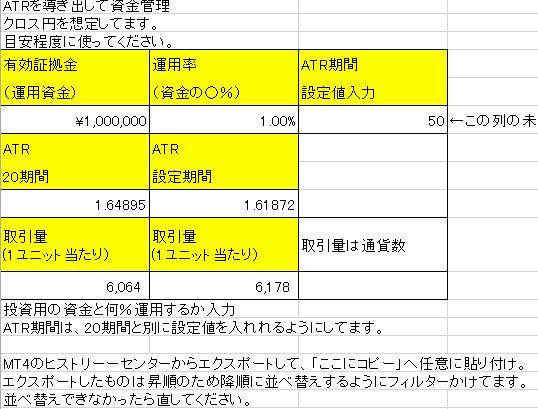 MT4のヒストリーセンターからエクスポートしたCSVの一部(計算したい場所)を貼り付け、運用金額と運用率(何%運用するか)を入力するとATRから1ユニット当たりの通貨量を計算します。
ATR期間は任意で設定もできます。
クロス円を想定してます。
MT4のヒストリーセンターからエクスポートしたCSVの一部(計算したい場所)を貼り付け、運用金額と運用率(何%運用するか)を入力するとATRから1ユニット当たりの通貨量を計算します。
ATR期間は任意で設定もできます。
クロス円を想定してます。
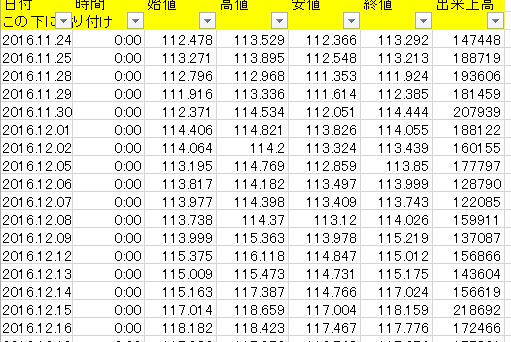 CSVは昇順なので貼り付け後は降順に切り替えられます。
つまり、上に行くにつれて新しい日付になります。
ならなかったら、直してください!
目安として使ってください。
何らかの損害などが生じても当方は責任取れません!
CSVは昇順なので貼り付け後は降順に切り替えられます。
つまり、上に行くにつれて新しい日付になります。
ならなかったら、直してください!
目安として使ってください。
何らかの損害などが生じても当方は責任取れません!
Free
Product outline
Community(0)
Best Seller Ranking
Recommended Products (Campaigns)
For those using GogoJungle for the first timeEasy 3 steps to use the product!
At GogoJungle, we provide services to enrich your investment life for our members. In addition, product purchases are normally limited to members. Why not register as a member now and make use of GogoJungle!
01
Enter user information and register as a member
02
Follow the instructions to make a purchase
03
Download from My Page