
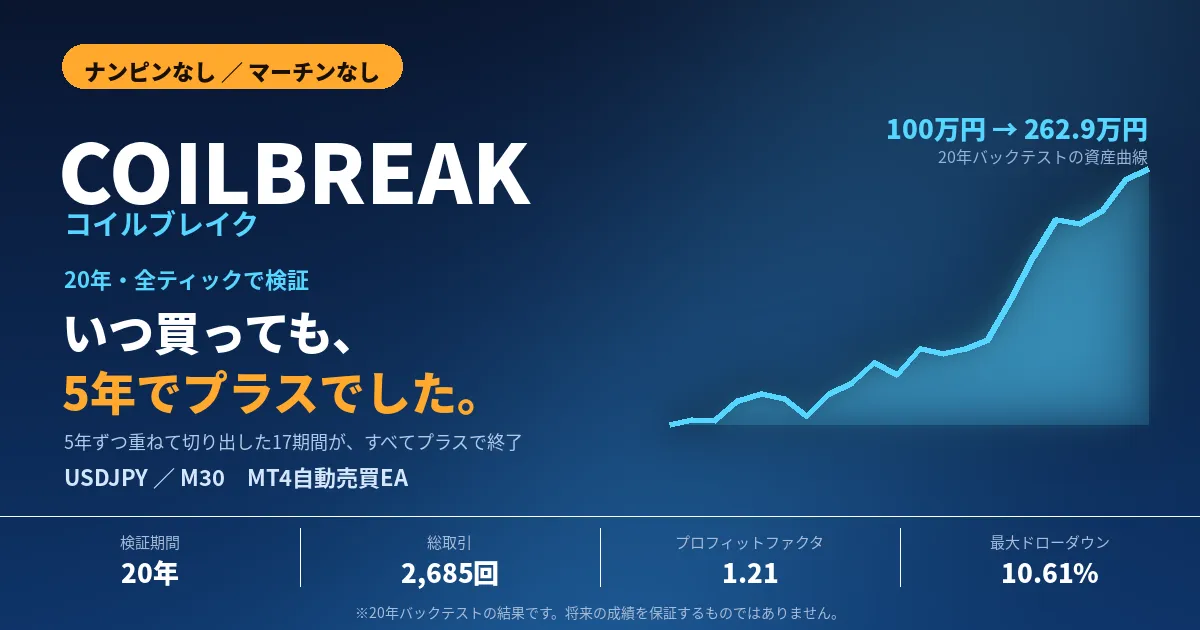
コイルブレイク USDJPY|ナンピンなし・20年バックテスト

- Whole period
- 2 years
- 1 year
- 6 months
- 3 months
- 1 month
Forward testing (Profit)
Monthly Statistics
- Jan
- Feb
- Mar
- Apr
- May
- Jun
- Jul
- Aug
- Sep
- Oct
- Nov
- Dec
Calendar for Months
About EA's Strategy
Translating...
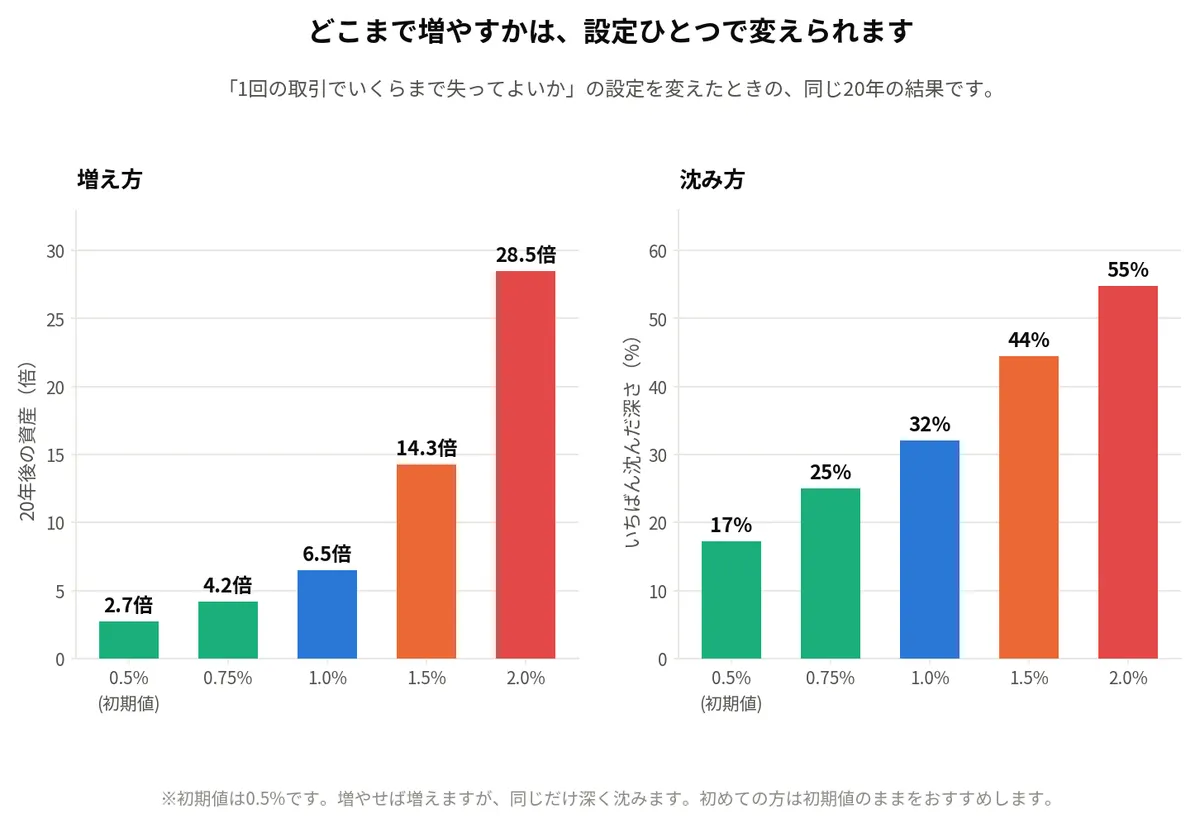
【どこまで増やすかは、あなたが決められます】 このEAには「1回の取引で、資金の何%まで失ってよいか」という設定が1つあります。 ここを変えると、同じEA・同じ20年でも結果がまったく変わります。 設定 20年後 倍率 いちばん沈んだ深さ ───────────────────────────────── 0.5%(初期値) 265万円 2.7倍 17% 0.75% 420万円 4.2倍 25% 1.0% 647万円 6.5倍 32% 1.5% 1,432万円 14.3倍 44% 2.0% 2,851万円 28.5倍 55% ※元手100万円で始めた場合。2006年8月〜2026年7月の同じ検証データを、 設定だけ変えて計算し直したものです。
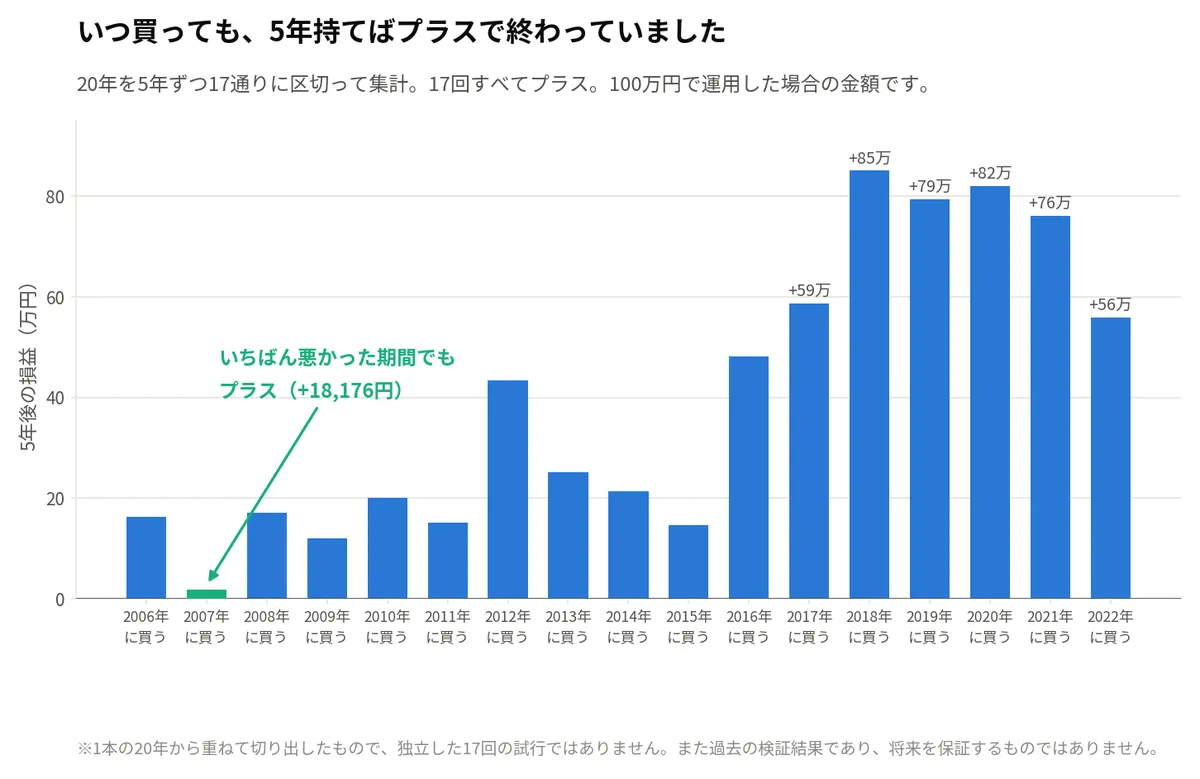
【買うタイミングを外しても大丈夫でした】 EAを買うとき、いちばん怖いのは「自分が買った時期がたまたま悪かったら どうしよう」だと思います。 そこで、20年を5年ずつ17通りに区切って集計しました。 2006年に買って5年持ったら → +162,075円 2007年に買って5年持ったら → +18,176円 2008年に買って5年持ったら → +170,768円 (中略) 2022年に買って5年持ったら → +559,433円 17回すべてプラスでした。 いちばん悪かったのが2007年開始の +18,176円。それでもマイナスにはなって いません。いちばん良かったのは2018年開始の +850,982円です。
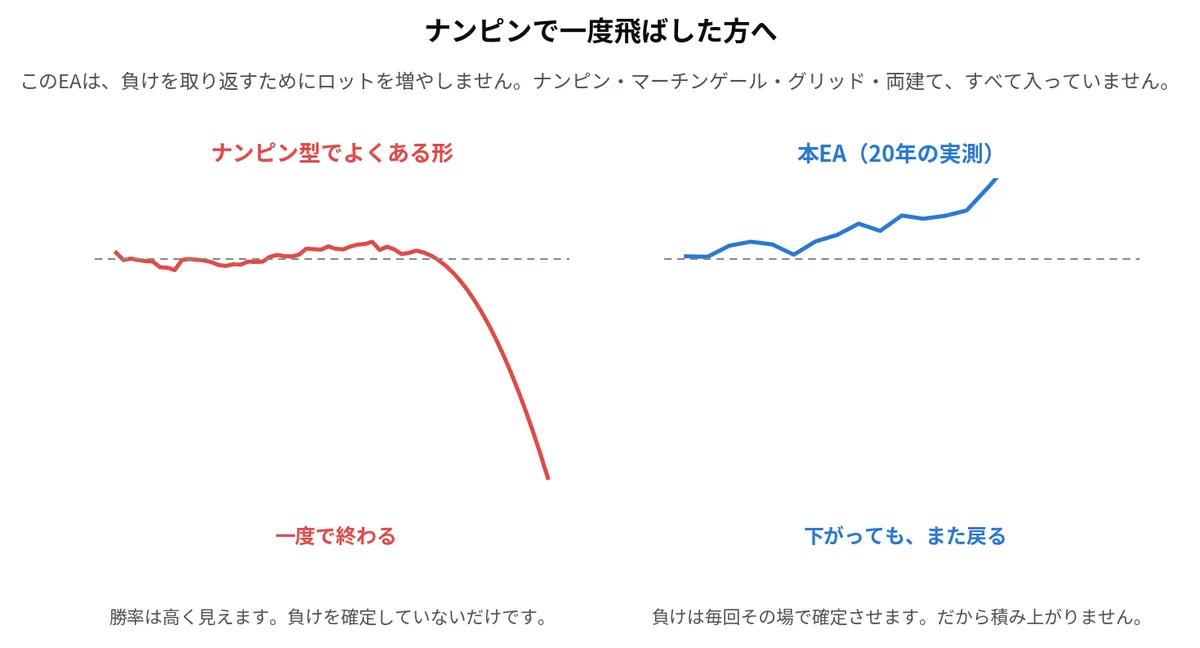
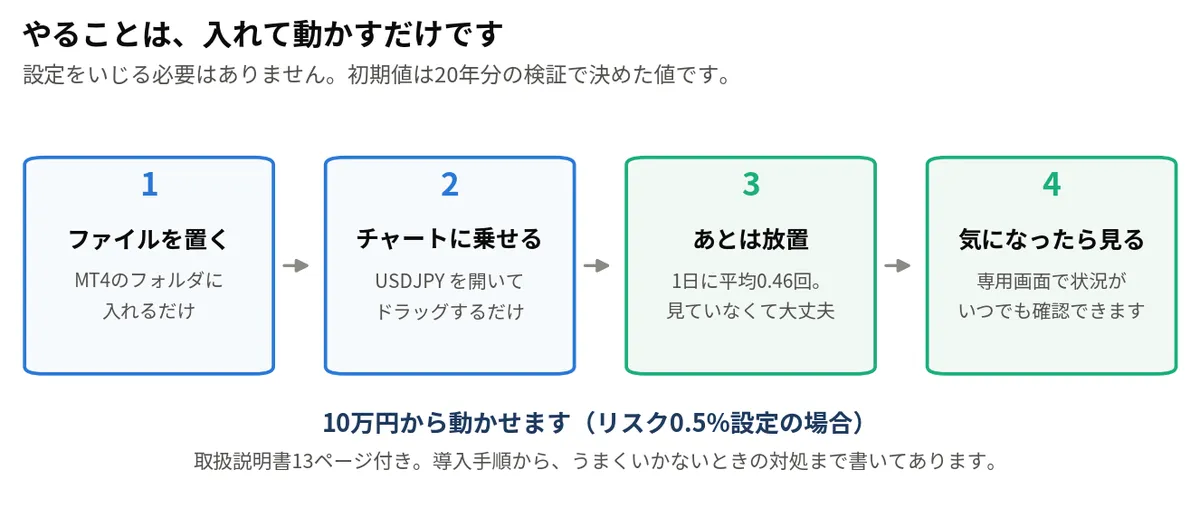
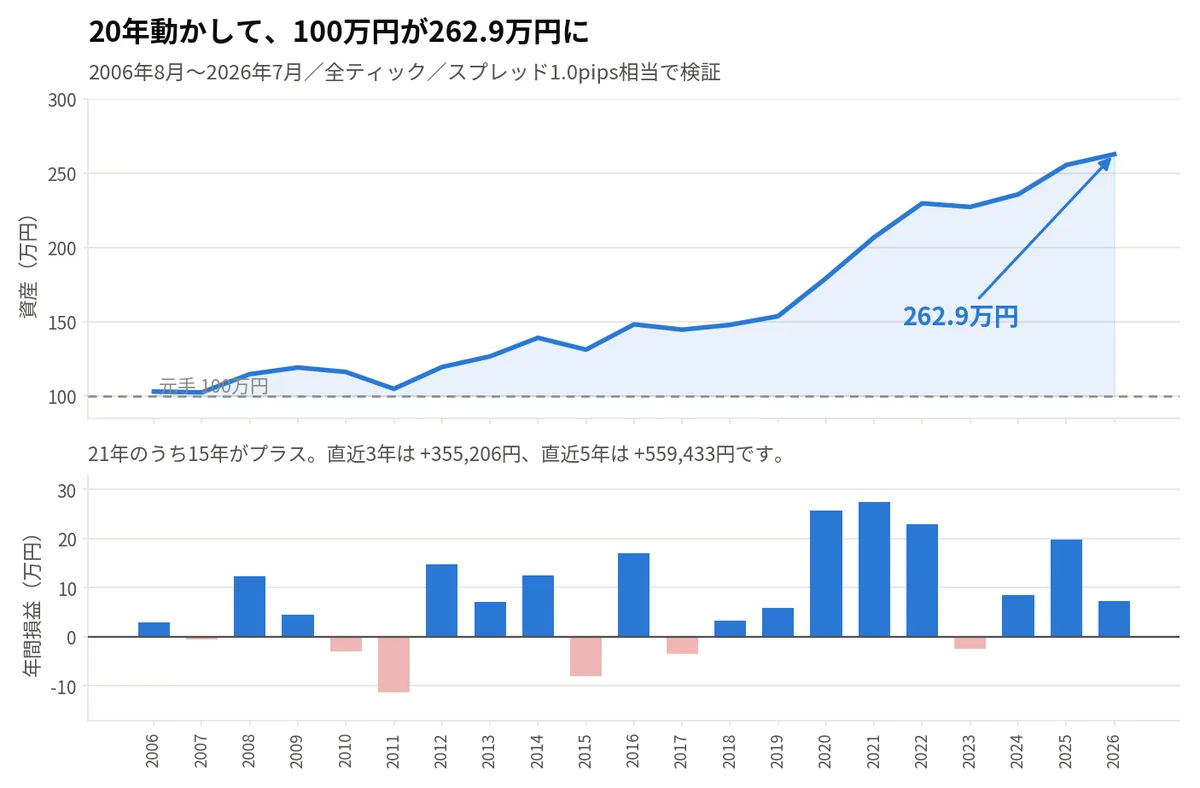
チャートに乗せると、こうなります。
【いくらから始めるべきか】
10万円から動作します。ただし現実的には30万円以上をおすすめします。
初期設定(リスク0.5%)の年利は、20年の検証で約5%でした。
10万円だと年5千円ほどにしかならず、このEAの代金を取り戻すのに
何年もかかってしまいます。
30万円 → 年 1万5千円
50万円 → 年 2万5千円
100万円 → 年 5万円
リスク設定を1.0%に上げれば、この約2倍になります。
ただし沈む深さも約2倍です。最初の表を見て決めてください。
※すべて過去の検証にもとづく目安です。将来を保証するものではありません。
【「動いていないけど、壊れてないよね?」に答えます】
EAを初めて使う方がいちばん不安になるのは、損失が出たときではありません。
何日もエントリーしないときです。壊れているのか、そういうものなのかが
分からないからです。
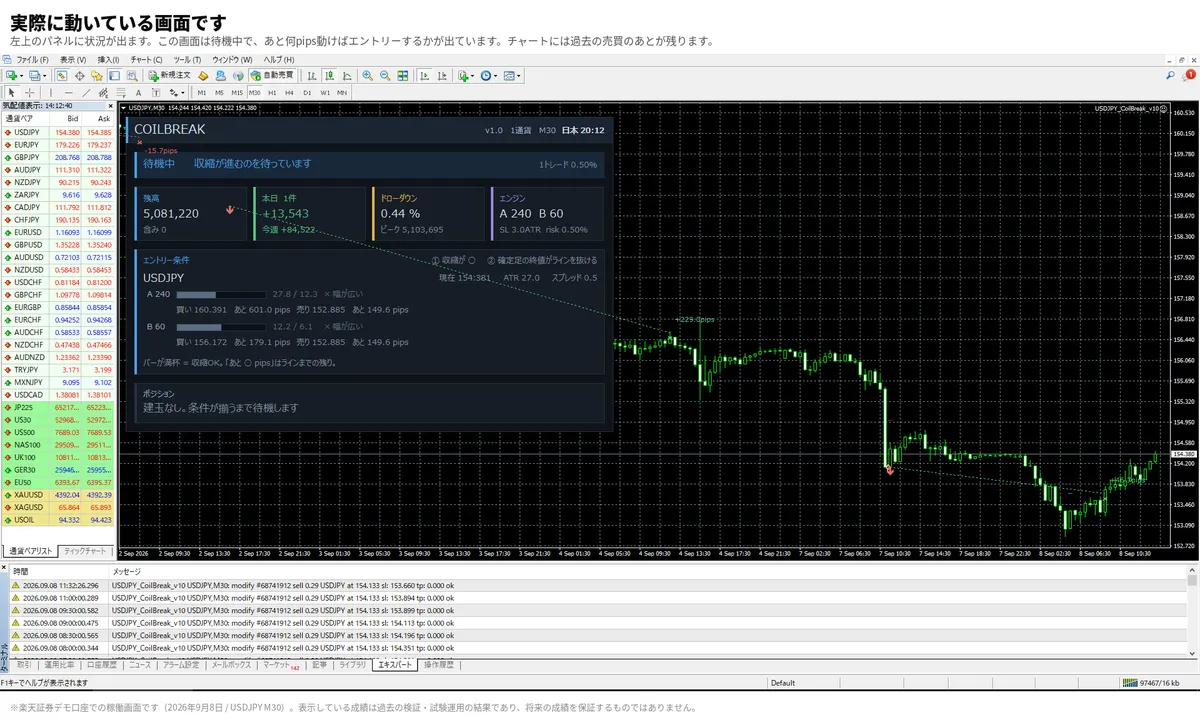
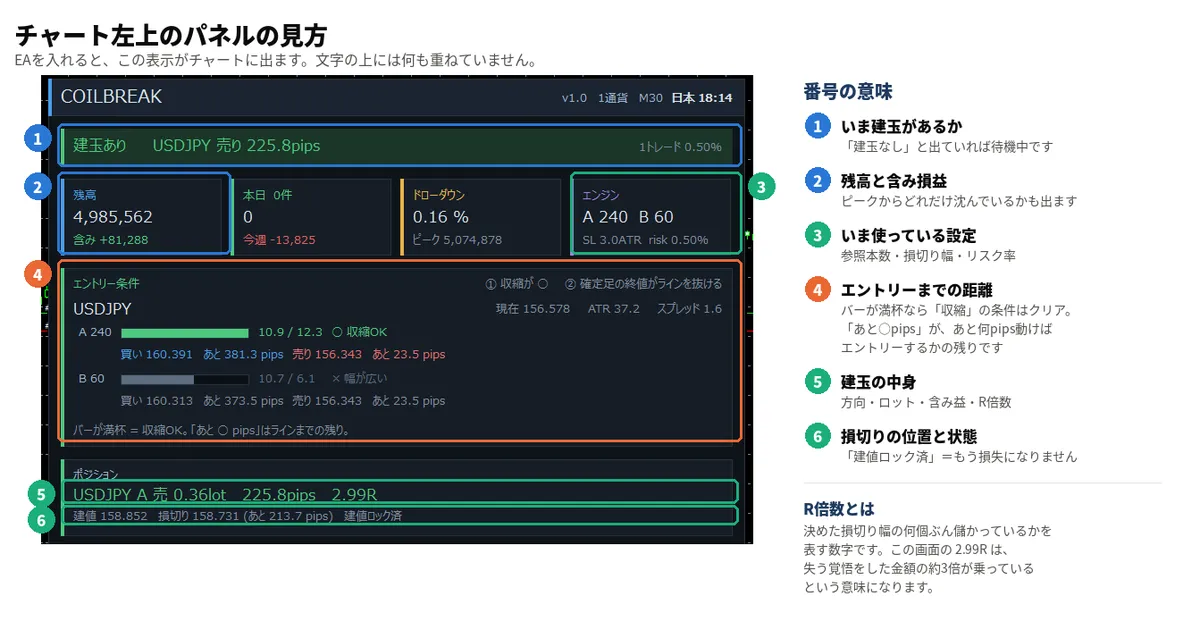
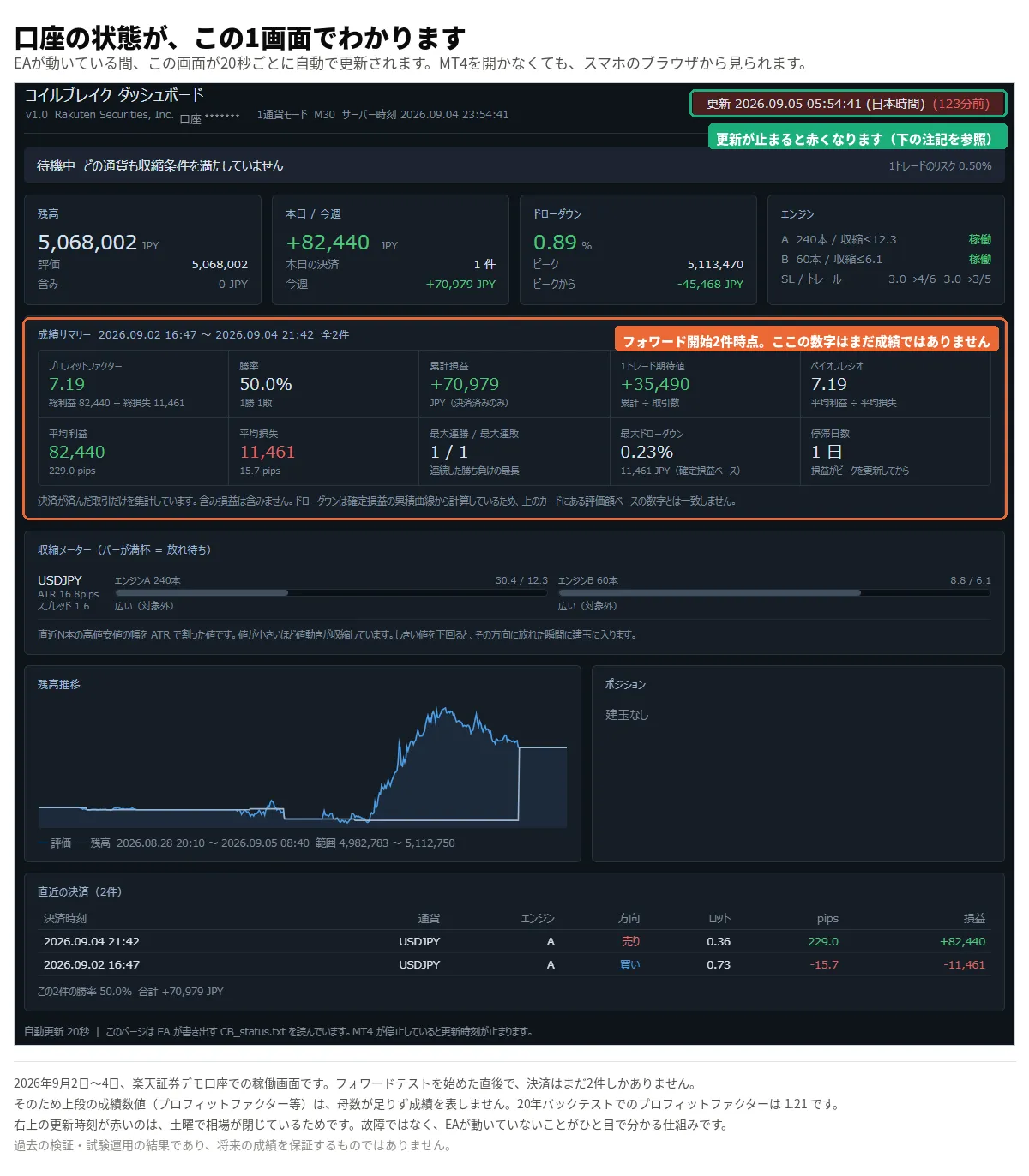
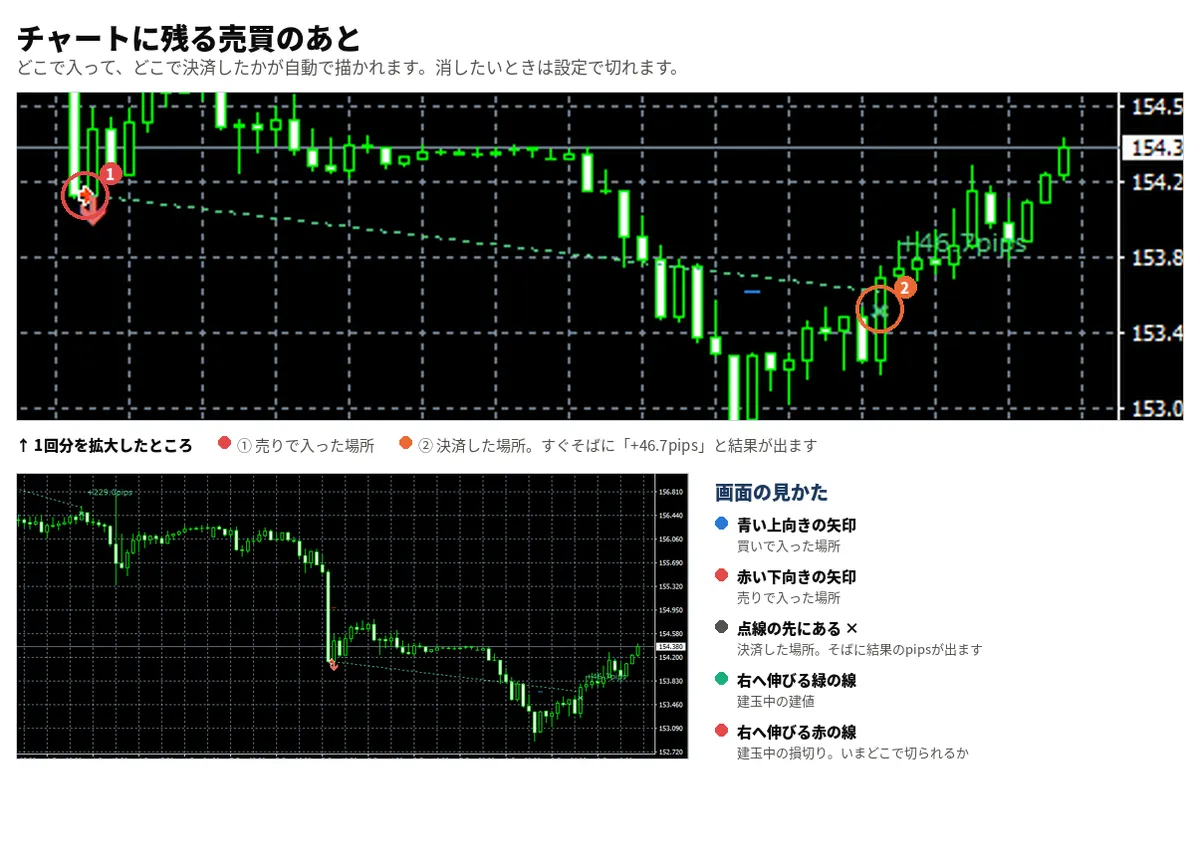
このEAには、それが分かる画面が付いています。
● チャート上のパネル
いま何を待っているのかが常に表示されます。
「収縮OK」「あと少し」「エントリーまであと2.9pips」というように、
条件にどれだけ近づいているかが数字で見えます。
【途中で止めてしまわないために】
ここからは、良くない数字です。
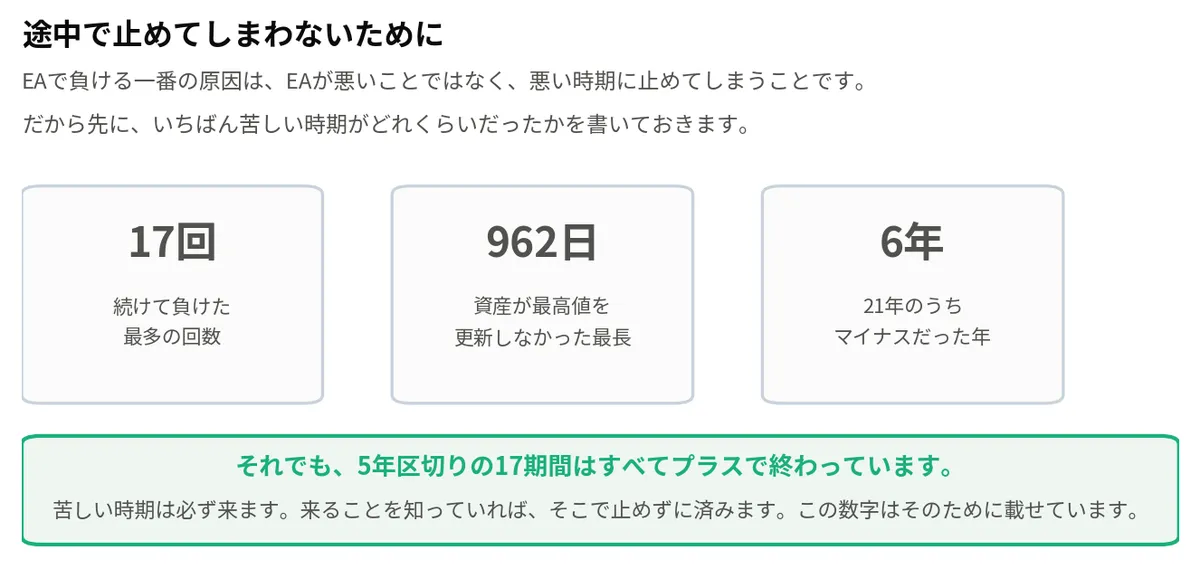
EAで負ける一番の原因は、EAが悪いことではありません。
悪い時期に耐えられず、そこで止めてしまうことです。
だから、いちばん苦しい時期がどれくらいだったかを先に書いておきます。
続けて負けた最多の回数 17回
資産が最高値を更新しなかった最長 962日(約2年8か月)
21年のうちマイナスだった年 6回
17回続けて負ける時期が、実際にありました。約2年8か月、まったく増えない
時期もありました。
それでも、5年区切りの17期間はすべてプラスで終わっています。
苦しい時期は必ず来ます。来ることを知っていれば、そこで止めずに済みます。
この数字は、そのために載せています。

●Payment





Just like discretionary trading, there are those that decide trading and settlement timings by combining indicators, those that repeatedly buy or sell at certain price (pips) intervals, and trading methods that utilize market anomalies or temporal features. The variety is as rich as the methods in discretionary trading.
To categorize simply,
・Scalping (Type where trades are completed within a few minutes to a few hours),
・Day Trading (Type where trades are completed within several hours to about a day),
・Swing Trading (Type where trades are conducted over a relatively long period of about 1 day to 1 week)
・Grid/Martingale Trading (Holding multiple positions at equal or unequal intervals and settling all once a profit is made. Those that gradually increase the lot number are called Martingale.)
・Anomaly EA (Mid-price trading, early morning scalping)
However, a substantial advantage of automated trading is its ability to limit and predict risks beforehand.
[Risk]
Inherent to forex trading are the trading risks that undeniably exist in automated trading as well.
・Lot Size Risk
Increasing the lot size forcibly due to a high winning rate can, in rare instances, depending on the EA, lead to substantial Pips loss when a loss occurs. It is crucial to verify the SL Pips and the number of positions held before operating with an appropriate lot.
・Rapid Market Fluctuation Risk
There are instances where market prices fluctuate rapidly due to index announcements or unforeseen news. System trading does not account for such unpredictable market movements, rendering it incapable of making decisions on whether to settle in advance or abstain from trading. As a countermeasure, utilizing tools that halt the EA based on indicator announcements or the VIX (fear index) is also possible.
[Benefits]
・Operates 24 hours a day
If there is an opportunity, system trading will execute trades on your behalf consistently. It proves to be an extremely convenient tool for those unable to allocate time to trading.
・Trades dispassionately without being swayed by emotions
There is an absence of self-serving rule modifications, a common human tendency, such as increasing the lot size after consecutive losses in discretionary trading or, conversely, hastily securing profits with minimal gains.
・Accessible for beginners
To engage in Forex trading, there is no prerequisite to study; anyone using system trading will achieve the same results.
[Disadvantages]
・Cannot increase trading frequency at will
Since system trading operates based on pre-programmed conditions, depending on the type of EA, it might only execute trades a few times a month.
・Suitability may vary with market conditions
Depending on the trading type of the EA, there are periods more suited to trend trading and periods more suited to contrarian trading, making consistent results across all periods unlikely. While the previous year might have yielded good results, this year's performance might not be as promising, necessitating some level of discretion in determining whether it is an opportune time to operate.
・MT4 (MetaTrader 4. An account needs to be opened with a Forex company that offers MT4.)
・EA (A program for automated trading)
・The operating deposit required to run the EA
・A PC that can run 24 hours or a VPS (Virtual Private Server), where a virtual PC is hosted on a cloud server to run MT4.
Additionally, there are both demo and real accounts available. You can experience trading with virtual money by applying for a demo account. After opening a real account, you select the connection server assigned by the Forex broker, enter the password, and log in to the account.
When you deposit money into your account using the method specified by the forex broker, the funds will be reflected in your MT4 account, and you can trade.
Firstly, download the purchased EA file from your My Page on GogoJungle. You will download a zip (compressed) file, so right-click to extract it and retrieve the file named ‘◯◯◯ (EA name)_A19GAw09 (any 8 alphanumeric characters).ex4’ from inside.
Next, launch MT4 and navigate to ‘File’ → ‘Open Data Folder’ → ‘MQL4’ → ‘Experts’ folder, and place the ex4 file inside. Once done, close MT4 and restart it. Then, go to the upper menu ‘Tools’ → ‘Options’, and under ‘Expert Advisors’, ensure ‘Allow automated trading’ and ‘Allow DLL imports’ are checked, then press OK to close.
The necessary currency pair and time frame for the correct operation of the EA are specified on the EA sales page. Refer to this information and open the chart of the correct currency pair time frame (e.g., USDJPY5M for a USD/Yen 5-minute chart).
Within the menu navigator, under ‘Expert Advisors’, you will find the EA file name you placed earlier. Click to select it, then drag & drop it directly onto the chart to load the EA. Alternatively, you can double-click the EA name to load it onto the selected chart.
If ‘Authentication Success’ appears in the upper left of the chart, the authentication has been successful. To operate the EA, you need to keep your PC running 24 hours. Therefore, either disable the automatic sleep function or host MT4 on a VPS and operate the EA.
If you want to use it with an account other than the authenticated one, you need to reset the registered account.
To reset the account, close the MT4 where the Web authentication is registered, then go to My Page on GogoJungle > Use > Digital Contents > the relevant EA > press the ‘Reset’ button for the registration number, and the registered account will be released.
When the account is in a reset state, using the EA with another MT4 account will register a new account.
Also, you can reset the account an unlimited number of times.
→ Items to Check When EA is Not Operating
1 lot = 100,000 currency units
0.1 lot = 10,000 currency units
0.01 lot = 1,000 currency units
For USD/JPY, 1 lot would mean holding 100,000 dollars.
The margin required to hold lots is determined by the leverage set by the Forex broker.
If the leverage is 25 times, the margin required to hold 10,000 currency units of USD/JPY would be:
10000*109 (※ at a rate of 109 yen per dollar) ÷ 25 = 43,600 yen.
・Risk-Return Ratio: Total Profit and Loss during the period ÷ Maximum Drawdown
・Maximum Drawdown: The largest unrealized loss during the operation period
・Maximum Position Number: This is the maximum number of positions that the EA can theoretically hold at the same time
・TP (Take Profit): The set profit-taking Pips (or specified amount, etc.) in the EA's settings
・SL (Stop Loss): The set maximum loss pips (or specified amount, etc.) in the EA's settings
・Trailing Stop: Instead of settling at a specified Pips, once a certain profit is made, the settlement SL is raised at a certain interval (towards the profit), maximizing the profit. It is a method of settlement.
・Risk-Reward Ratio (Payoff Ratio): Average Profit ÷ Average Loss
・Hedging: Holding both buy and sell positions simultaneously (Some FX companies also have types where hedging is not allowed)
・MT4 Beginner's Guide
・Understanding System Trading Performance (Forward and Backtesting)
・Choosing Your First EA! Calculating Recommended Margin for EAs
・Comparing MT4 Accounts Based on Spread, Swap, and Execution Speed
・What is Web Authentication?
・Checklist for When Your EA Isn't Working
