
ガチホしか勝たん!EURUSD

- Whole period
- 2 years
- 1 year
- 6 months
- 3 months
- 1 month
Forward testing (Profit)
Monthly Statistics
- Jan
- Feb
- Mar
- Apr
- May
- Jun
- Jul
- Aug
- Sep
- Oct
- Nov
- Dec
Calendar for Months
About EA's Strategy
Translating...

ガチホしか勝たん! EURUSD は、EURUSDを対象に固定ロットでじっくり積み上げることを目指したMT4専用EAです。
爆発力を狙うタイプではなく、継続運用のしやすさと扱いやすさを意識したバランス型の設計です。
内部条件に応じて追加エントリーを行いながら、平均建値ベースで全体を管理し、ポジション全体のバランスを見ながら決済していきます。
ゴールド系EAのような強い伸び方というより、EURUSDらしい比較的穏やかな値動きの中で、じっくり積み上げていくタイプのEAです。

■このEAの特徴
・EURUSD専用のMT4 EA
・固定ロット前提のバランス型設計
・内部条件に応じた追加エントリーあり
・平均建値ベースでポジション全体を管理
・爆発力より継続性と扱いやすさを重視
・推奨時間足はM5
・通常運用では最大ポジション数7を推奨
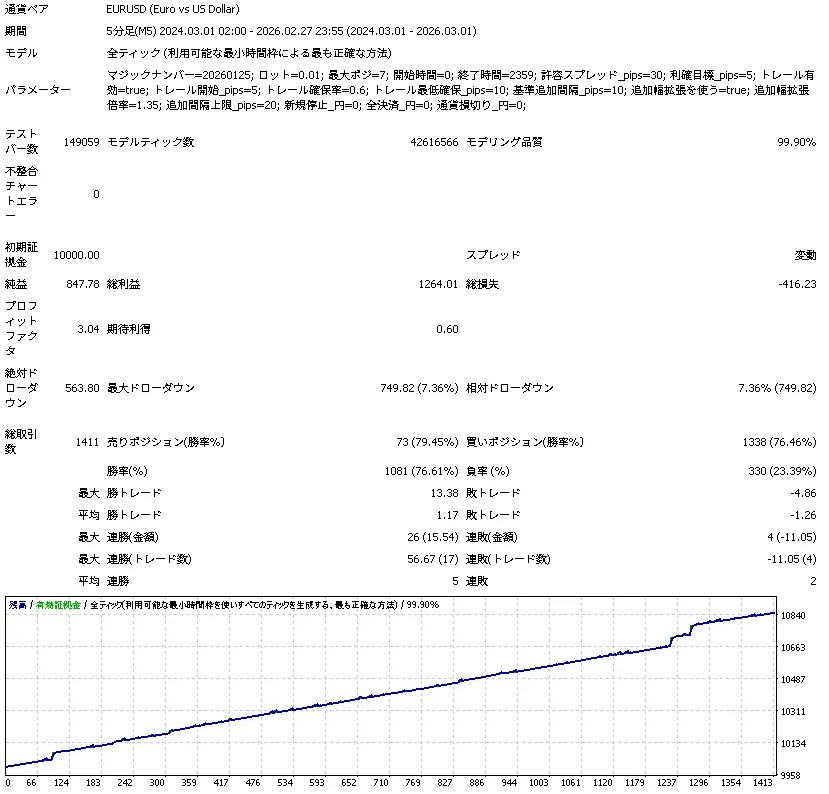
■バックテスト(2年・10,000USD)
まずは本商品の基本的な性格が分かりやすいように、初期証拠金10,000USDでの2年バックテストを掲載しています。
全ティック・99.90%品質の検証で、比較的低いドローダウンに抑えながら右肩上がりで推移しています。
過度に攻めた設計ではなく、まずは安定寄りの運用イメージを持っていただくためのメイン検証です。
■設計の考え方
本EAは、ロットを倍々に増やして一気に取り返すようなマーチン型ではありません。
固定ロットを前提としつつ、相場状況に応じて追加エントリーを行い、平均建値ベースで全体を管理していく構成です。
そのため、短期間で大きく増やすタイプではありませんが、設定を極端にしなければ比較的扱いやすく、通貨ペアEAとして落ち着いた性格を持っています。
■ロジック
ロジックはシンプルです。
EURUSDの押し目・戻りのような場面を拾って、平均建値ベースでバスケット決済していく方式です。
決済は可変方式ではなく、平均建値からの距離をpipsで管理する固定型です。(トレールあり)
そのためユーザー側から見てもかなり分かりやすく、
「今どこが平均建値で、どこを抜けると利確目標なのか」が把握しやすい構成です。


さらに、チャート上には
平均建値ライン
利確ライン
ALLCLEARボタン
を表示しているため、
裁量を少し混ぜたい方でも扱いやすくしています。
また追加エントリーについても、むやみにポジションを積み上げるのではなく、BUY時は平均建値より上で追加しない / SELL時は平均建値より下で追加しないように調整しています。
これによって利確寸前に不利な位置で追加してしまう事故を抑えています。
余計な項目はなるべく表に出さず、細かい部分は内部ロジックで固定。
初心者の方でも触りやすいように意識した設計にしました。
■入力項目
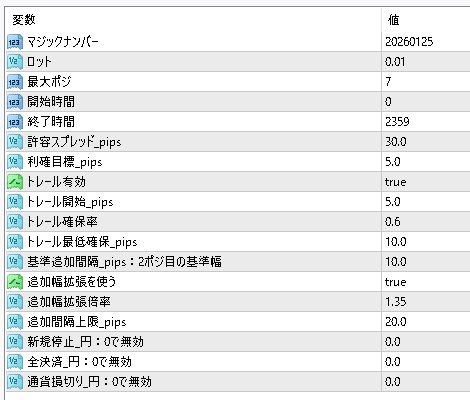
できるだけ扱いやすいように触る項目を必要最低限に絞っています。
細かいロジックは内部で固定しているため、初心者の方でも調整しやすい構成です。
マジックナンバー
EAごとの識別番号です。
同じ口座で複数のEAを動かす場合や同じEAを別設定で動かす場合に使います。基本的にはそのままでも大丈夫ですが、他EAと併用する場合は重ならない番号に変更してください。
ロット
1回のエントリーで使うロット数です。
上げるほど利益も大きくなりますが、そのぶん含み損やドローダウンも大きくなります。
まずは 0.01 からの運用がおすすめです。
最大ポジ
このEAが持つ最大ポジション数です。
数字を大きくすると深い逆行まで拾いやすくなりますが、そのぶん保有数も増えます。
標準運用では 7 を推奨しています。
より慎重に行くなら 5 前後、攻める場合でも 10 以上は上級者向けです。
開始時間 / 終了時間
EAが新規エントリーを行う時間帯です。
0〜2359 にしておけば終日稼働します。
特定の時間帯だけ動かしたい場合に調整してください。
許容スプレッド_pips
スプレッドが広すぎるときにエントリーを避けるための設定です。
通常はそのままで問題ありません。
スプレッドが広めの口座では少し緩めることもあります。
利確目標_pips
平均建値から何pipsで利確を狙うかの目安です。
このEAは複数ポジション時、平均建値ベースで全体決済を行うため、この値が利確の基準になります。
今回の検証では 5.0がかなり良好でした。
トレール有効
利が乗ったあと、さらに伸ばして利益を追うかどうかの設定です。
true ならトレールあり、false なら固定利確です。
トレールを切っても通常どおり利確は行われます。
トレール開始_pips
何pips利益が乗ったらトレールを開始するかの設定です。
通常は利確目標pipsと同じ値で使いやすいです。
トレール確保率
トレール開始後、どのくらい利益を残して決済するかの割合です。
高いほど早めに利益を確保し、低いほど粘りやすくなります。
一般的には 0.6 前後が扱いやすいです。
トレール最低確保_pips
トレール時に最低限確保したい利益幅です。
戻しで早く決済されすぎるのを防ぐための設定です。
基準追加間隔_pips
2ポジ目を追加する時の基準となる間隔です。
このEAはナンピン幅を自動拡張できますが、その元になる基本幅がこの値です。
小さくすると追加が早くなり、大きくすると慎重になります。
追加幅拡張を使う
true にすると、段数が進むほど追加間隔が広がります。
これにより、後半のポジションを焦って積みすぎないようにできます。
本EAではtrue 推奨 です。
追加幅拡張倍率
追加幅をどのくらいの割合で広げていくかの設定です。
1.0 なら固定、1.1〜1.35 あたりで後半を慎重にできます。
デフォルト付近はかなりバランスが良い設定です。
追加間隔上限_pips
追加幅が広がりすぎないようにする上限です。
0 にすると上限なしになります。
値を入れておくことで、「待ちすぎるEA」になるのを防ぎやすくなります。
新規停止_円
口座全体の損益が一定額まで悪化したとき、新規エントリーを止める設定です。
0 で無効 です。
通常は 0 のまま運用し、必要に応じて安全装置として使います。
全決済_円
口座全体の損益が一定額まで悪化したとき、全ポジションを決済する設定です。
0 で無効 です。
かなり強い安全装置なので、通常は 0 のままで問題ありません。
通貨損切り_円
このEAの通貨ペア単位で、一定額の損失になったとき損切りする設定です。
0 で無効 です。
こちらも必要に応じて使う保険的な項目です。
■設定
基本的には、まず
ロット
最大ポジ
利確目標_pips
この3つを中心に考えるのがおすすめです。
特に重要なのは 最大ポジ と 追加幅の考え方 で、
このEAはポジションが増えるほど平均建値ベースで利確しやすくなる一方、
無理に深追いすると保有時間も長くなります。
そのため、標準では
最大ポジ7前後・追加幅拡張あり
のバランス設定を基本にしています。
■推奨環境
・対応プラットフォーム:MetaTrader4
・推奨通貨ペア:EURUSD
・推奨時間足:M5
・推奨最大ポジション数:7
・固定ロット前提
・まずはデフォルト設定または推奨設定からの運用をおすすめします
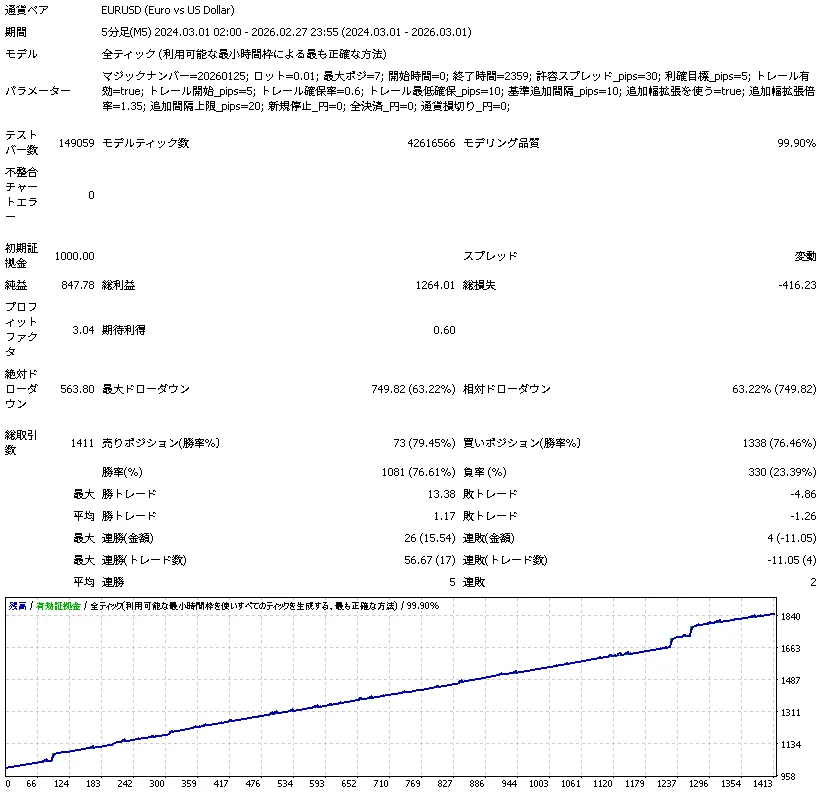
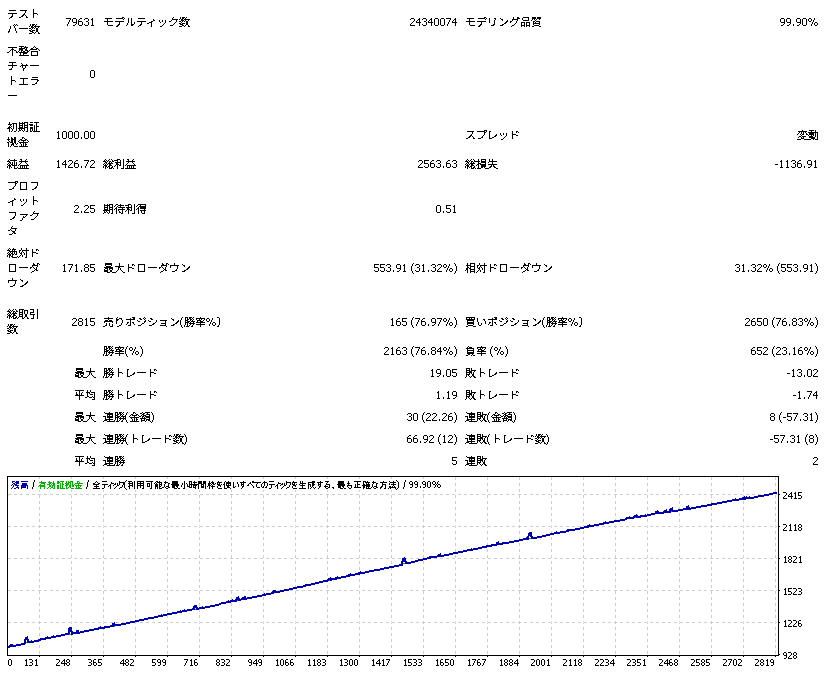
■参考検証(1,000USD)
参考として、同条件で初期証拠金1,000USDの2年検証も掲載しています。
こちらはドローダウン比率が大きくなりますが、少額条件でも破綻せず完走しており、本EAの耐性の一例として確認いただけます。
ただし、実運用ではドローダウンの重さを考慮し、余裕を持った証拠金での運用を推奨します。
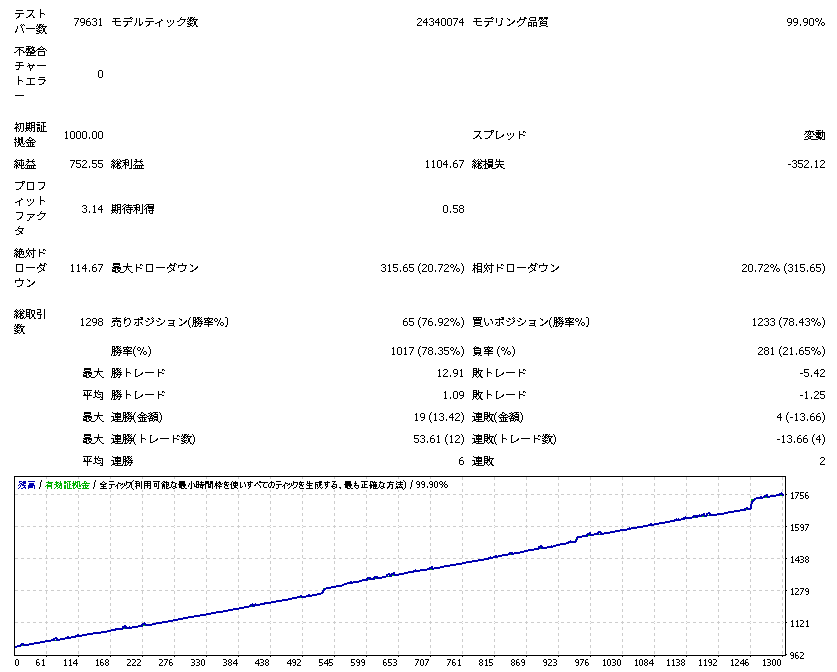
下記は1年間で最大ポジの数だけ変更した結果になります。
■このEAが向いている方
・爆発力より継続運用を重視したい方
・固定ロットで比較的扱いやすいEAを探している方
・ゴールド系とは違う、通貨ペアの落ち着いたEAを使いたい方
・EURUSDでじっくり積み上げたい方
「ガチホしか勝たん!」 は、
takoyakiEAの中でもかなりバランスの良い1本です。
派手さよりも、
分かりやすい
扱いやすい
通貨ペアが穏やか
テスト結果も素直
という強みがあります。
ゴールド系のような爆発力とは違いますが、
なだらかに積み上げていく魅力があるFX通貨EA として、
かなり面白い仕上がりになっています。
まずは無理のない範囲で触ってみてください。
■ご注意
・バックテストと実運用では、スプレッド、約定、スリッページ等により結果が異なる場合があります
・相場状況によっては保有時間が長くなる場合があります
・追加エントリーを行う設計のため、余裕を持った証拠金での運用を推奨します
・高ロット運用や過度な設定変更は、本来の設計意図と異なる結果につながる場合があります
・最終的な運用判断はご自身でお願いいたします
●Payment






●Payment
Just like discretionary trading, there are those that decide trading and settlement timings by combining indicators, those that repeatedly buy or sell at certain price (pips) intervals, and trading methods that utilize market anomalies or temporal features. The variety is as rich as the methods in discretionary trading.
To categorize simply,
・Scalping (Type where trades are completed within a few minutes to a few hours),
・Day Trading (Type where trades are completed within several hours to about a day),
・Swing Trading (Type where trades are conducted over a relatively long period of about 1 day to 1 week)
・Grid/Martingale Trading (Holding multiple positions at equal or unequal intervals and settling all once a profit is made. Those that gradually increase the lot number are called Martingale.)
・Anomaly EA (Mid-price trading, early morning scalping)
However, a substantial advantage of automated trading is its ability to limit and predict risks beforehand.
[Risk]
Inherent to forex trading are the trading risks that undeniably exist in automated trading as well.
・Lot Size Risk
Increasing the lot size forcibly due to a high winning rate can, in rare instances, depending on the EA, lead to substantial Pips loss when a loss occurs. It is crucial to verify the SL Pips and the number of positions held before operating with an appropriate lot.
・Rapid Market Fluctuation Risk
There are instances where market prices fluctuate rapidly due to index announcements or unforeseen news. System trading does not account for such unpredictable market movements, rendering it incapable of making decisions on whether to settle in advance or abstain from trading. As a countermeasure, utilizing tools that halt the EA based on indicator announcements or the VIX (fear index) is also possible.
[Benefits]
・Operates 24 hours a day
If there is an opportunity, system trading will execute trades on your behalf consistently. It proves to be an extremely convenient tool for those unable to allocate time to trading.
・Trades dispassionately without being swayed by emotions
There is an absence of self-serving rule modifications, a common human tendency, such as increasing the lot size after consecutive losses in discretionary trading or, conversely, hastily securing profits with minimal gains.
・Accessible for beginners
To engage in Forex trading, there is no prerequisite to study; anyone using system trading will achieve the same results.
[Disadvantages]
・Cannot increase trading frequency at will
Since system trading operates based on pre-programmed conditions, depending on the type of EA, it might only execute trades a few times a month.
・Suitability may vary with market conditions
Depending on the trading type of the EA, there are periods more suited to trend trading and periods more suited to contrarian trading, making consistent results across all periods unlikely. While the previous year might have yielded good results, this year's performance might not be as promising, necessitating some level of discretion in determining whether it is an opportune time to operate.
・MT4 (MetaTrader 4. An account needs to be opened with a Forex company that offers MT4.)
・EA (A program for automated trading)
・The operating deposit required to run the EA
・A PC that can run 24 hours or a VPS (Virtual Private Server), where a virtual PC is hosted on a cloud server to run MT4.
Additionally, there are both demo and real accounts available. You can experience trading with virtual money by applying for a demo account. After opening a real account, you select the connection server assigned by the Forex broker, enter the password, and log in to the account.
When you deposit money into your account using the method specified by the forex broker, the funds will be reflected in your MT4 account, and you can trade.
Firstly, download the purchased EA file from your My Page on GogoJungle. You will download a zip (compressed) file, so right-click to extract it and retrieve the file named ‘◯◯◯ (EA name)_A19GAw09 (any 8 alphanumeric characters).ex4’ from inside.
Next, launch MT4 and navigate to ‘File’ → ‘Open Data Folder’ → ‘MQL4’ → ‘Experts’ folder, and place the ex4 file inside. Once done, close MT4 and restart it. Then, go to the upper menu ‘Tools’ → ‘Options’, and under ‘Expert Advisors’, ensure ‘Allow automated trading’ and ‘Allow DLL imports’ are checked, then press OK to close.
The necessary currency pair and time frame for the correct operation of the EA are specified on the EA sales page. Refer to this information and open the chart of the correct currency pair time frame (e.g., USDJPY5M for a USD/Yen 5-minute chart).
Within the menu navigator, under ‘Expert Advisors’, you will find the EA file name you placed earlier. Click to select it, then drag & drop it directly onto the chart to load the EA. Alternatively, you can double-click the EA name to load it onto the selected chart.
If ‘Authentication Success’ appears in the upper left of the chart, the authentication has been successful. To operate the EA, you need to keep your PC running 24 hours. Therefore, either disable the automatic sleep function or host MT4 on a VPS and operate the EA.
If you want to use it with an account other than the authenticated one, you need to reset the registered account.
To reset the account, close the MT4 where the Web authentication is registered, then go to My Page on GogoJungle > Use > Digital Contents > the relevant EA > press the ‘Reset’ button for the registration number, and the registered account will be released.
When the account is in a reset state, using the EA with another MT4 account will register a new account.
Also, you can reset the account an unlimited number of times.
→ Items to Check When EA is Not Operating
1 lot = 100,000 currency units
0.1 lot = 10,000 currency units
0.01 lot = 1,000 currency units
For USD/JPY, 1 lot would mean holding 100,000 dollars.
The margin required to hold lots is determined by the leverage set by the Forex broker.
If the leverage is 25 times, the margin required to hold 10,000 currency units of USD/JPY would be:
10000*109 (※ at a rate of 109 yen per dollar) ÷ 25 = 43,600 yen.
・Risk-Return Ratio: Total Profit and Loss during the period ÷ Maximum Drawdown
・Maximum Drawdown: The largest unrealized loss during the operation period
・Maximum Position Number: This is the maximum number of positions that the EA can theoretically hold at the same time
・TP (Take Profit): The set profit-taking Pips (or specified amount, etc.) in the EA's settings
・SL (Stop Loss): The set maximum loss pips (or specified amount, etc.) in the EA's settings
・Trailing Stop: Instead of settling at a specified Pips, once a certain profit is made, the settlement SL is raised at a certain interval (towards the profit), maximizing the profit. It is a method of settlement.
・Risk-Reward Ratio (Payoff Ratio): Average Profit ÷ Average Loss
・Hedging: Holding both buy and sell positions simultaneously (Some FX companies also have types where hedging is not allowed)
・MT4 Beginner's Guide
・Understanding System Trading Performance (Forward and Backtesting)
・Choosing Your First EA! Calculating Recommended Margin for EAs
・Comparing MT4 Accounts Based on Spread, Swap, and Execution Speed
・What is Web Authentication?
・Checklist for When Your EA Isn't Working
