Alter Ego Tetra

- Whole period
- 2 years
- 1 year
- 6 months
- 3 months
- 1 month
Forward testing (Profit)
Monthly Statistics
- Jan
- Feb
- Mar
- Apr
- May
- Jun
- Jul
- Aug
- Sep
- Oct
- Nov
- Dec
Calendar for Months
About EA's Strategy
Translating...

疑似フォワード7年連続プラス。正統派デイトレードEA "Alter Ego Tetra"をご紹介いたします。
ご案内
EAに関する各種情報をブログでお届けしております。
ご質問、ご不明な点などございましたらぜひ一度下記ウェブページを御覧ください。
特徴
開発経緯とコンセプト
前作Alter Egoはシングルポジションを標榜し設計しておりましたが、シングルポジションゆえエントリー後の相場変動に対応できない場面があり、2005年以前のヒストリカルデータを用いると年間損益がマイナスになってしまう年があるとの指摘をいただきました。
それを受け新規相場に柔軟に対応するべく、とりうるポジション数を4つまで増やし再製作致しました。エントリー開始地点は前作を踏襲しほぼ変更しておりません。
本EAは2005~2017年の1時間足をロジック構築の教師データとして用いていますが、1999~2004年および2018年の計7年にわたるテストデータ、いわゆる疑似フォワードでも通年損益は全てプラスとなっており(スプレッド1.0pipsの場合)、自信をもってお届けできる一品となっています。
ロジック
複数の平均線を参考とし、1時間足が確定した時点でエントリーを行います。年末年始などを除きブローカー毎のエントリーの差はスキャルピングEA等と比較すると少ないです。
相場が意図した方向に逆行した場合、一定間隔ごとに同方向のポジションを取り直します(最大4ポジション)。
広義のナンピンだと思われるかもしれませんが、いずれのポジションも最大SLは50pipsのため、1取引の最大損失は200pipsとやや大きめではありますが限定されています。
TP, SLの値はEURUSDの価格によりますが、概ね比率は5:6と思っていただいて結構です。1ポジションが30pipsで利確する相場では36pipsで損切を行います。SLに対してTPが極端に小さい、いわゆるコツドカ型のEAではありません。
ブローカー間の差異を排除するためTrailing Stopは廃止致しました。
成績
バックテスト
1999年1月から2018年12月までのバックテスト結果をお示しします。0.01ロットでの単利運用、Alpariヒストリカルデータを使用しています。スプレッドは1.0pipsです。
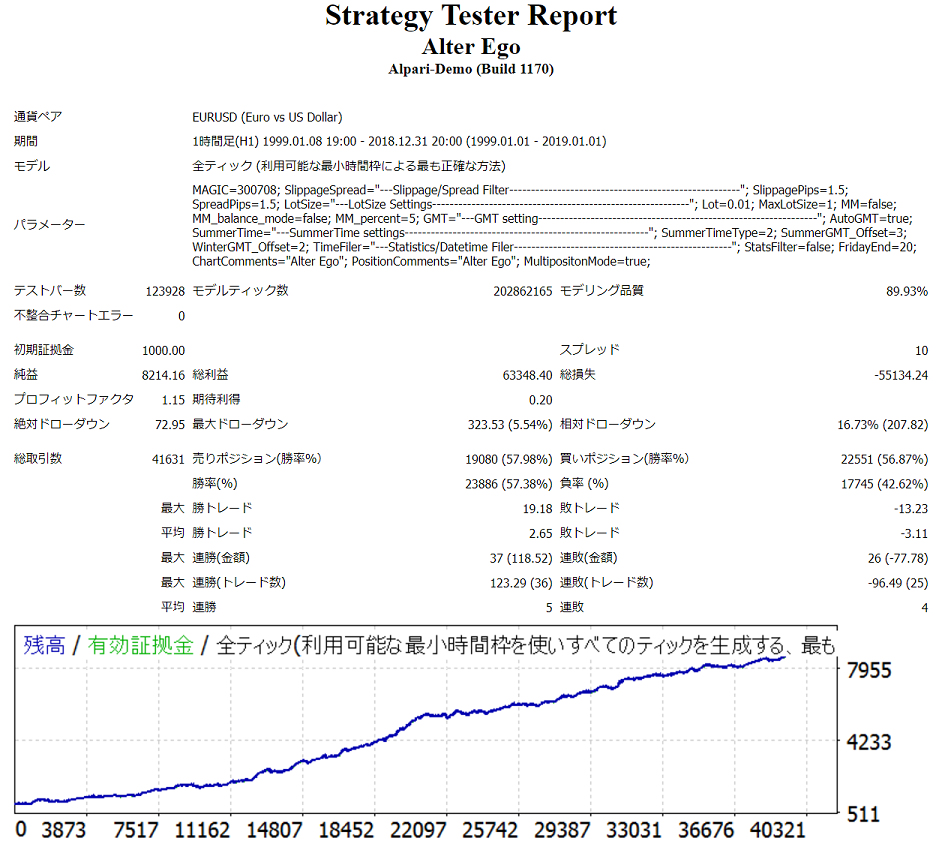
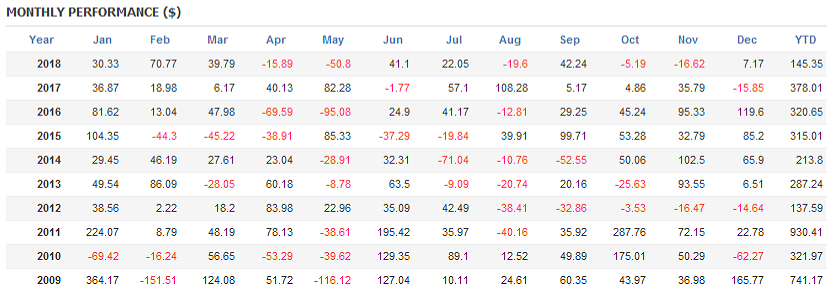
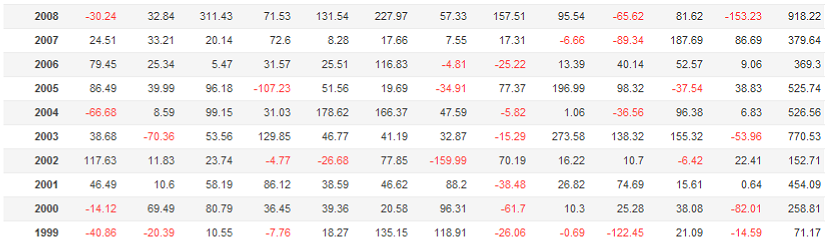
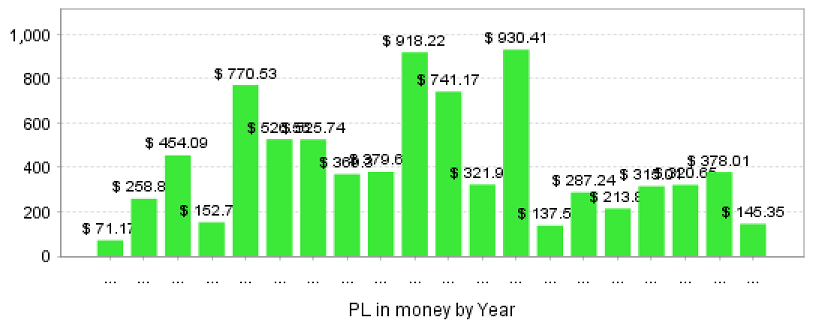
教師データである2005~2017年は勿論のこと、ロジック算出に用いていない1999~2004年、2018年も同様に通年損益プラスを記録しています。
最大ドローダウンがやや大きめでprofit factorも1.15と物足りなく感じられるかもしれませんが、ドローダウンから復帰し最大益を更新するまでの期間(max stagnation time)は1999~2000年に記録した258日です。
つまりスプレッド1.0pipsの場合、どのタイミングからEAを作動させても9ヶ月待てば利益が期待できる計算です。
複利については個人の投資方針によって資金推移が大きく変わるため、ここでは省略しています。皆様のご希望があれば現実的なロットで今後掲載させていただきます。
フォワードテスト
開発者自身による2019年3月からのフォワードテストを公開しております。OANDA Japan, NY v-20サーバー、0.01ロット固定での成績推移です。
複数のEAを同一口座で運用しております。そのため大変お手数ではございますがリンク先のmyfxbookに飛んでいただき、右上のCustom Analysis > MagicタブのAlter Ego TetraにチェックをつけAnalyzeボタンをお押しください。
パラメータ項目
Alter Ego Tetraで使用するパラメータ項目の一覧です。
ロット数、複利設定など特にエントリーに関わる項目については、実運用の前に必ずバックテストなどでご確認ください。
| 項目名 | 初期値 | 説明 |
| MagicNumber | 508756 | Alter Ego Tetraで使用するマジックナンバーです。同一口座で複数のEAを使用される場合は、必ず重複しない値をご設定ください。 |
| Slippage and Spread | - | 以下スリッページ、スプレッドのフィルター設定です。 |
| Max Slippage(pips) | 1.5 | スリッページのフィルターです。単位はpipsです。設定値よりスリッページが大きい場合はエントリーを行いません。 |
| Max Spread(pips) | 1.5 | スプレッドのフィルターです。単位はpipsです。設定値よりスプレッドが大きい場合はエントリーを行いません。 |
| Lot Size | - | 以下ロットサイズについての設定です。 |
| Lot for simple interest | 0.1 | 単利運用時のロット数です。1.0ロット=10万通貨単位です。複利運用時は参照されません。 |
| Max Lot Size | 1.0 | 運用ロットの最大値です。単利、複利とも設定ロットがこの値より大きい場合、自動的に設定値に調整されます。 |
| MM | false | 複利運用を行うかどうかの設定です。trueで複利運用、falseで単利運用となります。 |
| MM balance mode | false | 複利運用する資金の種類についての設定です。trueで口座残高、falseで余剰証拠金を元に複利計算を行います。単利運用時は参照されません。 |
| MM percent(%) | 5 | 複利運用する際のレバレッジの割合です。例えば設定値が5(%)の場合、レバレッジ25倍の口座であれば25x0.05=1.25倍、200倍の口座であれば200x0.05=10倍のレバレッジでの運用となります。単利運用時は参照されません。 |
| GMT | - | 以下GMT(標準時間)についての設定です。 |
| AutoGMT | true | ブローカーの標準時間を自動的に算出する機能です。バックテストの際は参照されないため、ヒストリカルデータに応じたブローカーの夏時間を同項目でご設定ください。 |
| SummerTime | - | 以下夏時間についての設定です。 |
| Summer Time Type | N.Y. | ブローカーの夏時間の形式です。Not Summer Time:夏時間不採用、London:英国式、N.Y.:米国式の夏時間です。GMT +2/+3のブローカーの場合はN.Y.を選択ください。 |
| Summer GMT Offset | 3 | ブローカーの夏時間のGMTです。GMT +2/+3のブローカーの場合は3を選択ください。 |
| Winter GMT Offset | 2 | ブローカーの冬時間のGMTです。GMT +2/+3のブローカーの場合は2を選択ください |
| TimeFilter | - | 以下エントリー、決済時間に関するフィルター設定です。年末年始にあたる12月24日0時から1月4日24時(ブローカー標準時間基準)のエントリーは行いません。 |
| Stats and Weekend Filter | false | 週末のエントリーを制限する機能です。trueの場合、金曜日の指定した時間以降のエントリーを制限し、ポジションを保持していた場合は同時刻に決済いたします。falseの場合は週末の市場閉鎖1時間前にポジションを決済いたします。 |
| Halt trade on Friday from(LocalTime) | 8:00 p.m. | 金曜日の設定した時間以降のエントリーを制限します。ローカル時間基準のため、ローカルPCの設定時間が不正な場合は正しく機能しませんのでご注意ください。週末フィルターがfalseの場合は参照されません。 |
| Comment on Chart | Alter Ego Tetra | Alter Ego Tetraを運用しているチャート上にコメントを記載します。 |
| Comment on Order | Alter Ego Tetra | Alter Ego Tetraが注文したオーダーにコメントを記載します。 |
FAQ
Q1. 運用可能なブローカーに制限はありますか?
A1. 本EAは基本的にMT4対応のブローカーであれば動作いたしますが、ロジックの関係上GMT +2/+3のブローカーを推奨しております。その他の標準時間採用のブローカーの場合、エントリーに齟齬が生じ本来のパフォーマンスを発揮できない可能性があります。採用標準時間については各種ブローカーのウェブページをご参照ください。
Q2. 推奨される運用ロットはありますか?
A2. 投資金額や投資スタンスに個人差がございますため一概には申し上げられませんが、こちらの記事などを参考にロットを決めていただければと思います。
本EAは単利の場合、1取引あたりの最大損失はレバレッジ1倍で全資産のおおよそ1.2%となるよう設計されています。最大ドローダウンを考慮すると、初期資産にもよりますが現実的なレバレッジは1倍前後、最もリスクをとったとしても1.5倍以下がよいでしょう。
疑似フォワードを元にするとレバレッジ1倍でも最低7%程度の年利を得られる計算です。
Q3. フォワードテストと異なるエントリー、決済があった。
A3. 本EAはロジックの設計上ブローカーによるエントリーの差異は出にくい仕様になっておりますが、ブローカー毎に配信チャートやスプレッド、スリッページなどの条件が異なりますため、どうしても運用成績に差が生まれる場面がございます。何卒ご容赦いただきますようお願い申し上げます。
本EAのOANDA Japan NYサーバーでの成績についてはこちらでご参照いただけます。ご利用されているブローカーとあまりに成績が異なる場合は、お手数ではございますがブローカーの移行をご検討いただけますと幸いに存じます。
Q4. エントリー直後に損失方向に逆行することがあり、エントリーの優位性が見出だせない。
A4. ご心配をおかけして申し訳ございません。ロジックの根幹に関わる問題のため詳細な言及は控えさせていただきますが、本EAは「現時点より一定時間以内に一定方向へ向かう可能性が高い」際にエントリーを行います。
そのため一時的な含み損が生じたり、ファンダメンタルな要素によってチャートが推移した場合には損失が生じることも相応にございます。何卒ご理解いただきますようお願い申し上げます。
Q5. Take Profit, Stop Lossなどの数値を変更したい。また日時によってエントリーを制限する機能を追加してほしい。
A5. 貴重なご意見誠にありがとうございます。
本EAに関して、Take Profit, Stop Lossの値は設計初期段階からロジックと密接に関わっているため、後付でそれらを変更してしまうと過去データへの過剰最適化が起き、将来的なパフォーマンスを損なう恐れがあると考えています。
また早朝スキャルピングタイプEAのように動作する日時の制限が効果的な場合もございますが、本EAは24時間365日有効となるよう調整を施されているため、時間的制限はエントリーの機会損失、ひいては期待利得の減少につながります。それゆえ週末フィルターも初期値はfalseになっております。
よって恐縮ではございますが現時点でこれらを変更可能にする要素の導入予定はございません。皆様からいただきましたご意見は、今後のEA製作の際の参考とさせていただきます。
Q6. 前作Alter Egoと比較して最も大きな違いはなんですか?
A6. マルチポジション化によりエントリー後の相場変動への対応力が格段に増しました。デメリットとしてはマルチポジションゆえに利益率が下がってしまったこと、推奨最低証拠金が増加したことがあります。
そのほかEAに関する各種情報をブログでもご案内しております。ぜひ一度ご覧ください。
Price:¥15,000 (taxed)
●Payment




Sales from : 04/23/2019 23:39
Price:¥15,000 (taxed)
●Payment
Just like discretionary trading, there are those that decide trading and settlement timings by combining indicators, those that repeatedly buy or sell at certain price (pips) intervals, and trading methods that utilize market anomalies or temporal features. The variety is as rich as the methods in discretionary trading.
To categorize simply,
・Scalping (Type where trades are completed within a few minutes to a few hours),
・Day Trading (Type where trades are completed within several hours to about a day),
・Swing Trading (Type where trades are conducted over a relatively long period of about 1 day to 1 week)
・Grid/Martingale Trading (Holding multiple positions at equal or unequal intervals and settling all once a profit is made. Those that gradually increase the lot number are called Martingale.)
・Anomaly EA (Mid-price trading, early morning scalping)
However, a substantial advantage of automated trading is its ability to limit and predict risks beforehand.
[Risk]
Inherent to forex trading are the trading risks that undeniably exist in automated trading as well.
・Lot Size Risk
Increasing the lot size forcibly due to a high winning rate can, in rare instances, depending on the EA, lead to substantial Pips loss when a loss occurs. It is crucial to verify the SL Pips and the number of positions held before operating with an appropriate lot.
・Rapid Market Fluctuation Risk
There are instances where market prices fluctuate rapidly due to index announcements or unforeseen news. System trading does not account for such unpredictable market movements, rendering it incapable of making decisions on whether to settle in advance or abstain from trading. As a countermeasure, utilizing tools that halt the EA based on indicator announcements or the VIX (fear index) is also possible.
[Benefits]
・Operates 24 hours a day
If there is an opportunity, system trading will execute trades on your behalf consistently. It proves to be an extremely convenient tool for those unable to allocate time to trading.
・Trades dispassionately without being swayed by emotions
There is an absence of self-serving rule modifications, a common human tendency, such as increasing the lot size after consecutive losses in discretionary trading or, conversely, hastily securing profits with minimal gains.
・Accessible for beginners
To engage in Forex trading, there is no prerequisite to study; anyone using system trading will achieve the same results.
[Disadvantages]
・Cannot increase trading frequency at will
Since system trading operates based on pre-programmed conditions, depending on the type of EA, it might only execute trades a few times a month.
・Suitability may vary with market conditions
Depending on the trading type of the EA, there are periods more suited to trend trading and periods more suited to contrarian trading, making consistent results across all periods unlikely. While the previous year might have yielded good results, this year's performance might not be as promising, necessitating some level of discretion in determining whether it is an opportune time to operate.
・MT4 (MetaTrader 4. An account needs to be opened with a Forex company that offers MT4.)
・EA (A program for automated trading)
・The operating deposit required to run the EA
・A PC that can run 24 hours or a VPS (Virtual Private Server), where a virtual PC is hosted on a cloud server to run MT4.
Additionally, there are both demo and real accounts available. You can experience trading with virtual money by applying for a demo account. After opening a real account, you select the connection server assigned by the Forex broker, enter the password, and log in to the account.
When you deposit money into your account using the method specified by the forex broker, the funds will be reflected in your MT4 account, and you can trade.
Firstly, download the purchased EA file from your My Page on GogoJungle. You will download a zip (compressed) file, so right-click to extract it and retrieve the file named ‘◯◯◯ (EA name)_A19GAw09 (any 8 alphanumeric characters).ex4’ from inside.
Next, launch MT4 and navigate to ‘File’ → ‘Open Data Folder’ → ‘MQL4’ → ‘Experts’ folder, and place the ex4 file inside. Once done, close MT4 and restart it. Then, go to the upper menu ‘Tools’ → ‘Options’, and under ‘Expert Advisors’, ensure ‘Allow automated trading’ and ‘Allow DLL imports’ are checked, then press OK to close.
The necessary currency pair and time frame for the correct operation of the EA are specified on the EA sales page. Refer to this information and open the chart of the correct currency pair time frame (e.g., USDJPY5M for a USD/Yen 5-minute chart).
Within the menu navigator, under ‘Expert Advisors’, you will find the EA file name you placed earlier. Click to select it, then drag & drop it directly onto the chart to load the EA. Alternatively, you can double-click the EA name to load it onto the selected chart.
If ‘Authentication Success’ appears in the upper left of the chart, the authentication has been successful. To operate the EA, you need to keep your PC running 24 hours. Therefore, either disable the automatic sleep function or host MT4 on a VPS and operate the EA.
If you want to use it with an account other than the authenticated one, you need to reset the registered account.
To reset the account, close the MT4 where the Web authentication is registered, then go to My Page on GogoJungle > Use > Digital Contents > the relevant EA > press the ‘Reset’ button for the registration number, and the registered account will be released.
When the account is in a reset state, using the EA with another MT4 account will register a new account.
Also, you can reset the account an unlimited number of times.
→ Items to Check When EA is Not Operating
1 lot = 100,000 currency units
0.1 lot = 10,000 currency units
0.01 lot = 1,000 currency units
For USD/JPY, 1 lot would mean holding 100,000 dollars.
The margin required to hold lots is determined by the leverage set by the Forex broker.
If the leverage is 25 times, the margin required to hold 10,000 currency units of USD/JPY would be:
10000*109 (※ at a rate of 109 yen per dollar) ÷ 25 = 43,600 yen.
・Risk-Return Ratio: Total Profit and Loss during the period ÷ Maximum Drawdown
・Maximum Drawdown: The largest unrealized loss during the operation period
・Maximum Position Number: This is the maximum number of positions that the EA can theoretically hold at the same time
・TP (Take Profit): The set profit-taking Pips (or specified amount, etc.) in the EA's settings
・SL (Stop Loss): The set maximum loss pips (or specified amount, etc.) in the EA's settings
・Trailing Stop: Instead of settling at a specified Pips, once a certain profit is made, the settlement SL is raised at a certain interval (towards the profit), maximizing the profit. It is a method of settlement.
・Risk-Reward Ratio (Payoff Ratio): Average Profit ÷ Average Loss
・Hedging: Holding both buy and sell positions simultaneously (Some FX companies also have types where hedging is not allowed)
・MT4 Beginner's Guide
・Understanding System Trading Performance (Forward and Backtesting)
・Choosing Your First EA! Calculating Recommended Margin for EAs
・Comparing MT4 Accounts Based on Spread, Swap, and Execution Speed
・What is Web Authentication?
・Checklist for When Your EA Isn't Working