商品概要
コミュニティ(0)

【レンジはチャンス】"レンジ"を制するRengeEyeOne!
レンジは敵ではない!相場が動かない?それはチャンスの始まり。 RengeEyeOneでブレイクの瞬間を逃すな!





【レンジはチャンス】"レンジ"を制するRengeEyeOne!
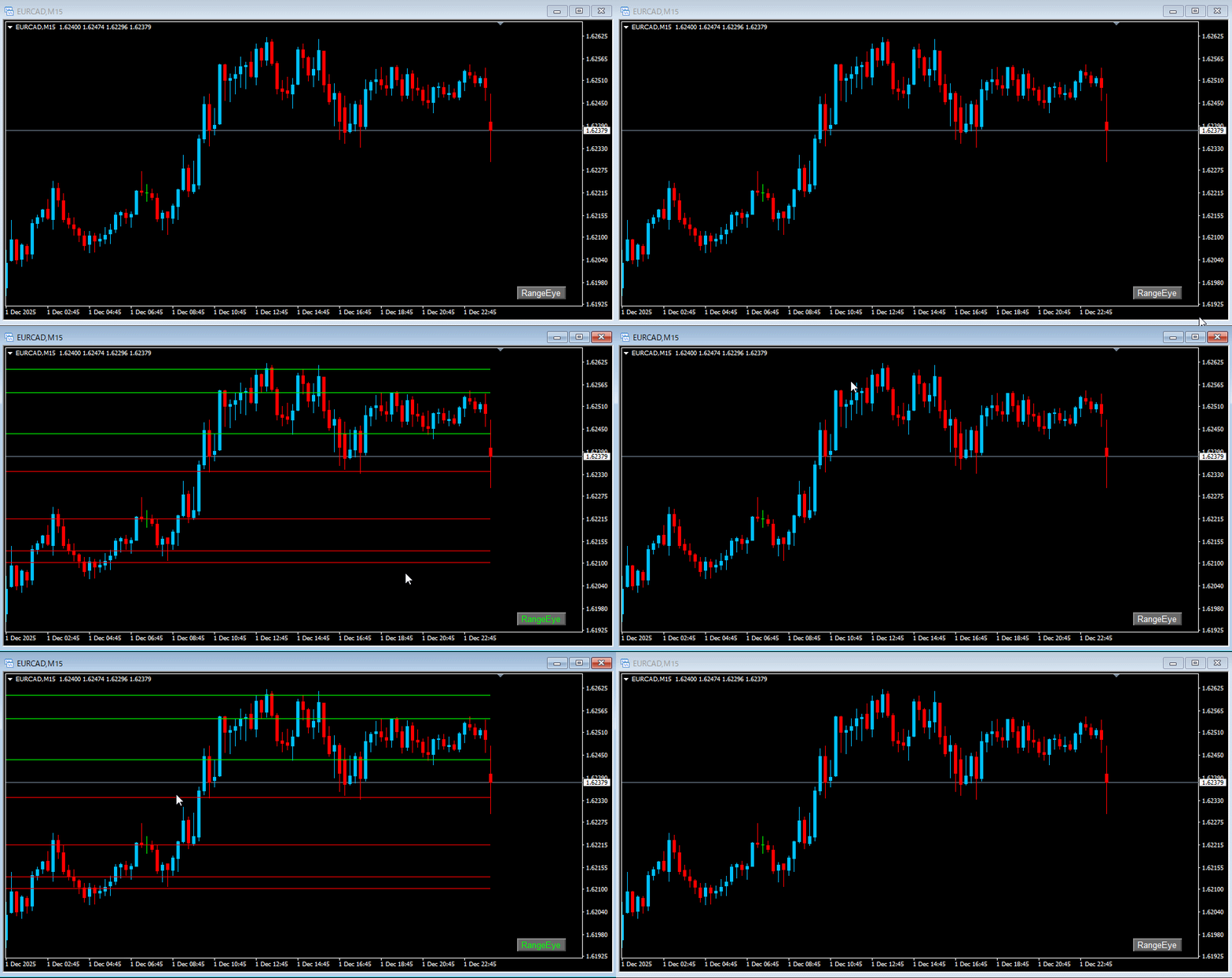
相場が動かない?それはチャンスの始まり。 RangeEyeでブレイクの瞬間を逃すな!
RangeEyeの特徴
■ SR(水平方向サポレジ抽出)
・レンジの幅を自動抽出。 相場の“天井と底”を一目で認識し、無駄なエントリーを回避。
・サポートライン=レッド レジスタンスライン=ライム 自動で色変化。
相場効力 ― いかに役立つか?
RangeEyeは「レンジ相場の視覚化」
これにより初心者の弱点である「レンジに翻弄されるミストレード」を防ぎ、
上級者にとっては「次のブレイクに乗るタイミング」を鋭く捉える武器となります。
レンジは敵ではない。 RangeEyeで“利益の獲物”に変えるのです。
■インストール手順
- お渡ししたZIPファイルをパソコンに保存してください。
- ZIPファイルを右クリックして「すべて展開」を選び、フォルダを解凍します。
- 解凍したフォルダの中にある「.ex4」ファイルを確認します。
- MT4を起動し、メニューから「ファイル」→「データフォルダを開く」を選びます。
・ MT4 → ・ファイル → ・データフォルダを開く
- 開いたフォルダで次の階層を開きます。
・ データフォルダ
└─ ・MQL4
   └─ ・Indicators
- 「.ex4」ファイルをコピー Indicators フォルダ貼り付けします。
- MT4に戻り、ナビゲーターの「インディケーター」を右クリック→「更新」を選びます。
- 一覧に表示されたインジケーターをチャートへドラッグ&ドロップします。
- 必要に応じてパラメーターを設定し、「OK」を押すと適用されます。
- チャート上で右クリック → 「プロパティ」 → 「全般」タブで「チャートを前面に表示」にチェックを入れます。
- 同じくチャート上で右クリック → 「グリッドの表示」のチェックを外します。
※MT4対応・軽量動作・ワンクリックON/OFF
¥6,000 (税込)
提供元 / 販売元:
販売サイト:
GogoJungle
●お支払い方法





商品概要
コミュニティ(0)
人気商品ランキング
おすすめ商品(キャンペーン商品)
GogoJungleを初めてご利用する方へ 商品のご利用まではかんたん3ステップ!
GogoJungleでは、会員様向けに、あなたの投資生活を豊かにするサービスをご用意しております。また、商品をご購入いただけるのは、会員様のみとなっております。今すぐ会員登録をして、GogoJungleを活用してみませんか!
01
ユーザー情報を入力し会員登録
02
案内に従い購入
03
マイページからダウンロード
