

Product outline
Community(0)
Smart Trade Indicators/E-books
Smart Trade
「資金管理から自動決済まで。あなたのトレードを『スマート』に。」
Sales Result:
0本
Reviews:
Category:
How to provide:
Indicator
Sales from:
03/20/2026
Last Updated:
03/20/2026
Version:
1_23
Web Authentication:
Enable
Available company:
Payment method:
Seller複素数
Seller's last login time:3/28/2026 20:38:08
Read more seller information
¥500 coupon available.
The coupon will expire in 2 days.
×
¥8,000(taxed)
?About 1-Click Order
Provider/Distributor
Sales site
GogoJungle

Smart Trade

(MT4用 視覚的トレード支援EA)

取扱説明書


1. 概要

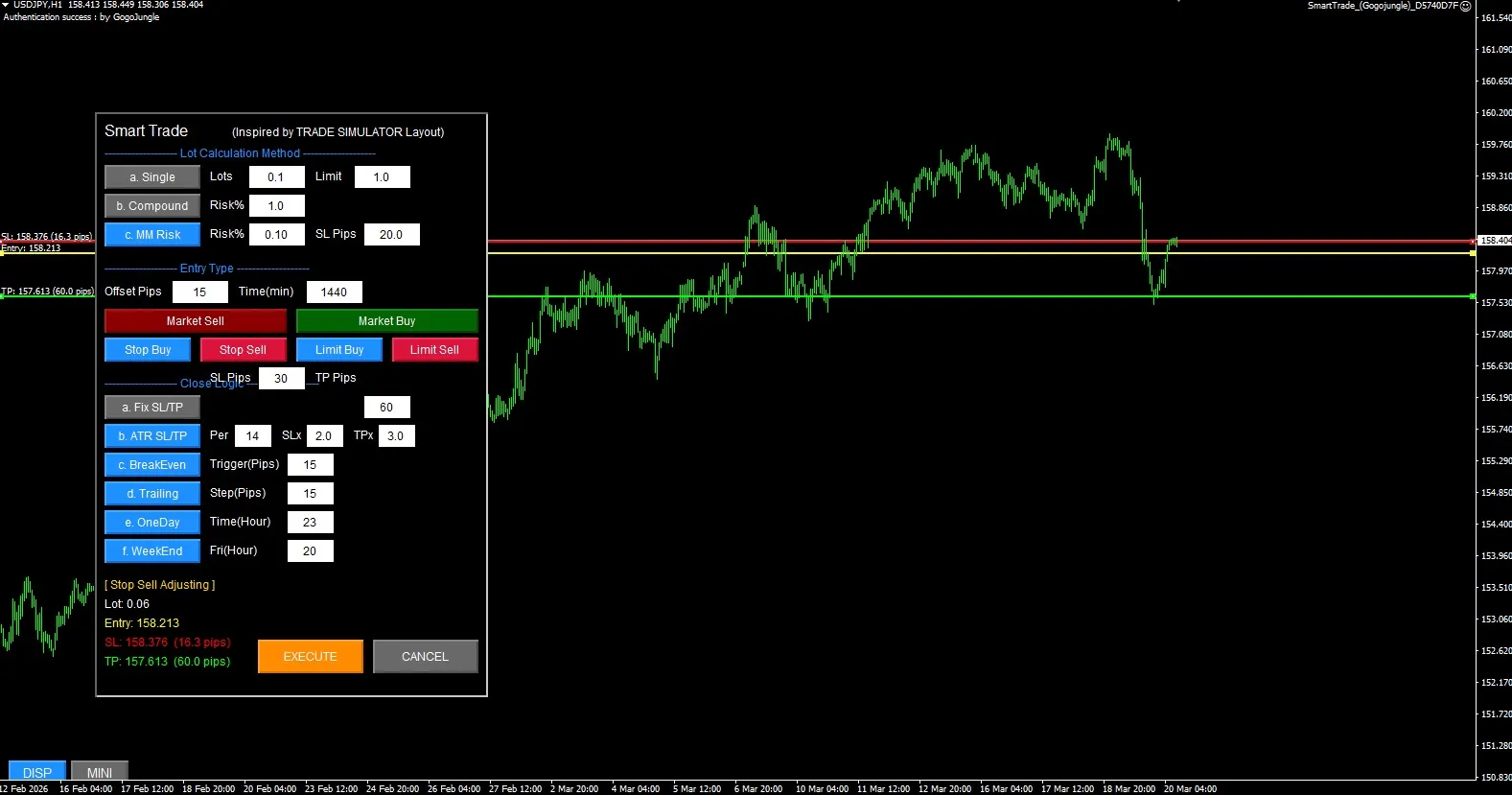
「Smart Trade」は、MetaTrader 4 (MT4) のチャート上で直感的に待機注文(Stop / Limit)を行える、高機能トレードパネルEAです。 複雑なロット計算や決済ロジックを自動化し、チャート上に表示されるライン(Entry, SL, TP)をマウスでドラッグするだけで、視覚的にリスクリワードを確認しながらスピーディな発注が可能です。

2. パラメータ設定 (F7キー)

EAをチャートに適用する際、以下の設定が可能です。

  • InpPanelX / InpPanelY: パネルの基本表示位置(X/Y座標)

  • InpDispCorner: DISP/MINIボタンを配置する四隅(左上、左下、右上、右下)

  • InpDispX / InpDispY: DISP/MINIボタンの微調整用座標

  • InpMiniScale: MINIボタンを押した際の縮小率(デフォルト: 0.85 = 85%サイズ)

  • MagicNumber: マジックナンバー(他のEAと競合しないよう設定)

  • Slippage: 許容スリッページ(ポイント)

3. 基本操作フロー

  1. モード選択: パネル中段の青・赤のボタン(Stop Buy, Stop Sell, Limit Buy, Limit Sell)のいずれかを押します。

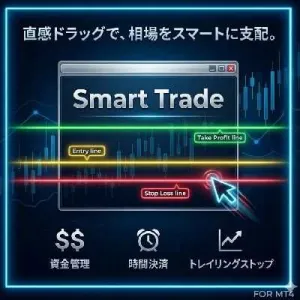
  2. ラインの調整: チャート上に黄色(Entry)、赤(SL)、緑(TP)の3本のラインが出現します。これらをマウスで上下にドラッグし、希望の価格に合わせます。

  3. 発注: 調整が完了したら、パネル下部に現れるオレンジ色の EXECUTE(決定)ボタンを押して発注完了です。やめる場合はグレーの CANCEL ボタンを押します。


4. パネル各部の機能詳細


① Lot Calculation Method (ロット計算方式)

証拠金やリスク許容度に合わせて、3つの計算方式から選べます。ラインを動かすと、パネル左下の「Lot: X.XX」の数値がリアルタイムで再計算されます。

  • a. Single: Lotsで指定した固定ロットで発注します。(Limitは誤入力防止の最大ロット上限です)

  • b. Compound: 現在の余剰証拠金に対する Risk% を基にロットを算出します。

  • c. MM Risk: 現在の口座残高に対する Risk% と、チャート上の「EntryからSLまでの幅(Pips)」から、損失許容額に収まる最適なロット数を自動計算します。(※初期設定時のSL幅は SL Pips の数値を参照します)

② Entry Type (エントリー設定)

  • Offset Pips: モード選択ボタンを押した際、現在の価格から何Pips離れた位置にEntryラインを初期表示させるかの設定です。

  • Time (min): 待機注文の有効期限(分)です。例: 1440=24時間。設定時間を過ぎると未約定の注文は自動で取り消されます。(0にすると無期限)

③ Close Logic (決済ロジック - SL/TP設定)

SL(損切り)とTP(利確)の初期幅をどう決定するかを選択します。

  • a. Fix SL/TP: SLTP の入力欄に指定した固定Pips幅でラインを描画します。

  • b. ATR SL/TP: 現在のボラティリティ(値動きの幅)を基に算出します。Perで期間を指定し、ATR値の SLx 倍に損切りラインを、TPx 倍に利確ラインを自動配置します。

④ 自動決済・管理ロジック (★重要)

以下の項目をON(青色)にして発注すると、EAが裏側でポジションを常時監視し、条件を満たした瞬間に自動で処理を実行します。

  • c. BreakEven: 含み益が Trigger(Pips)に達した瞬間、SL(損切りライン)を建値(エントリー価格)に移動させ、負けをなくします。

  • d. Trailing: 価格が有利な方向に進むごとに、Step(Pips)幅を保ちながらSLを追従(トレイリング)させ、利益を伸ばします。

  • e. OneDay: 毎日指定した Time(Hour)(例: 23)になった瞬間に、保有ポジションを強制決済します。

  • f. WeekEnd: 毎週金曜日の指定した Fri(Hour) になった瞬間に、週末持ち越しを防ぐため強制決済します。

⑤ UI操作ボタン (チャート角)

  • DISP: パネルの「表示(青)/非表示(赤)」を切り替えます。非表示にしても、裏側の自動決済ロジックは動き続けます。

  • MINI / NORM: パネルのサイズを「縮小(オレンジ)/通常(グレー)」に切り替えます。


5. ⚠️ 運用上の鉄則と注意事項

  1. 自動決済ロジック(ブレイクイーブン、トレイリング、時間決済)について これら(上記④)の機能は、**「EAを適用したMT4が起動している間のみ」**有効です。PCを閉じたりMT4を終了すると動作しません。24時間稼働させたい場合はVPS(仮想サーバー)のご利用を推奨します。 (※手動で設定したSL/TPラインでの決済は、PCを閉じても証券会社側で実行されます)

  2. チャートの切り替えについて EA稼働中に、同じチャート画面へ他の通貨ペアや違う時間足をドラッグ&ドロップしないでください。 EAが再起動されてしまい、パネルのON/OFF状態がリセットされるほか、保有中ポジションの自動決済監視が外れてしまう危険があります。 別の通貨ペアを取引したい場合は、**「必ず新しいチャートを新規に開き、そこにEAをセット」**してご利用ください。

¥8,000(Tax included)
?About 1-Click Order
Product outline
Community(0)
Best Seller Ranking
Recommended Products (Campaigns)

For those using GogoJungle for the first timeEasy 3 steps to use the product!

At GogoJungle, we provide services to enrich your investment life for our members. In addition, product purchases are limited to members. Why not register as a member now and make use of GogoJungle!

01
Enter user information and register as a member
02
Follow the instructions to make a purchase
03
Download from My Page
■ Important Matters and Risk Warnings Regarding Investment Products 【Financial Instruments Business Operator】
GogoJungle Inc.
Registration: Director-General of the Kanto Local Finance Bureau (Financial Instruments Business) No. 1960
【Member Association】
Japan Investment Advisers Association
【Fees and Expenses】
The use of software, e-books, investment advisory services, etc., provided on our platform involves purchase prices determined for each product.
Additionally, when conducting actual financial instrument transactions (such as FX or CFD trading), costs such as transaction fees and spreads (the difference between the sell and buy price) may be incurred through the connected brokerage firms.
【Margin and Risk of Loss】
Transactions such as FX (Foreign Exchange Margin Trading) and CFD (Contract for Difference) allow for trading in amounts exceeding the deposited margin.
Therefore, due to sudden fluctuations in target indices (currency, commodity prices, etc.), there is a risk of incurring losses that exceed the deposited margin (loss exceeding principal).
Furthermore, financial instrument transactions involve risks such as price fluctuations, which may result in losses falling below or exceeding the initial investment principal.
【Nature of Services and Trading Entity】
The Company operates a platform (marketplace) providing investment software and information; we do not engage in the buying, selling, mediation, brokerage, or agency of financial instruments on behalf of customers.
The services and information provided are intended as reference for investment decisions and do not guarantee future profits or specific results.
While some services include investment advice, they do not constitute a mandate or solicitation to trade specific financial instruments.
Final investment decisions and the execution of trades must be made at the customer’s own risk and discretion.
GogoJungle Inc.
Registration: Director-General of the Kanto Local Finance Bureau (Financial Instruments Business) No. 1960
Member Association: Japan Investment Advisers Association
GogoJungle Inc.
Registration: Director-General of the Kanto Local Finance Bureau (Financial Instruments Business) No. 1960
Member Association: Japan Investment Advisers Association
Financial Services AgencyJapan Investment Advisers AssociationFinancial Instruments Mediation Assistance CenterSecurities and Exchange Surveillance Commission

Copyright © 2026 GogoJungle Inc. All Rights Reserved.