
通貨ペア超簡単選択・CurrencySelecter-tm

Product outline
Community(0)
通貨ペア超簡単選択・CurrencySelecter-tm Indicators/E-books
通貨ペア超簡単選択・CurrencySelecter-tm
通貨ペアの変更を左右別々に選択する事で最短で行えるインジケーター
Sales Result:
3本
Reviews:
Category:
How to provide:
Indicator
Sales from:
01/14/2023
Last Updated:
04/24/2026
Version:
2.02
Available company:
Payment method:
Sellertms
Seller's last login time:4/24/2026 20:14:08
Read more seller information

このインジケーターで、通貨ペアの選択を簡単に。


使い方:

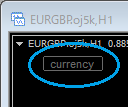
 1、通貨ペア変更時に「開く」ボタンをクリック

   (開きっぱなしにしておくこともできます)
   

        ▼

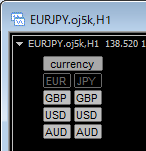
  5x5通貨でもシンプル選択中の通貨が非表示に


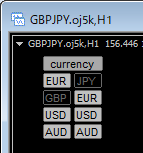
 2、例えば、USDJPY を GBPJPY に変えたい場合、、、
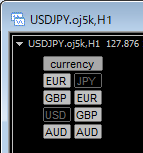
    [GBP] をクリック > 


基軸通貨(左側) と 決済通貨(右側) が逆の場合、

 例えば、USDJPY を EURUSD に変えたい場合も、

 EUR をクリックすれば、[USDEUR]は無いため、[EURUSD] に変更されます。

*左右が逆になる場合も、押されたボタンの位置は保持する機能を追加しました。

(通貨Aを軸にしたペアを、どちらか一方の列ボタンだけで切り替えて行けるようになりました)


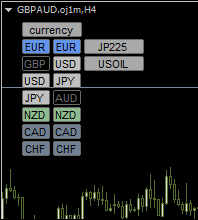
表示通貨を増やしても、、、
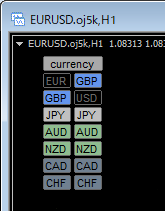

・欧州は青、オセアニアは緑 などの色設定

 (通貨一つ一つに、表示/非常時、背景色 が設定できます

・また、表示順は自由に設定できるので、

 一番取引する通貨を一番上に表示させるなどして、

 最小手数で変更できます。 


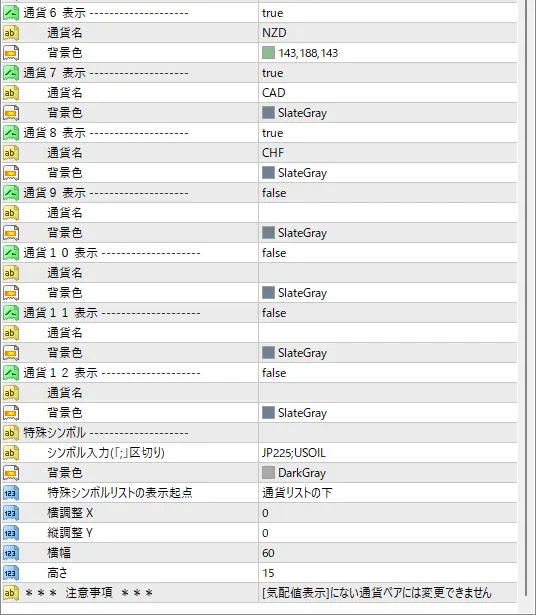
特殊シンボルに対応

 英3字以外や左右対になっていないシンボル(GOLD等)にも対応。

 プロパティ画面にて直接入力、セミコロン(;)区切りで数に制限なく項目を増やせます。

  *シンボル名の一致が変更条件になります。
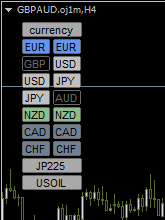
    

位置:通貨リスト下      メインボタン下(+特殊シンボルリストのX座標で横位置を調整)

*特殊シンボルリストも、縦一列表示、ボタン色・サイズ・位置調整可になります。

*ボタンの表示ウインドゥにサブウインドゥを指定できる様になりました


その他、

・変更するチャートを、単チャート・全チャート から選べるようになりました

・口座識別コードの有無も気にせずお使い頂けます。
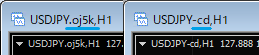

*通貨ペアは気配値リストを参照しています。

 選択したくない通貨ペアは気配値リストから削除することで選択されなくなります。

お試し版もあります。


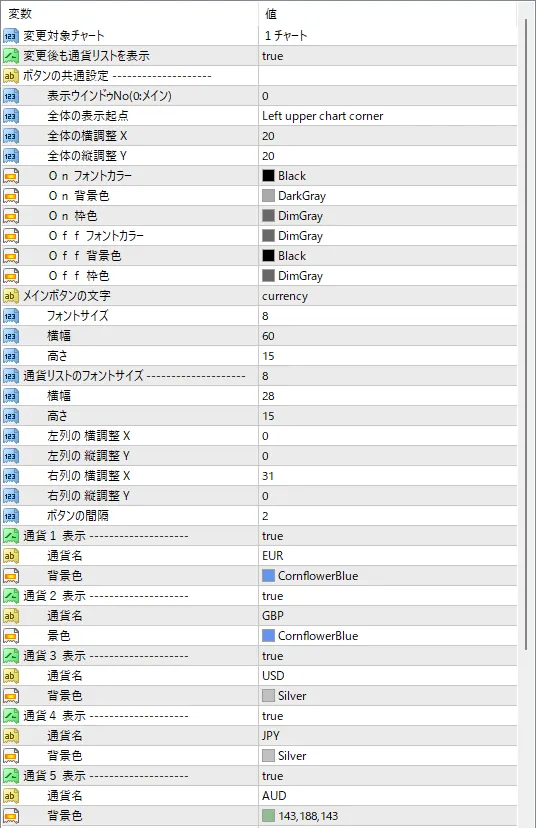
パラメーター詳細


■更新履歴

2026.04.25 ボタンの表示ウインドゥ(サブウインドゥ)を指定できるパラメーターを追加

2024.06.22 ボタンの押された位置を保持する機能を追加

2023.04.02 デフォルトで全チャート通貨ペアが変更されない様に修正

2023.03.06 特殊シンボル変更に対応

2023.03.06 変更チャートを単チャート・全チャート一括 から選選択(プロパティ設定)

2023.03.06 表示コーナーの位置によってボタンがはみ出すエラーを修正

2023.02.22 パラメーター項目と取扱説明書の分かりづらい個所を修正

2023.01.18 コードの整理・改善

2023.01.15 商品登録

¥2,000(Tax included)
?About 1-Click Order
Product outline
Community(0)
Best Seller Ranking
Recommended Products (Campaigns)

For those using GogoJungle for the first timeEasy 3 steps to use the product!

At GogoJungle, we provide services to enrich your investment life for our members. In addition, product purchases are limited to members. Why not register as a member now and make use of GogoJungle!

01
Enter user information and register as a member
02
Follow the instructions to make a purchase
03
Download from My Page
■ Important Matters and Risk Warnings Regarding Investment Products 【Financial Instruments Business Operator】
GogoJungle Inc.
Registration: Director-General of the Kanto Local Finance Bureau (Financial Instruments Business) No. 1960
【Member Association】
Japan Investment Advisers Association
【Fees and Expenses】
The use of software, e-books, investment advisory services, etc., provided on our platform involves purchase prices determined for each product.
Additionally, when conducting actual financial instrument transactions (such as FX or CFD trading), costs such as transaction fees and spreads (the difference between the sell and buy price) may be incurred through the connected brokerage firms.
【Margin and Risk of Loss】
Transactions such as FX (Foreign Exchange Margin Trading) and CFD (Contract for Difference) allow for trading in amounts exceeding the deposited margin.
Therefore, due to sudden fluctuations in target indices (currency, commodity prices, etc.), there is a risk of incurring losses that exceed the deposited margin (loss exceeding principal).
Furthermore, financial instrument transactions involve risks such as price fluctuations, which may result in losses falling below or exceeding the initial investment principal.
【Nature of Services and Trading Entity】
The Company operates a platform (marketplace) providing investment software and information; we do not engage in the buying, selling, mediation, brokerage, or agency of financial instruments on behalf of customers.
The services and information provided are intended as reference for investment decisions and do not guarantee future profits or specific results.
While some services include investment advice, they do not constitute a mandate or solicitation to trade specific financial instruments.
Final investment decisions and the execution of trades must be made at the customer’s own risk and discretion.