
JP225_Nikkei_M5
- Whole period
- 2 years
- 1 year
- 6 months
- 3 months
- 1 month
Forward testing (Profit)
Monthly Statistics
- Jan
- Feb
- Mar
- Apr
- May
- Jun
- Jul
- Aug
- Sep
- Oct
- Nov
- Dec
Calendar for Months
About EA's Strategy
Translating...
【EAのロジック】 過去10年間における日経平均と個別株の値動きを分析した結果、前日陽線なら翌日は陰線に、反対に前日陰線なら翌日陽線になる傾向が見つかりました。 この優位性から得られる利益は1日わずか0.1%~0.2%程度です。 日本時間のマーケットオープン直後9:00にエントリーし、引け15:00に自動で決済するEAを制作しました。
1ポジション型のEAで、両建ては行いません。
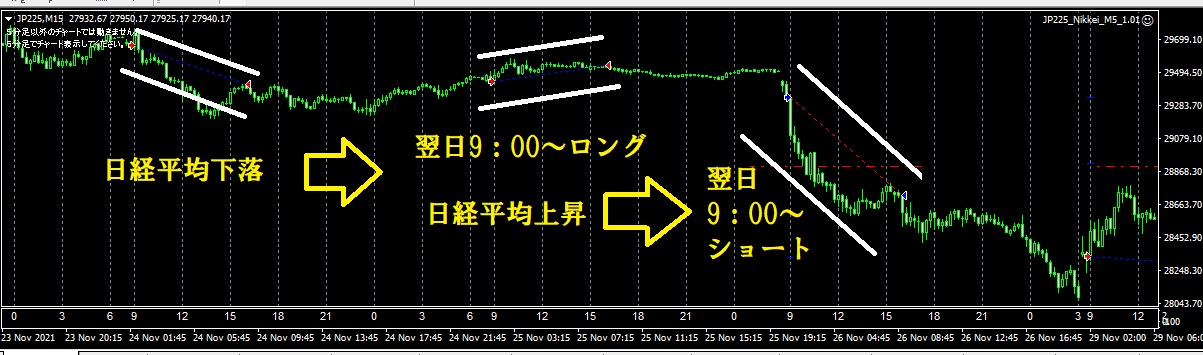
【対応証券会社】
GMT+2(冬)/+3(夏)のサーバーでJP225の自動売買ができる会社
EAの動作確認は楽天証券とOANDA JAPANで行っております。
【設定方法】 ■プロパティでトレード頻度を調節することができます。
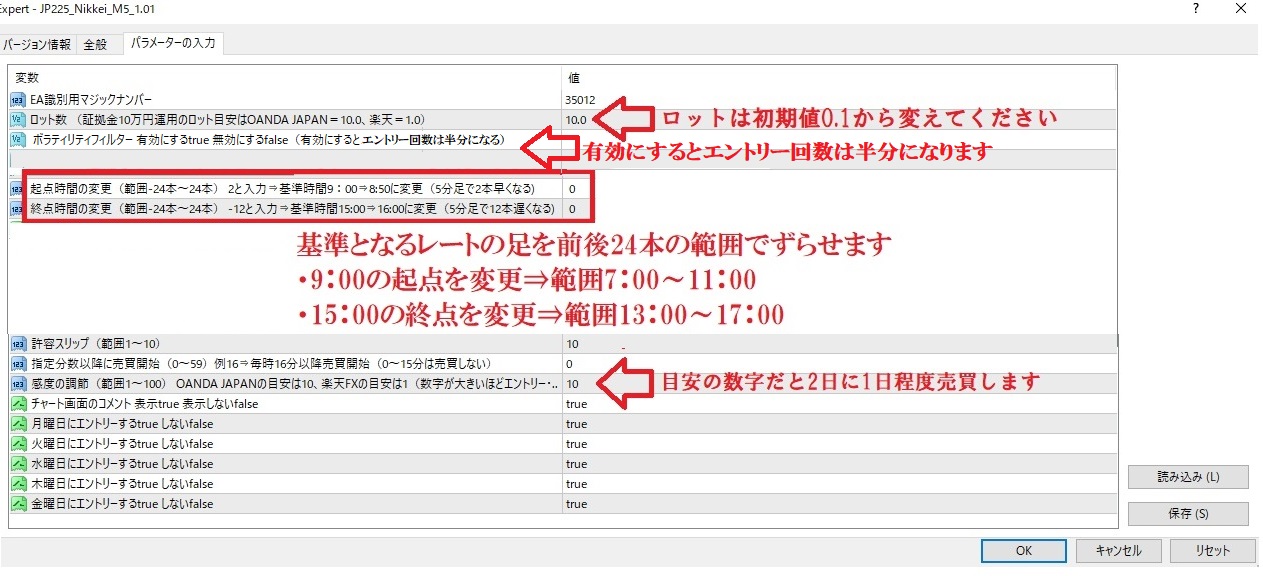
【感度の説明】
感度 Sensitivity = 1; //(範囲1~100)設定の目安は1~2です。
Sensitivity(感度)が1の時は前日の日経平均の始値(9:00)と終値(15:00)の価格差が100円以上の時にエントリーします。 およそ2日に1回程度の頻度でトレードします。
感度を10にするとわずか10円の価格差でもエントリーすることになり、ほぼ毎日トレードします。
ボラの大きな時期のみトレードする
ボラティリティフィルターを有効にするとエントリー回数が半分になるが、プロフィットファクタは上昇します。
【ボラティリティフィルターの説明】 直近5日の高値と安値の差が大きく開いたボラの大きな時期のみエントリーします。 日経平均の価格帯によるが約1,000円の値幅がある時を高ボラ相場と定義しました。
■ストップとリミットについて
Ver1.06からストップとリミット注文を1000円の値幅で固定としました。
【説明】
FXの通貨と異なり、日経平均のレートはMT4の仕様により異なるようです。
OANDAと楽天に関しては1000円のところにストップとリミット注文が置かれるようです。
もし場中にストップ注文とリミット注文に引っかかりポジションが決済されても、プログラム上は再度同じ方向にポジションを持ちます。
■注文ロット数と最大ロット数について
OANDA 最大10,000Lot、楽天 最大200Lot
証拠金10万円運用のロットの目安はOANDA JAPAN=10.0、楽天=1.0
OANDA JAPANの説明には、「MT4における取引数量(ロット数)はFXの場合とは異なり、1と入力すると、そのまま数量1で発注します。」とあります。 つまり、1ロットで注文すると日経平均が2万5,000円の時に25,000円分の取引を行うことになります。(このときに必要な証拠金の金額は株価指数25,000円×10%=2,500円) 楽天FXの場合は、「1Lotあたりの価額は株価指数×10」となります。 同じ1ロットでもOANDA JAPANの10倍の金額が注文され、その分証拠金も多く必要になります。 楽天FXの場合は、1ロットで注文すると日経平均が2万5,000円の時に250,000円分の取引を行うことになります。(このときに必要な証拠金の金額は株価指数25,000円×10×1lot×10%=25,000円)
【ロジックの優位性に関する根拠】
個別株や日経225連動型上場投信【1321】の2010/1/4~2021/10/15までのデータをExcelで集計した結果、売買を機械的に繰り返すことで長期間安定して勝ち続けていることが分かりました。
日経225連動型上場投信【1321】2010/1/4~2021/10/15までのデータ
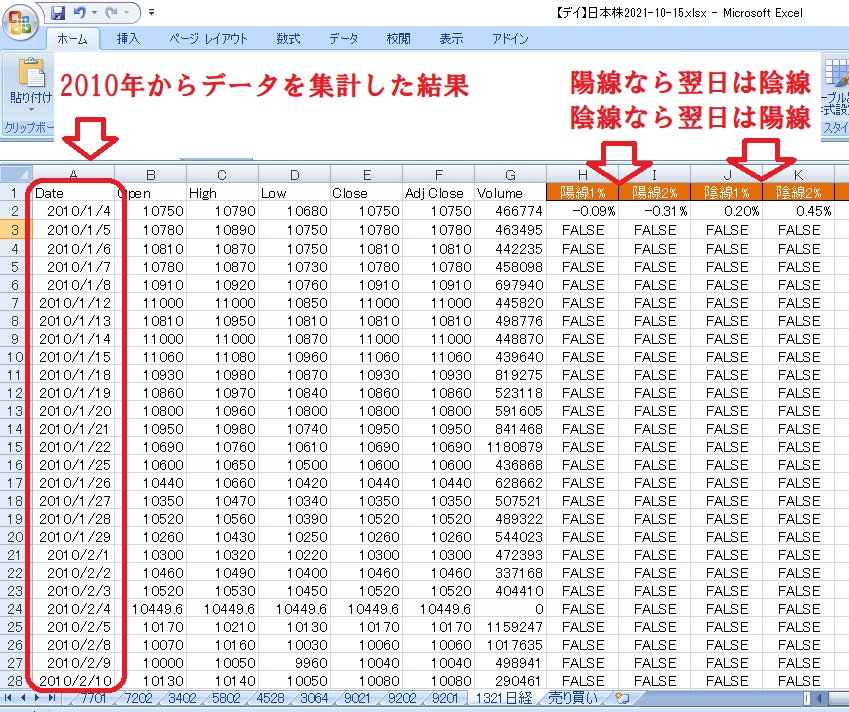
個別株の2010/1/4~2021/10/15までのデータ
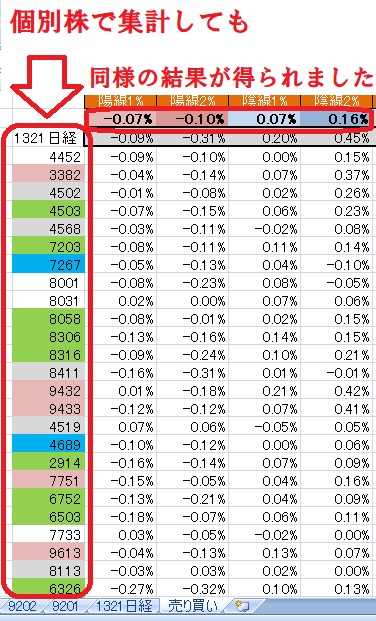
日経平均のみならず、個別株でも期待値がプラスになることが分かります。
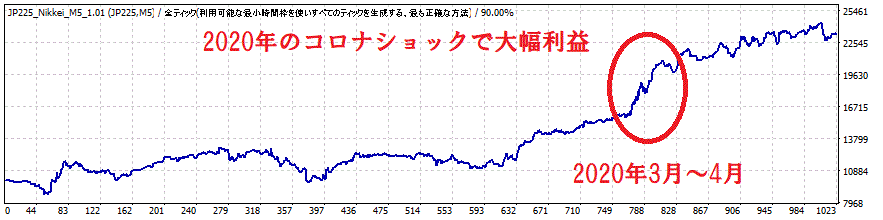
2018年以降はJP225のヒストリカルデータの精度も高く、期待通りの成績となっていることから、フォワードテストでも好成績が期待できます。
得意な相場はボラティリティの大きな時!
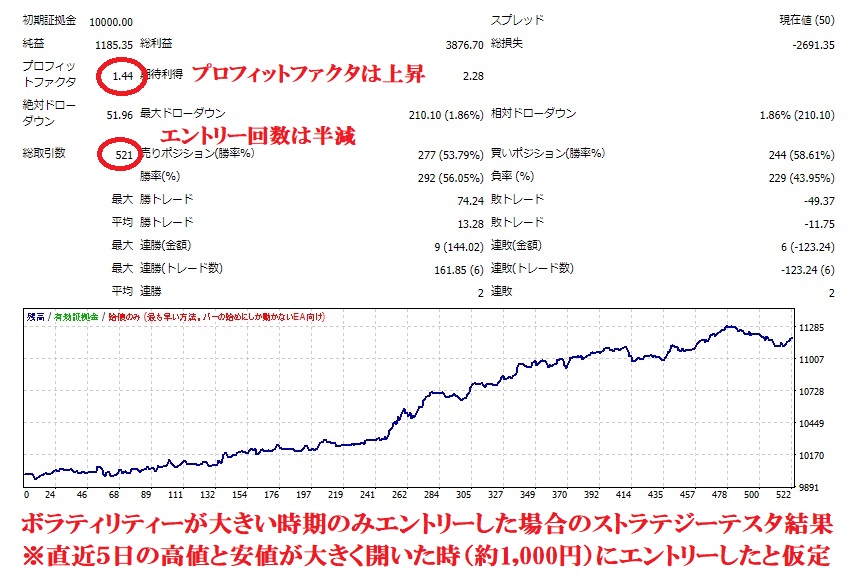
上の画像は、2013年4月から2022年6月までの期間で、ボラティリティフィルターを有効にした時の画像です。
直近5日の高値と安値の差が大きく開いた時(約1,000円)にエントリーします。 エントリー回数は半減しましたが、プロフィットファクタは1.30⇒1.44に改善しました。 以上の結果からコロナショックなどのボラの大きな時に利益が出ることが分かります。
試しに低ボラの時期だけエントリーする設定にしたところ、優位性は無いことがわかりました。
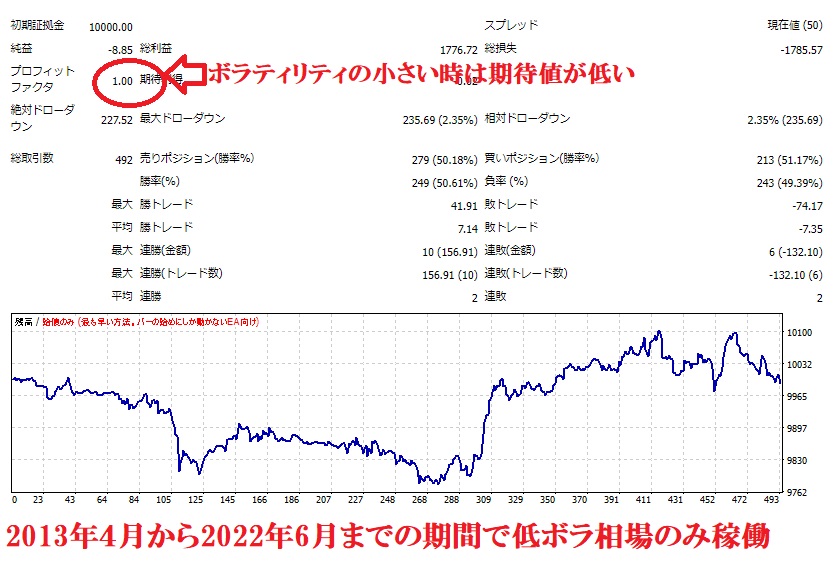
以上の結果から、日経平均の値動きの小さい時期は、無理してEAを動かす必要がないことが分かります。
このEAは前日の日本時間 9:00 (足±24本)と 15:00 (足±24本)のレートを比べて売買判断します。
基準の時間を変えることで、パフォーマンスが改善する場合がございます。
【売買判断の時間変更】 BarshiftForward = -7; //起点時間の変更(範囲-24本~24本) -7⇒基準時間9:00⇒9:35に変更(5分足で35本遅くなる) BarshiftBack = -7; //終点時間の変更(範囲-24本~24本) 2と入力⇒基準時間15:00⇒14:50に変更(5分足で2本早くなる)
基準となるレートの足を前後24本の範囲でずらせます。
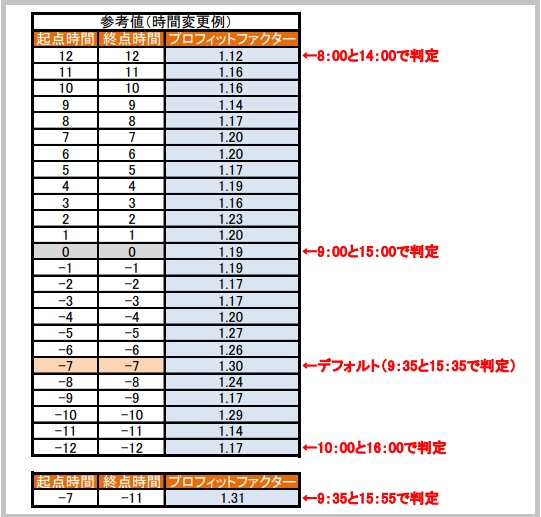
■5分足チャートの例
・9:00の起点を変更⇒範囲7:00~11:00 ・15:00の終点を変更⇒範囲13:00~17:00 例、5分足チャートの場合で起点時間を-12と入力⇒起点の時間が前日9:00⇒前日10:00で後ろにズレて売買判断(基準が5分足12本分遅くなる) 例、5分足チャートの場合で終点時間2と入力⇒終点の時間が前日15:00⇒前日14:50で前にズレて売買判断(基準が5分足2本分早くなる)
【お知らせ】
楽天FXのJP225の開始時間が7:30⇒7:00に変更になりました。(2022.1.17)
開発当初は2つのモードを用意しましたが、バージョン1.05のアップデートに伴い、楽天モードを廃止しました。
そのかわりバーシフト機能(基準となるレートの足を前後24本の範囲でシフト可能)を実装しました。
バックテストができる方は、最適な設定を見つけてリアル運用して頂けます。
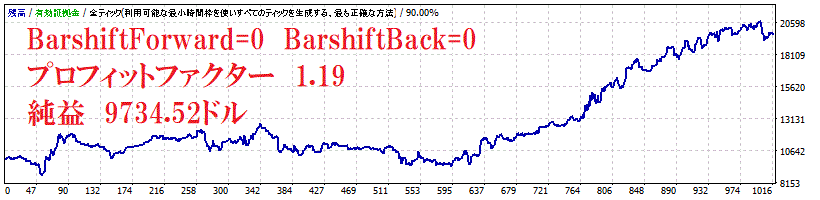
時間設定を変更してバックテストの成績を改善した例
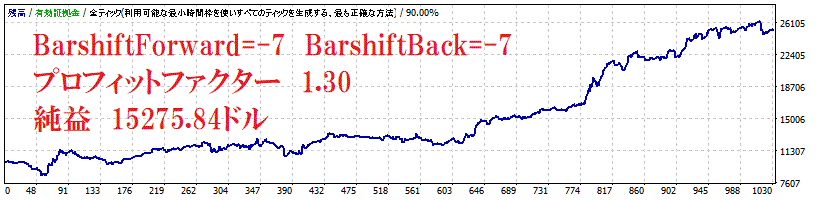
基準時間のシフトなし(9:00と15:00)のバックテストの成績
【その他】 ・トレード回数は感度10以上に上げると年間220回、感度を1にすると年間110回程度です。
・5分足チャートで動作します。
・他のEAとの同時稼働可能。
・マジックナンバーは他のEAと被らないように設定してください。
【バージョンアップ履歴】
バージョン1.05リリース(2022年2月7日) 1、エントリーする曜日が機能しない不具合を修正しました。 2、楽天FXのJP225の開始時間が7:30⇒7:00に変更になりました。(2022.1.17) 楽天モードのパフォーマンスが優秀な為、内部プログラムに変更は加えておりません。 そのままの設定で楽天モードをご利用ください。 バージョン1.01リリース(2021.12.13) 3、エントリー回数の上限設定の追加 システムバグ等でエントリーとエグジットの無限ループが行われた際の、保護機能を実装致しました。 EAによる新規エントリーは1日1回で設計しております。 短時間で30回以上エントリーが行われると保護機能が働き、それ以上新規のエントリーは行われなくなります。 手動で決済をするなどして上限に達した場合、MT4を再起動することでカウントが0にリセットされます。 プログラム内の回数リセットタイミングはサーバー時間の4:00(日本時間の10:00~11:00)と、11:00(日本時間の17:00~18:00)と、18:00(日本時間の24:00~1:00)の3回です。 4、エラー「array out of range」の修正(2022.1.27) チャートのバーの本数が不足している時のエラーを修正しました。
5、楽天モードの廃止とバーシフト機能の追加 バージョン1.05リリース(2022.2.7)
楽天のJP225営業時間の変更に伴い、楽天モードとOANDAモードを統一しました。 そのかわり、バーシフト機能(基準となるレートの足を前後24本の範囲でシフト可能)を実装しました。
The coupon will expire in 4 days.
Price:¥33,000 (taxed)
●Payment




The coupon will expire in 4 days.
Sales from : 02/01/2022 00:15
Price:¥33,000 (taxed)
●Payment
Just like discretionary trading, there are those that decide trading and settlement timings by combining indicators, those that repeatedly buy or sell at certain price (pips) intervals, and trading methods that utilize market anomalies or temporal features. The variety is as rich as the methods in discretionary trading.
To categorize simply,
・Scalping (Type where trades are completed within a few minutes to a few hours),
・Day Trading (Type where trades are completed within several hours to about a day),
・Swing Trading (Type where trades are conducted over a relatively long period of about 1 day to 1 week)
・Grid/Martingale Trading (Holding multiple positions at equal or unequal intervals and settling all once a profit is made. Those that gradually increase the lot number are called Martingale.)
・Anomaly EA (Mid-price trading, early morning scalping)
However, a substantial advantage of automated trading is its ability to limit and predict risks beforehand.
[Risk]
Inherent to forex trading are the trading risks that undeniably exist in automated trading as well.
・Lot Size Risk
Increasing the lot size forcibly due to a high winning rate can, in rare instances, depending on the EA, lead to substantial Pips loss when a loss occurs. It is crucial to verify the SL Pips and the number of positions held before operating with an appropriate lot.
・Rapid Market Fluctuation Risk
There are instances where market prices fluctuate rapidly due to index announcements or unforeseen news. System trading does not account for such unpredictable market movements, rendering it incapable of making decisions on whether to settle in advance or abstain from trading. As a countermeasure, utilizing tools that halt the EA based on indicator announcements or the VIX (fear index) is also possible.
[Benefits]
・Operates 24 hours a day
If there is an opportunity, system trading will execute trades on your behalf consistently. It proves to be an extremely convenient tool for those unable to allocate time to trading.
・Trades dispassionately without being swayed by emotions
There is an absence of self-serving rule modifications, a common human tendency, such as increasing the lot size after consecutive losses in discretionary trading or, conversely, hastily securing profits with minimal gains.
・Accessible for beginners
To engage in Forex trading, there is no prerequisite to study; anyone using system trading will achieve the same results.
[Disadvantages]
・Cannot increase trading frequency at will
Since system trading operates based on pre-programmed conditions, depending on the type of EA, it might only execute trades a few times a month.
・Suitability may vary with market conditions
Depending on the trading type of the EA, there are periods more suited to trend trading and periods more suited to contrarian trading, making consistent results across all periods unlikely. While the previous year might have yielded good results, this year's performance might not be as promising, necessitating some level of discretion in determining whether it is an opportune time to operate.
・MT4 (MetaTrader 4. An account needs to be opened with a Forex company that offers MT4.)
・EA (A program for automated trading)
・The operating deposit required to run the EA
・A PC that can run 24 hours or a VPS (Virtual Private Server), where a virtual PC is hosted on a cloud server to run MT4.
Additionally, there are both demo and real accounts available. You can experience trading with virtual money by applying for a demo account. After opening a real account, you select the connection server assigned by the Forex broker, enter the password, and log in to the account.
When you deposit money into your account using the method specified by the forex broker, the funds will be reflected in your MT4 account, and you can trade.
Firstly, download the purchased EA file from your My Page on GogoJungle. You will download a zip (compressed) file, so right-click to extract it and retrieve the file named ‘◯◯◯ (EA name)_A19GAw09 (any 8 alphanumeric characters).ex4’ from inside.
Next, launch MT4 and navigate to ‘File’ → ‘Open Data Folder’ → ‘MQL4’ → ‘Experts’ folder, and place the ex4 file inside. Once done, close MT4 and restart it. Then, go to the upper menu ‘Tools’ → ‘Options’, and under ‘Expert Advisors’, ensure ‘Allow automated trading’ and ‘Allow DLL imports’ are checked, then press OK to close.
The necessary currency pair and time frame for the correct operation of the EA are specified on the EA sales page. Refer to this information and open the chart of the correct currency pair time frame (e.g., USDJPY5M for a USD/Yen 5-minute chart).
Within the menu navigator, under ‘Expert Advisors’, you will find the EA file name you placed earlier. Click to select it, then drag & drop it directly onto the chart to load the EA. Alternatively, you can double-click the EA name to load it onto the selected chart.
If ‘Authentication Success’ appears in the upper left of the chart, the authentication has been successful. To operate the EA, you need to keep your PC running 24 hours. Therefore, either disable the automatic sleep function or host MT4 on a VPS and operate the EA.
If you want to use it with an account other than the authenticated one, you need to reset the registered account.
To reset the account, close the MT4 where the Web authentication is registered, then go to My Page on GogoJungle > Use > Digital Contents > the relevant EA > press the ‘Reset’ button for the registration number, and the registered account will be released.
When the account is in a reset state, using the EA with another MT4 account will register a new account.
Also, you can reset the account an unlimited number of times.
→ Items to Check When EA is Not Operating
1 lot = 100,000 currency units
0.1 lot = 10,000 currency units
0.01 lot = 1,000 currency units
For USD/JPY, 1 lot would mean holding 100,000 dollars.
The margin required to hold lots is determined by the leverage set by the Forex broker.
If the leverage is 25 times, the margin required to hold 10,000 currency units of USD/JPY would be:
10000*109 (※ at a rate of 109 yen per dollar) ÷ 25 = 43,600 yen.
・Risk-Return Ratio: Total Profit and Loss during the period ÷ Maximum Drawdown
・Maximum Drawdown: The largest unrealized loss during the operation period
・Maximum Position Number: This is the maximum number of positions that the EA can theoretically hold at the same time
・TP (Take Profit): The set profit-taking Pips (or specified amount, etc.) in the EA's settings
・SL (Stop Loss): The set maximum loss pips (or specified amount, etc.) in the EA's settings
・Trailing Stop: Instead of settling at a specified Pips, once a certain profit is made, the settlement SL is raised at a certain interval (towards the profit), maximizing the profit. It is a method of settlement.
・Risk-Reward Ratio (Payoff Ratio): Average Profit ÷ Average Loss
・Hedging: Holding both buy and sell positions simultaneously (Some FX companies also have types where hedging is not allowed)
・MT4 Beginner's Guide
・Understanding System Trading Performance (Forward and Backtesting)
・Choosing Your First EA! Calculating Recommended Margin for EAs
・Comparing MT4 Accounts Based on Spread, Swap, and Execution Speed
・What is Web Authentication?
・Checklist for When Your EA Isn't Working