
This product is currently not available.
Pound君 Hige Hunter EA
- Whole period
- 2 years
- 1 year
- 6 months
- 3 months
- 1 month
Profit
:
-510,150JPYProfit Factor
:
0.35Rate of return risk
?
:
-0.52Average Profit
:
1,687JPYAverage Loss
:
-27,106JPYBalance
?
:
489,850JPYRate of return (all periods)?
:
-24.56%Win Rate
:
85.06%
(148/174)
Maximum Position
?
:
11Maximum Drawdown
?
:
45.97%
(973,509JPY)
Maximum Profit
:
101,900JPYMaximum Loss
:
-143,013JPYRecommended Margin
?
:
2,077,420JPYUnrealized P/L
:
0JPYDeposit
?
:
1,000,000JPYCurrency
:
JPY- Account
Operable Brokers
Usable with MT4-adopting brokers.
※EA measurement is stopped
Forward testing (Profit)
Product Statistics
Product Comments
Monthly Statistics
2025
2024
2023
2022
2021
- Jan
- Feb
- Mar
- Apr
- May
- Jun
- Jul
- Aug
- Sep
- Oct
- Nov
- Dec
Calendar for Months
About EA's Strategy
Translating...
Currency Pairs
[USD/JPY]
Trading Style
[Swing Trading]
Maximum Number Position
12
Maximum Lot
0.54
Chart Time Frame
M5
Maximum Stop Loss
0
Take Profit
0
Straddle Trading
Yes
Application Type
Metatrader Auto Trading
Other File Usages
No
1. 概要
あの「Pound君 Hige Hunter」インジケータが、EAになって帰ってきました。
レンジ相場で強力なツールになる「Pound君 Hige Hunter」の特徴(波動のピーク、ボトムでの逆張り)を生かして、安定して利益が得られるEAに仕上げたものです。
2. 特徴
ナンピン型のEAです。
ナンピンの上限回数、1回毎のロット倍率をユーザーが指定できます。
少額資金モード、ロスカットモードを搭載しています。
過去20年間のバックテストを実施して、破綻が無いことを検証しています。
通貨ペアは、USDJPY。5分足チャートを使用します。
両建てを行うので、両建て対応の証券会社で運用してください。
3. ロジック
EAのEntry条件に「Pound君 Hige Hunter」インジケータのロジックをそのまま用いています。
EAのEntry条件には、「Pound君 Hige Hunter」インジケータの矢印が出ていることに加えて、長期移動平均線からの乖離度が上下に指定数値(閾値)を超えていること条件としました。
EAのExitにも「Pound君 Hige Hunter」インジケータのサインを利用します。Entry方向と逆方向にサインが出た時に、少しでも利益が出ていれば利確します。
保有するポジションと逆方向に相場が動いた場合、前回のEntry価格と終値の差が一定幅を超えたら、ナンピンを行います。さらに逆行した場合は、指定回数までナンピンを繰り返します。
「Pound君 Hige Hunter」インジケータのサイン出現時に、トータルで利益が出ていれば、保有する全ポジションを決済します。
最後のポジションを持った時刻から、指定時間が経過したら、損益の有無を問わず全決済を行うモードを備えています。(損失を拡大させない為の安全対策です。)通常は、この機能はOFFにしています。
利益確定を確実にする為に、最後のポジションを持った時刻から、指定時間が経過した時点で、少しでも利益が出ていれば決済します。(この機能もON/OFFできます。)
指定した最大利益以上の含み益が出ている場合、即決済する機能も付加しました。(この機能もON/OFFできます。)
レンジ逆張りに優位性のある「Pound君 Hige Hunter」のロジックに加え、小ロットでナンピンを行い、さらに、利益を確実に確保する仕掛けをあちこちに組みこみました。
4. パラメータ
デフォルト設定値 説明
1. Lots 0.01 初期ロット
2. Auto_Lots false 自動ロット有効
3. Base_Funds 600000 Auto_Lotsで計算の基準とする資金
4. xf_1 1 1回目ロット倍率
5. xf_2 1 2回目ロット倍率
6. xf_3 2 3回目ロット倍率
7. xf_4 3 4回目ロット倍率
8. xf_5 5 5回目ロット倍率
9. xf_6 8 6回目ロット倍率
10. xf_7 13 7回目ロット倍率
11. xf_8 21 8回目ロット倍率
12. xf_9 34 9回目ロット倍率
13. xf_10 55 10回目ロット倍率
14. xf_11 89 11回目ロット倍率
15. xf_12 144 12回目ロット倍率
16. max_cnt0 8 最大ポジション数
17. K_WD0 150 次のナンピン買いまでの幅(pips)
18. U_WD0 500 次のナンピン売りまでの幅
19. Low_AB_MODE false 少額資金モード有効
20. LAB_LC false ロスカット有り
21. LC_K1 6 買いロスカット作動
22. LC_U1 3 売りロスカット作動
23. K_WD1 160 少額買いStep幅
24. U_WD1 500 少額売りStep幅
25. KAIRI_TH1 3.2 上側乖離度閾値
26. KAIRI_TH2 -1.4 下側乖離度閾値
27. corner 0 表示位置
28. max_Gain_Exit true 最大利益決済有効
29. max_Gain 230000 最大利益額
30. Time_Gain_Exit true 時間経過利益決済
31. Time_Exit false 時間経過決済
32. Exit_TM 700 経過時間指定(hr)
33. TM_GAIN 200 利益判定額
34. MAGICNUM_ON true マジックナンバー有効
35. KAI true 買い側有効
36. URI true 売り側有効
37. MA_P1 20 短期移動平均期間
38. MA_P2 75 中期移動平均期間
39. MA_P3 200 長期移動平均期間
40. MA_MODE 1 移動平均のモード
41. HIFE_F 6.4 髭とみなす係数
42. STC_%K 44 ストキャスティクスの%k
43. STC_U_TH 92 ストキャスティクス上限
44. STC_L_TH 10 ストキャスティクス下限
45. STC_U_BORDER 88 ストキャスティクス上側境界
46. STC_L_BORDER 20 ストキャスティクス下側境界
47. Send Mail false メール送信の有無
48. MAGICNUMBER 12300007 マジックナンバー
49. Mail_Header Hige Hunter EA メールヘッダー文字
50. Buy_Gain Gold 買い含み益の色
51. Buy_Loss Aqua 買い含み損の色
52. Sell_Gain Gold 売り含み益の色
53. Sell_Loss Tomato 売り含み損の色
54. No_Position DarkGray ノーポジション時の色
55. Result_color Lime 結果表示色
56. CL_Buy_Avg DeepSkyBlue 買い平均水平線の色
57. CL_Sell_Avg Orange 売り平均水平線の色
初期ロットは必ず最低の0.01ロットから始めて下さい。資金に十分な余裕ができてから初期ロット数を増やして下さい。
自動ロット (Auto_Lots) 機能も付いています。通常、Auto_Lotsはfalseになっています。これを、trueにすると、資金残高がBase_Fundsの2倍以上になった場合に、残高に比例して初期ロット数を増やします。
ナンピンの係数は、xf_1からxf_12で指定します。デフォルトではフィボナッチ数列(1,1,2,3,5,8,13,21,….)になっています。初期ロット数にこの係数を掛けたものが、次のエントリーのロット数になります。もちろん、ユーザーが自由に変更できるので、資金に余裕のある方は、1,2,4,8,16,32,64(マーチンゲール)等に変えて頂いても構いませんが、推奨はしません。
最大ポジション数は、デフォルトでは8になっています。初期ロット数が0.01の場合、最大保有ロット数は0.54になります。
次のナンピンまでの幅の指定は、売り買い独立に指定できます。
少額資金モードについては、6.をご参照ください。
長期移動平均線とローソク足の乖離度が閾値以上ないと、エントリーしない仕様になっています。
Time_Gain_Exitは、時間経過して利益があれば決済する、Time_Exitは、時間が経過したら無条件で決済する、の違いがあります。通常は、Time_Gain_ExitがON(true)、Time_ExitがOFF(false)になっています。
MAGICNUM_ONは、他のEAとの干渉を避けるために設けました。
MAGICNUM_ONは、通常はtrueに設定してあります。手動でポジションを追加した場合なども含めて、全てを決済したい場合は、falseにしてください。USDJPYの全保有ポジションに対してEAの決済動作が実行されます。
通常は両建てで売り買いを実行しますが、買いのみ、売りのみにする場合はKAI,URIをそれぞれfalseにしてください。
パラメータのMA_P1からMA_P3は、移動平均線の期間指定になります。
MA_MODEは1で、指数移動平均を使用します。
HIGE_Fは、6.1でやや辛めの髭検出指定となっています。この値が大きいほど長い髭を持つローソク足に絞られることになります。
STC%KからSTC_L_BORDERまでは、「Pound君Hige Hunter」インジケータと同じ内容ですが、上側をやや絞った設定に変更してあります。
画面表示の色設定をユーザーが自由に変更できるようにしてあります。含み益の場合と含み損の場合で、表示色が変わります。
ポジションを持った場合、買い平均値と売り平均値の位置に、それぞれ別の色で点線の水平線を描画します。
5. ナンピンを上手く使うには
「ナンピンは怖い。マーチンゲールなど、もっての外」というご意見も、もっともです。ナンピンの手法は、本質的に危険な側面を含んでいます。一方向に相場が動いた場合には、含み損がどんどん増えていきます。言ってみればナンピンは毒です。ただ、毒も薬も使いようで、上手く使えば、通常のEAよりも高い勝率、高いPF(プロフィットファクター)のEAに仕上げることができます。
ロット数を最小からスタートする。
変動の激しい通貨ペアを避ける。
ナンピン回数に制限を設ける。
○○○ショックなどの、極端な相場変動にも耐えられる基本設計。
例えば、過去の最高値と最安値(極端ならゼロ)の間隔をn等分し、最悪なシナリオの場合でも破綻しないような十分な資金を用意した上で、ナンピン設計すれば、破綻しないEAが出来上がるわけですが、資金効率は極端に悪くなります。
資金効率を上げると、リスクが高まります。要は、資金効率とリスクをどう取るのかというバランス感覚が一番重要になってくるわけです。
6. 少額資金モード
本EAは、ナンピン型EAであるため、ある程度の総資金が必要です。しかし、資金が少ないユーザーの為に、少額資金モードを設けました。この設定をONにすると、ロット数およびナンピン係数が、少額資金用に変更されます。またポジションを増やす際のStep幅も、独自に指定されます。
少額資金モードでは、初期ロット数は、0.01に、ナンピン係数は1に固定されます。ロスカットONの場合は、指定された売り買い個別の上限ポジション数まで、ロスカットOFFの場合は、最大上限ポジション数の指定値まで、ナンピンを行います。
例えば、ロスカットOFFで最大上限ポジション数が12の場合は、ナンピンを11回まで繰り返します。保有ロット数の最大は0.12ロット(0.01ロットのポジションが12本)になります。
少額資金モードでは、ロスカット条件の指定を、売り買い別々に指定できます。指定ポジション数の上限に達すると、損失があっても決済されます。
少額資金モードでロスカット有を指定すると、指定したポジション数を超える条件に達した場合に、持っているポジションを損切り決済します。例えばLC_K1が6の場合、買いポジション数が6まではポジションを保持しますが、次の買い条件に達した場合に、ポジション数が7となるので(指定の6を超える)、ロスカット損切が発動します。
(なお、通常モードの場合は、ロスカットは動作しない仕様になっています。)
7. 実行画面
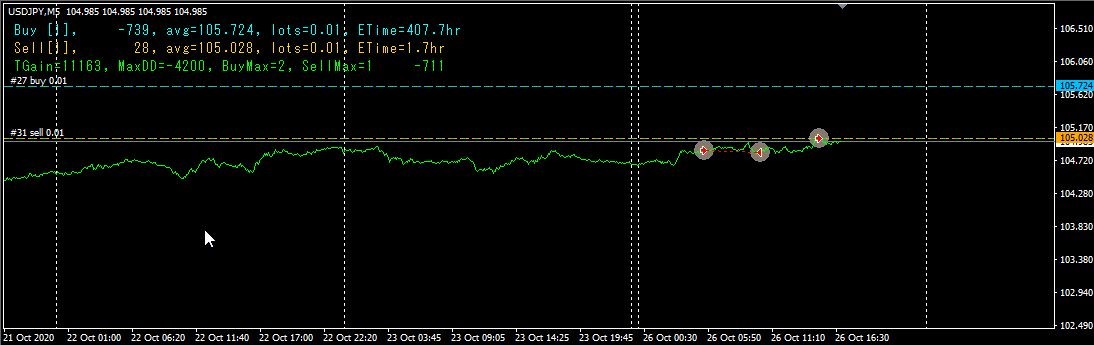 図1
1行目:買い:[ポジション数]、損益、平均値、総ロット数、経過時間
2行目:売り:[ポジション数]、損益、平均値、総ロット数、経過時間
3行目:通算利益、最大ドローダウン、過去最大ポジション数(買い、売り)、現在損益
8. バックテスト結果の3モードの比較
バックテストの期間は長ければ長いほど良いのですが、あまり期間が長いと検証に時間がかかるので、テスト期間を20年としました。これは、2008年のリーマンショックや2015年のチャイナショック等に耐えられるが否かについて検証したかったからです。(期間10年では、リーマンショックに対する耐性検証ができません。)
図1
1行目:買い:[ポジション数]、損益、平均値、総ロット数、経過時間
2行目:売り:[ポジション数]、損益、平均値、総ロット数、経過時間
3行目:通算利益、最大ドローダウン、過去最大ポジション数(買い、売り)、現在損益
8. バックテスト結果の3モードの比較
バックテストの期間は長ければ長いほど良いのですが、あまり期間が長いと検証に時間がかかるので、テスト期間を20年としました。これは、2008年のリーマンショックや2015年のチャイナショック等に耐えられるが否かについて検証したかったからです。(期間10年では、リーマンショックに対する耐性検証ができません。)
 図2
図2は、通常モードの結果(期間:1999年1月1日~2020年10月31日)
図2
図2は、通常モードの結果(期間:1999年1月1日~2020年10月31日)
 図3
図3は、少額資金モードの結果(期間は、通常モードと同じ)
図3
図3は、少額資金モードの結果(期間は、通常モードと同じ)
 図4
図4は、少額資金モード+ロスカット有(期間は、通常モードと同じ)
途中で何回かロスカットしていますが、トータルではプラスで終わっています。
図4
図4は、少額資金モード+ロスカット有(期間は、通常モードと同じ)
途中で何回かロスカットしていますが、トータルではプラスで終わっています。
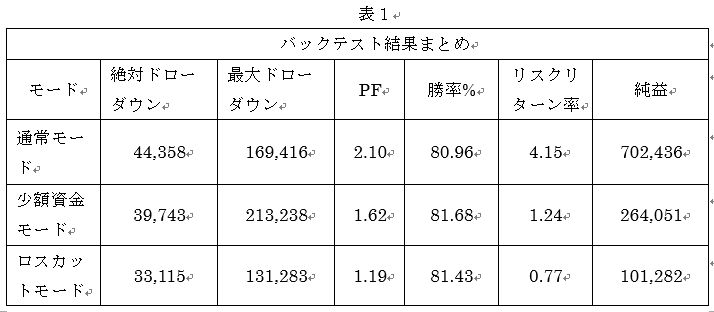 絶対ドローダウンの値は、通常モード > 少額資金モード > ロスカットモードの順番になっています。(PFはプロフィットファクターです。)
少額資金モード、ロスカットモードとも、絶対ドローダウンを下げるある程度の効果があると考えられます。
総合して考えると、やはり通常モードが最も優れていると判断できます。なお、バックテストでは、初期証拠金を通常モードでは100万円、少額資金モードおよびロスカットモードでは10万円としてスタートしています。
9. 資金管理
8.のバックテスト結果まとめの表を見て、資金管理を検討してみます。
1999年から2020年10月までの約20年間のバックテストの結果では、通常モードで、最大ドローダウンが約17万円なので、ドローダウン分として約17万円を用意します。これに加えて、ポジションを持つための証拠金が必要です。証拠金の額は、証券会社のレバレッジによって変わってきますが、国内の証券会社ではレバレッジが25倍なので、USDJPYのポジションを0.01ロット持つのに約4300円が必要になります。(1$=106円として計算)
通常モードの最大ロット数は、(最大ポジション数8として)0.54ロットです。従って必要証拠金が4,300 * 54 = 232,200円になります。
(海外の証券会社などでレバレッジの高い場合は、0.01ロット保有するのに120円程度などとなり、必要証拠金はかなり抑えられます。)
以上を合計して約41万円(17万+24万)が、通常モードを実行するのに必要な資金になります。
より安全サイドで検討すると、最大ドローダウンの2倍+必要証拠金をスタート資金とする考え方もあります。この場合は、17 * 2 + 24 = 58 となって、58万円が必要資金となります。
従って、20年間破綻しない為の必要総資金は、初期ロット数0.01あたり60万円と計算することができます。総資金が120万円になれば、初期ロット数を0.02に上げられます。
少額資金モードでは、最大ポジション数が12なので、最大ロット数は0.12ロットになります。この場合必要証拠金は4300 * 12 = 51,600 となります。少額資金モードの絶対ドローダウンが39,700なので、用意する資金はギリギリ10万円でなんとか運用ができそうです。できれば、最大ドローダウンの値を考慮に入れるべきなのですが、何せ少額資金しか無いのですから、取り敢えず絶対ドローダウンに耐える最低限の資金を用意し、走らせながら資金を増やしていくことになります。(ハイリスクだなぁ)
ロスカットモードでは、最大ポジション数が8なので、最大ロット数は0.08ロットになります。この場合必要証拠金は4300 * 8 = 34,400 となり、さらに小資金での運用が可能となります。
以上は、あくまでも過去データからの試算であり、将来の安全を保障するものではありません。また、バックテストにおいても、何時からバックテストを始めるかによって結果が異なってくることがあります。
十分な資金を用意された上で、通常モードで運用されることを推奨します。
10. もう少し攻めた運用法を考えてみました。
リスクは高くなりますが、少額資金から効率的に資金を増やしたい方向けの方法です。(むろん、この方法では20年間の長期バックテストには耐えられません。リスク覚悟の上で運用してください。)
絶対ドローダウンの値は、通常モード > 少額資金モード > ロスカットモードの順番になっています。(PFはプロフィットファクターです。)
少額資金モード、ロスカットモードとも、絶対ドローダウンを下げるある程度の効果があると考えられます。
総合して考えると、やはり通常モードが最も優れていると判断できます。なお、バックテストでは、初期証拠金を通常モードでは100万円、少額資金モードおよびロスカットモードでは10万円としてスタートしています。
9. 資金管理
8.のバックテスト結果まとめの表を見て、資金管理を検討してみます。
1999年から2020年10月までの約20年間のバックテストの結果では、通常モードで、最大ドローダウンが約17万円なので、ドローダウン分として約17万円を用意します。これに加えて、ポジションを持つための証拠金が必要です。証拠金の額は、証券会社のレバレッジによって変わってきますが、国内の証券会社ではレバレッジが25倍なので、USDJPYのポジションを0.01ロット持つのに約4300円が必要になります。(1$=106円として計算)
通常モードの最大ロット数は、(最大ポジション数8として)0.54ロットです。従って必要証拠金が4,300 * 54 = 232,200円になります。
(海外の証券会社などでレバレッジの高い場合は、0.01ロット保有するのに120円程度などとなり、必要証拠金はかなり抑えられます。)
以上を合計して約41万円(17万+24万)が、通常モードを実行するのに必要な資金になります。
より安全サイドで検討すると、最大ドローダウンの2倍+必要証拠金をスタート資金とする考え方もあります。この場合は、17 * 2 + 24 = 58 となって、58万円が必要資金となります。
従って、20年間破綻しない為の必要総資金は、初期ロット数0.01あたり60万円と計算することができます。総資金が120万円になれば、初期ロット数を0.02に上げられます。
少額資金モードでは、最大ポジション数が12なので、最大ロット数は0.12ロットになります。この場合必要証拠金は4300 * 12 = 51,600 となります。少額資金モードの絶対ドローダウンが39,700なので、用意する資金はギリギリ10万円でなんとか運用ができそうです。できれば、最大ドローダウンの値を考慮に入れるべきなのですが、何せ少額資金しか無いのですから、取り敢えず絶対ドローダウンに耐える最低限の資金を用意し、走らせながら資金を増やしていくことになります。(ハイリスクだなぁ)
ロスカットモードでは、最大ポジション数が8なので、最大ロット数は0.08ロットになります。この場合必要証拠金は4300 * 8 = 34,400 となり、さらに小資金での運用が可能となります。
以上は、あくまでも過去データからの試算であり、将来の安全を保障するものではありません。また、バックテストにおいても、何時からバックテストを始めるかによって結果が異なってくることがあります。
十分な資金を用意された上で、通常モードで運用されることを推奨します。
10. もう少し攻めた運用法を考えてみました。
リスクは高くなりますが、少額資金から効率的に資金を増やしたい方向けの方法です。(むろん、この方法では20年間の長期バックテストには耐えられません。リスク覚悟の上で運用してください。)
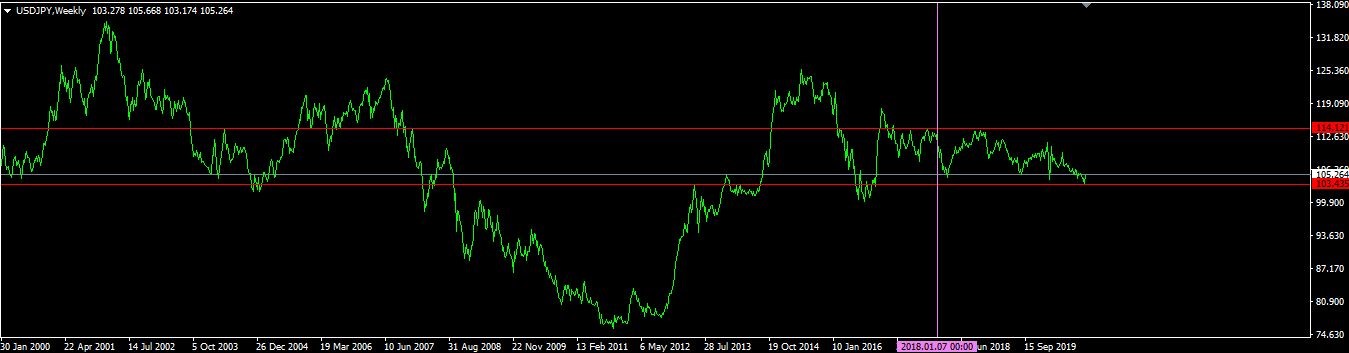 図5
図5は、ドル円の週足チャート(2000年~2020年の期間)です。2002年1月に134円の高値を付けてから2011年10月に75円まで下落、その後2015年5月に125円まで戻してから、やや下降気味に推移しています。
紫の縦線の位置が2018年1月です。2018年以降は、ドル円のレートは赤い2本の水平線の範囲内(103円~114円)に収まっています。ドル円の変動幅が約10円の幅に収まっているのであれば、EAのパラメータを変更して、収益率を上げることが可能になります。
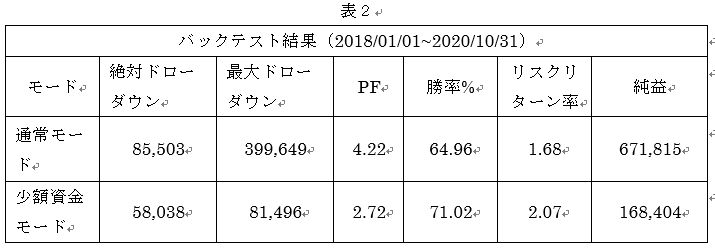
パラメータを次のように変更しました。
通常モード K_WD0 = 49, U_WD0 = 11
少額資金モード K_WD1 = 45, U_WD1 = 10
2018年1月1日から2020年10月31日の期間でバックテストを行ってみました。(なお、この期間内においてロスカットは発動しなかったため、ロスカットモードは表にありません)
スタート資金は、どちらのモードも10万円としました。
さすがに、通常モードで資金10万円では、破綻こそしないものの、かなり苦しい展開となりました。辛うじて破綻を免れていますが、相対ドローダウンが93。6%となり、かなり危ない状態でした。通常モードでは、もっと十分な資金を用意した方が良いでしょう。
一方、少額資金モードでは、なかなか良い成績を出しています。
図5
図5は、ドル円の週足チャート(2000年~2020年の期間)です。2002年1月に134円の高値を付けてから2011年10月に75円まで下落、その後2015年5月に125円まで戻してから、やや下降気味に推移しています。
紫の縦線の位置が2018年1月です。2018年以降は、ドル円のレートは赤い2本の水平線の範囲内(103円~114円)に収まっています。ドル円の変動幅が約10円の幅に収まっているのであれば、EAのパラメータを変更して、収益率を上げることが可能になります。
パラメータを次のように変更しました。
通常モード K_WD0 = 49, U_WD0 = 11
少額資金モード K_WD1 = 45, U_WD1 = 10
2018年1月1日から2020年10月31日の期間でバックテストを行ってみました。(なお、この期間内においてロスカットは発動しなかったため、ロスカットモードは表にありません)
スタート資金は、どちらのモードも10万円としました。
さすがに、通常モードで資金10万円では、破綻こそしないものの、かなり苦しい展開となりました。辛うじて破綻を免れていますが、相対ドローダウンが93。6%となり、かなり危ない状態でした。通常モードでは、もっと十分な資金を用意した方が良いでしょう。
一方、少額資金モードでは、なかなか良い成績を出しています。
 通常モードと少額資金モードのバックテスト結果を図に示します。
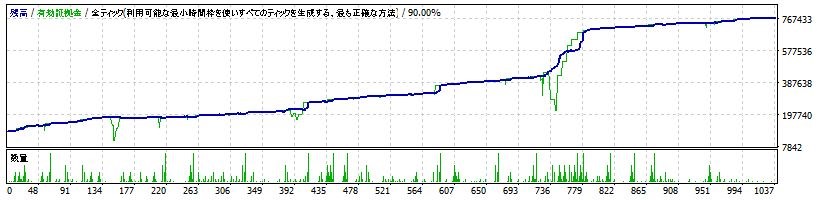 図6(通常モード)
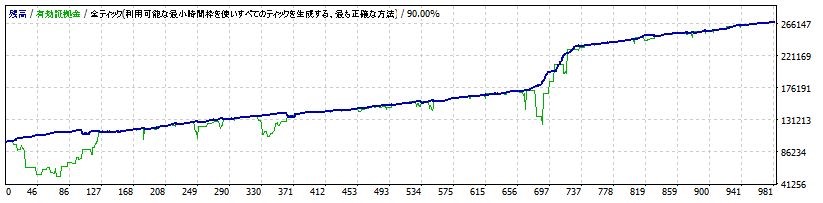 図7(少額資金モード)
11. 自動ロットの検証
通常モード
図7(少額資金モード)
11. 自動ロットの検証
通常モード
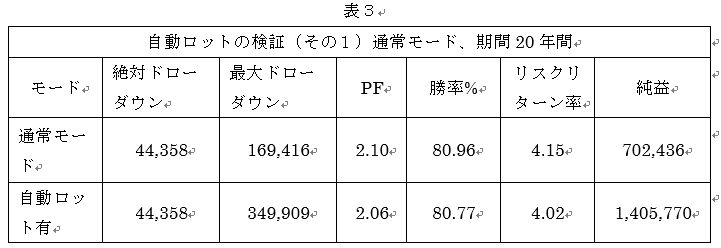 自動ロット(Base_Funds=600,000、初期証拠金1,000,000、K_WD0=150,U_WD0=500)でバックテストを実行すると、純益は初期ロット固定の約2倍になりました。(バックテストの期間は20年間、1999/01/01~2020/10/31)
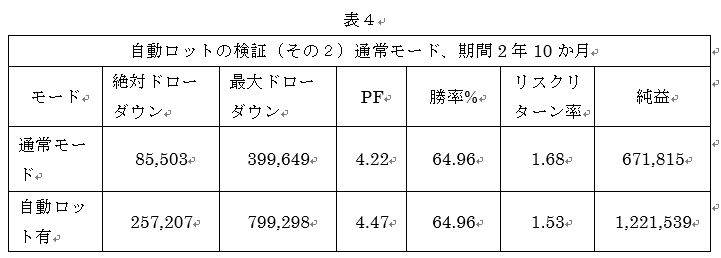 自動ロット(Base_Funds=600,000、初期証拠金1,000,000, K_WD0=49,U_WD0=11)でバックテストを実行すると、純益は初期ロット固定の約2倍になりました。
(バックテストの期間は2年10か月、2018/01/01~2020/10/31)
少額資金モードで自動ロット
自動ロット(Base_Funds=600,000、初期証拠金1,000,000, K_WD0=49,U_WD0=11)でバックテストを実行すると、純益は初期ロット固定の約2倍になりました。
(バックテストの期間は2年10か月、2018/01/01~2020/10/31)
少額資金モードで自動ロット
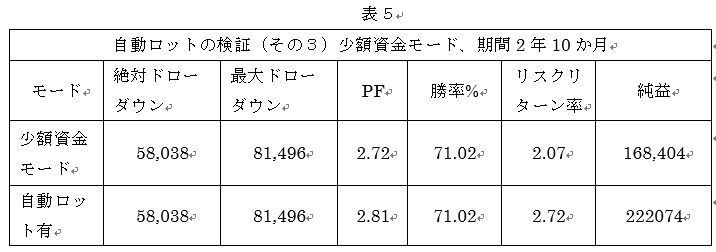 少額資金モードで、自動ロット(Base_Funds=100,000、初期証拠金100,000, K_WD1=45,U_WD1=10)でバックテストを実行してみました。純益は自動ロット有にすると無の場合の約1.32倍になりました。(バックテストの期間は2年10か月、2018/01/01~2020/10/31)
期間を直近の10か月に限ると、次のようになります。
少額資金モードで、自動ロット(Base_Funds=100,000、初期証拠金100,000, K_WD1=45,U_WD1=10)でバックテストを実行してみました。純益は自動ロット有にすると無の場合の約1.32倍になりました。(バックテストの期間は2年10か月、2018/01/01~2020/10/31)
期間を直近の10か月に限ると、次のようになります。
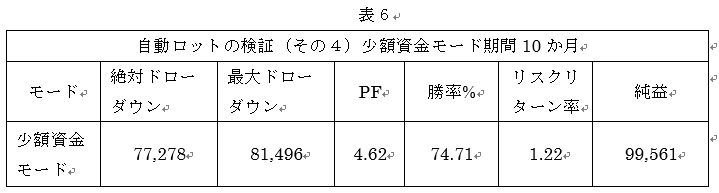 (自動ロット有、バックテストの期間10か月、2020/01/01~2020/10/31)
バックテストの検証期間を短くした例では、絶対ドローダウンの値が増えますが、最大ドローダウンの値は変わっていません。従って、この期間に最大ドローダウンが起きていることが分かります。何年何月何日からバックテストを始めるかにより、絶対ドローダウンの値は違ってきます。資金管理に当たっては、絶対ドローダウンの値を根拠にするよりも、最大ドローダウンの値を基準に考えた方が良いでしょう。
10か月で、初期証拠金100,000円が199,561円となり約2倍に増える結果となりましたが、相対ドローダウンが78.2%もあり、かなりリスクの高い状態だったことも同時に考えるべきでしょう。
(自動ロット有、バックテストの期間10か月、2020/01/01~2020/10/31)
バックテストの検証期間を短くした例では、絶対ドローダウンの値が増えますが、最大ドローダウンの値は変わっていません。従って、この期間に最大ドローダウンが起きていることが分かります。何年何月何日からバックテストを始めるかにより、絶対ドローダウンの値は違ってきます。資金管理に当たっては、絶対ドローダウンの値を根拠にするよりも、最大ドローダウンの値を基準に考えた方が良いでしょう。
10か月で、初期証拠金100,000円が199,561円となり約2倍に増える結果となりましたが、相対ドローダウンが78.2%もあり、かなりリスクの高い状態だったことも同時に考えるべきでしょう。
 図8(少額資金モード、期間10か月)
このEAは、ユーザーが各パラメータを自由に変更できるので、設定次第で、「長期安定型」から「短期ハイリスクハイリターン型」にまで、柔軟に対応することができます。どの運用方法で実施するかは、ユーザーの手に委ねられています。
図8(少額資金モード、期間10か月)
このEAは、ユーザーが各パラメータを自由に変更できるので、設定次第で、「長期安定型」から「短期ハイリスクハイリターン型」にまで、柔軟に対応することができます。どの運用方法で実施するかは、ユーザーの手に委ねられています。
図1
1行目:買い:[ポジション数]、損益、平均値、総ロット数、経過時間
2行目:売り:[ポジション数]、損益、平均値、総ロット数、経過時間
3行目:通算利益、最大ドローダウン、過去最大ポジション数(買い、売り)、現在損益
8. バックテスト結果の3モードの比較
バックテストの期間は長ければ長いほど良いのですが、あまり期間が長いと検証に時間がかかるので、テスト期間を20年としました。これは、2008年のリーマンショックや2015年のチャイナショック等に耐えられるが否かについて検証したかったからです。(期間10年では、リーマンショックに対する耐性検証ができません。)
図2
図2は、通常モードの結果(期間:1999年1月1日~2020年10月31日)
図3
図3は、少額資金モードの結果(期間は、通常モードと同じ)
図4
図4は、少額資金モード+ロスカット有(期間は、通常モードと同じ)
途中で何回かロスカットしていますが、トータルではプラスで終わっています。
絶対ドローダウンの値は、通常モード > 少額資金モード > ロスカットモードの順番になっています。(PFはプロフィットファクターです。)
少額資金モード、ロスカットモードとも、絶対ドローダウンを下げるある程度の効果があると考えられます。
総合して考えると、やはり通常モードが最も優れていると判断できます。なお、バックテストでは、初期証拠金を通常モードでは100万円、少額資金モードおよびロスカットモードでは10万円としてスタートしています。
9. 資金管理
8.のバックテスト結果まとめの表を見て、資金管理を検討してみます。
1999年から2020年10月までの約20年間のバックテストの結果では、通常モードで、最大ドローダウンが約17万円なので、ドローダウン分として約17万円を用意します。これに加えて、ポジションを持つための証拠金が必要です。証拠金の額は、証券会社のレバレッジによって変わってきますが、国内の証券会社ではレバレッジが25倍なので、USDJPYのポジションを0.01ロット持つのに約4300円が必要になります。(1$=106円として計算)
通常モードの最大ロット数は、(最大ポジション数8として)0.54ロットです。従って必要証拠金が4,300 * 54 = 232,200円になります。
(海外の証券会社などでレバレッジの高い場合は、0.01ロット保有するのに120円程度などとなり、必要証拠金はかなり抑えられます。)
以上を合計して約41万円(17万+24万)が、通常モードを実行するのに必要な資金になります。
より安全サイドで検討すると、最大ドローダウンの2倍+必要証拠金をスタート資金とする考え方もあります。この場合は、17 * 2 + 24 = 58 となって、58万円が必要資金となります。
従って、20年間破綻しない為の必要総資金は、初期ロット数0.01あたり60万円と計算することができます。総資金が120万円になれば、初期ロット数を0.02に上げられます。
少額資金モードでは、最大ポジション数が12なので、最大ロット数は0.12ロットになります。この場合必要証拠金は4300 * 12 = 51,600 となります。少額資金モードの絶対ドローダウンが39,700なので、用意する資金はギリギリ10万円でなんとか運用ができそうです。できれば、最大ドローダウンの値を考慮に入れるべきなのですが、何せ少額資金しか無いのですから、取り敢えず絶対ドローダウンに耐える最低限の資金を用意し、走らせながら資金を増やしていくことになります。(ハイリスクだなぁ)
ロスカットモードでは、最大ポジション数が8なので、最大ロット数は0.08ロットになります。この場合必要証拠金は4300 * 8 = 34,400 となり、さらに小資金での運用が可能となります。
以上は、あくまでも過去データからの試算であり、将来の安全を保障するものではありません。また、バックテストにおいても、何時からバックテストを始めるかによって結果が異なってくることがあります。
十分な資金を用意された上で、通常モードで運用されることを推奨します。
10. もう少し攻めた運用法を考えてみました。
リスクは高くなりますが、少額資金から効率的に資金を増やしたい方向けの方法です。(むろん、この方法では20年間の長期バックテストには耐えられません。リスク覚悟の上で運用してください。)
図5
図5は、ドル円の週足チャート(2000年~2020年の期間)です。2002年1月に134円の高値を付けてから2011年10月に75円まで下落、その後2015年5月に125円まで戻してから、やや下降気味に推移しています。
紫の縦線の位置が2018年1月です。2018年以降は、ドル円のレートは赤い2本の水平線の範囲内(103円~114円)に収まっています。ドル円の変動幅が約10円の幅に収まっているのであれば、EAのパラメータを変更して、収益率を上げることが可能になります。
パラメータを次のように変更しました。
通常モード K_WD0 = 49, U_WD0 = 11
少額資金モード K_WD1 = 45, U_WD1 = 10
2018年1月1日から2020年10月31日の期間でバックテストを行ってみました。(なお、この期間内においてロスカットは発動しなかったため、ロスカットモードは表にありません)
スタート資金は、どちらのモードも10万円としました。
さすがに、通常モードで資金10万円では、破綻こそしないものの、かなり苦しい展開となりました。辛うじて破綻を免れていますが、相対ドローダウンが93。6%となり、かなり危ない状態でした。通常モードでは、もっと十分な資金を用意した方が良いでしょう。
一方、少額資金モードでは、なかなか良い成績を出しています。
通常モードと少額資金モードのバックテスト結果を図に示します。
図6(通常モード)
図7(少額資金モード)
11. 自動ロットの検証
通常モード
自動ロット(Base_Funds=600,000、初期証拠金1,000,000、K_WD0=150,U_WD0=500)でバックテストを実行すると、純益は初期ロット固定の約2倍になりました。(バックテストの期間は20年間、1999/01/01~2020/10/31)
自動ロット(Base_Funds=600,000、初期証拠金1,000,000, K_WD0=49,U_WD0=11)でバックテストを実行すると、純益は初期ロット固定の約2倍になりました。
(バックテストの期間は2年10か月、2018/01/01~2020/10/31)
少額資金モードで自動ロット
少額資金モードで、自動ロット(Base_Funds=100,000、初期証拠金100,000, K_WD1=45,U_WD1=10)でバックテストを実行してみました。純益は自動ロット有にすると無の場合の約1.32倍になりました。(バックテストの期間は2年10か月、2018/01/01~2020/10/31)
期間を直近の10か月に限ると、次のようになります。
(自動ロット有、バックテストの期間10か月、2020/01/01~2020/10/31)
バックテストの検証期間を短くした例では、絶対ドローダウンの値が増えますが、最大ドローダウンの値は変わっていません。従って、この期間に最大ドローダウンが起きていることが分かります。何年何月何日からバックテストを始めるかにより、絶対ドローダウンの値は違ってきます。資金管理に当たっては、絶対ドローダウンの値を根拠にするよりも、最大ドローダウンの値を基準に考えた方が良いでしょう。
10か月で、初期証拠金100,000円が199,561円となり約2倍に増える結果となりましたが、相対ドローダウンが78.2%もあり、かなりリスクの高い状態だったことも同時に考えるべきでしょう。
図8(少額資金モード、期間10か月)
このEAは、ユーザーが各パラメータを自由に変更できるので、設定次第で、「長期安定型」から「短期ハイリスクハイリターン型」にまで、柔軟に対応することができます。どの運用方法で実施するかは、ユーザーの手に委ねられています。
Sales from
:
05/26/2021 07:11
Purchased: 0times
Price:¥24,000 (taxed)
●Payment




Forward Test
Back Test
Sales from : 05/26/2021 07:11
Purchased: 0times
Price:¥24,000 (taxed)
●Payment
About Forex Automated Trading
What is Forex Automated Trading (MT4 EA)?
Forex Automated Trading refers to trading that is automated through programming, incorporating predetermined trading and settlement rules. There are various methods to conduct automated trading, but at GogoJungle, we deal with Experts Advisors (hereinafter referred to as EA) that operate on a trading platform called MT4.
Trading Types of Forex Automated Trading
There are various types of EAs (Expert Advisors) for different trading types that can be used on MT4.
Just like discretionary trading, there are those that decide trading and settlement timings by combining indicators, those that repeatedly buy or sell at certain price (pips) intervals, and trading methods that utilize market anomalies or temporal features. The variety is as rich as the methods in discretionary trading.
To categorize simply,
・Scalping (Type where trades are completed within a few minutes to a few hours),
・Day Trading (Type where trades are completed within several hours to about a day),
・Swing Trading (Type where trades are conducted over a relatively long period of about 1 day to 1 week)
・Grid/Martingale Trading (Holding multiple positions at equal or unequal intervals and settling all once a profit is made. Those that gradually increase the lot number are called Martingale.)
・Anomaly EA (Mid-price trading, early morning scalping)
Just like discretionary trading, there are those that decide trading and settlement timings by combining indicators, those that repeatedly buy or sell at certain price (pips) intervals, and trading methods that utilize market anomalies or temporal features. The variety is as rich as the methods in discretionary trading.
To categorize simply,
・Scalping (Type where trades are completed within a few minutes to a few hours),
・Day Trading (Type where trades are completed within several hours to about a day),
・Swing Trading (Type where trades are conducted over a relatively long period of about 1 day to 1 week)
・Grid/Martingale Trading (Holding multiple positions at equal or unequal intervals and settling all once a profit is made. Those that gradually increase the lot number are called Martingale.)
・Anomaly EA (Mid-price trading, early morning scalping)
Risks, Advantages, and Disadvantages of Forex Automated Trading
When engaging in Forex, there are risks in automated trading just as there are in discretionary trading.
However, a substantial advantage of automated trading is its ability to limit and predict risks beforehand.
[Risk]
Inherent to forex trading are the trading risks that undeniably exist in automated trading as well.
・Lot Size Risk
Increasing the lot size forcibly due to a high winning rate can, in rare instances, depending on the EA, lead to substantial Pips loss when a loss occurs. It is crucial to verify the SL Pips and the number of positions held before operating with an appropriate lot.
・Rapid Market Fluctuation Risk
There are instances where market prices fluctuate rapidly due to index announcements or unforeseen news. System trading does not account for such unpredictable market movements, rendering it incapable of making decisions on whether to settle in advance or abstain from trading. As a countermeasure, utilizing tools that halt the EA based on indicator announcements or the VIX (fear index) is also possible.
[Benefits]
・Operates 24 hours a day
If there is an opportunity, system trading will execute trades on your behalf consistently. It proves to be an extremely convenient tool for those unable to allocate time to trading.
・Trades dispassionately without being swayed by emotions
There is an absence of self-serving rule modifications, a common human tendency, such as increasing the lot size after consecutive losses in discretionary trading or, conversely, hastily securing profits with minimal gains.
・Accessible for beginners
To engage in Forex trading, there is no prerequisite to study; anyone using system trading will achieve the same results.
[Disadvantages]
・Cannot increase trading frequency at will
Since system trading operates based on pre-programmed conditions, depending on the type of EA, it might only execute trades a few times a month.
・Suitability may vary with market conditions
Depending on the trading type of the EA, there are periods more suited to trend trading and periods more suited to contrarian trading, making consistent results across all periods unlikely. While the previous year might have yielded good results, this year's performance might not be as promising, necessitating some level of discretion in determining whether it is an opportune time to operate.
However, a substantial advantage of automated trading is its ability to limit and predict risks beforehand.
[Risk]
Inherent to forex trading are the trading risks that undeniably exist in automated trading as well.
・Lot Size Risk
Increasing the lot size forcibly due to a high winning rate can, in rare instances, depending on the EA, lead to substantial Pips loss when a loss occurs. It is crucial to verify the SL Pips and the number of positions held before operating with an appropriate lot.
・Rapid Market Fluctuation Risk
There are instances where market prices fluctuate rapidly due to index announcements or unforeseen news. System trading does not account for such unpredictable market movements, rendering it incapable of making decisions on whether to settle in advance or abstain from trading. As a countermeasure, utilizing tools that halt the EA based on indicator announcements or the VIX (fear index) is also possible.
[Benefits]
・Operates 24 hours a day
If there is an opportunity, system trading will execute trades on your behalf consistently. It proves to be an extremely convenient tool for those unable to allocate time to trading.
・Trades dispassionately without being swayed by emotions
There is an absence of self-serving rule modifications, a common human tendency, such as increasing the lot size after consecutive losses in discretionary trading or, conversely, hastily securing profits with minimal gains.
・Accessible for beginners
To engage in Forex trading, there is no prerequisite to study; anyone using system trading will achieve the same results.
[Disadvantages]
・Cannot increase trading frequency at will
Since system trading operates based on pre-programmed conditions, depending on the type of EA, it might only execute trades a few times a month.
・Suitability may vary with market conditions
Depending on the trading type of the EA, there are periods more suited to trend trading and periods more suited to contrarian trading, making consistent results across all periods unlikely. While the previous year might have yielded good results, this year's performance might not be as promising, necessitating some level of discretion in determining whether it is an opportune time to operate.
Equipment and Environment Needed for Automated Trading Operation
The requirements for operating automated trading (EA) on MT4 are as follows:
・MT4 (MetaTrader 4. An account needs to be opened with a Forex company that offers MT4.)
・EA (A program for automated trading)
・The operating deposit required to run the EA
・A PC that can run 24 hours or a VPS (Virtual Private Server), where a virtual PC is hosted on a cloud server to run MT4.
・MT4 (MetaTrader 4. An account needs to be opened with a Forex company that offers MT4.)
・EA (A program for automated trading)
・The operating deposit required to run the EA
・A PC that can run 24 hours or a VPS (Virtual Private Server), where a virtual PC is hosted on a cloud server to run MT4.
Installation of MT4 and Account Login
If you open an account with a forex broker that supports MT4, you can use MT4 as provided by that forex broker. MT4 is a stand-alone type of software that needs to be installed on your computer, so you download the program file from the website of the FX company where you opened the account and install it on your computer.
Additionally, there are both demo and real accounts available. You can experience trading with virtual money by applying for a demo account. After opening a real account, you select the connection server assigned by the Forex broker, enter the password, and log in to the account.
When you deposit money into your account using the method specified by the forex broker, the funds will be reflected in your MT4 account, and you can trade.
Additionally, there are both demo and real accounts available. You can experience trading with virtual money by applying for a demo account. After opening a real account, you select the connection server assigned by the Forex broker, enter the password, and log in to the account.
When you deposit money into your account using the method specified by the forex broker, the funds will be reflected in your MT4 account, and you can trade.
How to Install EA on MT4
To set up an EA when you purchase it through GogoJungle, follow the steps below:
Firstly, download the purchased EA file from your My Page on GogoJungle. You will download a zip (compressed) file, so right-click to extract it and retrieve the file named ‘◯◯◯ (EA name)_A19GAw09 (any 8 alphanumeric characters).ex4’ from inside.
Next, launch MT4 and navigate to ‘File’ → ‘Open Data Folder’ → ‘MQL4’ → ‘Experts’ folder, and place the ex4 file inside. Once done, close MT4 and restart it. Then, go to the upper menu ‘Tools’ → ‘Options’, and under ‘Expert Advisors’, ensure ‘Allow automated trading’ and ‘Allow DLL imports’ are checked, then press OK to close.
The necessary currency pair and time frame for the correct operation of the EA are specified on the EA sales page. Refer to this information and open the chart of the correct currency pair time frame (e.g., USDJPY5M for a USD/Yen 5-minute chart).
Within the menu navigator, under ‘Expert Advisors’, you will find the EA file name you placed earlier. Click to select it, then drag & drop it directly onto the chart to load the EA. Alternatively, you can double-click the EA name to load it onto the selected chart.
If ‘Authentication Success’ appears in the upper left of the chart, the authentication has been successful. To operate the EA, you need to keep your PC running 24 hours. Therefore, either disable the automatic sleep function or host MT4 on a VPS and operate the EA.
Firstly, download the purchased EA file from your My Page on GogoJungle. You will download a zip (compressed) file, so right-click to extract it and retrieve the file named ‘◯◯◯ (EA name)_A19GAw09 (any 8 alphanumeric characters).ex4’ from inside.
Next, launch MT4 and navigate to ‘File’ → ‘Open Data Folder’ → ‘MQL4’ → ‘Experts’ folder, and place the ex4 file inside. Once done, close MT4 and restart it. Then, go to the upper menu ‘Tools’ → ‘Options’, and under ‘Expert Advisors’, ensure ‘Allow automated trading’ and ‘Allow DLL imports’ are checked, then press OK to close.
The necessary currency pair and time frame for the correct operation of the EA are specified on the EA sales page. Refer to this information and open the chart of the correct currency pair time frame (e.g., USDJPY5M for a USD/Yen 5-minute chart).
Within the menu navigator, under ‘Expert Advisors’, you will find the EA file name you placed earlier. Click to select it, then drag & drop it directly onto the chart to load the EA. Alternatively, you can double-click the EA name to load it onto the selected chart.
If ‘Authentication Success’ appears in the upper left of the chart, the authentication has been successful. To operate the EA, you need to keep your PC running 24 hours. Therefore, either disable the automatic sleep function or host MT4 on a VPS and operate the EA.
In Case You Want to Change the Account in Use
EAs from GogoJungle can be used with one real account and one demo account per EA.
If you want to use it with an account other than the authenticated one, you need to reset the registered account.
To reset the account, close the MT4 where the Web authentication is registered, then go to My Page on GogoJungle > Use > Digital Contents > the relevant EA > press the ‘Reset’ button for the registration number, and the registered account will be released.
When the account is in a reset state, using the EA with another MT4 account will register a new account.
Also, you can reset the account an unlimited number of times.
If you want to use it with an account other than the authenticated one, you need to reset the registered account.
To reset the account, close the MT4 where the Web authentication is registered, then go to My Page on GogoJungle > Use > Digital Contents > the relevant EA > press the ‘Reset’ button for the registration number, and the registered account will be released.
When the account is in a reset state, using the EA with another MT4 account will register a new account.
Also, you can reset the account an unlimited number of times.
Solutions for Errors During Web Authentication or Non-Functional Account Trading
If you encounter an error with Web authentication, or if the EA is trading on GogoJungle's forward performance page but not on your own account, there could be various reasons. For more details, please refer to the following link:
→ Items to Check When EA is Not Operating
→ Items to Check When EA is Not Operating
About the Size of Trading Lots
In Forex trading, the size of a lot is usually:
1 lot = 100,000 currency units
0.1 lot = 10,000 currency units
0.01 lot = 1,000 currency units
For USD/JPY, 1 lot would mean holding 100,000 dollars.
The margin required to hold lots is determined by the leverage set by the Forex broker.
If the leverage is 25 times, the margin required to hold 10,000 currency units of USD/JPY would be:
10000*109 (※ at a rate of 109 yen per dollar) ÷ 25 = 43,600 yen.
1 lot = 100,000 currency units
0.1 lot = 10,000 currency units
0.01 lot = 1,000 currency units
For USD/JPY, 1 lot would mean holding 100,000 dollars.
The margin required to hold lots is determined by the leverage set by the Forex broker.
If the leverage is 25 times, the margin required to hold 10,000 currency units of USD/JPY would be:
10000*109 (※ at a rate of 109 yen per dollar) ÷ 25 = 43,600 yen.
Glossary of Automated Trading
・Profit Factor: Total Profit ÷ Total Loss
・Risk-Return Ratio: Total Profit and Loss during the period ÷ Maximum Drawdown
・Maximum Drawdown: The largest unrealized loss during the operation period
・Maximum Position Number: This is the maximum number of positions that the EA can theoretically hold at the same time
・TP (Take Profit): The set profit-taking Pips (or specified amount, etc.) in the EA's settings
・SL (Stop Loss): The set maximum loss pips (or specified amount, etc.) in the EA's settings
・Trailing Stop: Instead of settling at a specified Pips, once a certain profit is made, the settlement SL is raised at a certain interval (towards the profit), maximizing the profit. It is a method of settlement.
・Risk-Reward Ratio (Payoff Ratio): Average Profit ÷ Average Loss
・Hedging: Holding both buy and sell positions simultaneously (Some FX companies also have types where hedging is not allowed)
・Risk-Return Ratio: Total Profit and Loss during the period ÷ Maximum Drawdown
・Maximum Drawdown: The largest unrealized loss during the operation period
・Maximum Position Number: This is the maximum number of positions that the EA can theoretically hold at the same time
・TP (Take Profit): The set profit-taking Pips (or specified amount, etc.) in the EA's settings
・SL (Stop Loss): The set maximum loss pips (or specified amount, etc.) in the EA's settings
・Trailing Stop: Instead of settling at a specified Pips, once a certain profit is made, the settlement SL is raised at a certain interval (towards the profit), maximizing the profit. It is a method of settlement.
・Risk-Reward Ratio (Payoff Ratio): Average Profit ÷ Average Loss
・Hedging: Holding both buy and sell positions simultaneously (Some FX companies also have types where hedging is not allowed)
Useful related pages
・How to Install MT4 EA (Expert Advisor) and Indicators
・MT4 Beginner's Guide
・Understanding System Trading Performance (Forward and Backtesting)
・Choosing Your First EA! Calculating Recommended Margin for EAs
・Comparing MT4 Accounts Based on Spread, Swap, and Execution Speed
・What is Web Authentication?
・Checklist for When Your EA Isn't Working
・MT4 Beginner's Guide
・Understanding System Trading Performance (Forward and Backtesting)
・Choosing Your First EA! Calculating Recommended Margin for EAs
・Comparing MT4 Accounts Based on Spread, Swap, and Execution Speed
・What is Web Authentication?
・Checklist for When Your EA Isn't Working