
ゴトーSELL&BUY For MT5

- ทุกช่วงเวลา
- 2 ปี
- 1 ปี
- 6 เดือน
- 3 เดือน
- 1 เดือน
Forward testing (Profit)
รายละเอียดสถิติ (รายเดือน)
- ม.ค.
- ก.พ.
- มี.ค.
- เม.ย.
- พ.ค.
- มิ.ย.
- ก.ค.
- ส.ค.
- ก.ย.
- ต.ค.
- พ.ย.
- ธ.ค.
ปฏิทินการเทรดของเดือนนี้
เกี่ยวกับกลยุทธ์
กำลังแปล...
バージョンアップ情報!
GotoSELL&BUY_v3.3 MT4,MT5共通です。
〇 何が新しくなったか?

尚、本EAを異次元の感覚(少し言い過ぎ)で生まれ変わらせたインジケーターとEAそして画像認識に使われるニューラルネットワークを用いたインジケーターとEAを、出品する予定です。ご期待ください。
本EAの説明は、これ以降です。
全般
【ナンピン・マーチンゲール 一切なし、USD/JPY、M1】
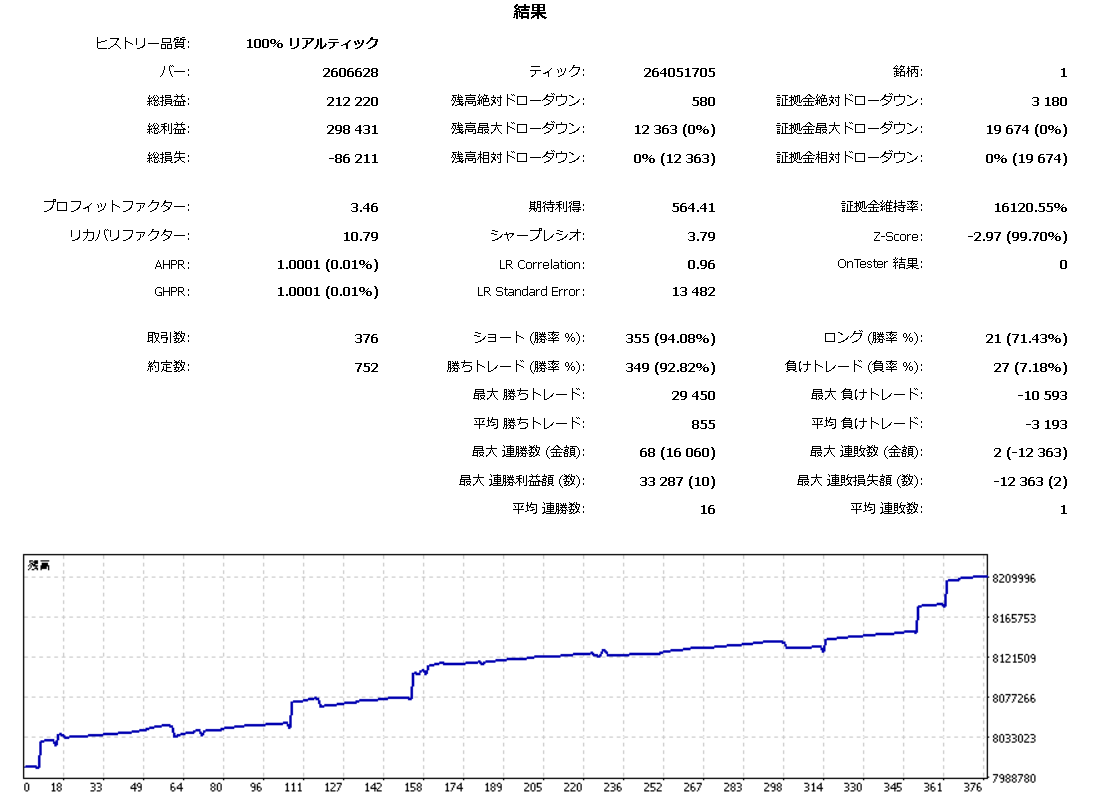
ゴトー日(5日、10日、15日、20日、25日、30日)とはこの日に決まった値動きをしやすい通貨ペア(USD/JPY)がある日のことです。ゴトー日を狙ったEAの中で、GotoSELL&BUY(以下、本EAと呼ぶ)は東京時間の仲値後にUSD/JPYが下がる傾向を利用し、SELLでポジションを持ちます。しかし実際はそう簡単ではありません。
このため本EAの流れは、
1 任意の時刻でまずSELLポジション持つ。
2 TPまたは固有ロジック(非公開)どちらかで手仕舞いを行う。
3 手仕舞いや日数制限がマイナスの場合、ドテン(BUY)を行う。
4 ドテンはトレイリングストップで手仕舞いとする。
となっています。
バックテストにおいて2019以前は機械的にゴトー日を計算しています。2020,2021,2022年はプログラムに含んだゴトー日カレンダーを使用しています。2019以降は2019以前に比し、地道な収益UPとなっています。また本EAは、コツコツドカンのドカン部分をなんとかドテンでカバーしているとも言えます。2022末には2023年以降のゴトー日カレンダーを追加し、細部のパラメータも見直し、バージョンアップ行う予定です。本EAは2015年からのバックテストにおいて最適化されております。GogojyanのHPの「FX自動売買について」のリスクをご確認の上、運用はご自身の判断でお願いします。尚、作者自身は実績計測用ブローカーで運用しております。他社でも運用自体可能です。ご存知の方も多いと思いますが、通過ペアのconfigが会社によって微妙に異なる場合があり、それにより、リアルな収益が異なる場合があります。しかしそれ自体、本EAのみの話ではなく、おおよそ全てのEAに関わると考えてます。そういう意味においては、会社の違いは他のEAと同様だと考えております。
パラメータについて
【マジックナンバー、スリッページ、売買ロット数、スプレッドをご確認の上、他のパラメータはそのまま(デフォルト)でご使用いただけます。】
●MAGIC(基本マジックナンバー) :マジックナンバーを設定
●SlippagePips(許容スリッページpips) : 許容スリッペイジを設定
●コメント入力 :取引のコメント欄に、「コメント(任意)+マジックナンバー」で出力されます。
●売買ロット数 :ロットサイズを設定。
●スプレッド :許容スプレッドを設定。
●TP(pips) -1:無効 :テイクプロフィットの設定。-1の場合、この機能なし。TPと固有ロジックはORの関係です。固有ロジックのみの場合はTPを-1にして下さい。-1でも収益にあまり影響はありません。ドテンへは影響しません。SELLのみです。
●SL(pips) -1:無効 :ストップロスの設定。-1の場合、この機能なし。基本的にストップロスの機能は次の日数制限で行っています。寝ている間に恐ろしいことが起きるかもしれないための対策として主にこのストップロスは設けています。デフォルトは7年間のバックテストの結果で、‐1でも収益にほぼ影響はありません。ドテンへは影響しません。SELLのみです。
●日数制限 :ポジション後、強制的にCUTする日数を、小数点で設定します。0.5なら12時間です。バックテストするときのストップは4日です。ゴトー日の次のチャンス(5日後)を失わないため4にしました。もしバックテストを行うのであればTP、SLをまず無効にした状態で日数制限だけで実施されることがベターです。ドテンへは影響しません。SELLのみです。
●ゴトー日SELL時間 :SELLの時刻(時間)です。範囲は0時から4時です。
●ゴトー日SELL分 :SELLの時刻(分)です。範囲は0分から59分です。
●ドテン true:実施 false:無効 :ドテンの実施の有無です。以下ドテンの手仕舞いに関するパラメータです。
●トレイリングストップ幅 true:ATR自動設定 false:固定値 :ドテンの手仕舞いに使用するトレイリングストップ幅を、ATRで自動設定するか、固定値にするかを決めます。
●固定値(pips) :トレイリングストップ幅を固定値で設定します。
●ATRPERIOD :ATRのPERIODを設定します。
●ATR times(例 300で3倍) :ATRの値を何倍してトレイリングストップ幅にせっていするか決めます。本EAでは1倍なら100、2倍なら200、3倍なら300となります。
●利益確定後 ON:true 最初から OFF:false :利確後トレイリングストップが動作するかどうか設定します。基本OFFで、短期で手仕舞いするようにします。ONだと少し利益は上がりますが、いつまでもポジションを持っている可能性があります。尚、SLと日数制限はドテンへ影響しないようになっています。
バージョンアップ情報!
GotoSELL&BUY_v3.0 MT4,MT5共通です。
〇 何が新しくなったか?
1.ゴトー日のSELLポジションを、ある時間範囲から自動でポジションをとれる項目追加。
2.SELLポジションのOUT(手仕舞い)パラメータを変更可とした。
3.SELLからBUYへのドテン判断を早くした。(損をしながらいつまでSELLのままをできるだけ改善するため。)
4.BUY(ドテン)のOUTパラメータの見直し。
5.オーバーシュートCUT機能の追加。トレイリングストップで手仕舞う場合、OUTとなる前は必ず「Purofitの値」>「OUTの収益」となる。このもったいない部分をオーバーシュートと呼び、できるだけ「Purofitの値」=「OUTの収益」となるようにする機能。
〇 パラメータ説明
(パラメータ変更はご自身の判断でお願いいたします。出品者が投資指導をするものではありません。)
デフォルトで運用OKです。後の説明のため、A,B,Cを振っています。
A MAGIC(基本マジックナンバー) :マジックナンバーです。
B SlippagePips(許容スリッページpips): スリッページです。
C 売買ロット数:売買ロット数です。
D スプレッド:スプレッドです。
E ドテンモードの表示 1:有 0:無 :チャート上に現在のモードを表示します。
F TP(pips) -1:無効 :テイクプロフィットです。
G SL(pips) -1:無効 :ストップロスです。
H ゴトー日時刻固定:false Serch(自動):true :falseでこれまで同様、以下I,Jの時刻でSELLポジション。trueで以下K,Lの時刻からI,Jの時刻の間でSELL]ポジションを探します。
I ゴトー日SELL固定[時間] :時間を指定します。
J ゴトー日SELL固定[分] :分を指定します。
(バックテストにより得られたI,Jのデフォルト値ですが、なぜこの値か根拠がありません。)
K Serch_h :SELLポジションを探す開始時間(時)を指定します。
L Serch_m :SELLポジションを探す開始時間(分)を指定します。
------------以下 SELL手仕舞い設定 ----------
M SELL OUT方法 Indi使用:0 トレイリング:1 両方同時:2 :SELLのOUT方法を指定します。
----Indi設定-----
N SellOut_shift0 :インジケータのシフト量を設定します。
O SellOut_shift1 : インジケータの第のシフト量を設定します。
P SellOut_Period :インジケータの周期を設定します。
Q SellOut_Level :SELL OUTの判定基準です。負の方向は利益大・不確実となりますが、0に近い場合、その逆です。
----トレイリング設定-----
R profit_falag :falseの場合、利確前からトレイリング実施。trueの場合、利確後からトレイリング実施します。
S TRW :正の場合、トレイリング固定幅を設定します。負の場合、以下のATRによるトレイリング幅になります。
T ATRperiod :ATRの期間です。
U ATRtimes :ATR × ATRtimes(倍数)がトレイリング幅となります。
V ra1 :ATRの変化を大きくするレートです。0の場合ATRのみ、1の場合最大の変化率となります。
------------以下doten判断 ------
W ドテン有:true 無:false :ドテン実行の有無です。無の場合、BUYはありません。
X BliT :SELLからBUYまでの時間(単位 分)を指定します。0に近いとすぐBUYになります。
Y tt :SELL最大保持時間(単位 時間)です。
Z SLL :SELL最大のロス(pips)です。
AA Judge_HLevel :高すぎると強制的にドテンしずらく、低いと頻繁にドテンします。
AB UPL :高すぎると確実なドテンとなりますがタイミング遅くなります。
AC Ma_Period :使用するMAの期間です。
AD Judge_Level :高すぎると確実なドテンとなりますがタイミング遅くなります。
------ 以下 BUY(ドテン時)OUT設定
AE profit_falagdo : falseの場合、利確前からトレイリング実施。trueの場合、利確後からトレイリング実施します。
AF TRW2 :正の場合、トレイリング固定幅を設定します。負の場合、以下のATR2によるトレイリング幅になります。
AG ATRperiod2 :ATR2の期間です;
AH ATRtimes2 :ATR2 × ATRtimes2(倍数)がトレイリング幅となります。AI ra2 :ATR2の変化を大きくするレートです。0の場合ATR2のみ、1の場合最大の変化率となります。
------ オーバーシュートCUT------
AJ 有:true 無:false :オーバーシュートCUTの有無です。
AK OverShoot_SHIFT :オーバーシュートインジケータのシフト値です。
AL OverShoot_Level :高すぎるとあまり効果がなく、低すぎるとマイナスの効果となり、適切な値があります。
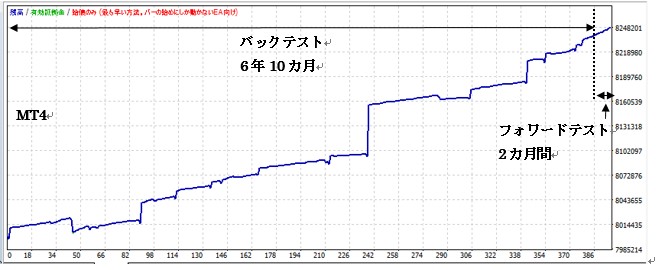
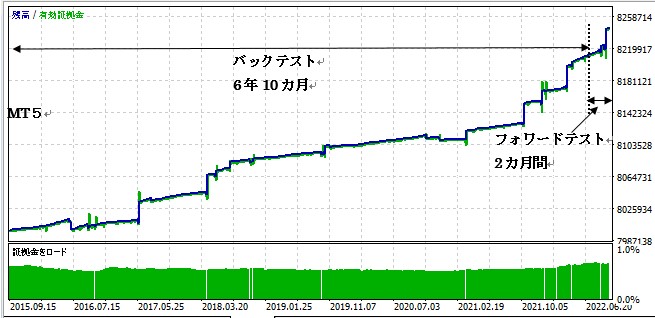
〇 バックテスト(2015/8/22~2022/6/22)とフォワードテスト(2022/6/22~2022/8/22)
バックテスト期間のみで最適化を行い、そのパラメータを使い最適化せずにフォワードテストを行ってます。(当たり前ですが)
● MT4について
● MT5について
〇 バックテスト実施録
(ここは出品者の経験であり、投資指導をするものではありません。あくまでもご自身の判断でお願いします。)
MT4,MT5共にバックテストのモデルは「始値のみ」、順番は次のグループ順で実施しました。
① AJを「無 false」
② A ~L
③ M~V
④ W~AD
⑤ AE~AI
⑥ AJ~AL 「有 true」
例えば途中⑤からスタートしても構いと思います。尚、MT4でステップ数を含め変更が多すぎると「Too many…」エラーとなりました。MT5は③~⑥同時に可能でした。
GotoSELL&BUY_For_MT(4or5)_v3.1MT4,MT5共通す。(エントリー、手仕舞い能力に全く変更はありません。)
追加変更点
1 チャートに「SELLモード」と表示していたのを、次回のゴトー予定日を表示するようにしました。
2 エントリーの禁止時間帯(年月日時刻:GMT)を設定可能にしました。手仕舞いは影響されません。デフォルトでfalseなので、不必要な方はデフォルトで。
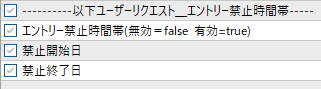
MT4では以下のように「禁止開始日」のところがグレーで選択できなさそうですが、ダブルクリックして下さい。
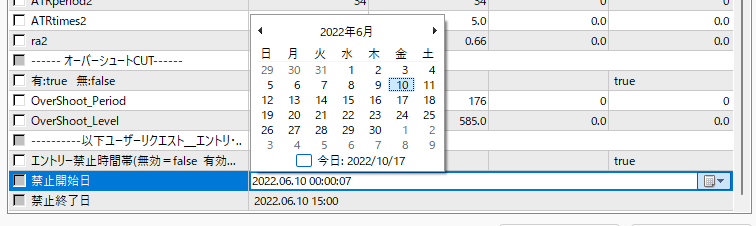
 をクリックすると年月日の選択欄が出てきます。時刻まで設定するときはカーソルを時刻のところへ持っていき、数値入力です。MT5も下図のように入力可です。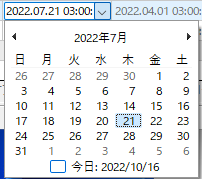

3 マイナーチェンジ これまで再起動しても値の残るGlobalVariable変数を使って、土日PCを止めてもドテンエントリーの有無を判断してましたが、色々トラブルの元になると判断し、GlobalVariable変数の使用を中止しました。エントリーした場合PCを切らないで下さい。再起動で元に戻る保証はできません。しかしエントリーしていない場合、再起動問題ありません。(当たり前ですが)
GotoSELL&BUY_For_MT(4or5)_v3.2 MT4,MT5共通です。
(エントリー、手仕舞い能力に全く変更はありません。)
追加変更点 2023年度ゴトー日カレンダーを追加しました。
ราคา:¥19,800 (รวมภาษี)
●วิธีการชำระเงิน




วันที่เริ่มขาย : 30/05/2022 10:45
ราคา:¥19,800 (รวมภาษี)
●วิธีการชำระเงิน
เช่นเดียวกับการซื้อขายตามดุลยพินิจ มีวิธีการซื้อขายหลายประเภท เช่น วิธีการซื้อขายที่รวมตัวบ่งชี้เพื่อกำหนดเวลาของการซื้อขายและการชำระบัญชี การซื้อและขายซ้ำในช่วงเวลาราคาคงที่ (pips) และวิธีการซื้อขายที่ใช้ความผิดปกติของตลาดและ ลักษณะเวลา มีหลายประเภทตามวิธีการซื้อขายที่ใช้ดุลยพินิจ
การจำแนกประเภทอย่างง่ายคือ
・Scalping (ประเภทของธุรกรรมที่เสร็จสิ้นภายในไม่กี่นาทีถึงไม่กี่ชั่วโมง),
・การซื้อขายรายวัน (ประเภทของธุรกรรมที่เสร็จสิ้นภายในไม่กี่ชั่วโมงถึงหนึ่งวัน)
・สวิง (ประเภทการซื้อขายในระยะเวลาค่อนข้างนานตั้งแต่หนึ่งวันขึ้นไปถึงประมาณหนึ่งสัปดาห์)
・Nampin Martin (ประเภทที่ถือครองหลายตำแหน่งในช่วงเวลาที่เท่ากันหรือไม่เท่ากัน และชำระทั้งหมดพร้อมกันเมื่อมีการทำกำไร ประเภทที่เพิ่มจำนวนล็อตในแต่ละขั้นเรียกว่า martingale)
・Anomaly EA (Mid-price trading, early morning scalping) และอื่น ๆ
อย่างไรก็ตาม ข้อได้เปรียบที่สำคัญของการซื้อขายอัตโนมัติคือความสามารถในการจำกัดและคาดการณ์ความเสี่ยงล่วงหน้า
[ความเสี่ยง]
พื้นฐานของการซื้อขายฟอเร็กซ์คือความเสี่ยงในการซื้อขายที่มีอยู่ในการซื้อขายอัตโนมัติเช่นกัน
・ความเสี่ยงขนาดล็อต
การเพิ่มขนาดล็อตโดยการบังคับเนื่องจากอัตราการชนะที่สูง ในบางกรณีที่เกิดขึ้นได้ยาก ขึ้นอยู่กับ EA อาจทำให้สูญเสีย Pips อย่างมากเมื่อเกิดการขาดทุน การตรวจสอบ SL Pips และจำนวนตำแหน่งที่ถืออยู่เป็นสิ่งสำคัญก่อนที่จะดำเนินการกับล็อตที่เหมาะสม
・ความเสี่ยงจากความผันผวนของตลาดอย่างรวดเร็ว
มีกรณีที่ราคาตลาดผันผวนอย่างรวดเร็วเนื่องจากการประกาศดัชนีหรือข่าวที่ไม่คาดฝัน การซื้อขายของระบบไม่ได้คำนึงถึงความเคลื่อนไหวของตลาดที่ไม่สามารถคาดเดาได้ ทำให้ไม่สามารถตัดสินใจได้ว่าจะชำระล่วงหน้าหรือละเว้นจากการซื้อขาย เพื่อเป็นมาตรการตอบโต้ การใช้เครื่องมือที่จะหยุด EA ตามการประกาศตัวบ่งชี้หรือ VIX (ดัชนีความกลัว) ก็เป็นไปได้เช่นกัน
[คุณประโยชน์]
・ให้บริการตลอด 24 ชั่วโมง
หากมีโอกาส ระบบการซื้อขายจะดำเนินการซื้อขายในนามของคุณอย่างสม่ำเสมอ มันพิสูจน์ได้ว่าเป็นเครื่องมือที่สะดวกอย่างยิ่งสำหรับผู้ที่ไม่สามารถจัดสรรเวลาในการซื้อขายได้
・ซื้อขายอย่างไม่เต็มใจโดยไม่ถูกครอบงำด้วยอารมณ์
ไม่มีการปรับเปลี่ยนกฎการให้บริการด้วยตนเอง ซึ่งเป็นแนวโน้มทั่วไปของมนุษย์ เช่น การเพิ่มขนาดล็อตหลังจากการขาดทุนติดต่อกันในการซื้อขายตามดุลยพินิจ หรือในทางกลับกัน การได้รับผลกำไรอย่างเร่งรีบโดยได้รับผลกำไรน้อยที่สุด
・สามารถเข้าถึงได้สำหรับผู้เริ่มต้น
หากต้องการมีส่วนร่วมในการซื้อขายฟอเร็กซ์ ไม่มีข้อกำหนดเบื้องต้นในการศึกษา ใครก็ตามที่ใช้ระบบการซื้อขายจะได้รับผลลัพธ์เดียวกัน
[ข้อเสีย]
・ไม่สามารถเพิ่มความถี่ในการซื้อขายได้ตามต้องการ
เนื่องจากระบบการซื้อขายดำเนินการตามเงื่อนไขที่ตั้งโปรแกรมไว้ล่วงหน้า ขึ้นอยู่กับประเภทของ EA ระบบจึงอาจดำเนินการซื้อขายเพียงไม่กี่ครั้งต่อเดือน
・ความเหมาะสมอาจแตกต่างกันไปตามสภาวะตลาด
ขึ้นอยู่กับประเภทการซื้อขายของ EA มีช่วงเวลาที่เหมาะสมกับการซื้อขายตามแนวโน้มมากกว่าและช่วงเวลาที่เหมาะกับการซื้อขายที่ขัดแย้งกันมากกว่า ทำให้ผลลัพธ์ที่สม่ำเสมอในทุกช่วงเวลาไม่น่าเป็นไปได้ แม้ว่าปีที่แล้วอาจมีผลลัพธ์ที่ดี แต่ผลการดำเนินงานในปีนี้อาจไม่มีแนวโน้มที่ดีนัก ซึ่งจำเป็นต้องใช้ดุลยพินิจในระดับหนึ่งในการพิจารณาว่าเป็นเวลาที่เหมาะสมในการดำเนินการหรือไม่
・MT4 (MetaTrader 4 จำเป็นต้องเปิดบัญชีกับบริษัท Forex ที่ให้บริการ MT4)
・EA (โปรแกรมสำหรับการซื้อขายอัตโนมัติ)
・เงินฝากปฏิบัติการที่จำเป็นสำหรับการใช้งาน EA
・พีซีที่สามารถทำงานได้ตลอด 24 ชั่วโมงหรือ VPS (Virtual Private Server) โดยที่พีซีเสมือนโฮสต์บนเซิร์ฟเวอร์คลาวด์เพื่อรัน MT4
นอกจากนี้ยังมีบัญชีทดลองและบัญชีจริง และเมื่อสมัครบัญชีทดลอง คุณจะได้สัมผัสกับการซื้อขายด้วยเงินเสมือนจริง หลังจากเปิดบัญชีจริงแล้ว ให้เลือกเซิร์ฟเวอร์การเชื่อมต่อที่กำหนดโดยโบรกเกอร์ ป้อนรหัสผ่านและเข้าสู่ระบบบัญชี
เมื่อคุณฝากเงินเข้าบัญชีของคุณโดยใช้วิธีการที่โบรกเกอร์กำหนด เงินจะปรากฏในบัญชี MT4 ของคุณและคุณจะสามารถซื้อขายได้
ขั้นแรก ดาวน์โหลดไฟล์ EA ที่ซื้อจากหน้าของฉันบน GogoJungle คุณจะดาวน์โหลดไฟล์ zip (บีบอัด) ดังนั้นให้คลิกขวาเพื่อแตกไฟล์และดึงไฟล์ชื่อ '◯◯◯ (ชื่อ EA)_A19GAw09 (ตัวอักษรและตัวเลข 8 ตัวใดก็ได้ ).ex4' จากด้านใน
จากนั้น เปิด MT4 และไปที่ 'File' → 'Open Data Folder' → 'MQL4' → โฟลเดอร์ 'Experts' และวางไฟล์ ex4 ไว้ข้างใน เมื่อเสร็จแล้ว ปิด MT4 และรีสตาร์ท จากนั้น ไปที่เมนูด้านบน ' เครื่องมือ' → 'ตัวเลือก' และภายใต้ 'ที่ปรึกษาผู้เชี่ยวชาญ' ตรวจสอบให้แน่ใจว่าได้เลือก 'อนุญาตการซื้อขายอัตโนมัติ' และ 'อนุญาตการนำเข้า DLL' แล้ว จากนั้นกด ตกลง เพื่อปิด
คู่สกุลเงินและกรอบเวลาที่จำเป็นสำหรับการดำเนินการที่ถูกต้องของ EA ระบุไว้ในหน้าการขายของ EA อ้างอิงข้อมูลนี้และเปิดแผนภูมิของกรอบเวลาคู่สกุลเงินที่ถูกต้อง (เช่น USDJPY5M สำหรับแผนภูมิ 5 นาที USDJPY).
ภายในแถบนำทางเมนู ใต้ 'Expert Advisors' คุณจะพบชื่อไฟล์ EA ที่คุณวางไว้ก่อนหน้านี้ คลิกเพื่อเลือก จากนั้นลากและวางลงในแผนภูมิโดยตรงเพื่อโหลด EA หรือคุณสามารถดับเบิลคลิกที่ EA ชื่อเพื่อโหลดลงในแผนภูมิที่เลือก
หาก 'Authentication Success' ปรากฏขึ้นที่ด้านซ้ายบนของแผนภูมิ แสดงว่าการรับรองความถูกต้องสำเร็จแล้ว ในการใช้งาน EA คุณต้องให้พีซีของคุณทำงานตลอด 24 ชั่วโมง ดังนั้น ให้ปิดการใช้งานฟังก์ชันสลีปอัตโนมัติหรือโฮสต์ MT4 บน VPS และใช้งาน EA
หากคุณต้องการใช้กับบัญชีอื่นที่ไม่ใช่บัญชีที่ผ่านการรับรองความถูกต้อง คุณจะต้องรีเซ็ตบัญชีที่ลงทะเบียน
หากต้องการรีเซ็ตบัญชี ให้ปิด MT4 ที่มีการลงทะเบียนการรับรองความถูกต้องของเว็บ จากนั้นไปที่หน้าของฉันบน GogoJungle > การใช้งาน > เนื้อหาดิจิทัล > EA ที่เกี่ยวข้อง > กดปุ่ม 'รีเซ็ต' เพื่อดูหมายเลขการลงทะเบียน และบัญชีที่ลงทะเบียนจะถูกปล่อย .
เมื่อบัญชีอยู่ในสถานะรีเซ็ต การใช้ EA กับบัญชี MT4 อื่นจะเป็นการลงทะเบียนบัญชีใหม่
นอกจากนี้คุณยังสามารถรีเซ็ตบัญชีได้ไม่จำกัดจำนวนครั้ง
→ รายการที่ต้องตรวจสอบเมื่อ EA ไม่ทำงาน
1 ล็อต = 100,000 สกุลเงิน
0.1 ล็อต = 10,000 สกุลเงิน
0.01 ล็อต = 1,000 สกุลเงิน
มันกลายเป็น.
ในสกุลเงินดอลลาร์เยน 1 ล็อต = 100,000 ดอลลาร์
มาร์จิ้นที่จำเป็นสำหรับการถือครองล็อตนั้นถูกกำหนดโดยเลเวอเรจที่กำหนดโดยบริษัท FX
หากเลเวอเรจเป็น 25 เท่า หลักประกันที่ต้องถือ 10,000 USD/JPY จะเท่ากับ 10,000*109 (*ในอัตรา 109 เยนต่อดอลลาร์) ÷ 25 = 43,600 เยน
・อัตราผลตอบแทนความเสี่ยง: กำไรและขาดทุนทั้งหมดในระหว่างงวด ÷ การเบิกเงินสูงสุด
・การเบิกถอนสูงสุด: การสูญเสียที่ยังไม่เกิดขึ้นสูงสุดในระหว่างระยะเวลาดำเนินการ
・จำนวนตำแหน่งสูงสุด: จำนวนตำแหน่งสูงสุดที่ EA สามารถถือได้ในทางทฤษฎีในเวลาเดียวกัน
・TP (Take Profit): กำไร Pips (หรือจำนวนที่ระบุ ฯลฯ) ในการตั้งค่า EA
・SL (Stop Loss): จุดขาดทุนสูงสุด (หรือจำนวนที่ระบุ ฯลฯ) ในการตั้งค่า EA
・Trailing stop: นี่คือวิธีการชำระเงินที่เพิ่มผลกำไรสูงสุดโดยการเพิ่ม SL การชำระเงินในช่วงเวลาปกติ (ในทิศทางของผลกำไร) เมื่อมีการทำกำไรจำนวนหนึ่ง แทนที่จะชำระเงินตาม pip ที่ระบุ
・อัตราส่วนผลตอบแทนความเสี่ยง (อัตราส่วนผลตอบแทน): กำไรเฉลี่ย − ขาดทุนเฉลี่ย
・ทั้งสองตำแหน่ง: ถือทั้งตำแหน่งซื้อและขายในเวลาเดียวกัน (โบรกเกอร์บางแห่งไม่อนุญาตให้ใช้ทั้งสองตำแหน่ง)
・MT4 Beginner's Guide
・การตรวจสอบผลงานการซื้อขายระบบ (Forward & Back Testing)
・การเลือก EA ครั้งแรก! วิธีคำนวณเงินทุนที่แนะนำ
・เปรียบเทียบบัญชี MT4 ด้วย Spread, Swap, และความสามารถในการจัดการคำสั่งซื้อขาย
・Web Authentication คืออะไร?
・ตรวจสอบข้อสรุปเมื่อ EA ไม่ทำงาน