



1. インジケータ概要
概要
Trend Line Indicator Ver2
対応プラットフォーム MetaTrader 4 (MT4)
バージョン 2.0
対応通貨ペア: 全通貨ペア対応
対応時間足: すべての時間足
リリース日: 2025年2月14日
2. 機能説明
このインジケータは、チャート上にトレンドラインを自動描画し、トレンドの方向性を視覚的に示します。トレンドの強弱や反転ポイントを判断する際に有効です。
主な機能
トレンドラインの自動描画
最新のバーの中心値からN本前のバーの中心値を直線で結ぶ。
上昇トレンド時:赤色のライン。
下降トレンド時:青色のライン。
並行チャンネルラインの描画
中心線を基準に±Pips範囲に上下平行ライン(サポート/レジスタンス)を描画。
上限:赤色(デフォルト)、下限:黄色(デフォルト)のライン。
トレンド方向の表示
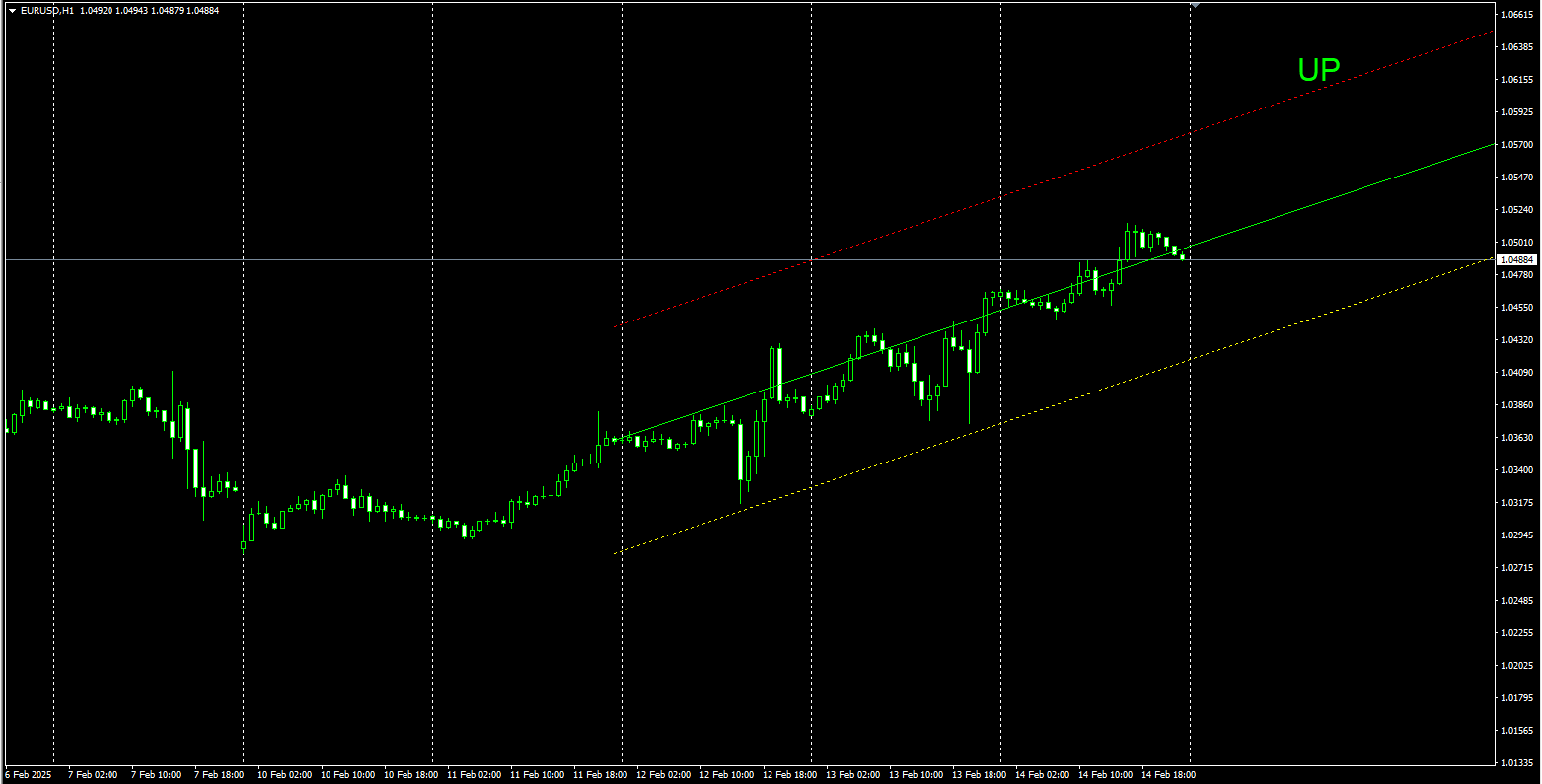
チャート右上に「UP」または「DOWN」を表示。
Show_Trend_Disp = true の場合、トレンド方向が表示される。
未来延長の制御機能
Extend_Future = true に設定すると、未来のバーまでラインが延長される。
FutureBars で未来延長のバー数を指定可能。
Extend_Future = false の場合、未来のラインを描画しない。
過去延長の制御機能
Extend_Past = true に設定すると、過去のバーまでラインが延長される。
PastBars で過去延長のバー数を指定可能。
Extend_Past = false の場合、過去のラインを描画しない。
ラインスタイルのカスタマイズ
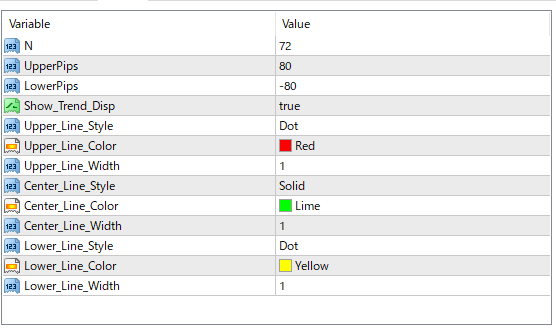
Upper_Line_Style、Center_Line_Style、Lower_Line_Style を設定可能。
Upper_Line_Color、Center_Line_Color、Lower_Line_Color の変更可能。
Upper_Line_Width、Center_Line_Width、Lower_Line_Width でラインの太さを変更。
トレンドラインの自動描画
最新のバーの中心値からN本前のバーの中心値を直線で結ぶ。
上昇トレンド時:赤色のライン。
下降トレンド時:青色のライン。
並行チャンネルラインの描画
中心線を基準に±Pips範囲に上下平行ライン(サポート/レジスタンス)を描画。
上限:赤色(デフォルト)、下限:黄色(デフォルト)のライン。
トレンド方向の表示
チャート右上に「UP」または「DOWN」を表示。
Show_Trend_Disp = true の場合、トレンド方向が表示される。
未来延長の制御機能
Extend_Future = true に設定すると、未来のバーまでラインが延長される。
FutureBars で未来延長のバー数を指定可能。
Extend_Future = false の場合、未来のラインを描画しない。
過去延長の制御機能
Extend_Past = true に設定すると、過去のバーまでラインが延長される。
PastBars で過去延長のバー数を指定可能。
Extend_Past = false の場合、過去のラインを描画しない。
ラインスタイルのカスタマイズ
Upper_Line_Style、Center_Line_Style、Lower_Line_Style を設定可能。
Upper_Line_Color、Center_Line_Color、Lower_Line_Color の変更可能。
Upper_Line_Width、Center_Line_Width、Lower_Line_Width でラインの太さを変更。
3. インストール方法
Trend_Line_Indicater_Ver2.mq4 ファイルをMT4の MQL4/Indicators/ フォルダにコピー。
MT4を再起動。
「ナビゲーター」ウィンドウから Trend_Line_Indicater_Ver2 をドラッグして適用。
設定パラメータをカスタマイズし、「OK」をクリック。
Trend_Line_Indicater_Ver2.mq4 ファイルをMT4の MQL4/Indicators/ フォルダにコピー。
MT4を再起動。
「ナビゲーター」ウィンドウから Trend_Line_Indicater_Ver2 をドラッグして適用。
設定パラメータをカスタマイズし、「OK」をクリック。
4. 使い方
トレンドの確認
チャート上の赤/青のラインで現在のトレンドを確認。
「UP」表示で上昇トレンド、「DOWN」表示で下降トレンド。
エントリーポイントの検討
トレンドラインのブレイクを確認し、エントリーの判断材料にする。
サポートライン付近での反発を狙う。
未来/過去延長の設定
Extend_Future を true にすると、未来のバーにラインが延長される。
Extend_Past を true にすると、過去のバーにラインが延長される。
FutureBars や PastBars の値を変更して、延長の長さを調整可能。
パラメータ調整
設定画面から N や UpperPips の数値を変更し、好みに応じて最適化。
トレンドの確認
チャート上の赤/青のラインで現在のトレンドを確認。
「UP」表示で上昇トレンド、「DOWN」表示で下降トレンド。
エントリーポイントの検討
トレンドラインのブレイクを確認し、エントリーの判断材料にする。
サポートライン付近での反発を狙う。
未来/過去延長の設定
Extend_Future を true にすると、未来のバーにラインが延長される。
Extend_Past を true にすると、過去のバーにラインが延長される。
FutureBars や PastBars の値を変更して、延長の長さを調整可能。
パラメータ調整
設定画面から N や UpperPips の数値を変更し、好みに応じて最適化。
5. 注意事項
本インジケータは過去データを基にした分析ツールであり、将来の価格を保証するものではありません。
過度なパラメータ変更は過剰最適化につながる可能性があります。
他のインジケータと併用し、複数の根拠を持って取引を行ってください。
本インジケータは過去データを基にした分析ツールであり、将来の価格を保証するものではありません。
過度なパラメータ変更は過剰最適化につながる可能性があります。
他のインジケータと併用し、複数の根拠を持って取引を行ってください。
●お支払い方法





GogoJungleを初めてご利用する方へ 商品のご利用まではかんたん3ステップ!
GogoJungleでは、会員様向けに、あなたの投資生活を豊かにするサービスをご用意しております。また、商品をご購入いただけるのは、会員様のみとなっております。今すぐ会員登録をして、GogoJungleを活用してみませんか!
