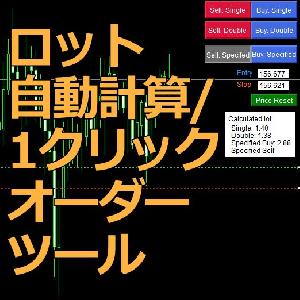

ロット自動計算/1クリックオーダーツール

Product outline
Community(0)
ロット自動計算/1クリックオーダーツール Indicators/E-books
ロット自動計算/1クリックオーダーツール
自動でリスクと資金を管理 ラインを動かして価格を指定→クリックで注文まで完結!
Sales Result:
0本
Reviews:
Category:
How to provide:
Indicator
Sales from:
02/16/2022
Last Updated:
-
Version:
-
Web Authentication:
Enable
Available company:
Payment method:

Japan

フォロー 0 フォロワー 1
Seller's last login time:3/2/2026 03:12:37
Read more seller information

※本ツールはMT4用です。
※注文機能があるのでMT4上での分類としてはインジケーターではなくEAです。インストール先にご注意ください。

機能概要


価格指定から注文実行までマウス操作だけで完結

ツールの主な機能は2点、
  • ロット数の自動計算
  • 1クリックで注文実行

さらに、

  • 1回の取引での損失リスク(%)を自由に設定可能
  • 4パターンロット数自動計算、1クリック注文
  • エントリーとストップ価格を自由に指定可能
    • ラインを動かすだけで自動で設定!
    • もちろん手動入力もOK
  • 自動計算ロットと固定ロットの切り替え機能
  • 予約注文の自動キャンセル機能(オンオフ可)
  

実際に使っている動画がこちら。


ツール説明

MT4上でのはこのように表示されます。

チャート上にエントリーとストップを指定するラインと、チャート右上に注文ボタンと自動計算ロット数が表示されます。


ロット数の自動計算


チャート右の「Calculated lot」が自動計算されたロット数です。

ロットの計算に必要なものは、

  • エントリーポイント
  • ストップポイント
  • 資金に対する損失額の割合(%)


計算のイメージはこちら。


それぞれのロット計算の説明はこちら。

表示説明
Single現在の1本前のローソク足の高値、安値から計算したロット数
Double現在の1本前と2本前のローソク足の高値、安値から計算したロット数
Specified BuyEntryに価格が入力されている場合:
 EntryとStopに入力された価格から計算したロット数 
Entryに「0」が入力されている場合:
 現在の価格(Ask)とStopに入力された価格から計算したロット数
Specified SellEntryに価格が入力されている場合:
 EntryとStopに入力された価格から計算したロット数 
Entryに「0」が入力されている場合:
 現在の価格(Bid)とStopに入力された価格から計算したロット数  

※注文不可能(買い注文なのにストップラインが注文価格よりも上にある、またはその逆)な場合、ロット計算結果は「-」と表示されます。


1クリック注文


チャート右上の各注文ボタンをクリックすると1クリックで注文を実行します。

ボタンクリック時の現在価格に応じて、指値・逆指値を自動選択して予約注文、成行注文を実行します。

注文不可能(買い注文なのにストップラインが注文価格よりも上にある、またはその逆)な場合、そのボタンを無効化します。


※Entryに「0」を入力時に【Buy/Sell: Specified】をクリックすると成行注文されるため注意


ボタン説明
Buy: Single 
自動計算ロット数で買い注文を予約
エントリーは1本前のローソク足の高値
ストップは1本前のローソク足の安値
Sell: Single 
自動計算ロット数で売り注文を予約
エントリーは1本前のローソク足の安値
ストップは1本前のローソク足の高値
Buy: Double 
自動計算ロット数で買い注文を予約
エントリーは1本前と2本前のローソク足の高値の高い方
ストップは1本前と2本前のローソク足の安値の安い方
Sell: Double 
自動計算ロット数で売り注文を予約
エントリーは1本前と2本前のローソク足の安値の安い方
ストップは1本前と2本前のローソク足の高値の高い方
Buy: Specified 
Entryに価格が入力されている場合:
 自動計算ロット数で買い注文を予約
 エントリーとストップはそれぞれ入力した価格
Entryに「0」が入力されている場合:
 自動計算ロット数で買い注文を成行で実行
 ストップは入力した価格
Sell: Specified 
Entryに価格が入力されている場合:
 自動計算ロット数で売り注文を予約
 エントリーとストップはそれぞれ入力した価格
Entryに「0」が入力されている場合:
 自動計算ロット数で売り注文を成行で実行
 ストップは入力した価格

エントリー、ストップ価格指定


「Entry」、「Stop」に入力する数値についてです。


テキストボックス説明初期値
Entryエントリー価格か、「0」を入力 チャート中央の価格
Stopストップ価格を入力 (必須)
チャート中央の価格 - 10 pips

テキストボックスに価格を直接入力してもOKラインを動かして指定もOKです。

「Price Reset」ボタンをクリックすると、価格が初期値に戻り、ラインの位置もリセットされます。

ラインでの価格指定はオンオフ可能なので、ラインが邪魔な場合には表示させないこともできます。


複数のロット計算パターンの考え方

なぜ1本前と2本前のローソク足の高値、安値を使うのか?


その考え方のもとになるものは、「ピンバー」です。

説明をすると長くなってしまうので省きますが、有名で効果的なプライスアクションの一つで、エントリーの根拠の一つに使えます。

2本のローソク足を1本として見てピンバーかどうかも判断できるので、1本前と2本前のローソク足の計2本を使用して計算も行っています。

エントリーとストップを自由に設定できるようにしたのは利便性を考えてです。


本ツールとの相性抜群!ピンバー/合成ピンバーを検知するツールはこちら。

https://www.gogojungle.co.jp/tools/indicators/36426

ピンバーの通知を受け取って、ワンクリックで注文まで完了!


設定パラメータ
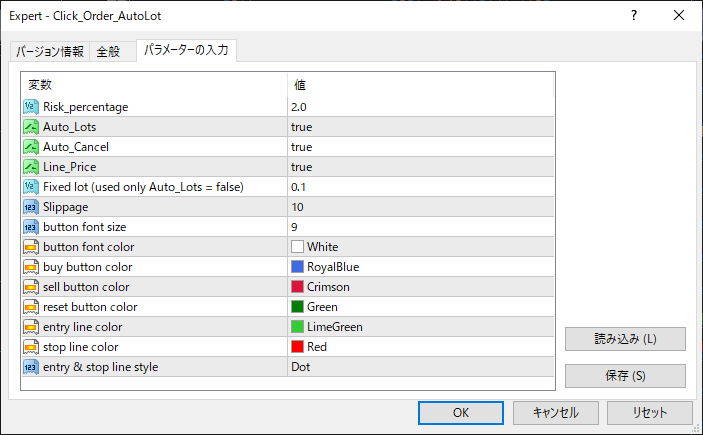

ここでは主なところだけ説明します。

パラメータ説明
Risk_percentage資金に対する損失額の割合(%)
Auto_Lotsロットの自動計算を行うかどうかのパラーメータ
Auto_Cancel現在価格が損切りラインを越えた場合に注文を自動キャンセルするかのパラメータ
Line_Price価格指定を水平ラインの操作で行えるようにするかどうかのパラメータ
Fixed lot

Auto_Lotsが「false」の時のみ有効

ボタンクリック時の注文ロット数をここで指定した値にする


¥3,000(Tax included)
?About 1-Click Order
Product outline
Community(0)
Best Seller Ranking
Recommended Products (Campaigns)

For those using GogoJungle for the first timeEasy 3 steps to use the product!

At GogoJungle, we provide services to enrich your investment life for our members. In addition, product purchases are limited to members. Why not register as a member now and make use of GogoJungle!

01
Enter user information and register as a member
02
Follow the instructions to make a purchase
03
Download from My Page
■ Important Matters and Risk Warnings Regarding Investment Products 【Financial Instruments Business Operator】
GogoJungle Inc.
Registration: Director-General of the Kanto Local Finance Bureau (Financial Instruments Business) No. 1960
【Member Association】
Japan Investment Advisers Association
【Fees and Expenses】
The use of software, e-books, investment advisory services, etc., provided on our platform involves purchase prices determined for each product.
Additionally, when conducting actual financial instrument transactions (such as FX or CFD trading), costs such as transaction fees and spreads (the difference between the sell and buy price) may be incurred through the connected brokerage firms.
【Margin and Risk of Loss】
Transactions such as FX (Foreign Exchange Margin Trading) and CFD (Contract for Difference) allow for trading in amounts exceeding the deposited margin.
Therefore, due to sudden fluctuations in target indices (currency, commodity prices, etc.), there is a risk of incurring losses that exceed the deposited margin (loss exceeding principal).
Furthermore, financial instrument transactions involve risks such as price fluctuations, which may result in losses falling below or exceeding the initial investment principal.
【Nature of Services and Trading Entity】
The Company operates a platform (marketplace) providing investment software and information; we do not engage in the buying, selling, mediation, brokerage, or agency of financial instruments on behalf of customers.
The services and information provided are intended as reference for investment decisions and do not guarantee future profits or specific results.
While some services include investment advice, they do not constitute a mandate or solicitation to trade specific financial instruments.
Final investment decisions and the execution of trades must be made at the customer’s own risk and discretion.
GogoJungle Inc.
Registration: Director-General of the Kanto Local Finance Bureau (Financial Instruments Business) No. 1960
Member Association: Japan Investment Advisers Association
GogoJungle Inc.
Registration: Director-General of the Kanto Local Finance Bureau (Financial Instruments Business) No. 1960
Member Association: Japan Investment Advisers Association
Financial Services AgencyJapan Investment Advisers AssociationFinancial Instruments Mediation Assistance CenterSecurities and Exchange Surveillance Commission

Copyright © 2026 GogoJungle Inc. All Rights Reserved.
