NapsNags MT5 version

- Whole period
- 2 years
- 1 year
- 6 months
- 3 months
- 1 month
Forward testing (Profit)
Monthly Statistics
- Jan
- Feb
- Mar
- Apr
- May
- Jun
- Jul
- Aug
- Sep
- Oct
- Nov
- Dec
Calendar for Months
About EA's Strategy
Translating...
This is the MT5 version of NapsNags currently on sale for MT4.Please note that it only supports hedge accounts,and does not support netting accounts.
The advantages of MT5 include fast backtesting, especially optimization, andthe ability to select real-time ticks actually distributed by the broker during backtesting.
!Attention! Regarding operation on swap-free accounts
This EA has a logic that enters with a Sell before rollover, but it has been reported by users that this is considered an improper use of swap-free instruments, leading to the cancellation of the swap-free status. Once canceled, it seems that it cannot be restored.
Regarding operation on swap-free accounts,
we kindly ask that you proceed with an understanding of the above risks.
Logic Overview
Trades will be conducted in the early morning Japan time.
No entries will be made on Saturday mornings to avoid gap risks.
The parameters have been changed to conduct trades only on Thursday early mornings (excluding gap-filling trades). (ver2.73)
Trading will be suspended on December 24, 25, and from January 1 to January 4.
On Mondays, a Sell entry will be made if a gap of more than 50 pips occurs.
However, if the spread is too large,
the entry may not occur due to the spread filter function.
The above applies when each parameter is set to its initial value.
Parameter Explanation
⛀Basic Settings
Trade Lot (Initial Value: 1.0)
This sets the trade lot when not using compound interest.
Compound Interest Operation (Initial Value: true)
true: Use compound interest
false: Do not use compound interest
Excess Margin
Effective Margin
Account Balance
Lot for Compound Interest Operation (Lot per 1 million yen) (Initial Value: 1.0)
This sets the lot against 1 million yen.
With an initial value of 1.0, if the amount set in the compound lot calculation basis is 1 million yen,
a position of 1.0 Lot will be taken.
If the account currency is yen, the following applies.
・If 1.0
If the compound lot calculation basis amount is 1 million yen, Entry Lot = 1.0 Lot
If the compound lot calculation basis amount is 500,000 yen, Entry Lot = 0.5 Lot
If the compound lot calculation basis amount is 300,000 yen, Entry Lot = 0.3 Lot
・If 1.5
If the compound lot calculation basis amount is 1 million yen, Entry Lot = 1.5 Lot
If the compound lot calculation basis amount is 500,000 yen, Entry Lot = 0.75 Lot
If the compound lot calculation basis amount is 300,000 yen, Entry Lot = 0.45 Lot
If the account currency is USD, the following applies.
・If 100.0
If the compound lot calculation basis amount is 10,000 USD, Entry Lot = 1.0 Lot
If the compound lot calculation basis amount is 5,000 USD, Entry Lot = 0.5 Lot
If the compound lot calculation basis amount is 3,000 USD, Entry Lot = 0.3 Lot
・If 150.0
If the compound lot calculation basis amount is 10,000 USD, Entry Lot = 1.5 Lot
If the compound lot calculation basis amount is 5,000 USD, Entry Lot = 0.75 Lot
If the compound lot calculation basis amount is 3,000 USD, Entry Lot = 0.45 Lot
Fill Policy (Initial Value: Automatic)
This is the order method determined by the broker.
If there is a problem with the automatic initial value, a change is necessary.
If there is a problem, an error occurs at the time of orderUnsupported filling modeand
the order will not go through.
Automatic: Automatically retrieves and sets the broker's fill policy.
FOK: Sets the fill policy to FOK.
IOC: Sets the fill policy to IOC.
RETURN: Sets the fill policy to RETURN.
MT Offset (Winter Time) (-12 to 12) (Initial Value: 2)
Please enter the value of your broker.
For brokers with winter time GMT+2 and summer time GMT+3, it will be 2.
Daylight Saving Time Method (Initial Value: US Style)Please select the daylight saving time method from the following three options.
Please adjust according to your broker's environment.
US Style: Daylight Saving Time (Second Sunday in March to First Sunday in November)
UK Style: Daylight Saving Time (Last Sunday in March to Last Sunday in October)
None
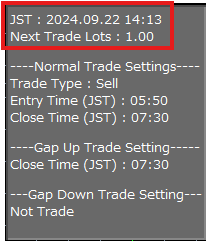
Important: How to Check if GMT Offset and Daylight Saving Time Method Settings are Correct (ver1.3 and later)
If the JST (Japan Standard Time) displayed in the upper left of the chart matches the current Japan time, it is OK.
This cannot be confirmed during weekends when the chart is stopped.
Also, the next scheduled trade lot will be displayed just below.
Compound Interest Operationwill be updated as needed due to fluctuations in theCompound Lot Calculation Basis.
The content displayed below will be explained in the subsequent ⛀Normal Trading Settings (excluding Monday gap trading).
Magic Number (Initial Value: 231110)
Can be changed to any value.Please ensure that the value does not overlap with other EAs operating within the same MT4.
Order Comment: -GU will be added at the end for upper gaps, and -GD for lower gaps (Initial Value: 54517:NapsNags)
Allowed Slippage (points) (Initial Value: 5)
This setting is effective when the execution rule is streaming.
If slippage exceeds 5 points, the order will not be executed.
Points are the smallest unit.
For brokers displaying USDJPY as 123.456,
it will be 6 (third decimal place).
If the execution rule is countdown, it will be ignored.
The execution rule is set by the broker and cannot be changed.
Most brokers adopt the latter.
Slippage Log File Output (Initial Value: false)
Records and saves a file that logs slippage, etc., for each trade.
The purpose is to monitor malicious slippage by brokers.
The file extension is csv. Only trades of this EA will be targeted.
true: Output
false: Do not output
File save location: \MQL4\Files
Description of recorded content

Order Number
This is the ticket number assigned individually for each order.
Trade Time
This will be server time.
Trade Type
There are the following eight types.
New Sell, New Buy, Sell Close, Buy Close,
Sell TP, Buy TP, Sell SL, Buy SL
LotThis is the number of order lots.
Order Price: For trade types New Buy, New Sell, Buy Close, Sell Close,
this is the price at the time the order was placed.
For Sell TP, Buy TP, Sell SL, Buy SL,
this is the limit/stop price.
Execution Price: The price at which the order was executed.
Slippage (pips): The difference between the order price and the execution price
is positive if favorable and negative if unfavorable.
The unit is pips.
Spread (pips): The spread at the time of order (unit is pips)
Order Processing Time (ms): For trade types New Buy, New Sell, Buy Close, Sell Close,
this is the time from sending the order to execution.
For Sell TP, Buy TP, Sell SL, Buy SL,
the time cannot be measured, so it is marked as “-”.
The unit is ms (1/1000 seconds).
Slippage Log File Name (Initial Value: NapsNags_slippage_log)
The file name should be specified in half-width alphanumeric characters within 25 characters. Half-width underscores can also be used.
Trading on December 24 and 25 (Christmas) (Initial Value: false)
true: Will trade
false: Will not trade
Trading on December 31 (Year-End) (Initial Value: false)
true: Will trade
false: Will not trade
Trading from January 1 to January 3 (New Year) (Initial Value: false)
true: Will trade
false: Will not trade
Entry Grace Period (minutes) (0-59) (Initial Value: 5)
This is the time to retry entry if entry cannot be made due to reasons such as no ticks (no price movement).
It will retry for the time specified here (in minutes).
Example:
If the entry time is 23:50 and the initial value is 5,
it will retry from 23:50:00 to 23:55:59 until it can enter.
Note
When crossing time (hours), the following behavior occurs.
Example:
If the entry time is 23:50 and the entry grace period is set to 15 minutes,
it will retry from 23:50:00 to 23:59:59.
The part that crosses the time (00:00:00 to 00:05:59) will be ignored,
and will not retry.
Settlement Grace Period (minutes) (0-59) (Initial Value: 5)
The operation is the same as the entry grace period.
This is the setting for the settlement time.
For the following settings, the initial values are recommended.
Please make changes at your own discretion.
⛀Normal Trading Settings (excluding Monday gap filling trades)
Sell or Buy (Initial Value: Sell)
This is the choice between selling or buying.
Even if Sell is selected, if the setting for Buy Entry during Monday's lower gap in ⛀Monday Lower Gap Trading Settings is set to true,
a buy trade will be executed during the lower gap. The reverse is also true.
Take Profit (pips) (Initial Value: 10.0) Changed from 60.0 to 10.0 in Ver.2.73
This value will be set as the limit order.
This value will be set as the stop order.
Entry Time (Hour) (Initial Value: 23)
Entry Time (Minute) (Initial Value: 50)
Please input the entry time and the next item’s settlement time in GMT+2 winter time (+3 summer time), within the US-style daylight saving time zone.
(⅛Even if your broker uses UK-style daylight saving time or no daylight saving time.)
The relationship with Japan time is as follows.
Beginning of the Week
End of the Week
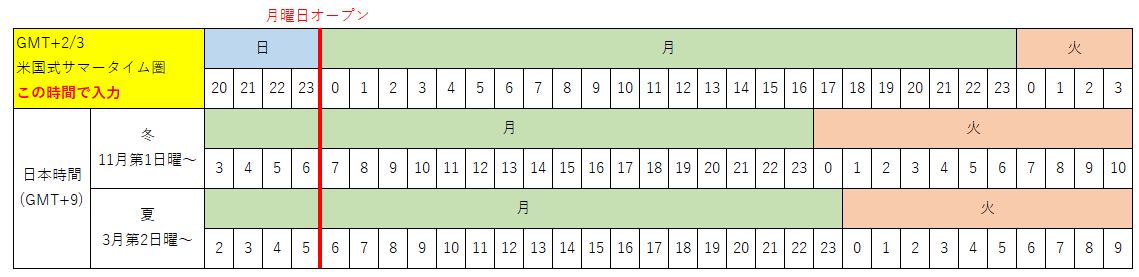
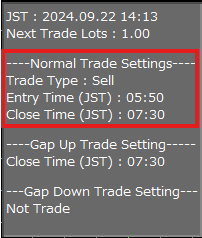
In addition, the chart will display Sell or Buy and the time converted to Japan time in the upper left.
The entry time will be set to 23:50 by default (Japan time 6:50 AM (winter), 5:50 AM (summer)).
If there are no ticks (no rate changes) between 23:50:00 and 23:50:59,
entry will not be possible. The same applies to settlement.
It is recommended to avoid extremely low movement times or times when orders cannot be placed (such as market close).
The same caution is necessary for all subsequent time settings.
Also, if the server connection with MT4 is cut off within one minute of the specified time,
or if the VPS is stopped, entry and settlement will not be possible.
Settlement Time (Hour) (Initial Value: 1)
Settlement Time (Minute) (Initial Value: 30)
By default, settlement will occur at 1:30 AM (Japan time 8:30 AM (winter), 7:30 AM (summer)).
If you input 99 in the Settlement Time (Hour), no time-based settlement will occur.
It will wait until it reaches the limit order or stop order, or it will be manually settled.
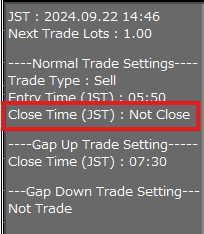
In addition, the chart will display Sell or Buy and the entry and settlement times converted to Japan time in the upper left.
If you input 99 in the Settlement Time (Hour), "Not Close" will be displayed next to Close Time (JST).
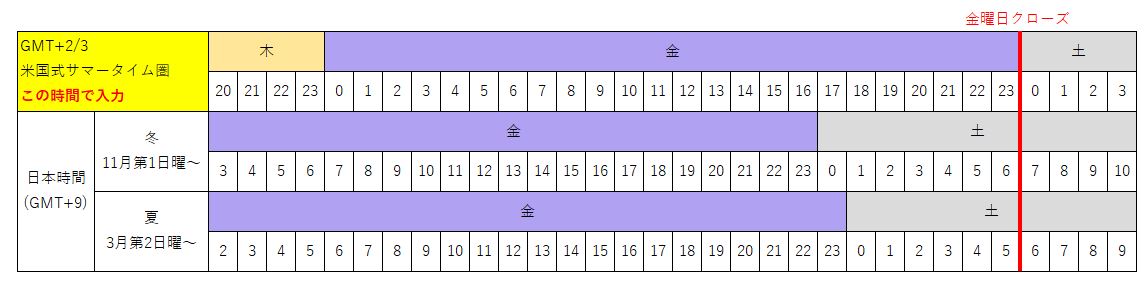
Changed from true to false in Ver.2.73
Wednesday Entry (Initial Value: true)
Thursday Entry (Initial Value: false)Changed from true to false in Ver.2.73
Friday Entry (Initial Value: false)
true: Will trade
false: Will not trade
This is the entry determination for each day of the week.
The reason for setting Friday to false is that entering at the default time of 23:50 (Japan time Saturday morning) poses a gap risk.
If all are set to false, no entries will be made. If positions are held, settlements will be made.
Caution
The days of the week are based on GMT+2 winter time (+3 summer time), within the US-style daylight saving time zone.
Even if Monday is set to false,
if the subsequent Monday's upper (lower) gap Sell (Buy) entry is set to true,
gap-filling trades will be executed.
Spread Filter (pips) (Initial Value: 10)
If the spread is wider than this, entry will not occur.
This is the ATR filter threshold to limit entries when volatility is high.
If the ATR is above this value, entry will not occur.
ATR Filter Average Time (This Value x 5 minutes) (Initial Value: 36)
Making this value smaller will make it easier to impose entry restrictions.
⛀Monday Upper Gap Trading Settings
Monday Upper Gap Sell Entry (Initial Value: true)
true: Will trade
false: Will not trade
Caution
If set to true, even if the Sell or Buy in ⛀Normal Trading Settings (excluding Monday gap trading) is set to Buy, it will execute a Sell entry during the upper gap.
Entry Determination Value (pips) (Initial Value: 50.0)
Entry will occur if a gap of this value or more occurs.
Entry Stop Determination Value (pips) (Initial Value: 200.0)
Entry will not occur if a gap of this value or more occurs.
Take Profit (pips) (Initial Value: 60.0)
This value will be set as the limit order.
Take Profit on Gap Filling (Initial Value: false)
If false, the value set for Take Profit (pips) will be set as the limit order.
If true, the previous day's closing price will be set as the limit order.
Even if set to true, time-based settlement is valid.
If you do not want to perform time-based settlement, please input 99 in the Settlement Time (Hour).
Stop Loss (pips) (Initial Value: 50.0)
This value will be set as the stop order.
Entry Restriction Time (minutes) (Initial Value: 30)
Maximum 59 minutes
From 0:00 (Japan time 7:00 AM (winter), 6:00 AM (summer)) on Monday open,
this is the time to wait until the entry conditions are met.
The maximum value is 59 (minutes).
Entry will occur if all of the following entry conditions are met,
and within the entry restriction time.
・A gap of more than the entry determination value has occurred.
・The gap has not closed.
・Current Bid - Friday's closing price is more than the entry determination value
・The spread is smaller than the spread filter
Settlement Time (Hour) (Initial Value: 1)
Settlement Time (Minute) (Initial Value: 30)
Settlement time should be after the entry restriction time.
By default, settlement will occur at 1:30 AM (Japan time 8:30 AM (winter), 7:30 AM (summer)).
If you input 99 in the Settlement Time (Hour), no time-based settlement will occur.
It will wait until it reaches the limit order or stop order, or it will be manually settled.
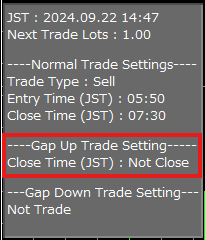
In addition, the time converted to Japan time will be displayed in the following locations.
If you input 99 in the Settlement Time (Hour), "Not Close" will be displayed next to Close Time (JST).
Spread Filter (pips) (Initial Value: 10)
If the spread is wider than this, entry will not occur.
⛀Monday Lower Gap Trading Settings
Monday Lower Gap Buy Entry (Initial Value: false)
true: Will trade
false: Will not trade
Caution
If set to true, even if the Sell or Buy in ⛀Normal Trading Settings (excluding Monday gap trading) is set to Sell, it will execute a Buy entry during the lower gap.
Entry Determination Value (pips) (Initial Value: 50.0)
Entry will occur if a gap of this value or more occurs.
Entry Stop Determination Value (pips) (Initial Value: 200.0)
Entry will not occur if a gap of this value or more occurs.
Take Profit (pips) (Initial Value: 60.0)
This value will be set as the limit order.
Take Profit on Gap Filling (Initial Value: false)
If false, the value set for Take Profit (pips) will be set as the limit order.
If true, the previous day's closing price will be set as the limit order.
Even if set to true, time-based settlement is valid.
If you do not want to perform time-based settlement, please input 99 in the Settlement Time (Hour).
Stop Loss (pips) (Initial Value: 50.0)
This value will be set as the stop order.
Entry Restriction Time (minutes) (Initial Value: 30)
Maximum 59 minutes
From 0:00 (Japan time 7:00 AM (winter), 6:00 AM (summer)) on Monday open,
this is the time to wait until the entry conditions are met.
The maximum value is 59 (minutes).
Entry will occur if all of the following entry conditions are met,
and within the entry restriction time.
・A gap of more than the entry determination value has occurred.
・The gap has not closed.
・Friday's closing price - Current Ask is more than the entry determination value
・The spread is smaller than the spread filter
Settlement Time (Hour) (Initial Value: 1)
Settlement Time (Minute) (Initial Value: 30)
Settlement time should be after the entry restriction time.
By default, settlement will occur at 1:30 AM (Japan time 8:30 AM (winter), 7:30 AM (summer)).
If you input 99 in the Settlement Time (Hour), no time-based settlement will occur.
It will wait until it reaches the limit order or stop order, or it will be manually settled.
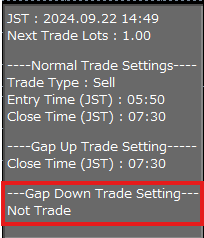
In addition, the time converted to Japan time will be displayed in the following locations.
⛯Other Important Notes
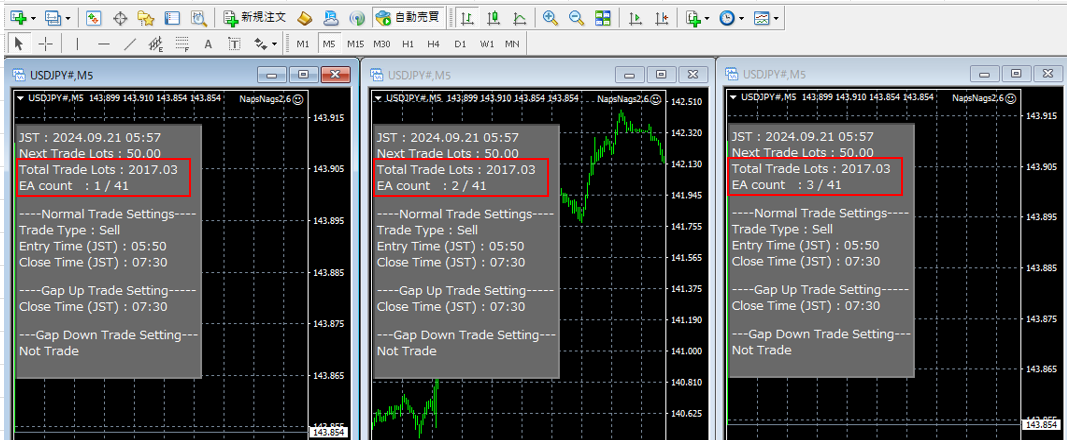
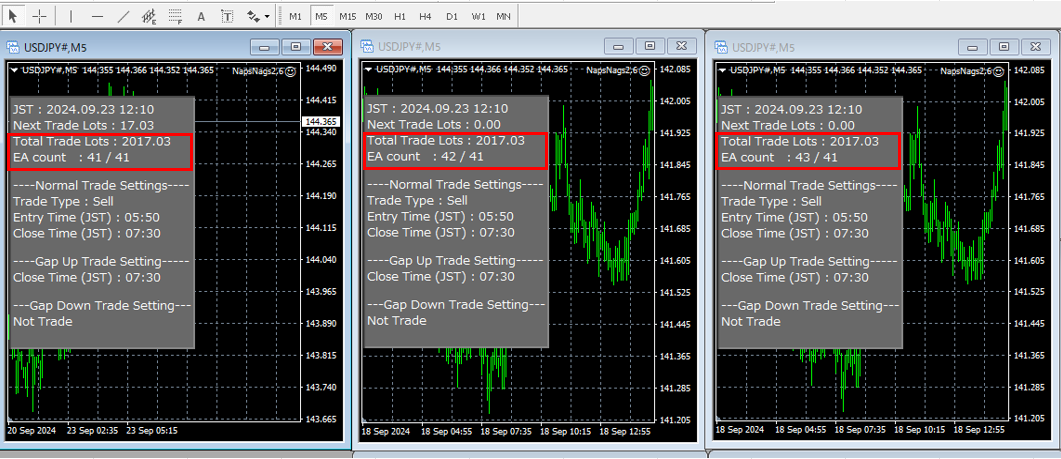
The maximum number of positions held in one direction is 1.
While holding positions in normal trading settings, positions in the same direction for gap-filling trades will not be taken.
The reverse is also true; while holding positions in gap-filling trades, positions in the same direction for normal trading settings will not be taken.
Additionally, positions obtained through gap-filling trades will not be settled at the time specified in normal trading settings.
The reverse is also true.
(This is determined by the presence or absence of "-GU" or "-GD" in the order comment to identify which logic obtained the position.)
If the directions of positions in normal trading settings and gap-filling trades are opposite,
there may be cases of hedging.
This concludes the explanation.
Thank you very much.
Price: $118.65 (taxed)
¥19,000(taxed)
●Payment



Sales from : 10/08/2024 23:26
Price: $118.65 (taxed)
¥19,000(taxed)
●Payment
Just like discretionary trading, there are those that decide trading and settlement timings by combining indicators, those that repeatedly buy or sell at certain price (pips) intervals, and trading methods that utilize market anomalies or temporal features. The variety is as rich as the methods in discretionary trading.
To categorize simply,
・Scalping (Type where trades are completed within a few minutes to a few hours),
・Day Trading (Type where trades are completed within several hours to about a day),
・Swing Trading (Type where trades are conducted over a relatively long period of about 1 day to 1 week)
・Grid/Martingale Trading (Holding multiple positions at equal or unequal intervals and settling all once a profit is made. Those that gradually increase the lot number are called Martingale.)
・Anomaly EA (Mid-price trading, early morning scalping)
However, a substantial advantage of automated trading is its ability to limit and predict risks beforehand.
[Risk]
Inherent to forex trading are the trading risks that undeniably exist in automated trading as well.
・Lot Size Risk
Increasing the lot size forcibly due to a high winning rate can, in rare instances, depending on the EA, lead to substantial Pips loss when a loss occurs. It is crucial to verify the SL Pips and the number of positions held before operating with an appropriate lot.
・Rapid Market Fluctuation Risk
There are instances where market prices fluctuate rapidly due to index announcements or unforeseen news. System trading does not account for such unpredictable market movements, rendering it incapable of making decisions on whether to settle in advance or abstain from trading. As a countermeasure, utilizing tools that halt the EA based on indicator announcements or the VIX (fear index) is also possible.
[Benefits]
・Operates 24 hours a day
If there is an opportunity, system trading will execute trades on your behalf consistently. It proves to be an extremely convenient tool for those unable to allocate time to trading.
・Trades dispassionately without being swayed by emotions
There is an absence of self-serving rule modifications, a common human tendency, such as increasing the lot size after consecutive losses in discretionary trading or, conversely, hastily securing profits with minimal gains.
・Accessible for beginners
To engage in Forex trading, there is no prerequisite to study; anyone using system trading will achieve the same results.
[Disadvantages]
・Cannot increase trading frequency at will
Since system trading operates based on pre-programmed conditions, depending on the type of EA, it might only execute trades a few times a month.
・Suitability may vary with market conditions
Depending on the trading type of the EA, there are periods more suited to trend trading and periods more suited to contrarian trading, making consistent results across all periods unlikely. While the previous year might have yielded good results, this year's performance might not be as promising, necessitating some level of discretion in determining whether it is an opportune time to operate.
・MT4 (MetaTrader 4. An account needs to be opened with a Forex company that offers MT4.)
・EA (A program for automated trading)
・The operating deposit required to run the EA
・A PC that can run 24 hours or a VPS (Virtual Private Server), where a virtual PC is hosted on a cloud server to run MT4.
Additionally, there are both demo and real accounts available. You can experience trading with virtual money by applying for a demo account. After opening a real account, you select the connection server assigned by the Forex broker, enter the password, and log in to the account.
When you deposit money into your account using the method specified by the forex broker, the funds will be reflected in your MT4 account, and you can trade.
Firstly, download the purchased EA file from your My Page on GogoJungle. You will download a zip (compressed) file, so right-click to extract it and retrieve the file named ‘◯◯◯ (EA name)_A19GAw09 (any 8 alphanumeric characters).ex4’ from inside.
Next, launch MT4 and navigate to ‘File’ → ‘Open Data Folder’ → ‘MQL4’ → ‘Experts’ folder, and place the ex4 file inside. Once done, close MT4 and restart it. Then, go to the upper menu ‘Tools’ → ‘Options’, and under ‘Expert Advisors’, ensure ‘Allow automated trading’ and ‘Allow DLL imports’ are checked, then press OK to close.
The necessary currency pair and time frame for the correct operation of the EA are specified on the EA sales page. Refer to this information and open the chart of the correct currency pair time frame (e.g., USDJPY5M for a USD/Yen 5-minute chart).
Within the menu navigator, under ‘Expert Advisors’, you will find the EA file name you placed earlier. Click to select it, then drag & drop it directly onto the chart to load the EA. Alternatively, you can double-click the EA name to load it onto the selected chart.
If ‘Authentication Success’ appears in the upper left of the chart, the authentication has been successful. To operate the EA, you need to keep your PC running 24 hours. Therefore, either disable the automatic sleep function or host MT4 on a VPS and operate the EA.
If you want to use it with an account other than the authenticated one, you need to reset the registered account.
To reset the account, close the MT4 where the Web authentication is registered, then go to My Page on GogoJungle > Use > Digital Contents > the relevant EA > press the ‘Reset’ button for the registration number, and the registered account will be released.
When the account is in a reset state, using the EA with another MT4 account will register a new account.
Also, you can reset the account an unlimited number of times.
→ Items to Check When EA is Not Operating
1 lot = 100,000 currency units
0.1 lot = 10,000 currency units
0.01 lot = 1,000 currency units
For USD/JPY, 1 lot would mean holding 100,000 dollars.
The margin required to hold lots is determined by the leverage set by the Forex broker.
If the leverage is 25 times, the margin required to hold 10,000 currency units of USD/JPY would be:
10000*109 (※ at a rate of 109 yen per dollar) ÷ 25 = 43,600 yen.
・Risk-Return Ratio: Total Profit and Loss during the period ÷ Maximum Drawdown
・Maximum Drawdown: The largest unrealized loss during the operation period
・Maximum Position Number: This is the maximum number of positions that the EA can theoretically hold at the same time
・TP (Take Profit): The set profit-taking Pips (or specified amount, etc.) in the EA's settings
・SL (Stop Loss): The set maximum loss pips (or specified amount, etc.) in the EA's settings
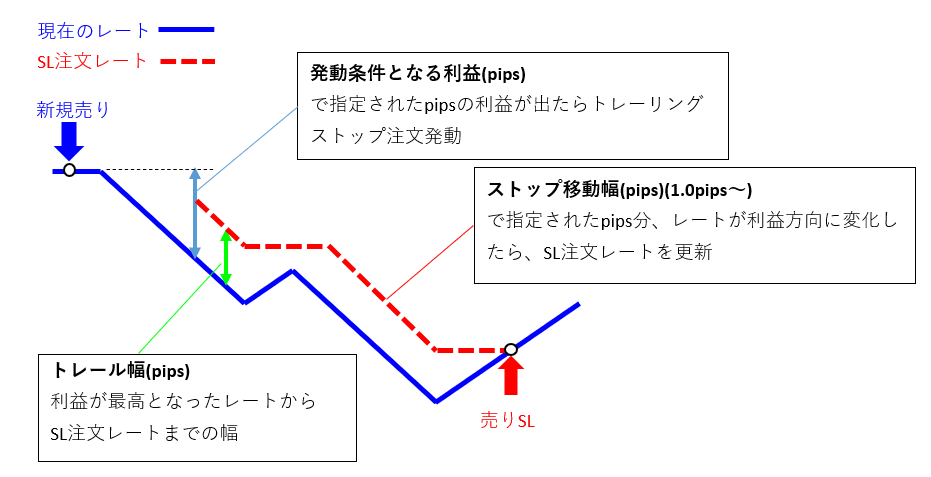
・Trailing Stop: Instead of settling at a specified Pips, once a certain profit is made, the settlement SL is raised at a certain interval (towards the profit), maximizing the profit. It is a method of settlement.
・Risk-Reward Ratio (Payoff Ratio): Average Profit ÷ Average Loss
・Hedging: Holding both buy and sell positions simultaneously (Some FX companies also have types where hedging is not allowed)
・MT4 Beginner's Guide
・Understanding System Trading Performance (Forward and Backtesting)
・Choosing Your First EA! Calculating Recommended Margin for EAs
・Comparing MT4 Accounts Based on Spread, Swap, and Execution Speed
・What is Web Authentication?
・Checklist for When Your EA Isn't Working