
[Upcoming Release] ZoneBreaker Core Bonus ③ Free first-come, first-served distribution of the Multi-Info Button!
[Coming Soon] ZoneBreaker Core Bonus ③
This might be your last chance――
・Limited Editionbonus indicator.
This time“Multi-Info Button”will be free distributed to the first 50 customers
for free!
Check economic indicators, market holidays, and news at a glance with one click!
Never miss market information — Multi-Info Button
Install four buttons on the MT4 chart. Access economic indicators, holiday information, news, and your favorite sites instantly with a single click!
Are you spending too much time gathering information?
While you’re tab-switching or searching to look up economic indicators or holiday information, you could be missing opportunities… Have you had that experience?
With the Multi-Info Buttonyou can access the necessary information with one click from the four buttons on the chart.
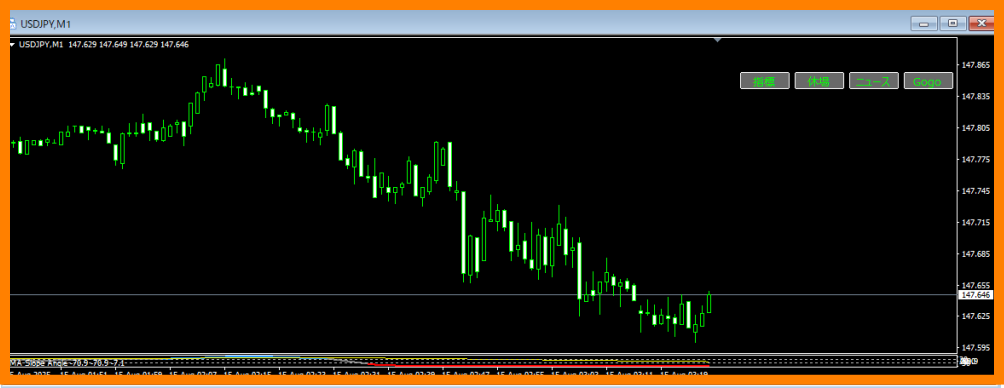
Main Features
- Indicator:Instant access to the specified economic calendar
- Holidays:Jump to each country's market holiday calendar
- News:Open your favorite news site
- Gogo:Free space that can be set to any URL
Button positions, colors, fonts, etc. can be freely changed via parameters.
Don’t forget to allow DLL usage.
How to Use (3 Steps)
- Unzip the ZIP file and copy the .ex4 file into MT4's Indicators folder
- Apply the indicator to a chart to display four buttons at the top right
- Click each button to open the configured URL in an external browser
Installation Procedure
- MT4 → File → Open Data Folder
- Copy the .ex4 file to MQL4 → Indicators folder
- Restart MT4 or click "Refresh" in Navigator
- Drag & drop onto a chart to apply
- Right-click the chart → Properties → General and check "Bring chart to front"
- Right-click again → uncheck "Show grid"
Parameter Quick Reference
| Item | Content |
|---|---|
| btn_corner | Reference for display position (Top-right / Bottom-right / Top-left / Bottom-left) |
| btn_x / btn_y | X and Y distance from the reference position |
| btn_width / btn_height | Button width and height |
| btn_spacing | Horizontal space between buttons |
| btn_text_on / btn_text_off | Text color (ON / OFF) |
| btn_bg_color / btn_border_color | Background color / Border color |
| btn_fontsize / btn_fontname | Text size / Font name |
| btn1_text ~ btn4_text | Display names for each button |
| btn1_url ~ btn4_url | URLs for each button |
Usage Scenarios
- Immediately check the calendar before indicator releases
- Check news with one click during sudden movements
- Check holiday closures in advance to avoid trading
- Obtain information without changing the monitored time frame
Frequently Asked Questions
A. It will open with your PC’s default browser.
A. You can freely change it from the indicator parameters.
A. It will not interfere as long as button names do not overlap.
A. Please ensure that "Allow DLL imports" is checked.
Caveats and Disclaimers
This tool is for information access support and does not guarantee trading results or profits.
Please make final judgments at your own responsibility.
【ZoneBreaker Core Release Date Here】
Bonus ① ZigDonchian MA Line
Bonus ② XAUUSD_Meter (worth約20,000 yen)
And this time Bonus ③“Multi-Info Button”is distributed for free!
Please look forward to further announcements.