Gurtore EA upgrades from v3 to v4 with no blind spots in offense or defense! (Gurugurutorein)
Nice to meet you, I am Watomato. This time, as a user of Gultre EA, I will introduce Gultre.
Gul Gul Train (hereinafter Gultre) is a hedged averaging method developed by “Kawasaki Doruemon,”
and the burdensome manual order process, which was its only drawback, was turned into an EA by “Shepherd.”
For detailed methods of Gultre, please purchase the Kindle book, or refer to several articles on my blog,
and refer accordingly.
Gul Gul Train(Official site)
Position progress during 1-yen Gultre in bull market(Penguin can understand FX)
By the way, Gultre EA is sold for ¥17,800, but it can currently be obtained for free under the campaign below.
FOREX EXCHANGE×「羊飼いのグルトレ EA」タイアップキャンペーン

Now, on 2019-01-08, “Shepherd’s Gultre EA” was upgraded from v3 to v4.
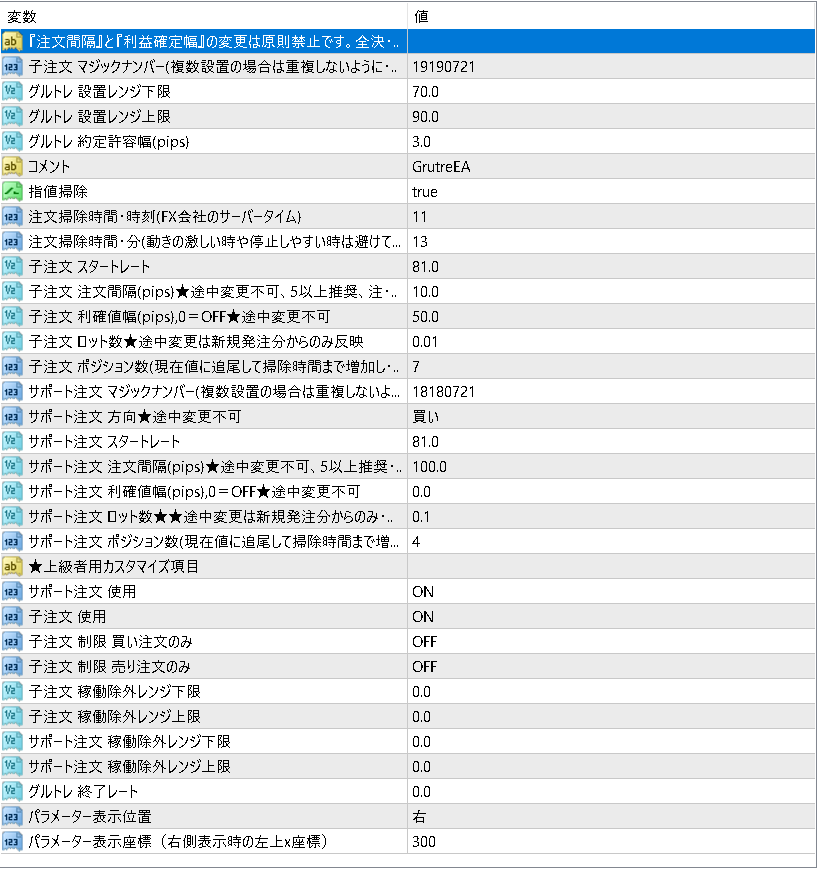
v3 Setting parameters
v4 Setting parameters
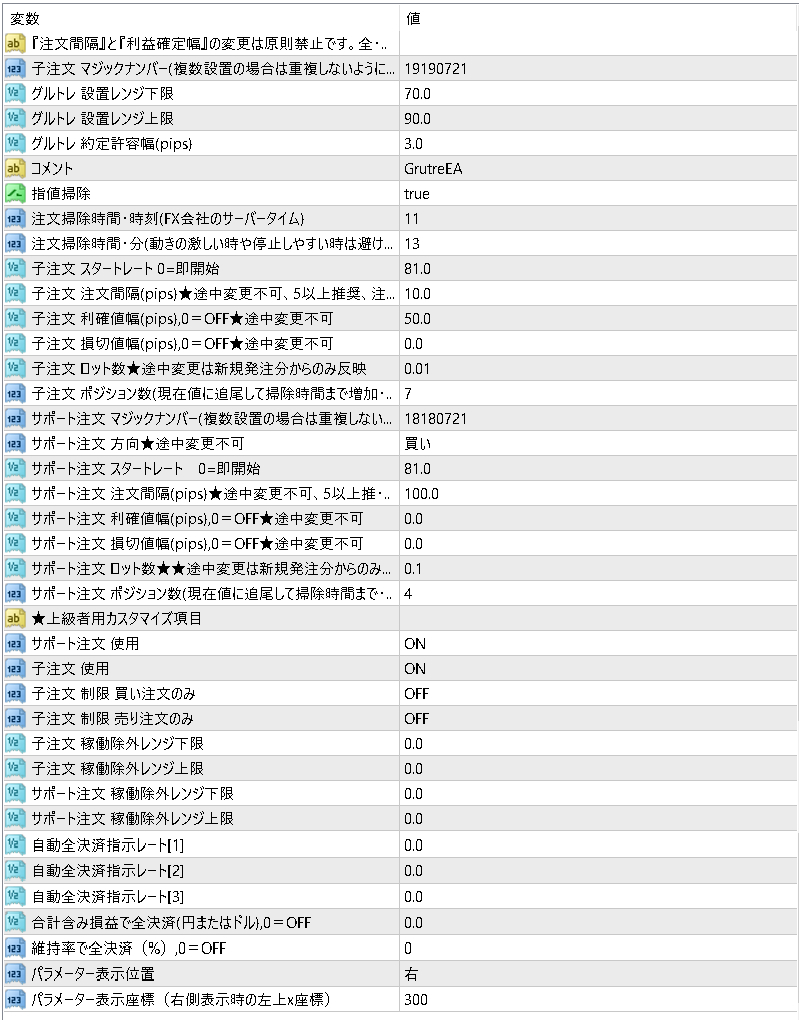
For the meaning of each parameter, please refer to this
Reference:Shepherd’s Gultre EA Manual★Version 4 (January 2019 update)
You won’t understand unless you check the items properly, but
v3’s item labeled “Gultre End Rate” has become “Automatic Full Settlement Instruction Rate [1]〜[3]” in v4.
Until v3, only one setting could end Gultre when this rate was reached, but
from v4 you can set up to three.
In other wordsOCO orders that can set profit-taking and stop-loss lines have become possible.
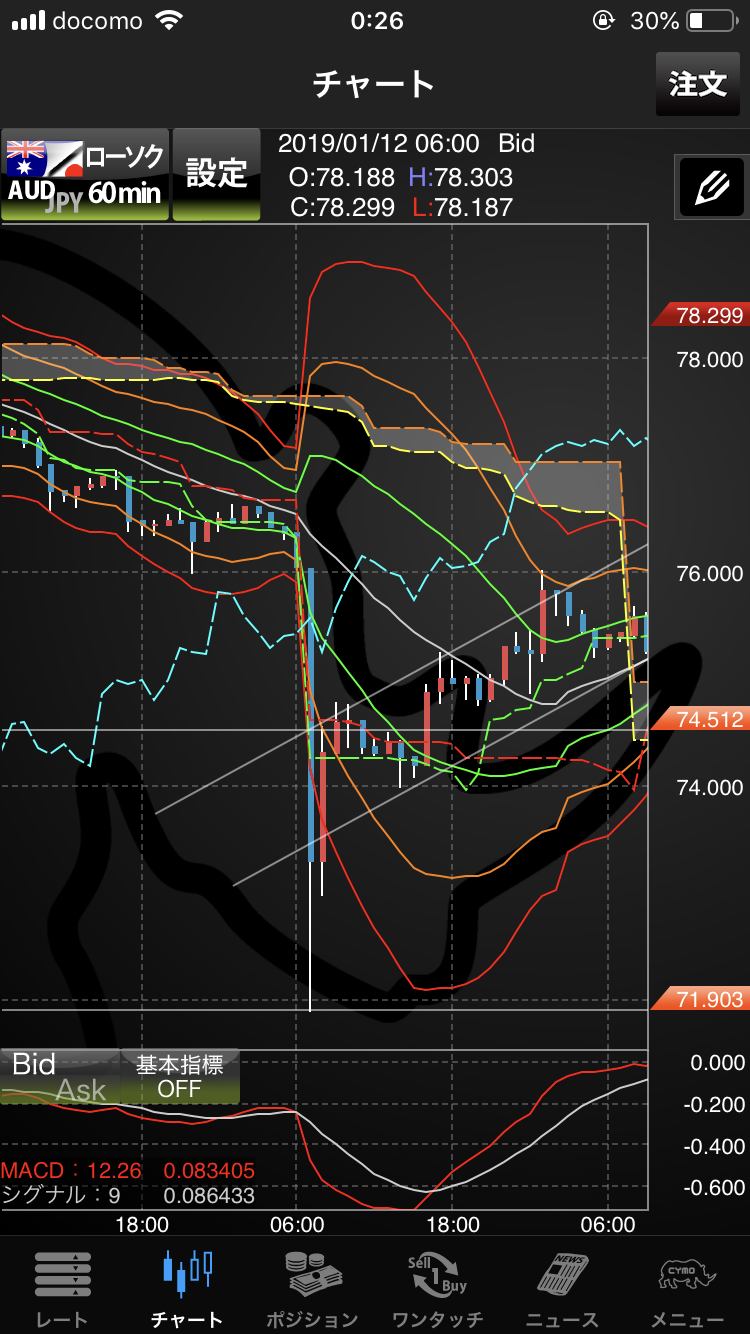
What’s good about having OCO orders is that you can now respond to sharp drops like the one on 2019-01-03, which is fresh in everyone’s memory.
Because of this plunge, many people supporting Gultre were forced to close out at a loss.
Especially for the EA, within the range from lower to upper, trades were executed automatically, so it seemed there was no way to stop it.
Probably at S support, unless you fully closed all positions at pinpoint times, profits would have decreased on subsequent reversals.
※ By the way, I happened not to run the EA during this period and was saved
Reference:From 1-yen Gultre progress to retrogression
2019-01-03 AUD/JPY 1-hour chart
Now, how to use this OCO order when starting Gultre EA, I think it’s good to decide the settings below before starting.
1. Decide the “Support Order Direction”
2. Enter the “Gultre Setup Lower Range”
3. Enter the “Gultre Setup Upper Range”
4. Enter the profit-taking line into “Automatic Full Settlement Instruction Rate [1]”
5. Enter the stop-loss line into “Automatic Full Settlement Instruction Rate [2]”
※ If you don’t want to set a stop-loss line, but instead want to stop when total unrealized P/L reaches a certain amount, enter “Total unrealized P/L for full settlement”
If you set the above, you can control your profits and losses, so it should not lead to forced liquidation,
and you can rest assured that when the point to fully settle and lock in profits comes while you’re asleep, you can still act.
Truly a fortress on both offense and defense!
Finally, for Gultre beginners, when you actually run Gultre, I will introduce a backtesting site to show how much profit you can make.
Now, please enjoy the Gultre EA life, everyone!
Wishing you great profits all around!
FOREX EXCHANGE×「羊飼いのグルトレ EA」タイアップキャンペーン